We independently review everything we recommend. When you buy through our links, we may earn a commission. As an Amazon Associate we earn from qualifying purchases.
Best Budget Gaming Monitor: 5 Picks for Smooth Play
Looking for a budget gaming monitor? We compare 5 fast 1080p monitors with high refresh rates, low response times, and adaptive sync for smooth play.
The AOC 24G2 is the best budget gaming monitor for most players. Its 23.8-inch IPS panel runs at 144Hz with a 1ms response time, FreeSync Premium keeps frames tear-free, and the fully adjustable stand is rare at this level. The ASUS TUF Gaming VG249Q1A overclocks to 165Hz and adds built-in speakers and shadow enhancement. The Acer Nitro KG241Y Sbiip is the cheapest way into 165Hz gaming, with a VA panel for deeper contrast. The LG UltraGear 24GN600-B brings a true 1ms gray-to-gray response and HDR10 support, while the Samsung Odyssey G3 G30D pushes the refresh rate to 180Hz with a height-adjustable stand.
How to Choose a Budget Gaming Monitor
Start with the refresh rate, because it decides how smooth motion looks. A 144Hz display redraws the image far more often than a 60Hz display, so fast camera movement and quick turns look cleaner and aiming feels more responsive. For competitive shooters, 144Hz is the sensible minimum, and 165Hz or 180Hz adds a little more headroom. Match the monitor to the frame rates your system actually reaches, since a graphics card that rarely passes 144 frames per second will not use a faster panel.
Resolution matters just as much. Every monitor in this roundup runs at 1920 by 1080, known as Full HD. At 24 inches, 1080p looks sharp, and it is far easier for an affordable graphics card to drive at high refresh rates than 1440p or 4K.
Panel type shapes color and contrast. IPS panels offer wide viewing angles and accurate, vivid colors, which suit both gaming and everyday work. VA panels trade some viewing angle for deeper blacks and stronger contrast, so dark scenes in horror games and movies look richer, though colors can shift when viewed from the side.
Response time tells you how quickly a pixel changes color, and lower is better for reducing blur and ghosting behind moving objects. Adaptive sync ties it together, matching the monitor refresh rate to the graphics card output to remove tearing and reduce stutter. All five monitors here support FreeSync, so check your graphics card and enable the matching setting in its control panel.
Finally, look at the stand and the ports. A height-adjustable stand lets you set the screen at eye level, which matters during long sessions, while tilt-only stands may need a monitor arm to reach the right height. For ports, DisplayPort is the best choice for reaching the full refresh rate, while HDMI works well for consoles and secondary devices.
The AOC 24G2 is the classic budget gaming monitor, and it still earns the top spot. Its 23.8-inch IPS panel delivers Full HD resolution at 144Hz with a 1ms response time, and FreeSync Premium keeps the action tear-free when frame rates dip during busy scenes. Colors look vivid and accurate, with wide viewing angles that hold up when a friend watches from the side.
What sets the 24G2 apart is the stand. Height, tilt, swivel, and pivot adjustments are all included, so you can set the screen exactly at eye level and rotate it to portrait for reading or coding, with no extra spending on a monitor arm. Connectivity covers two HDMI ports, one DisplayPort, and a VGA input for older devices.
Specs
Panel Size: 23.8 inches
Panel Type: IPS
Resolution: 1920 x 1080 Full HD
Refresh Rate: 144Hz
Response Time: 1ms
Adaptive Sync: FreeSync Premium
Ports: 2 x HDMI 1.4, 1 x DisplayPort 1.2, 1 x VGA
Stand: Height, tilt, swivel, and pivot adjustable
VESA Mount: Yes
Color Gamut: Wide sRGB coverage
Eye Care: Low blue light mode, flicker-free
ASIN: B07WVN6CWT
Best for: Most players who want a proven 144Hz IPS monitor with a fully adjustable stand.
The ASUS TUF Gaming VG249Q1A takes the same 23.8-inch IPS formula and pushes the refresh rate higher. It runs at 144Hz out of the box and overclocks to 165Hz, giving competitive players a little extra smoothness without stepping up to a more expensive display.
Shadow Boost is the standout extra here. It brightens dark areas of the scene without blowing out the brighter parts, so enemies hiding in shadows become easier to spot in competitive shooters. Built-in speakers handle casual play and videos without a separate speaker purchase. The tilt-only stand is the main compromise, so buyers who need height adjustment should plan on a VESA monitor arm, which the display supports.
The Acer Nitro KG241Y Sbiip is the lowest-cost route to 165Hz in this roundup, and it does it with a VA panel instead of IPS. The trade is deliberate: VA panels deliver deeper blacks and stronger contrast than IPS, so dark scenes look richer and horror games gain atmosphere, while the 165Hz refresh rate and 1ms VRB response keep motion smooth.
The 23.8-inch Full HD panel is the right size for 1080p, and the 1ms visual response boost mode reduces blur in fast action. The stand tilts only, which is the expected compromise at this level, and the monitor is VESA mountable for buyers who want a better mounting option later. Viewing angles are narrower than an IPS panel, so it suits a single viewer sitting directly in front of the screen.
Specs
Panel Size: 23.8 inches
Panel Type: VA
Resolution: 1920 x 1080 Full HD
Refresh Rate: 165Hz
Response Time: 1ms VRB
Adaptive Sync: FreeSync Premium
Ports: 1 x DisplayPort 1.2, 2 x HDMI 2.0
Stand: Tilt adjustable
VESA Mount: Yes
Design: ZeroFrame thin bezels
ASIN: B0B6DFG1FQ
Best for: Tight budgets that still want a 165Hz refresh rate and deep VA contrast.
The LG UltraGear 24GN600-B is the precision pick of the group. Its 23.8-inch IPS panel runs at 144Hz, and unlike most budget monitors, LG rates its response time at 1ms gray-to-gray, the stricter measure of pixel transition speed. That combination means motion stays crisp in fast shooters and racing games, with the accurate colors and wide viewing angles that IPS is known for.
FreeSync Premium keeps the refresh rate matched to the graphics card, and the three-side virtually borderless design looks modern on the desk and pairs well in a dual-monitor setup. The stand adjusts for height and tilt, which is a welcome step up from tilt-only rivals and makes it easy to set the screen at eye level.
The Samsung Odyssey G3 G30D is the fastest monitor in this roundup, running at 180Hz with a 1ms MPRT response time. Its 24-inch VA panel delivers Full HD resolution with the deep blacks and strong contrast that VA is known for, so dark maps and night scenes hold detail instead of washing out to gray.
The stand is the best in this group alongside the AOC, with height, tilt, swivel, and pivot adjustments, so the screen can be set exactly at eye level and rotated for portrait use. Gaming extras include Black Equalizer, which lifts shadow detail, and a Virtual Aim Point overlay for shooters. Eye Saver Mode and flicker-free backlighting reduce strain during long sessions, and the slim design fits easily on a smaller desk. It sits at the premium tier of this roundup.
Specs
Panel Size: 24 inches
Panel Type: VA
Resolution: 1920 x 1080 Full HD
Refresh Rate: 180Hz
Response Time: 1ms MPRT
Adaptive Sync: FreeSync
Ports: 1 x DisplayPort, 1 x HDMI
Stand: Height, tilt, swivel, and pivot adjustable
VESA Mount: Yes
Gaming Features: Black Equalizer, Virtual Aim Point
Eye Care: Eye Saver Mode, flicker-free
ASIN: B0D5ZZ9G26
Best for: Competitive players who want the fastest refresh rate and a fully adjustable stand.
Is 144Hz enough for gaming, or should I buy a 165Hz or 180Hz monitor?
144Hz is enough for most players and is a large step up from 60Hz, with smoother motion and more responsive aiming. A 165Hz or 180Hz monitor adds a small amount of extra smoothness, and it is worth choosing when the refresh rate is close to what your graphics card can actually deliver at 1080p. If your system rarely passes 144 frames per second, the extra refresh rate will sit unused.
Does a budget gaming monitor work with a console?
Yes, all five monitors here accept HDMI input from a console, and current consoles can output Full HD at 120Hz on these displays. Use the HDMI port for the console and the DisplayPort input for the PC, so both stay connected. Check that the console is set to 1080p output.
What is the difference between IPS and VA panels for gaming?
IPS panels offer wider viewing angles and more accurate colors, which suits shared viewing and everyday work as well as gaming. VA panels offer deeper blacks and stronger contrast, so dark scenes look richer, but colors can shift when viewed from an angle. Choose IPS for color and viewing angles or VA for contrast and atmosphere.
Do I need a DisplayPort cable to reach the full refresh rate?
DisplayPort is the most reliable way to reach the full refresh rate, especially at 165Hz and 180Hz. HDMI can also reach high refresh rates on many models, but the exact limit depends on the HDMI version, so check the port specs before relying on HDMI alone. When in doubt, connect the PC over DisplayPort and keep HDMI free for a console.
Conclusion
The best budget gaming monitor depends on what you value most, but the AOC 24G2 is the right starting point for most players. It pairs a 144Hz IPS panel with FreeSync Premium and a fully adjustable stand, covering the essentials without a weak spot. The ASUS TUF Gaming VG249Q1A adds 165Hz and useful gaming extras for competitive play, while the Acer Nitro KG241Y Sbiip brings 165Hz to the lowest tier with deep VA contrast. The LG UltraGear 24GN600-B stands out for its true 1ms gray-to-gray response and accurate color, and the Samsung Odyssey G3 G30D leads the group at 180Hz with the most flexible stand. Pick the one that matches your graphics card, your desk, and your budget, then connect over DisplayPort and enable adaptive sync.
E
Emubox Editorial Team
We compare specs, materials and verified owner reviews before a product earns a spot. Rankings are never paid.
Affiliate disclosure. As an Amazon Associate we earn from qualifying purchases at no extra cost to you. Prices accurate as of the date shown.
Best 2mm 70 cm portable antennas compared: telescopic radio antennas near 70 cm, with connectors, bands and collapsed sizes explained before you buy today.
Find the best thermostat setting for winter and summer, with energy-saving setbacks, humidity tips, and smart schedules for a comfortable home year-round.
The best affordable business computer monitors balance sharp text, eye comfort and lasting value. Compare four reliable office displays built for long workdays.
Looking for the best inexpensive HD TVs non smart? Compare five genuinely non-smart HD televisions with tuners, HDMI inputs and simple setup for any small room.

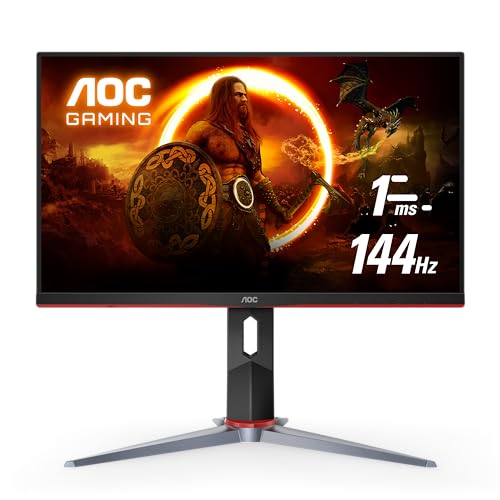 AOC 24G2
 ASUS TUF Gaming VG249Q1A
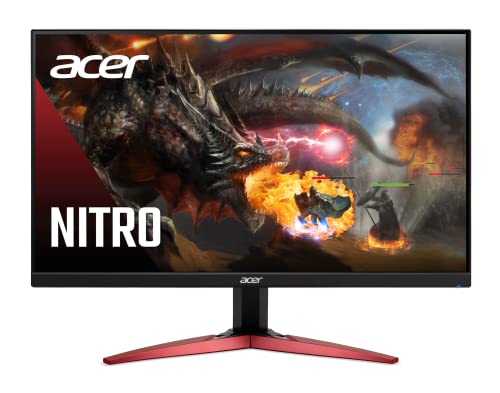 Acer Nitro KG241Y Sbiip
 LG UltraGear 24GN600-B
 Samsung Odyssey G3 G30D 24-Inch









