We independently review everything we recommend. When you buy through our links, we may earn a commission. As an Amazon Associate we earn from qualifying purchases.
Best Budget Ultrawide Monitors: 5 Top Picks for 2026
Compare five budget ultrawide monitors with curved 34-inch screens, sharp QHD resolution, and fast refresh rates, and pick the right one for work and play.
Compare five budget ultrawide monitors with curved 34-inch screens, sharp QHD resolution, and fast refresh rates, and pick the right one for work and play.
⭐ Key Takeaways
Quick answer: Our top pick is Sceptre C345B-QUT168, with Gigabyte G34WQC A as a strong alternative.
As an Amazon Associate, we earn from qualifying purchases.
The Sceptre C345B-QUT168 is the best budget ultrawide monitor for most buyers, because it pairs a 34-inch curved screen with a sharp 3440 x 1440 resolution, a fast refresh rate up to 180Hz, and built-in speakers at a budget tier that undercuts most rivals. If color accuracy matters more than gaming speed, the LG 34WP60C-B is the stronger pick for photo and video work, while the KOORUI 34E6UC is the one to choose when the highest refresh rate and the most adjustable stand matter most.
An ultrawide monitor replaces a two-screen setup with a single seamless panel. The extra width holds a spreadsheet beside a document or a game beside a chat window, without the bezel gap that splits a dual-monitor desk. All five monitors below use a 34-inch panel with 3440 x 1440 resolution and a 21:9 aspect ratio, and all support adaptive sync for smooth motion. The differences sit in refresh rate, color coverage, curve strength, and stand adjustment, so the right choice depends on how the screen will be used day to day.
Start with resolution. A 34-inch ultrawide at 3440 x 1440, often called WQHD or UWQHD, gives a clear step up from a standard 2560 x 1080 ultrawide, with sharper text and more room for detail work. Cheaper 29-inch ultrawides use the lower resolution, so check the specification sheet before buying.
Refresh rate decides how smooth motion looks. A 60Hz or 75Hz panel is fine for office work and video, while 144Hz and above makes scrolling and fast games feel noticeably smoother. Gamers should look for 144Hz or higher plus adaptive sync support, which matches the monitor refresh rate to the graphics card output and reduces tearing.
Panel type shapes color and contrast. Every monitor in this roundup uses a VA panel, which delivers deep blacks and strong contrast for movies and games. VA panels can show some smearing in very fast dark scenes, but IPS ultrawides cost more at this size and usually give up some contrast.
Curve strength is measured as a radius: a 1500R curve is gentle and suits mixed work and play, while a 1000R curve wraps more tightly around the viewer and feels more immersive for gaming.
Finally, check connectivity and the stand. Look for at least one DisplayPort input and one HDMI input, because DisplayPort usually unlocks the highest refresh rate. Built-in speakers remove the need for separate desktop speakers, and a height-adjustable stand is worth having, since a 34-inch panel sits low on a fixed stand. Most budget ultrawides support a 75 x 75 mm or 100 x 100 mm VESA mount, which leaves the door open to a monitor arm later.
The Sceptre C345B-QUT168 leads this roundup because it covers the most ground for the least money. Its 34-inch VA panel runs at 3440 x 1440 with a 1500R curve, and the refresh rate reaches up to 180Hz over DisplayPort, ahead of older budget ultrawides that topped out at 144Hz. The 1 ms response time keeps fast motion clean, and AMD FreeSync support keeps frames smooth when the graphics card output varies.
For everyday use, the wide 21:9 screen fits two full windows side by side, which makes it a strong single-screen replacement for a dual-monitor office setup. The built-in speakers handle video calls, notifications, and casual video without extra hardware on the desk. Two DisplayPort inputs and HDMI inputs cover a desktop and a laptop at the same time, and picture-by-picture support lets two sources share the screen.
Specs
Screen size: 34 inches
Resolution: 3440 x 1440 (WQHD)
Aspect ratio: 21:9
Panel type: VA
Refresh rate: Up to 180Hz
Response time: 1 ms
Curve: 1500R
Adaptive sync: AMD FreeSync
Speakers: Built-in speakers
Inputs: DisplayPort x 2, HDMI
VESA mount: Yes
Tier: Budget
LG 34WP60C-B
The LG 34WP60C-B is the pick for buyers who care about color first. Its 34-inch VA panel produces accurate, vivid color with HDR10 support and wide sRGB coverage that suits photo editing, video work, and design tasks where color shifts would be a problem. The 160Hz refresh rate is fast enough for casual gaming too, so this is a genuine all-rounder rather than a pure office screen.
The 1500R curve wraps the screen gently around the viewer, which helps the far edges of a wide panel stay readable without turning the head. A three-sided virtually borderless design keeps the frame slim, and AMD FreeSync Premium support smooths out frame rate changes in games. HDMI and DisplayPort inputs cover a desktop, a laptop, or a console.
The Gigabyte G34WQC A is a gaming-first ultrawide that still works well as a daily driver. Its 34-inch VA panel runs at 3440 x 1440 with a 144Hz refresh rate and a 1 ms response time, and the 1500R curve pulls the edges of the screen into the field of view for a more immersive feel in racing and first-person games. AMD FreeSync Premium support keeps tearing out of fast scenes.
Color is a strength here as well as speed. The panel covers a wide DCI-P3 color gamut, which gives games and movies rich, saturated color, and VESA DisplayHDR 400 certification adds brighter highlights in supported content. Two built-in speakers handle basic audio, and the stand adjusts for both tilt and height. Connectivity is generous, with two DisplayPort 1.4 inputs and two HDMI 2.0 inputs, so a gaming PC, a work laptop, and a console can all stay plugged in.
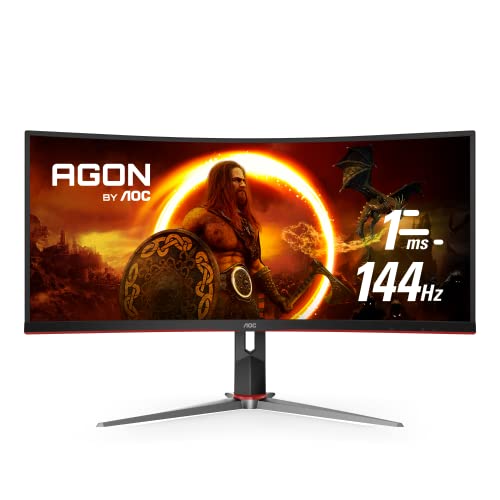
The AOC CU34G2X has been a budget ultrawide favorite for years, and it earns its place here on proven value. Its 34-inch VA panel delivers 3440 x 1440 resolution with a 144Hz refresh rate and a 1 ms response time, which covers smooth gaming and fluid scrolling in everyday use. Adaptive-Sync support keeps the picture tear-free across a wide range of frame rates.
The 1500R curve is gentle and comfortable for long sessions, and the three-sided frameless design keeps the bezel slim for a clean look on the desk. The stand adjusts for height as well as tilt, and the panel supports VESA mounting for a monitor arm. AOC backs the monitor with a three-year zero dead pixel policy, which adds peace of mind when buying a large panel online.
The KOORUI 34E6UC tops this roundup on raw speed. Its 34-inch VA panel reaches a 200Hz refresh rate over DisplayPort, the highest in this group, with a 1 ms response time and FreeSync Premium support for smooth high-frame-rate gaming. The tight 1000R curve wraps the screen further around the viewer than the 1500R panels above, which makes the wide field of view feel more immersive in racing and simulation games.
Color and brightness are strong for the tier as well. The panel covers a wide DCI-P3 color gamut with DisplayHDR 400 support, so games and streaming video show rich color and brighter highlights. Picture-in-picture and picture-by-picture modes let two sources share the screen, which is useful for streaming a console beside a PC desktop or comparing two documents side by side. The stand adjusts for tilt, swivel, and height, so the screen can be set at eye level without a separate monitor arm.
Is a 34-inch ultrawide monitor good for office work?
Yes. A 34-inch ultrawide with 3440 x 1440 resolution fits two full windows side by side, which replaces a dual-monitor setup with a single seamless screen. The extra width suits spreadsheets, timelines, code editors, and research, and the 1440p resolution keeps text sharp at normal viewing distances.
What resolution should a budget ultrawide monitor have?
Look for 3440 x 1440 on a 34-inch panel. Cheaper ultrawides sometimes use 2560 x 1080, which looks soft on a screen this size and leaves less room for detail work. All five monitors in this roundup use 3440 x 1440, so any of them clears the bar.
Do I need a powerful graphics card for a 3440 x 1440 monitor?
A 3440 x 1440 screen has more pixels than a standard 1080p display, so it asks more of a graphics card in games. For office work, video, and browsing, any modern integrated graphics or entry-level card handles it without trouble. For gaming at high refresh rates, a mid-range graphics card or better makes the most of a 144Hz or faster panel.
Is a curved ultrawide monitor better than a flat one?
A curve helps on a wide panel because it keeps the far edges at a more even distance from the eyes, which reduces head turning and makes the screen feel more immersive. A gentle 1500R curve suits mixed work and play, while a tighter 1000R curve feels more enveloping for games.
Conclusion
The best budget ultrawide monitor depends on how the screen will be used, but the Sceptre C345B-QUT168 is the strongest overall pick: a 34-inch curved panel, sharp 3440 x 1440 resolution, a refresh rate up to 180Hz, and built-in speakers at a budget tier. The LG 34WP60C-B is the right choice when color accuracy leads, thanks to its wide color coverage and HDR10 support. The Gigabyte G34WQC A suits gamers who want DisplayHDR 400, a height-adjustable stand, and generous connectivity. The AOC CU34G2X remains a proven budget all-rounder with a height-adjustable stand and a three-year zero dead pixel policy. The KOORUI 34E6UC takes the speed crown with a 200Hz refresh rate and a tight 1000R curve.
Whichever model fits, the essentials stay the same: a 34-inch panel, 3440 x 1440 resolution, a refresh rate of 144Hz or higher, and adaptive sync support. Check the inputs against the devices on the desk, measure the desk depth before ordering, and confirm the stand adjusts to eye level or plan for a VESA monitor arm.
E
Emubox Editorial Team
We compare specs, materials and verified owner reviews before a product earns a spot. Rankings are never paid.
Affiliate disclosure. As an Amazon Associate we earn from qualifying purchases at no extra cost to you. Prices accurate as of the date shown.
Best 2mm 70 cm portable antennas compared: telescopic radio antennas near 70 cm, with connectors, bands and collapsed sizes explained before you buy today.
Find the best thermostat setting for winter and summer, with energy-saving setbacks, humidity tips, and smart schedules for a comfortable home year-round.
The best affordable business computer monitors balance sharp text, eye comfort and lasting value. Compare four reliable office displays built for long workdays.
Looking for the best inexpensive HD TVs non smart? Compare five genuinely non-smart HD televisions with tuners, HDMI inputs and simple setup for any small room.

 Sceptre C345B-QUT168
 Gigabyte G34WQC A
 AOC CU34G2X
 KOORUI 34E6UC









