
Our Short List of 3
All 5 Picks at a Glance
| Product | Specs | Action |
|---|---|---|
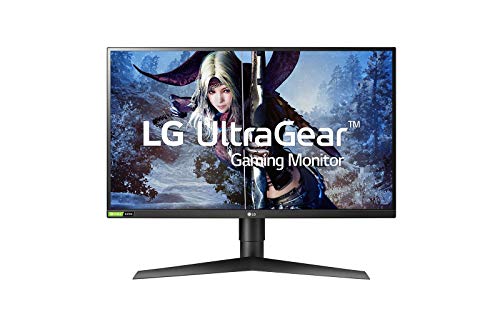 LG UltraGear 27GL850-B | Check price on Amazon | |
 ASUS ROG Swift PG279QM | Check price on Amazon | |
 Alienware AW2723DF | Check price on Amazon | |
 GIGABYTE M27Q | Check price on Amazon | |
 LG UltraGear 27GP950-B | Check price on Amazon |
Key takeaways
- Find the best gaming monitor for smooth, sharp play. Compare five QHD and 4K displays with fast refresh rates, low response times, and adaptive sync.
A gaming monitor decides how fast, sharp, and smooth every match looks, and it is the one part of a setup that a player stares at for every minute of play. A slow panel smears fast motion, a low resolution softens distant enemies, and a weak stand turns a long session into a sore neck. The five monitors below sit above the entry level, with fast refresh rates, low response times, and adaptive sync as standard. Each one suits a different kind of player, from the competitive shooter fan to the single-player fan who wants a rich 4K image.
As an Amazon Associate, we earn from qualifying purchases.
Quick answer
Pick the LG UltraGear 27GP950-B for 4K play, the ASUS ROG Swift PG279QM for competitive speed, and the Alienware AW2723DF for a bright esports panel with a fully adjustable stand. The GIGABYTE M27Q is the versatile QHD choice with a built-in KVM switch, while the LG UltraGear 27GL850-B suits players who want strong color and wide viewing angles at QHD resolution.
LG UltraGear 27GL850-B
The LG UltraGear 27GL850-B is the color-first pick in this lineup, built around a 27-inch Nano IPS panel with a 2560 by 1440 resolution. Its 144Hz refresh rate and 1ms response time keep fast motion clean, while HDR10 support adds depth to bright and dark scenes. Nano IPS color gives games a vivid look without the washed-out feel of cheaper panels, and the 178-degree viewing angle keeps the image consistent from the side. The listing records two USB 3.0 ports for a mouse receiver, a headset dongle, or a flash drive without reaching behind a PC. At 13.46 pounds with the stand and 10.8 by 24.2 by 22.6 inches overall, it is a substantial desk display that still fits a standard 27-inch space. This monitor suits players who split time between games and creative work, since the same color strength that makes game worlds pop also helps photo and video editing. The trade-off is refresh rate: 144Hz is smooth, but the 240Hz models below feel faster in competitive shooters. It also lacks the HDMI 2.1 connection of the 4K pick, so console players chasing 120Hz at 4K should look elsewhere.
ASUS ROG Swift PG279QM
The ASUS ROG Swift PG279QM is the competitive pick, pairing a 27-inch WQHD Fast IPS panel at 2560 by 1440 with a 240Hz refresh rate and a 1ms response time. That combination keeps crosshair movement crisp and reduces the blur that hides enemies in fast turns. It carries NVIDIA G-SYNC support and a NVIDIA Reflex Latency Analyzer, a tool that measures the delay between a mouse click and the on-screen result, which is useful for players who tune their setup for responsiveness. DisplayHDR400 certification adds modest high-dynamic-range support for games that use it. Eye Care features aim to reduce strain during long sessions, and the height-adjustable stand lets the screen sit at eye level without a separate arm. HDMI, DisplayPort, and USB connections cover a PC and a console at the same time. The panel is a strong match for high-frame-rate shooters and racing games, where every millisecond of clarity counts. Its limits are resolution and size: it stays at QHD on a 27-inch screen, so players who want a larger canvas or true 4K detail should consider the 4K pick below.
Alienware AW2723DF
The Alienware AW2723DF is the esports-ready pick, with a 27-inch panel at 2560 by 1440, a 240Hz refresh rate, and a 1ms response time. NVIDIA G-Sync keeps frames tear-free when the frame rate moves up and down, which happens often in demanding matches. A DisplayPort 1.4 connection carries the full high-refresh signal from a modern graphics card, and preset on-screen display modes let players switch between game genres without digging through menus. The stand adjusts for height, tilt, swivel, and pivot, so the screen can sit upright for a shooter, rotate for a vertical feed, or tilt back for a relaxed session. Its Lunar Light finish stands out from the usual black chassis and suits a light-colored desk setup. This monitor fits players who want a fast, bright panel and a stand that adapts to different seating positions without extra hardware. The QHD resolution keeps frame rates high on mid-range graphics cards, which is the point for competitive play. The trade-off is a lack of 4K detail, and players who mainly play slow strategy or story games will not use its speed.
GIGABYTE M27Q
The GIGABYTE M27Q is the versatile pick, built for players who share one screen between a gaming PC and a second machine. Its 27-inch SS IPS panel runs at 2560 by 1440 with a 165Hz refresh rate and a 0.5ms MPRT response time, which keeps motion sharp in shooters and racing games. A built-in KVM switch is the standout feature: it lets one keyboard and mouse control two connected computers, so a work laptop and a gaming PC can share the same desk without swapping cables. Color coverage reaches 92 percent of the DCI-P3 range, which gives games a rich look and helps with light creative work, and HDR Ready support adds range to supported titles. FreeSync Premium keeps frames smooth on compatible graphics cards. Connections include one DisplayPort 1.2 port, two HDMI 2.0 ports, and two USB 3.0 ports, covering a PC, a console, and peripherals at once. This monitor suits a mixed-use desk where gaming, work, and streaming share one screen. Its limits are a 165Hz ceiling below the 240Hz models here and a DisplayPort 1.2 connection rather than a newer revision.
LG UltraGear 27GP950-B
The LG UltraGear 27GP950-B is the 4K pick, with a 27-inch UHD Nano IPS display at 3840 by 2160. Its 144Hz refresh rate and 1ms GtG response time keep 4K play fluid, and VESA DSC technology allows an overclock to 160Hz through DisplayPort for players whose graphics card can drive it. HDMI 2.1 brings 4K with variable refresh rate up to 120Hz, which suits current consoles as well as PC play. NVIDIA G-SYNC Compatible and AMD FreeSync Premium Pro support cover both major graphics card brands, so tearing stays under control either way. Color coverage reaches 98 percent of the DCI-P3 range, and VESA DisplayHDR 600 certification supports brighter highlights than standard HDR panels. Typical brightness is 350 candela per square meter, typical contrast is 1000 to 1 with a 700 to 1 minimum, and typical power consumption is 65 watts with a 95-watt maximum. The four-side virtually borderless design keeps the focus on the image, and gaming features include Dynamic Action Sync, Black Stabilizer, and a crosshair overlay. This monitor suits players with a strong graphics card who want the sharpest image in this lineup. Its demand on hardware is the trade-off: weaker cards will not reach high frame rates at 4K.
How to choose
Start with resolution and match it to the graphics card. QHD at 2560 by 1440 is the sweet spot for most gaming PCs, because it looks sharp on a 27-inch screen without demanding as much power as 4K. Choose 4K only when the graphics card can hold high frame rates at 3840 by 2160. Next, weigh refresh rate against the games played. Competitive shooters reward 240Hz, while story games and strategy titles feel fine at 144Hz or 165Hz. Panel type matters too: IPS panels give wide viewing angles and strong color, which suits mixed gaming and work. Check adaptive sync against the graphics card brand, since G-Sync favors NVIDIA cards and FreeSync favors AMD cards, although many monitors now support both. Count the ports before buying: DisplayPort carries the highest refresh rates from a PC, HDMI 2.1 matters for consoles at 4K, and extra USB ports keep dongles close. Finally, check the stand. Height, tilt, swivel, and pivot adjustment cost little and save a separate monitor arm purchase. A check of CPSC recall listings found no recall covering any of the five models in this guide.
Who should skip
Players with an older or entry-level graphics card should skip the 4K pick, since it needs serious power to show its advantage, and a QHD monitor will look smoother on the same hardware. Casual players who game a few hours a week at 1080p will not use 240Hz or a KVM switch. Small desks are another reason to pause: every pick here is 27 inches, so a shallow desk leaves little room for a keyboard and puts the screen too close to the eyes. Players who work with static images all day should also think carefully, since a gaming panel prioritizes speed over the calibration of a dedicated work display. Anyone who needs built-in speakers, a webcam, or USB-C charging should check the listing first, since none of these five models is sold on those extras. Finally, players who already own a good 144Hz QHD monitor will see only a small gain from another QHD model here, and should upgrade to 4K or 240Hz instead of sideways.
Frequently asked questions
Is 144Hz enough for competitive play?
Yes, 144Hz is enough for most competitive players, and it is a large step up from a standard 60Hz display. Motion stays clear and aiming feels responsive in fast games. Players who compete at a high level may still prefer 240Hz, since it trims motion blur further and makes tracking fast targets easier. The gain from 144Hz to 240Hz is smaller than the jump from 60Hz to 144Hz, so 144Hz is a sensible place to start.
Do I need a 4K monitor for gaming?
No, most players do not need 4K. QHD at 2560 by 1440 is the better balance of sharpness and speed on a 27-inch screen. A 4K panel shows finer detail in open worlds and slow, visual games, but it demands a much stronger graphics card to hold high frame rates. Players with a mid-range card will enjoy smoother play at QHD than choppy play at 4K. Choose 4K when the card is strong and detail beats frame rate.
Does adaptive sync work with any graphics card?
Most modern monitors support adaptive sync, but the exact feature depends on the card. NVIDIA G-Sync works with NVIDIA cards, while AMD FreeSync works with AMD cards, and many monitors now carry both labels or a compatible mode. A G-Sync Compatible monitor can also work with newer AMD cards in many cases, and FreeSync monitors often work with NVIDIA cards over DisplayPort. Check the listing for the exact sync labels, and use DisplayPort for the widest compatibility.
What size gaming monitor is best?
A 27-inch screen is the best size for most players. It fits a standard desk, keeps QHD resolution sharp, and leaves room for a keyboard and speakers. Smaller screens suit tight desks and competitive players who sit close, while larger screens suit story games and media watching. A 32-inch screen needs a deeper desk and benefits from 4K resolution, since QHD can look soft at that size. Measure desk depth, and leave an arm’s length between eyes and screen.
Final verdict
The LG UltraGear 27GP950-B is the best gaming monitor here for players with a strong PC, with its 4K Nano IPS panel and HDMI 2.1. Competitive players should choose the ASUS ROG Swift PG279QM or the Alienware AW2723DF for 240Hz speed, while the GIGABYTE M27Q is the smart pick for a shared work and gaming desk. The LG UltraGear 27GL850-B rounds out the set for players who want strong color at QHD without chasing the highest refresh rate. Match the monitor to the graphics card first, and the right pick becomes clear.
Product and ASIN Reference
| Product | ASIN |
|---|---|
| LG UltraGear 27GL850-B | B07TD94TQF |
| ASUS ROG Swift PG279QM | B08LCNWQWL |
| Alienware AW2723DF | B0BCXJ7XXM |
| GIGABYTE M27Q | B08JWCHR5N |
| LG UltraGear 27GP950-B | B094RWMN8K |









