We independently review everything we recommend. When you buy through our links, we may earn a commission. As an Amazon Associate we earn from qualifying purchases.
Best Budget Mechanical Keyboard: 5 Picks That Feel Great
Find the best budget mechanical keyboard for typing and gaming. Compare five affordable mechanical keyboards by layout, switches, build, and connectivity.
Find the best budget mechanical keyboard for typing and gaming. Compare five affordable mechanical keyboards by layout, switches, build, and connectivity.
As an Amazon Associate, we earn from qualifying purchases.
The best budget mechanical keyboard for most people is the Redragon K552 Kumara, because it pairs a sturdy metal frame with quiet linear switches, a compact tenkeyless layout, and a simple wired connection at a budget tier. If desk space matters more than a number pad, or if you want wireless freedom and hot-swappable switches, the RK ROYAL KLUDGE RK61 and the Keychron K2 Version 2 are strong alternatives. For a clean, office-friendly board from a major brand, the Logitech G413 TKL SE stands out, while the HyperX Alloy Origins Core suits gamers who want a solid aluminum body and tactile switches at a premium tier within this budget roundup.
A mechanical keyboard feels different from a membrane keyboard because each key has its own switch beneath the keycap. That switch controls how the key moves, how much force it needs, and how it sounds. The result is a more consistent press from key to key and a board that often lasts longer under daily use. Every pick below is a true mechanical keyboard, and each one suits a different kind of buyer.
Our Top Picks at a Glance
Best overall budget pick: Redragon K552 Kumara, a tenkeyless wired board with linear red switches and a metal frame.
Best compact wireless pick: RK ROYAL KLUDGE RK61, a 61-key board with Bluetooth, 2.4 GHz wireless, and a wired mode.
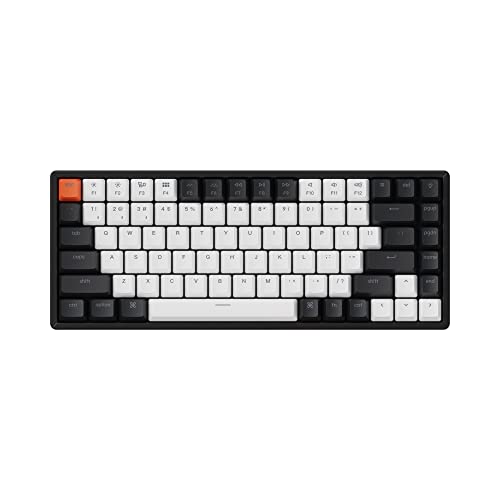
Best for Mac and Windows: Keychron K2 Version 2, a 84-key board with hot-swappable switches and an aluminum frame.
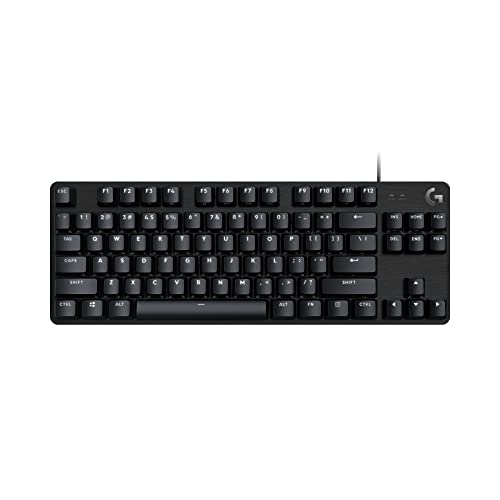
Best office-friendly pick: Logitech G413 TKL SE, a tenkeyless board with tactile switches, PBT keycaps, and white backlighting.
Best premium-feeling pick: HyperX Alloy Origins Core, a tenkeyless board with tactile HyperX Aqua switches and an aluminum body.
How to Choose a Budget Mechanical Keyboard
Start with layout, because it decides how much desk space the keyboard takes and which keys you keep within reach. A full-size board includes a number pad, arrow keys, and a function row. A tenkeyless board drops the number pad while keeping the arrow keys and function row, which frees space for a mouse. A compact 61-key board drops the function row and arrow keys as well, which suits small desks, but it asks you to use key combinations for some functions. A 75 layout, with 84 keys, sits between those two options and keeps the function row and arrow keys in a tight arrangement.
Next, consider switch feel and build. Linear switches move straight down with a smooth press and no tactile bump, which many gamers and fast typists prefer. Tactile switches add a small bump partway through the press, which gives clear feedback without a loud click. Clicky switches add both a bump and an audible click, which can disturb people nearby. A metal top plate or an aluminum frame reduces flex, and PBT keycaps resist shine and wear better than thin ABS keycaps. Hot-swappable sockets let you change switches without soldering.
A wired USB connection is simple, needs no charging, and avoids wireless lag. Bluetooth suits people who switch between a laptop, a tablet, and a desktop, because one board can pair with several devices. A 2.4 GHz wireless connection offers a middle path with a stable link and no cable across the desk. Anti-ghosting and N-key rollover matter for gaming, because they let the board register several keys pressed at once. If you use a Mac, look for Mac keycaps or a Mac and Windows switch.
The Redragon K552 Kumara is the best budget mechanical keyboard for most buyers because it covers the essentials well and leaves out the extras that raise the tier. It uses a tenkeyless layout with 87 keys, so it keeps the function row and arrow keys while dropping the number pad. That layout suits a smaller desk, a gaming setup with room for mouse movement, and a typist who rarely uses a number pad. The wired USB connection keeps setup simple: plug it in and start typing, with no battery to charge and no wireless pairing to manage.
The linear red switches give a smooth press with no tactile bump, which suits fast typing and gaming alike. The metal frame adds weight and stiffness, so the board stays in place during long sessions.
Specs
Layout: Tenkeyless, 87 keys
Switches: Linear red switches, hot-swappable
Connectivity: Wired USB
Backlighting: LED backlighting, RGB on the listed variant
Frame: Metal frame with a splash-resistant design
Anti-ghosting: Yes
Key life: 50 million keystrokes, per the product description
The RK ROYAL KLUDGE RK61 is the best compact pick in this roundup for people who want a small keyboard that still feels like a full mechanical board. It has 61 keys in a compact layout, so it takes up far less desk space than a tenkeyless or full-size board. That size suits a small desk, a portable setup, and a gaming station where mouse space matters more than a dedicated function row. The board connects in three ways: Bluetooth, 2.4 GHz wireless, and wired USB-C, so you can switch between a laptop, a desktop, and a tablet without swapping keyboards.
The hot-swappable brown switches give a gentle tactile bump without a loud click, which suits mixed typing and gaming and keeps noise down in a shared room. Because the switches are hot-swappable, you can change them later without soldering if you want a linear or clicky feel instead.
The Keychron K2 Version 2 is the best pick in this roundup for people who split time between Mac and Windows. It has 84 keys in a 75 layout, which keeps the function row and arrow keys in a compact frame, so it saves desk space without forcing you onto a function layer for common keys. The aluminum frame gives the board a firm and steady feel, and the double-shot keycaps resist wear and keep legends readable over time. A physical switch lets you change between Mac and Windows layouts, and the board includes keycaps for both systems.
The hot-swappable board uses Keychron Super Red switches in the listed variant, which give a smooth linear press that suits long typing sessions and gaming. Bluetooth 5.1 connects to up to three devices, so you can switch between a laptop, a tablet, and a desktop with a key press.
Specs
Layout: 75 layout, 84 keys
Switches: Keychron Super Red switches, linear and hot-swappable
Connectivity: Bluetooth 5.1, three devices, plus wired USB-C
Backlighting: RGB backlighting
Frame: Aluminum frame with double-shot keycaps
Battery: Rechargeable battery for wireless use
Rollover: N-key rollover with anti-ghosting
Compatibility: Mac and Windows, layout switch, keycaps for both
The Logitech G413 TKL SE is the best office-friendly pick in this roundup, because it keeps the design clean and the typing feel consistent. It uses a tenkeyless layout, so it keeps the function row and arrow keys while dropping the number pad, which suits a desk where mouse space matters. The tactile mechanical switches give a clear bump on each press, which helps you feel when a key has registered without the loud click of a clicky switch. That feel suits long typing sessions, coding, and office work.
PBT keycaps resist heat and wear, so they stay readable and keep their texture longer than thin keycaps. The black-brushed aluminum top case adds stiffness and gives the board a tidy, professional look. White LED backlighting keeps the keys visible in a dim room without the color and distraction of RGB lighting.
Specs
Layout: Tenkeyless
Switches: Tactile mechanical switches
Connectivity: Wired USB
Backlighting: White LED backlighting
Keycaps: PBT, heat and wear resistant
Frame: Black-brushed aluminum top case
Media controls: Twelve function-key media controls
Anti-ghosting: Six-key rollover anti-ghosting
Compatibility: Windows and macOS
Tier: Mid-range
HyperX Alloy Origins Core
The HyperX Alloy Origins Core is the premium-feeling pick in this roundup for gamers who want a solid board with a clear tactile feel. It uses a tenkeyless layout, so it keeps the function row and arrow keys while dropping the number pad, which frees space for mouse movement. The aircraft-grade aluminum body gives the board a firm and steady feel, with little flex under hard key presses. That build quality is the main reason to step up to this tier: the board feels dense and planted on the desk.
The listed variant uses HyperX Aqua switches, which are tactile switches with a clear bump and a quiet press. That feel suits gamers who want feedback on each key without the noise of a clicky switch, and it also suits typists who want a clear actuation point.
Specs
Layout: Tenkeyless
Switches: HyperX Aqua switches, tactile
Connectivity: Wired USB
Backlighting: RGB LED backlighting
Frame: Aircraft-grade aluminum body
Software: HyperX NGENUITY, lighting and macros
Key life: 80 million keystrokes, per the product description
Compatibility: Windows, QWERTY layout
Tier: Premium
Frequently Asked Questions
What is the best budget mechanical keyboard for a first-time buyer?
The Redragon K552 Kumara is a good first choice, because it has a simple wired connection, a sturdy metal frame, and smooth linear switches at a budget tier. It uses a tenkeyless layout, so it saves desk space while keeping the arrow keys and function row.
Are linear, tactile, and clicky switches very different to type on?
Yes, the feel is easy to notice once you type for a few minutes. Linear switches move straight down with a smooth press. Tactile switches add a small bump partway through the press, which gives clear feedback. Clicky switches add a bump and an audible click.
Do I need a number pad on a mechanical keyboard?
It depends on how you work. A number pad helps if you enter numbers, work in spreadsheets, or use accounting software every day. A tenkeyless or compact board drops the number pad to save desk space and give your mouse more room.
Is a hot-swappable keyboard worth it on a budget board?
Yes, if you want flexibility without buying a new keyboard later. Hot-swappable sockets let you change switches without soldering, so you can try a different switch feel or replace a single faulty switch.
Conclusion
The best budget mechanical keyboard depends on your layout, switch feel, and connection style, but the five picks above cover the main needs without pushing into a high tier. The Redragon K552 Kumara is the best overall budget pick for most people, with a sturdy metal frame, linear switches, and a simple wired setup. The RK ROYAL KLUDGE RK61 suits small desks and wireless use, with a compact 61-key layout and hot-swappable tactile switches. The Keychron K2 Version 2 suits Mac and Windows users who want one board for several devices. The Logitech G413 TKL SE suits office work and clean desks, with tactile switches and PBT keycaps. The HyperX Alloy Origins Core suits gamers who want a solid aluminum body and tactile switches at a premium tier.
E
Emubox Editorial Team
We compare specs, materials and verified owner reviews before a product earns a spot. Rankings are never paid.
Affiliate disclosure. As an Amazon Associate we earn from qualifying purchases at no extra cost to you. Prices accurate as of the date shown.
Best 2mm 70 cm portable antennas compared: telescopic radio antennas near 70 cm, with connectors, bands and collapsed sizes explained before you buy today.
Find the best thermostat setting for winter and summer, with energy-saving setbacks, humidity tips, and smart schedules for a comfortable home year-round.
The best affordable business computer monitors balance sharp text, eye comfort and lasting value. Compare four reliable office displays built for long workdays.
Looking for the best inexpensive HD TVs non smart? Compare five genuinely non-smart HD televisions with tuners, HDMI inputs and simple setup for any small room.

 Redragon K552 Kumara
 RK ROYAL KLUDGE RK61
 Keychron K2 Version 2
 Logitech G413 TKL SE









