We independently review everything we recommend. When you buy through our links, we may earn a commission. As an Amazon Associate we earn from qualifying purchases.
Best Budget DDR5 RAM Kits: 5 Picks for Gaming PCs 2026
Compare five budget DDR5 RAM kits for gaming and everyday PCs, covering capacity, speed, latency, and compatibility so you can pick the right memory kit.
Compare five budget DDR5 RAM kits for gaming and everyday PCs, covering capacity, speed, latency, and compatibility so you can pick the right memory kit.
⭐ Key Takeaways
Quick answer: Our top pick is Corsair Vengeance 32GB DDR5 6000MHz CL30, with Kingston FURY Beast 32GB DDR5 6000MHz CL30 as a strong alternative.
The best budget DDR5 RAM kit for most builders is the Corsair Vengeance 32GB (2x16GB) DDR5-6000 CL30 kit. It pairs a well-known brand with a low-profile design, tight CL30 timings, and both AMD EXPO and Intel XMP profiles. The Kingston FURY Beast and G.Skill Ripjaws S5 match that speed at a lower tier, the TEAMGROUP T-Force Vulcan ECO adds a recycled-aluminum heat spreader, and the Crucial 32GB DDR5-5600 kit runs at JEDEC speeds with no BIOS profile required.
How to Choose Budget DDR5 RAM
Start with capacity. For a budget gaming PC in 2026, 32GB is the sensible baseline: it covers current games, a browser full of tabs, and background apps. A matched 2x16GB kit runs in dual-channel mode from day one, giving the memory controller two paths to the RAM. That bandwidth shows up in frame rates and everyday responsiveness, so a two-stick kit is the better buy for most builders.
Next, look at speed and latency together. DDR5-6000 is the sweet spot for budget builds: fast enough for current AMD and Intel processors without the premium of 6400MT/s and faster kits. AMD Ryzen 7000 and 9000 processors pair especially well with DDR5-6000. CAS latency, written as CL30, measures how many clock cycles pass before data is ready, so lower is better at the same speed.
Check the voltage and the profile. Budget DDR5-6000 kits generally run at 1.35V with an Intel XMP 3.0 profile, an AMD EXPO profile, or both. Out of the box, a kit usually boots at a lower JEDEC speed, often 4800MT/s, until the profile is enabled in the BIOS. Dual-profile kits suit builders who may switch platforms later, while a single-profile kit is fine when the platform is already decided.
Compatibility deserves a minute of attention before checkout. Confirm the motherboard has DDR5 slots, since DDR4 and DDR5 modules are keyed differently and do not fit each other’s slots. A DDR5 board also needs a compatible processor: AMD Ryzen 7000 series or newer, or a 12th generation Intel Core processor or newer. Check the motherboard maker’s qualified vendor list for the exact kit model.
The Vengeance is the most established name in this roundup, and it earns that position with a design built around compatibility. The kit runs at DDR5-6000 with CL30-36-36-76 timings at 1.40V, and it carries both AMD EXPO and Intel XMP 3.0 profiles for a one-step BIOS change on either platform. That dual-profile support makes the Vengeance the easiest recommendation for builders who have not yet settled on a processor brand.
The low-profile heat spreader slides under large tower coolers, and the plain gray finish suits unlit builds. Corsair backs the kit with a lifetime warranty, and the Vengeance line has been validated across a wide range of motherboards.
Specs
Capacity: 32GB (2 x 16GB)
Speed: DDR5-6000MT/s (PC5-48000)
Timings: CL30-36-36-76
Voltage: 1.40V
Form factor: 288-pin UDIMM
Profile: AMD EXPO and Intel XMP 3.0
Heat spreader: Low-profile aluminum
Model: CMK32GX5M2B6000Z30
ASIN: B0CBRJ63RT
Best for: Builders who want a proven kit with dual EXPO and XMP support, low-profile clearance, and wide motherboard support.
The FURY Beast is the quiet achiever of this roundup. It runs at DDR5-6000 with CL30 timings at 1.35V, matching the Corsair kit on speed and latency at a mid-range tier. The kit supports both AMD EXPO and Intel XMP 3.0, and Plug N Play setup runs the kit at the highest speed the BIOS allows.
The low-profile black heat spreader clears most tower coolers, and the kit carries no lighting. Buyers should double-check the exact model number when ordering, since the FURY Beast line ships in RGB and non-RGB versions and in CL30 and CL36 variants; the kit covered here is the non-RGB CL30 model KF560C30BBEK2-32.
Specs
Capacity: 32GB (2 x 16GB)
Speed: DDR5-6000MT/s (PC5-48000)
Timings: CL30-36-36
Voltage: 1.35V
Form factor: 288-pin UDIMM
Profile: AMD EXPO and Intel XMP 3.0, Plug N Play
Heat spreader: Low-profile aluminum, black
Model: KF560C30BBEK2-32
ASIN: B0CYHC58P6
Best for: Builders who want CL30 speed with dual-profile support and a plain, low-profile design at a mid-range tier.
The Ripjaws S5 is a long-running favorite among PC builders, and the matte black version covered here keeps that reputation going. It runs at DDR5-6000 with CL30-40-40-96 timings at 1.35V, which matches the Corsair and Kingston kits on primary latency with looser secondary timings. The trade is small for most gaming builds, and the budget tier makes it an easy recommendation.
The modules use a low-profile matte black aluminum heat spreader, and at 33mm tall they clear most tower coolers. The kit is built for Intel platforms, carrying an Intel XMP 3.0 profile for one-step setup, and G.Skill lists validated boards for Intel 600 and 700 series chipsets.
Specs
Capacity: 32GB (2 x 16GB)
Speed: DDR5-6000MT/s (PC5-48000)
Timings: CL30-40-40-96
Voltage: 1.35V
Form factor: 288-pin UDIMM
Profile: Intel XMP 3.0
Heat spreader: Low-profile matte black aluminum, 33mm tall
Model: F5-6000J3040F16GX2-RS5K
ASIN: B0BNLNB682
Best for: Intel builders who want CL30 timings and a low-profile, unlit kit at the budget tier.
The T-Force Vulcan ECO is the value pick of this roundup: its heat spreader is made from recycled aluminum. The silver spreader gives the kit a distinct look in a windowed case. Underneath that design, the specifications match the best kits here: DDR5-6000 with CL30-36-36-76 timings at 1.35V, with both Intel XMP 3.0 and AMD EXPO profiles on board.
The kit supports on-die ECC for system stability, and TEAMGROUP covers it with a lifetime warranty. The rated speed lines up with the sweet spot for AMD Ryzen 7000 and 9000 processors as well as recent Intel platforms.
Specs
Capacity: 32GB (2 x 16GB)
Speed: DDR5-6000MT/s (PC5-48000)
Timings: CL30-36-36-76
Voltage: 1.35V
Form factor: 288-pin UDIMM
Profile: Intel XMP 3.0 and AMD EXPO
Heat spreader: Recycled aluminum, silver
Model: FLESD532G6000HC30DC01
ASIN: B0CYTK2RL5
Best for: Budget builders who want CL30 speed, dual-profile support, and a recycled-aluminum heat spreader.
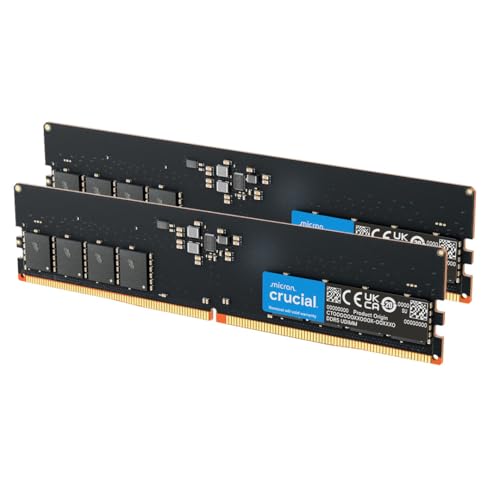
The Crucial kit is the simplest option in this roundup, and for many budget builders that simplicity is the point. It runs at DDR5-5600 with CL46 timings at 1.10V, following the JEDEC standard with no profile to enable. Install the two modules and the memory runs at its rated speed with no BIOS changes, which suits office PCs, family computers, and first builds.
The trade is speed. DDR5-5600 with CL46 is slower than the DDR5-6000 CL30 kits in this guide, and the difference shows up most in latency-sensitive games. The modules ship without heat spreaders, so they fit under any cooler. Builders should order the desktop UDIMM model CT2K16G56C46U5, since Crucial sells a laptop SODIMM version with a similar name that does not fit desktop boards.
Specs
Capacity: 32GB (2 x 16GB)
Speed: DDR5-5600MT/s (PC5-44800)
Timings: CL46
Voltage: 1.10V
Form factor: 288-pin UDIMM
Profile: JEDEC, no XMP or EXPO profile required
Heat spreader: None
Model: CT2K16G56C46U5
ASIN: B0BLTGP2JX
Best for: Builders who want a simple JEDEC kit with no BIOS setup, and office or family PCs that do not need overclocked speeds.
Installing DDR5 memory takes a few minutes. Power the system down, switch off the power supply, and open the case. Push the slot clips outward, line up the notch on the module with the key in the slot, and press down firmly until the clips snap shut. For a two-module kit, use the slots the motherboard manual recommends, usually the second and fourth slots from the processor, for dual-channel mode.
After the modules are seated, boot into the BIOS and enable the XMP or EXPO profile to reach the rated speed; without that step, the kit runs at its JEDEC base speed. Save the setting and confirm the speed in the system information screen. If the system fails to boot, clear the BIOS settings and update the motherboard BIOS, since newer releases often improve memory compatibility.
Frequently Asked Questions
How much RAM do I need for gaming in 2026?
For most gaming PCs in 2026, 32GB is the right amount. It covers current games, a voice chat app, a browser with several tabs, and background tasks at the same time. A 16GB kit still works for lighter games, but newer releases push past that limit more often. A 64GB kit suits video editing and virtual machines, but most gaming builds do not need it.
Is DDR5-6000 CL30 the right speed for a budget build?
DDR5-6000 with CL30 timings is the best balance of speed and cost for most budget DDR5 builds. It is fast enough for current AMD and Intel processors without the higher tier of faster kits. AMD Ryzen 7000 and 9000 processors pair especially well with DDR5-6000. A DDR5-5600 kit such as the Crucial option costs less and needs no BIOS profile, but it gives up some responsiveness in latency-sensitive games.
Can I mix a DDR5 kit with my old DDR4 memory?
No, DDR4 and DDR5 memory cannot be used together. The modules are keyed differently, so DDR4 sticks do not fit DDR5 slots and DDR5 sticks do not fit DDR4 slots. A DDR5 upgrade needs a DDR5 motherboard and a compatible processor: an AMD Ryzen 7000 series or newer chip, or a 12th generation Intel Core processor or newer. Replace the old memory with a matched DDR5 kit rather than combining old and new modules.
Do I need to enable XMP or EXPO after installing DDR5 RAM?
Yes, for the four overclocked kits in this guide. A DDR5-6000 kit boots at a JEDEC base speed, often 4800MT/s, until the profile is enabled in the BIOS. The profile is a saved factory setting for speed, timings, and voltage. Open the BIOS after installing the memory, select XMP or EXPO, save, and restart. The Crucial DDR5-5600 kit in this guide is the exception: it follows the JEDEC standard and runs at its rated speed with no profile to enable.
Conclusion
The best budget DDR5 RAM for most builders is the Corsair Vengeance 32GB DDR5-6000 CL30 kit, thanks to dual EXPO and XMP support, a low-profile design, and wide motherboard validation. At a lower tier, the G.Skill Ripjaws S5 suits Intel systems and the TEAMGROUP T-Force Vulcan ECO suits either platform, while the Kingston FURY Beast sits in the middle with dual-profile support and Plug N Play setup. The Crucial DDR5-5600 kit is the pick for anyone who wants a simple JEDEC install with no BIOS changes. Whichever kit fits the build, confirm the motherboard has DDR5 slots, buy a matched 2x16GB kit for dual-channel mode, and enable the XMP or EXPO profile after installation.
E
Emubox Editorial Team
We compare specs, materials and verified owner reviews before a product earns a spot. Rankings are never paid.
Affiliate disclosure. As an Amazon Associate we earn from qualifying purchases at no extra cost to you. Prices accurate as of the date shown.
Best 2mm 70 cm portable antennas compared: telescopic radio antennas near 70 cm, with connectors, bands and collapsed sizes explained before you buy today.
Find the best thermostat setting for winter and summer, with energy-saving setbacks, humidity tips, and smart schedules for a comfortable home year-round.
The best affordable business computer monitors balance sharp text, eye comfort and lasting value. Compare four reliable office displays built for long workdays.
Looking for the best inexpensive HD TVs non smart? Compare five genuinely non-smart HD televisions with tuners, HDMI inputs and simple setup for any small room.

 Kingston FURY Beast 32GB DDR5 6000MHz CL30
 G.Skill Ripjaws S5 32GB DDR5 6000MHz CL30
 TEAMGROUP T-Force Vulcan ECO 32GB DDR5 6000MHz CL30
 Crucial 32GB DDR5 5600MHz









