
Key takeaways
- Compare five budget KVM switches for two computers, from 4K HDMI models with USB 3.0 to a cabled audio pick, and find the right fit for your desk.
As an Amazon Associate, we earn from qualifying purchases.
The best budget KVM switch for most buyers is the UGREEN HDMI KVM Switch, because it pairs 4K video at 60Hz with four USB 3.0 ports, an aluminum enclosure, and every cable in the box, so two computers share one monitor, keyboard, and mouse with a single button press. If you want the lowest-cost way into the same setup, the Hearvo S7232H covers the same 4K at 60Hz video with adaptive EDID and three USB 3.0 ports. The TESmart HKS201-P23 is the step-up pick, adding hotkey switching, EDID emulators, and audio and microphone pass-through.
A budget KVM switch should solve one problem cleanly: let one keyboard, one mouse, and one monitor control two computers without swapping cables. The five models below all do that, and they differ mainly in video resolution, USB ports, switching method, and whether the cables arrive in the box.
Table of Contents
- Quick Comparison
- How to Choose a Budget KVM Switch
- 1. UGREEN HDMI KVM Switch
- 2. Hearvo USB 3.0 HDMI KVM Switch S7232H
- 3. TESmart USB 3.0 HDMI KVM Switch HKS201-P23
- 4. GREATHTEK USB 3.0 KVM Switch 2 Port HDMI
- 5. IOGEAR 2-Port USB HDMI Cabled KVM Switch GCS62HU
- Frequently Asked Questions
- Conclusion
- Product and ASIN Reference
Quick Comparison
| KVM Switch | Computers | Video | USB Ports | Switching | Tier |
|---|---|---|---|---|---|
| UGREEN HDMI KVM Switch | 2 | 4K at 60Hz | 4 USB 3.0 | Button, desktop controller | Mid-range |
| Hearvo S7232H | 2 | 4K at 60Hz | 3 USB 3.0 | Button, wired remote | Budget |
| TESmart HKS201-P23 | 2 | 4K at 60Hz | 2 USB 3.0, 2 USB 1.1 | Hotkey, button, remote | Premium |
| GREATHTEK 2 Port HDMI | 2 | 4K at 60Hz | 3 USB 3.0 | Button | Budget |
| IOGEAR GCS62HU | 2 | 1920 x 1200 at 60Hz | 2 USB 2.0 | Hotkey, remote button | Mid-range |
How to Choose a Budget KVM Switch
Start with the video connection. All five switches here use HDMI, and four of them support 4K at 60Hz, which keeps cursor movement and window dragging smooth. The IOGEAR is the exception, topping out at 1920 x 1200 at 60Hz, so it suits a 1080p monitor and not a 4K panel. Check your monitor’s native resolution first.
Next, weigh the USB ports. A keyboard and mouse need two ports, so a switch with three or four USB ports leaves room for a printer, a flash drive, or a webcam. USB 3.0 ports move data at up to 5Gbps, which matters for external drives, while USB 2.0 ports are fine for a keyboard and mouse alone.
Look at how you switch between computers. A physical button on the box is the simplest method, and a wired desktop controller or remote lets you place the switch out of reach and still flip inputs from the desk. Hotkey switching, offered by the TESmart and the IOGEAR, lets you change computers from the keyboard, though hotkey combinations can occasionally conflict with an application’s own shortcuts.
Check EDID handling before you buy. EDID is the handshake between a computer and a monitor, and a switch with EDID emulation or adaptive EDID keeps window positions stable when you flip between computers. The Hearvo, TESmart, and GREATHTEK models all list EDID support, while the UGREEN listing states plainly that it does not support hotkey switching or EDID emulation.
1. UGREEN HDMI KVM Switch
The UGREEN HDMI KVM Switch is the most complete budget package in this roundup. It connects two computers to one monitor at up to 4K at 60Hz, shares four USB 3.0 devices, and ships with two HDMI cables, two USB cables, and a desktop controller, so the desk is ready as soon as the box opens. The aluminum enclosure keeps the unit compact on a crowded desk, and the controller lets you place the switch behind the monitor and still flip inputs from within reach.
The four USB 3.0 ports split into three USB-A ports and one USB-C port, covering a keyboard, a mouse, a printer, and a flash drive at up to 5Gbps. Setup is driver-free and plug and play. The trade-offs are documented on the listing: no hotkey switching and no EDID emulation, so window positions may shift when you switch.
Specs
- Computers: 2
- Monitors: 1
- Video: HDMI, up to 4K at 60Hz
- USB ports: 4 USB 3.0 (3 USB-A, 1 USB-C), up to 5Gbps
- Switching: Button, desktop controller
- Hotkey switching: No
- EDID emulation: No
- Enclosure: Aluminum
- Included cables: 2 HDMI cables, 2 USB cables
- Operating systems: Windows, macOS, Linux
- ASIN: B0C8NFPSJV
2. Hearvo USB 3.0 HDMI KVM Switch S7232H
The Hearvo S7232H is the lowest-cost way into a proper two-computer, one-monitor desk. It delivers the same 4K at 60Hz video as the UGREEN, with HDCP 2.2 support for protected content, and it adds adaptive EDID, which helps keep the display stable when you flip between computers. Three USB 3.0 ports share a keyboard, mouse, and one extra device at up to 5Gbps, and the switch runs without a separate power supply or driver software.
Switching happens with the button on the unit or the wired remote, so you can tuck the switch behind the monitor and keep the remote on the desk. The listing states compatibility with Windows, macOS, and Linux, plus laptops and game consoles with HDMI output. The main compromise is the cable count: the package includes two USB 3.0 cables but no HDMI cables, so you need two of your own.
Specs
- Computers: 2
- Monitors: 1
- Video: HDMI, up to 4K at 60Hz, HDCP 2.2
- USB ports: 3 USB 3.0, up to 5Gbps
- Switching: Button, wired remote
- EDID: Adaptive EDID
- Power: No separate power supply required
- Included cables: 2 USB 3.0 cables (HDMI cables not included)
- Operating systems: Windows, macOS, Linux
- Model number: S7232H
- ASIN: B0D5D4FK1H
3. TESmart USB 3.0 HDMI KVM Switch HKS201-P23
The TESmart HKS201-P23 is the step-up pick for buyers who want the most switching options and the most complete kit. It offers hotkey switching, a button on the unit, and a remote switch, so you can change computers from the keyboard, the desk, or the box itself. Two EDID emulators keep the display handshake stable, and the switch passes left and right audio plus microphone signals, which the other picks in this roundup do not.
The USB layout is split by purpose: two USB 3.0 ports, one of which supports charging, plus two USB 1.1 ports for a keyboard and mouse. The package includes all input cables, so there is nothing extra to buy. Video reaches 4K at 60Hz over HDMI, and the switch supports Windows, macOS, and Linux. The trade-off is complexity: with three switching methods and audio routing, this is the most involved switch here.
Specs
- Computers: 2
- Monitors: 1
- Video: HDMI, up to 4K at 60Hz
- USB ports: 2 USB 3.0 (1 charging), 2 USB 1.1
- Switching: Hotkey, button, remote switch
- EDID: 2 EDID emulators
- Audio: L/R audio and microphone pass-through
- Included cables: All input cables included
- Operating systems: Windows, macOS, Linux
- Model number: HKS201-P23
- ASIN: B0C6XSNPK1
4. GREATHTEK USB 3.0 KVM Switch 2 Port HDMI
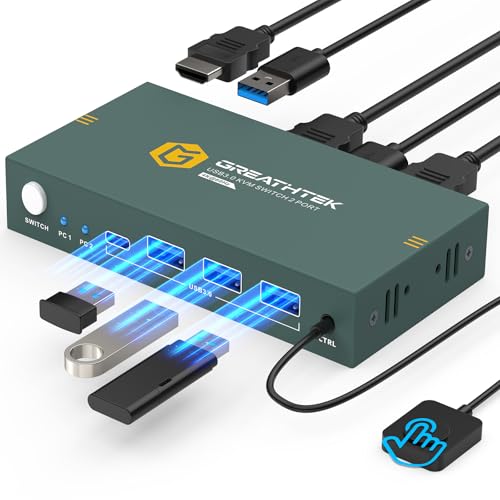
The GREATHTEK USB 3.0 KVM Switch is the simple 4K pick for a buyer who wants three fast USB ports and nothing else to learn. It connects two computers to one monitor at 4K at 60Hz with HDCP 2.2, shares three USB 3.0 devices at up to 5Gbps, and switches with a single button. EDID support is listed in the published specifications, which helps keep the display steady when you flip between computers.
The switch is driver-free and plug and play, and the listing states compatibility with PCs, laptops, game consoles, Windows, macOS, and Linux. The limits are the feature list: no hotkey switching and no remote, so you press the button on the unit every time, and no audio or microphone pass-through. It is also a single-monitor design.
Specs
- Computers: 2
- Monitors: 1
- Video: HDMI, up to 4K at 60Hz, HDCP 2.2
- USB ports: 3 USB 3.0, up to 5Gbps
- Switching: Button
- EDID: Yes
- Operating systems: Windows, macOS, Linux
- Brand: GREATHTEK
- Date first available: August 16, 2023
- ASIN: B0CFVBK4XQ
5. IOGEAR 2-Port USB HDMI Cabled KVM Switch GCS62HU

The IOGEAR GCS62HU is the established pick in this roundup, from a maker that has sold KVM switches for years. It is a cabled switch, which means the HDMI, USB, and audio cables are built into the unit, so setup is a matter of plugging the attached cables into both computers and the monitor. Hotkey switching and a remote button both change computers, and 2.1 stereo audio passes through the 3.5mm speaker and microphone jacks.
The mouse port doubles as a USB 2.0 peripheral sharing port, so a powered USB hub connected there expands the single extra port into several. The switch is backed by a 3-year warranty with free lifetime technical support, the longest warranty in this roundup. The compromise is resolution: the GCS62HU tops out at 1920 x 1200 at 60Hz, which covers a 1080p monitor but will not drive a 4K panel at its native resolution.
Specs
- Computers: 2
- Monitors: 1
- Video: HDMI, up to 1920 x 1200 at 60Hz
- USB ports: 2 USB 2.0, peripheral sharing via mouse port
- Switching: Hotkey, remote button
- Audio: 2.1 stereo, 3.5mm speaker and microphone jacks
- Cables: Integrated HDMI, USB, and audio cables
- Warranty: 3-year warranty, free lifetime technical support
- Operating systems: Windows, macOS, Linux, Unix
- Model number: GCS62HU
- ASIN: B004YCUDMU
Frequently Asked Questions
Do I need a KVM switch if I only use one computer?
No, a KVM switch only earns its place when two or more computers share one desk. With a single computer, the monitor, keyboard, and mouse connect directly, and a switch adds nothing.
What is the difference between 4K at 30Hz and 4K at 60Hz on a KVM switch?
The refresh rate decides how smooth the picture feels. At 60Hz the cursor and windows move smoothly, while at 30Hz the same movement can feel choppy. Four of the switches here support 4K at 60Hz. Confirm the switch’s rated refresh rate at 4K rather than assuming any 4K label means 60Hz.
Will a KVM switch work with a wireless keyboard and mouse?
It depends on how the wireless set connects. A wireless keyboard and mouse that use a USB receiver dongle usually work, because the switch sees the dongle as a standard USB keyboard and mouse. A Bluetooth-only set will not work through a KVM switch, because the switch has no Bluetooth radio.
Do budget KVM switches include the cables I need?
Some do and some do not, so check the package list before you buy. The UGREEN and TESmart in this roundup ship with the HDMI and USB cables included, and the IOGEAR has its cables built into the unit. The Hearvo ships with two USB 3.0 cables and expects you to supply your own HDMI cables.
Conclusion
The best budget KVM switch for most buyers is the UGREEN HDMI KVM Switch, which covers two computers, one monitor, 4K video at 60Hz, four USB 3.0 ports, and every cable in the box. The Hearvo S7232H is the lowest-cost way into the same 4K setup, with adaptive EDID and three USB 3.0 ports, provided you already own HDMI cables. The TESmart HKS201-P23 is the step-up pick, adding hotkey switching, EDID emulators, and audio pass-through. The GREATHTEK keeps it simple with three USB 3.0 ports and a single button, and the IOGEAR GCS62HU trades 4K video for integrated cables, audio, hotkeys, and a 3-year warranty.









