
Key takeaways
- Compare the best budget Chromebooks for school, work, and home. Five affordable models, the specs that matter, and tips for choosing the right one.
As an Amazon Associate, we earn from qualifying purchases.
Table of Contents
- Best Budget Chromebooks: 5 Top Picks for Students 2026
- Quick Comparison
- Lenovo IdeaPad Slim 3 Chromebook 14-Inch
- Acer Chromebook Spin 311 R725T
- HP Chromebook 14-Inch (2024)
- ASUS Chromebook CX1 15.6-Inch
- Samsung Galaxy Chromebook Go 14-Inch
- How to Choose a Budget Chromebook
- Frequently Asked Questions
- Conclusion
- Product and ASIN Reference
The best budget Chromebook for most people is the Lenovo IdeaPad Slim 3 Chromebook 14-Inch, which pairs a sharp Full HD touchscreen with an eight-core MediaTek processor and 4GB of memory in a light, travel-friendly body. The Acer Chromebook Spin 311 R725T is the stronger pick for a smaller convertible with more memory, while the ASUS Chromebook CX1 suits anyone who wants the largest screen here. Every model runs ChromeOS and covers browsing, documents, video calls, and streaming.
A budget Chromebook makes sense when most of your work lives in a browser. ChromeOS boots fast and updates itself, so a modest processor and 4GB of memory go further than the same hardware would on a heavier system. The trade-offs are real: storage is usually 64GB or 128GB of eMMC, screens are often HD rather than Full HD, and Windows software does not run.
Quick Comparison
| Model | Screen | Processor | RAM | Storage | Best For |
|---|---|---|---|---|---|
| Lenovo IdeaPad Slim 3 Chromebook | 14-inch FHD touchscreen | MediaTek Kompanio 520 | 4GB | 64GB eMMC | Everyday all-rounder |
| Acer Chromebook Spin 311 R725T | 11.6-inch HD touchscreen | MediaTek | 8GB | 64GB eMMC | Small convertible |
| HP Chromebook 14-Inch (2024) | 14-inch HD | Intel Celeron N4120 | 4GB | 64GB eMMC + 64GB card | Simple home laptop |
| ASUS Chromebook CX1 15.6-Inch | 15.6-inch FHD | Intel Celeron N4500 | 4GB | 128GB eMMC | Largest screen |
| Samsung Galaxy Chromebook Go | 14-inch HD | Intel Celeron N4500 | 4GB | 64GB eMMC | Light travel laptop |
Lenovo IdeaPad Slim 3 Chromebook 14-Inch
The Lenovo IdeaPad Slim 3 Chromebook is the best all-round pick in this group, and the reason is balance. Its 14-inch Full HD touchscreen shows text and video clearly, the MediaTek Kompanio 520 octa-core processor keeps a dozen browser tabs moving, and 4GB of LPDDR4X memory covers documents, email, and streaming side by side. At 2.87 pounds it carries easily, and the 47Wh battery is rated for up to 13.5 hours.
ChromeOS support is another strength: Google lists automatic updates through June 2031. Ports include one USB-C 3.2, one USB-A 3.2, a microSD reader, and a headphone and microphone jack, plus Wi-Fi 6. One detail to confirm: the listing is sold as a bundle that adds a docking station set to the 64GB eMMC machine, so read it to confirm what ships in the box.
Specs
- Display: 14-inch Full HD (1920 x 1080) IPS touchscreen, 300 nits
- Processor: MediaTek Kompanio 520 octa-core, up to 2.0 GHz
- Memory: 4GB LPDDR4X
- Storage: 64GB eMMC, microSD card slot
- Battery: 47Wh, up to 13.5 hours
- Connectivity: Wi-Fi 6 (802.11ax), 1 x USB-C 3.2, 1 x USB-A 3.2, headphone/microphone jack
- Dimensions: 12.83 x 8.7 x 0.73 inches
- Weight: 2.87 pounds
- Operating system: ChromeOS, updates through June 2031
- Color: Abyss Blue
Acer Chromebook Spin 311 R725T
The Acer Chromebook Spin 311 R725T is the convertible of this group, and the only model here with 8GB of memory. The 11.6-inch HD touchscreen folds back on a 360-degree hinge, so it works as a laptop, a tent for watching video, or a tablet for reading. That flexibility suits students and anyone who reads or watches more than they type, and the compact body slips easily into a small bag.
The 8GB of memory is the headline feature: ChromeOS runs well on 4GB, but 8GB gives more room for many tabs, Android apps, and video calls at once, which is where budget machines usually slow down. Storage is 64GB of eMMC, so files should live in Google Drive or on a microSD card. Confirm model R725T-84ZN before ordering, since Acer sells this machine in more than one configuration, and note that battery life and weight are not published on the listing.
Specs
- Display: 11.6-inch HD (1366 x 768) touchscreen, 360-degree convertible
- Processor: MediaTek
- Memory: 8GB
- Storage: 64GB eMMC
- Battery: Not stated on the listing
- Connectivity: Wi-Fi, USB-C, USB-A, headphone jack
- Dimensions: Not stated on the listing
- Weight: Not stated on the listing
- Operating system: ChromeOS
- Model: R725T-84ZN
- Warranty: 1 year manufacturer
HP Chromebook 14-Inch (2024)
The HP Chromebook 14-Inch is the simplest machine in this roundup, and that is its appeal. It is a straightforward 14-inch clamshell with an Intel Celeron N4120 quad-core processor, 4GB of memory, and a 14-inch HD display, built for browsing, documents, email, and video calls without extra features to learn. The 1366 x 768 screen is softer than Full HD, but fine for text and video, and the larger display is easier on the eyes than an 11.6-inch screen.
Storage is a useful detail: the listing pairs 64GB of eMMC with a 64GB storage card, for 128GB in total, more room for offline files than the 64GB-only models here. The Celeron N4120 runs at a 1.10 GHz base clock and bursts up to 2.6 GHz. Confirm the configuration before ordering, because HP sells the 14-inch Chromebook in several similar builds; the listing covered here is the 2024 model with the N4120 and the 64GB eMMC plus 64GB card combination. Battery life is described as long, but no hour figure is published.
Specs
- Display: 14-inch HD (1366 x 768)
- Processor: Intel Celeron N4120 quad-core, 1.10 GHz base, up to 2.6 GHz burst
- Memory: 4GB LPDDR4
- Storage: 64GB eMMC plus 64GB storage card, 128GB total
- Battery: Long battery life per listing, no hour figure published
- Connectivity: Wi-Fi, webcam, USB-A and USB-C
- Dimensions: Not stated on the listing
- Weight: Not stated on the listing
- Operating system: ChromeOS
- Model year: 2024
- Color: Gray
ASUS Chromebook CX1 15.6-Inch
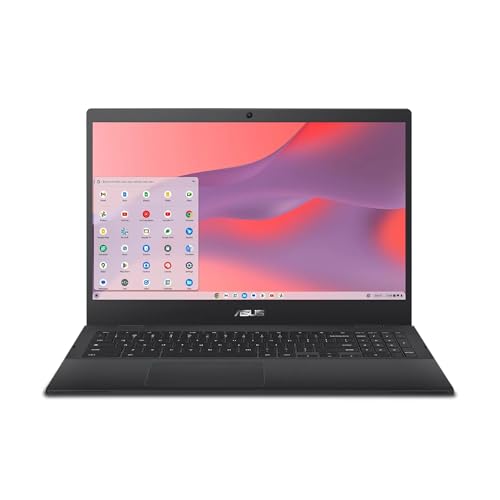
The ASUS Chromebook CX1 is the big-screen pick here, with a 15.6-inch Full HD NanoEdge display, the largest in this roundup. The 1920 x 1080 resolution shows more of a document or web page at once than the HD screens on the smaller models. The Intel Celeron N4500 processor, 4GB of DDR4 memory, and 128GB of eMMC storage cover browsing, documents, and streaming, and the 128GB is the most built-in space in this group.
Durability is a genuine selling point: the CX1 is built to the MIL-STD 810H military standard, covering drops, vibration, and everyday knocks. Wi-Fi 6 keeps wireless speeds current, and ports include two USB-C, two USB 3.2, and a microSD reader. Retailer listings put battery life at up to 11 hours. Confirm model CX1500CKA-SS48F in Mineral Gray; the listing’s weight field reads 5.99 pounds, which appears to be a shipping figure.
Specs
- Display: 15.6-inch Full HD (1920 x 1080) NanoEdge
- Processor: Intel Celeron N4500, up to 2.8 GHz
- Memory: 4GB DDR4
- Storage: 128GB eMMC
- Battery: Up to 11 hours per retailer listings
- Connectivity: Wi-Fi 6 (802.11ax), 2 x USB-C, 2 x USB 3.2, microSD reader
- Dimensions: 14.22 x 9.84 x 0.74 inches
- Weight: Not stated reliably on the listing
- Operating system: ChromeOS
- Durability: MIL-STD 810H
- Model: CX1500CKA-SS48F
- Color: Mineral Gray
Samsung Galaxy Chromebook Go 14-Inch

The Samsung Galaxy Chromebook Go is the travel pick in this group. It weighs 3.2 pounds, measures 12.88 x 8.88 x 0.63 inches, and pairs a 14-inch display with a spill-resistant keyboard, so it survives a commute or a classroom better than most budget laptops. The Intel Celeron N4500 and 4GB of LPDDR4X memory handle browsing, documents, and video calls, and the 12-hour battery rating is the longest claimed here.
The screen is a 14-inch LED HD panel at 1366 x 768, the main compromise, though the spill-resistant keyboard and MIL-STD-810G rating add real-world toughness. Wi-Fi 6 is included, with one USB-A 3.2 port, two USB-C ports, a headphone jack, and a 720p camera. Confirm model XE340XDA-KA2US in Silver with 4GB of memory and 64GB of eMMC storage, since Samsung also sells 32GB and 128GB versions and an LTE model. ChromeOS updates run through June 2031.
Specs
- Display: 14-inch LED HD (1366 x 768)
- Processor: Intel Celeron N4500, up to 2.8 GHz
- Memory: 4GB LPDDR4X
- Storage: 64GB eMMC
- Battery: Up to 12 hours
- Connectivity: Wi-Fi 6, 1 x USB-A 3.2, 2 x USB-C, headphone jack
- Dimensions: 12.88 x 8.88 x 0.63 inches
- Weight: 3.2 pounds
- Operating system: ChromeOS, updates through June 2031
- Durability: MIL-STD-810G, spill-resistant keyboard
- Model: XE340XDA-KA2US
- Color: Silver
How to Choose a Budget Chromebook
Start with the screen. A 14-inch display is the comfortable middle ground for writing and browsing, an 11.6-inch convertible suits travel and reading, and a 15.6-inch Full HD display suits desk work. Full HD shows sharper text than HD, so prefer it if you read or write for hours. Touchscreens and 360-degree hinges add flexibility, but neither is essential for basic work.
Memory matters more than processor speed in this class. All five models run ChromeOS well, but 8GB, as on the Acer Spin 311 R725T, gives more headroom for many tabs and Android apps at once. With 4GB, keep tab counts modest. Storage is the other limit: 64GB of eMMC fills up fast, so plan on Google Drive and a microSD card, or pick the 128GB HP or ASUS models if you keep files offline. Finally, check the ChromeOS update end date and confirm the exact model number on the listing.
Frequently Asked Questions
Is 4GB of RAM enough for a budget Chromebook?
Yes, for the jobs most people buy a Chromebook for. ChromeOS is lighter than Windows, so 4GB covers browsing, documents, email, video calls, and streaming. The limit appears when many tabs, Android apps, and a video call run at once. If that is your normal workload, the 8GB Acer Chromebook Spin 311 R725T in this roundup is the safer choice.
Can a Chromebook run Microsoft Office?
Chromebooks do not run the Windows desktop versions of Word, Excel, or PowerPoint, but Microsoft 365 web apps work in the Chrome browser, and Google Docs, Sheets, and Slides open and save Microsoft file formats. If your work depends on desktop-only Windows software, a Chromebook is the wrong machine.
How much storage do I need on a Chromebook?
Most Chromebook files live in Google Drive, so 64GB of eMMC is enough for documents, downloads, and a modest set of Android apps. Pick 128GB if you keep photos or videos offline. A microSD slot, included on the Lenovo, Acer, and ASUS models here, is a cheap way to add space later.
Do budget Chromebooks get software updates for a long time?
It depends on the model, not the price. Google sets an Auto Update Expiration date for each Chromebook, usually around eight to ten years from the platform launch. The Lenovo IdeaPad Slim 3 and Samsung Galaxy Chromebook Go in this roundup both receive updates through June 2031. Always confirm the update end date for the exact model number before buying.
Conclusion
The Lenovo IdeaPad Slim 3 Chromebook is the best budget Chromebook for most people, thanks to its Full HD touchscreen, eight-core processor, long battery life, and updates through June 2031. Students who want a small convertible with more memory should pick the Acer Chromebook Spin 311 R725T, while anyone who wants the biggest screen should look at the ASUS Chromebook CX1. The HP Chromebook 14-Inch is the plain, dependable choice for home use, and the Samsung Galaxy Chromebook Go is the lightest travel option with the longest claimed battery life. Confirm the exact model number on the listing, check the update end date, and make sure the storage and memory match the way you work.









