We independently review everything we recommend. When you buy through our links, we may earn a commission. As an Amazon Associate we earn from qualifying purchases.
Best Budget All-in-One PCs: 5 Picks for Every Desk
Five budget all-in-one PCs compared: built-in displays, everyday processors, and solid-state storage for work, study, and family computing at home.
As an Amazon Associate, we earn from qualifying purchases.
The best budget all-in-one PC is the HP 24-cr0002, because it pairs a 23.8-inch Full HD display with an AMD Ryzen 5 processor, 8GB of memory, and a 256GB solid-state drive in a single tidy unit that needs no separate tower. If you want more memory and storage, the Lenovo IdeaCentre AIO 3 with 16GB of RAM and a 512GB SSD is the stronger all-rounder, while the Acer Aspire C24-1700-UA91 is the simplest choice for light everyday use.
An all-in-one PC builds the computer into the back of the display, so the whole system sits on your desk with one power cable and no tower underfoot. That makes it a natural fit for a kitchen desk, a student bedroom, or a home office corner where space matters. The trade-off is that most budget models are not meant to be opened and upgraded the way a tower is, so the configuration you buy is largely the configuration you will live with.
Start with the display. Every model in this roundup has a 23.8-inch Full HD screen, which gives you enough room for two documents side by side and a comfortable view for video calls and streaming. A Full HD panel at this size keeps text sharp at a normal viewing distance, and the IPS panel on the Acer model holds its colors steady when viewed from an angle.
Next, weigh the processor and memory together. A modern multi-core processor such as the AMD Ryzen 5 7520U or Ryzen 5 5500U handles web browsing with many tabs open, office documents, video calls, and light photo editing without strain. The Intel Core i3-1215U in the Acer and the Intel Core i3-N305 in the Lenovo IdeaCentre 24 are aimed at lighter work, such as email, streaming, and school assignments. For memory, 8GB is enough for everyday use, while 16GB gives you more headroom when you keep a browser, a word processor, and a video call open at the same time.
Storage matters just as much. All five models here use solid-state storage, which makes the system start quickly and open programs without the long waits of an older hard drive. A 256GB drive covers the operating system and everyday programs with room for documents, while a 512GB drive is the safer choice if you keep a large photo library or install several large programs. Check whether the listing you choose is the exact configuration in this guide, because several of these model lines are sold in more than one memory and storage combination.
Finally, look at the small details that affect daily use. A built-in webcam and microphone keep video calls simple, Wi-Fi 6 keeps the wireless connection steady, and a keyboard and mouse in the box mean you can start work right away. The DVD drive on the Lenovo IdeaCentre AIO 3 is a rare extra on a modern all-in-one and suits anyone with a collection of discs.
The HP 24-cr0002 is the best budget all-in-one PC for most buyers, because it covers the essentials without a weak link. The 23.8-inch Full HD display gives you a clear view for documents and video, the AMD Ryzen 5 7520U processor handles everyday multitasking with ease, and the 256GB solid-state drive keeps startup and program loading quick. It runs Windows 11 Home and uses AMD Radeon graphics for video playback and light creative work.
This model suits a home office, a student desk, or a shared family computer. The 8GB of memory is enough for browsing, office work, streaming, and video calls, while the 256GB drive holds the operating system, everyday programs, and a reasonable library of documents and photos.
The Lenovo IdeaCentre AIO 3 is the strongest all-rounder in this roundup, because it pairs a six-core AMD Ryzen 5 5500U processor with 16GB of memory and a 512GB solid-state drive. That combination gives you room to run a browser with many tabs, an office suite, and a video call at the same time without the machine slowing down. The 24-inch Full HD display is the same comfortable size as the rest of the group, and the DVD-RW drive is a genuinely useful extra for anyone who still plays discs.
This model is the right choice if you want one computer to serve the whole household. The extra memory helps when several people share the machine and leave programs open, and the larger drive means you can install more programs and keep more files on the computer itself.
The Acer Aspire C24-1700-UA91 is the simplest pick in this roundup, and that is exactly its appeal. The 23.8-inch Full HD IPS display stays clear and consistent from a wide viewing angle, the Intel Core i3-1215U processor is built for everyday tasks, and the 512GB NVMe solid-state drive gives you generous room for programs and files. It ships with Windows 11 Home, Intel UHD Graphics, and Wi-Fi 6, so it handles browsing, email, streaming, and video calls without fuss.
This model suits a first computer, a spare room desk, or a kitchen counter setup where the machine is used for short sessions rather than heavy work. The 8GB of DDR4 memory is enough for one or two programs at a time, and the large drive means you will not need to manage storage carefully. The IPS panel is a real advantage if more than one person watches the screen, since colors shift less when you sit off to the side.
The Lenovo IdeaCentre 24 is the quiet achiever of this roundup. It combines an eight-core Intel Core i3-N305 processor with 16GB of DDR4 memory and a 512GB PCIe solid-state drive, which is a generous amount of memory and storage for a budget machine. The 23.8-inch Full HD display suits documents, video calls, and streaming, and the built-in Wi-Fi 6 and Bluetooth keep it connected to a wireless network and to accessories such as headphones and speakers.
The eight-core processor is efficient rather than powerful, so this model is best for steady everyday work: browsing, office documents, school assignments, and video calls. Where it stands out is the 16GB of memory, which keeps the machine responsive when you have many browser tabs open or switch between programs through the day. Buyers should confirm the configuration on the listing before ordering, because this model line is sold in more than one memory and storage combination.
The HP OmniStudio 24-cv0150 is the premium pick in this roundup, and it brings the newest hardware of the group. The AMD Ryzen AI 5 340 processor is a 2026-era chip with AI-ready features, paired with 16GB of memory and a 512GB solid-state drive. The 23.8-inch Full HD display, AMD Radeon graphics, and Windows 11 Home complete a machine that is built for everyday work today and for the software updates of the next few years.
This model suits anyone who wants the longest useful life from a budget all-in-one. The newer processor and the generous memory and storage mean it will stay comfortable with new versions of office software, browsers, and video calling tools for longer than the older models here. Confirm the listing is the 24-cv0150 configuration in Jet Black with the Ryzen AI 5 340 processor, because HP sells the OmniStudio line in several sizes and configurations.
Is a budget all-in-one PC good enough for working from home?
Yes, for most home office work a budget all-in-one is enough. The models in this roundup handle web browsing, office documents, email, and video calls comfortably, and the solid-state drive in each one keeps the system responsive. If your work involves large spreadsheets, heavy photo editing, or video editing, look for the 16GB models here, such as the Lenovo IdeaCentre AIO 3 or the HP OmniStudio 24-cv0150.
Can I upgrade the memory or storage in a budget all-in-one PC?
Most budget all-in-one PCs are not designed for easy upgrades. The memory is often soldered to the main board or hidden behind the display panel, and opening the case can void the warranty. That is why it is better to buy the memory and storage you need from the start. A 512GB drive and 16GB of memory, as found on three of the models here, give you more room to grow.
Do all-in-one PCs come with a keyboard and mouse?
Most all-in-one PCs sold on Amazon ship with a keyboard and mouse in the box, and the HP and Lenovo models in this roundup are typically sold that way. Check the “in the box” or “included components” section of the listing before you order, because some listings sell the display unit alone.
Should I choose a touchscreen all-in-one PC?
A touchscreen adds cost and is not necessary for most buyers. A standard non-touch display is easier to keep clean and costs less at the same specification, and a mouse and keyboard are faster for office work and writing. For a budget buy the money is usually better spent on more memory or storage instead.
Conclusion
The best budget all-in-one PC for most buyers is the HP 24-cr0002, with its balanced Ryzen 5 processor, 8GB of memory, and 256GB solid-state drive in a tidy 23.8-inch package. If you want more room to multitask and store files, the Lenovo IdeaCentre AIO 3 and the HP OmniStudio 24-cv0150 both offer 16GB of memory and a 512GB drive, with the OmniStudio bringing the newest processor of the group. The Acer Aspire C24-1700-UA91 is the simplest choice for light everyday use, and the Lenovo IdeaCentre 24 pairs an efficient eight-core processor with generous memory for steady home office work. Pick the configuration that matches how you use a computer each day and confirm the exact model on the listing, and you will have a clean, space-saving desktop without a tower under the desk.
E
Emubox Editorial Team
We compare specs, materials and verified owner reviews before a product earns a spot. Rankings are never paid.
Affiliate disclosure. As an Amazon Associate we earn from qualifying purchases at no extra cost to you. Prices accurate as of the date shown.
Best 2mm 70 cm portable antennas compared: telescopic radio antennas near 70 cm, with connectors, bands and collapsed sizes explained before you buy today.
Find the best thermostat setting for winter and summer, with energy-saving setbacks, humidity tips, and smart schedules for a comfortable home year-round.
The best affordable business computer monitors balance sharp text, eye comfort and lasting value. Compare four reliable office displays built for long workdays.
Looking for the best inexpensive HD TVs non smart? Compare five genuinely non-smart HD televisions with tuners, HDMI inputs and simple setup for any small room.

 HP 24-cr0002 All-in-One Desktop PC
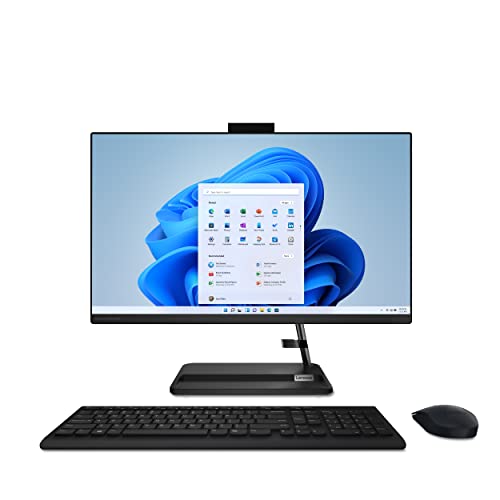 Lenovo IdeaCentre AIO 3 24-Inch All-in-One
 Acer Aspire C24-1700-UA91 All-in-One Desktop
 Lenovo IdeaCentre 24 All-in-One Desktop









