We independently review everything we recommend. When you buy through our links, we may earn a commission. As an Amazon Associate we earn from qualifying purchases.
Best Budget Mini PC Stands: 5 Picks for Every Desk 2026
Compare five budget mini PC stands and mounts for 2026, from VESA brackets to under-desk holders, and find the right fit for your desk and device.
As an Amazon Associate, we earn from qualifying purchases.
Short Answer
The best budget mini PC stand for most desks is a mount that matches the way you want to hide or display the computer. For Mac Mini owners, the HumanCentric Mac Mini Mount is the standout pick because it is molded to fit the computer and mounts to a wall, under a desk, or behind a monitor. For a small tower or a mini PC on a wall, the VIVO MOUNT-PC03V gives the most mounting flexibility for the least money. For a heavy tower under a standing desk, the PUTORSEN Under Desk PC Mount carries far more weight than the rest of this roundup, while the two remaining VIVO mounts cover the trickiest setups: a desk leg with no drilling, and a swivel mount for easy cable access.
Start by measuring the computer. Width, depth, and weight are the three numbers that decide whether a stand fits. A bracket built for a slim thin client will not hold a small tower, and a heavy-duty tower holder is overkill for a Mac Mini. Measure the device in inches, then compare those numbers with the adjustment range in the listing. Leave a little clearance on every side so the case does not press against the bracket and block a vent.
Next, decide where the computer should live. A wall mount keeps the computer off the floor and away from dust, and it works well in a shared office. An under-desk mount hides the computer completely and frees the whole desktop, but it needs a desk thick enough to hold the screws. A behind-monitor mount uses the VESA holes on the back of the display, so check whether the monitor uses a 75 by 75 millimeter or 100 by 100 millimeter pattern. A clamp-on desk leg mount suits renters and anyone who wants to avoid drilling, because it grips the leg instead of the desktop.
Quick Comparison
Product
Mounting Style
Width Range
Weight Capacity
Tier
HumanCentric Mac Mini Mount
Wall, under desk, behind monitor
Fits Mac Mini
Not stated
Mid-range
VIVO Universal PC Wall Mount MOUNT-PC03V
Wall
4.8 to 8.3 in
22 lb
Budget
PUTORSEN Under Desk PC Mount
Under desk
7.9 to 13.4 in
77 lb
Premium
VIVO Adjustable Clamp-on Desk Leg PC Mount MOUNT-PC01C
Desk leg clamp
Not stated
Not stated
Mid-range
VIVO Adjustable Under Desk and Wall Mount MOUNT-PC01W
The HumanCentric Mac Mini Mount is the only product in this roundup molded for one specific computer, and that focus is its strength. The custom plastic cradle matches the shape of the Mac Mini, so the computer clicks into place and sits tight without straps or clamps pressing on the case. It mounts to a wall, under a desk, or behind a monitor, which makes it the most flexible Mac Mini holder here. Drywall screws, anchors, and VESA screws come in the box, so all three mounting options are ready out of the box.
The mount weighs only 8 ounces and measures 7.09 by 7.09 by 1.57 inches, so it adds almost no bulk. The open design keeps the ports and the power button reachable, and the plastic cradle protects the computer from scratches. The one hard limit is compatibility: the listing states clearly that this mount does not work with the 2024 M4 Mac Mini, which uses a smaller enclosure.
Specs
ASIN: B0717152XT
Model: 101-2010
Material: Custom molded plastic
Dimensions: 7.09 x 7.09 x 1.57 in
Weight: 8 oz
VESA patterns: 75 x 75 mm and 100 x 100 mm
Mounting options: Wall, under desk, behind monitor
Hardware included: Drywall screws, anchors, VESA screws
First available: May 18, 2017
Best for: Mac Mini owners who want a custom-fit mount for a wall, desk, or monitor.
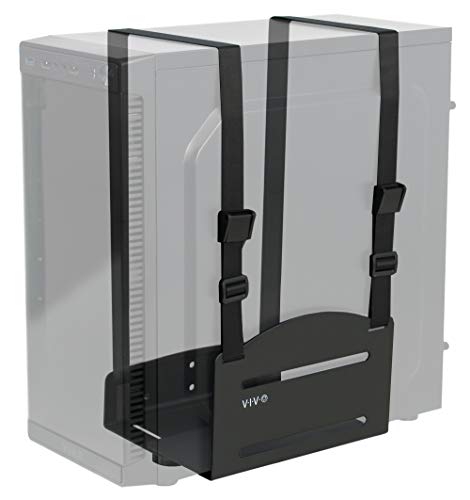
The VIVO MOUNT-PC03V is a steel wall mount with an open frame and adjustable straps, built to lift a computer off the floor and onto a wall. Its width adjusts from 4.8 to 8.3 inches, which covers most mini PCs and many small towers, and it carries up to 22 lb. The open frame keeps air moving around the case, and the straps add a second layer of security once the computer is in place. Wall mounting hardware is included, and VIVO backs the mount with a three-year warranty.
At 4.9 lb and 6.1 by 8.4 by 9.3 inches, the mount itself is compact, and the steel frame is sturdy enough for daily use. The wall position also protects the computer from floor dust and from knocks under the desk. Buyers should measure the case width first, because a tower wider than 8.3 inches will not fit.
Specs
ASIN: B0799Q52RR
Model: MOUNT-PC03V
UPC: 818538021592
Material: Steel
Dimensions: 6.1 x 8.4 x 9.3 in
Weight: 4.9 lb
Width range: 4.8 to 8.3 in
Weight capacity: 22 lb
Mounting: Wall mount with adjustable straps
Warranty: 3-year manufacturer warranty
Best for: Wall mounting a mini PC or small tower on a tight budget.
The PUTORSEN Under Desk PC Mount is the heavy lifter of this roundup. It adjusts from 7.9 to 13.4 inches wide and up to 23.23 inches tall, and it supports cases up to 77 lb, which is far more than any mini PC needs and enough for a mid tower. Protective mats sit between the steel brackets and the case, and the open frame leaves room for airflow around the tower. The mount is designed to rise and lower in sync with a standing desk, so cables stay slack instead of pulling tight when the desk moves.
The bracket weighs 3.45 kg and uses reinforced steel with industrial-grade hardware, and PUTORSEN includes a two-year manufacturer warranty. Installation takes five steps: measure the case, assemble the mount to match, attach it under the desk, place the tower, and enjoy the cleared floor. The width range fits mid towers and mini towers, including ATX, Micro-ATX, and Mini-ITX cases, so it also works if the computer is upgraded later to a larger case.
Specs
ASIN:
Brand: PUTORSEN
Material: High quality steel
Width range: 7.9 to 13.4 in
Height adjustment: Up to 23.23 in
Weight capacity: 77 lb
Weight: 3.45 kg
Mounting: Under desk
Features: Protective mats, open frame, standing desk sync
Warranty: 2-year manufacturer warranty
Best for: Heavy towers and standing desks that need a high-capacity under-desk mount.
The VIVO MOUNT-PC01C solves the one problem the other mounts in this roundup cannot: it mounts a computer without drilling anything. The bracket clamps onto a desk leg with a side clamp mount, so renters and anyone with a glass or thin desktop can hide a mini PC without putting holes in the furniture. Installation is tool-free, and the alloy steel bracket weighs 8.2 lb, which gives it a solid feel on the leg.
The mount measures 3.5 by 3.5 by 11.5 inches and carries a three-year warranty from VIVO. The listing does not state a weight capacity, so buyers with a heavier small tower should measure the case and check the current listing before ordering. For a standard mini PC or thin client, the clamp design is a practical pick: it keeps the computer off the floor, leaves the ports within reach, and comes off cleanly if the desk moves.
Specs
ASIN: B0BHF5W87B
Model: MOUNT-PC01C
Part number: MOUNT-PC01C
Material: Alloy steel
Dimensions: 3.5 x 3.5 x 11.5 in
Weight: 8.2 lb
Mounting type: Side clamp mount on desk leg
Installation: Tool-free
Weight capacity: Not stated in the listing
Warranty: 3-year manufacturer warranty
Best for: Renters and anyone who wants a drill-free mount on a desk leg.
The VIVO MOUNT-PC01W is the swivel pick of this roundup. It mounts under a desk or on a wall, fits cases from 3.5 to 7.8 inches wide, and carries up to 22 lb, with a swivel and a secure locking mechanism that turns the computer toward the user for cable changes. The white finish suits light desks and bright offices, and the mount uses the same VIVO three-year warranty as the other VIVO picks here.
The combination of under-desk and wall mounting in one bracket makes this a flexible choice for a home office that may be rearranged later. The 22 lb capacity covers most mini PCs, thin clients, and small form factor desktops with room to spare. Buyers should confirm the colorway on the listing, because the white model is a separate listing from the black version, and check that the case width falls inside the 3.5 to 7.8 inch range before ordering.
Specs
ASIN: B082FNNX49
Model: MOUNT-PC01W
Color: White
Width range: 3.5 to 7.8 in
Weight capacity: 22 lb
Mounting: Under desk and wall
Features: Swivel, secure locking
Warranty: 3-year manufacturer warranty
Best for: A swivel under-desk or wall mount in white for a bright home office.
Measure the width, depth, and weight of the computer first, then compare those numbers with the adjustment range in the listing. The VIVO MOUNT-PC03V fits cases from 4.8 to 8.3 inches wide, the VIVO MOUNT-PC01W fits 3.5 to 7.8 inches, and the PUTORSEN mount fits 7.9 to 13.4 inches. Leave clearance on every side so the bracket does not press against a vent.
Can I mount a mini PC behind a monitor?
Yes, if the mount and the monitor share a VESA pattern. The HumanCentric Mac Mini Mount supports 75 by 75 millimeter and 100 by 100 millimeter VESA patterns, which are the two standard sizes on most monitors. Check the pattern on the back of the display before ordering.
Will a mount block the power button or ports?
It depends on the bracket and the computer. Open frame and strap designs usually leave the sides clear, while a rigid cradle can cover a button on the bottom or the side of the device. The HumanCentric Mac Mini Mount is molded for the Mac Mini, so the ports stay reachable, but it does not fit the 2024 M4 Mac Mini at all. Check the exact model and the button position before buying.
Do I need to drill into my desk to use these mounts?
Most wall and under-desk mounts need screws, and the listings include the hardware. The VIVO MOUNT-PC01C is the exception: it clamps onto a desk leg with a tool-free side clamp, so it needs no drilling. If the desk is glass or thinner than the mount requires, choose the clamp mount or a wall mount instead of forcing screws into the desktop.
Conclusion
A budget mini PC stand earns its place by matching the computer and the desk, not by adding features nobody uses. Mac Mini owners get the cleanest result from the HumanCentric Mac Mini Mount, while the VIVO MOUNT-PC03V is the best wall mount for a small tower on a tight budget. The PUTORSEN Under Desk PC Mount handles the heaviest cases and standing desks, the VIVO MOUNT-PC01C mounts without drilling, and the VIVO MOUNT-PC01W adds a swivel for easy cable access.
E
Emubox Editorial Team
We compare specs, materials and verified owner reviews before a product earns a spot. Rankings are never paid.
Affiliate disclosure. As an Amazon Associate we earn from qualifying purchases at no extra cost to you. Prices accurate as of the date shown.
Best 2mm 70 cm portable antennas compared: telescopic radio antennas near 70 cm, with connectors, bands and collapsed sizes explained before you buy today.
Find the best thermostat setting for winter and summer, with energy-saving setbacks, humidity tips, and smart schedules for a comfortable home year-round.
The best affordable business computer monitors balance sharp text, eye comfort and lasting value. Compare four reliable office displays built for long workdays.
Looking for the best inexpensive HD TVs non smart? Compare five genuinely non-smart HD televisions with tuners, HDMI inputs and simple setup for any small room.

 HumanCentric Mac Mini Mount
 VIVO Universal PC Wall Mount MOUNT-PC03V
 VIVO Adjustable Clamp-on Desk Leg PC Mount MOUNT-PC01C
 VIVO Adjustable Under Desk and Wall Mount MOUNT-PC01W









