
Our Short List of 3

- Best for: everyday carry and smaller hands
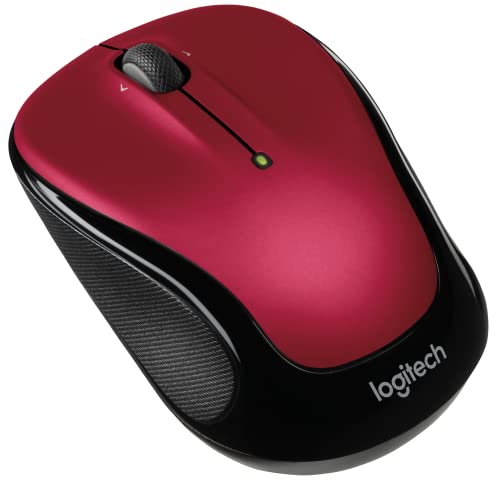
- Best for: web browsing and scrolling through long pages
All 5 Picks at a Glance
| Product | Specs | Action |
|---|---|---|
| Logitech M185 Wireless Mouse |
| Check price on Amazon |
| Logitech M325 Wireless Mouse |
| Check price on Amazon |
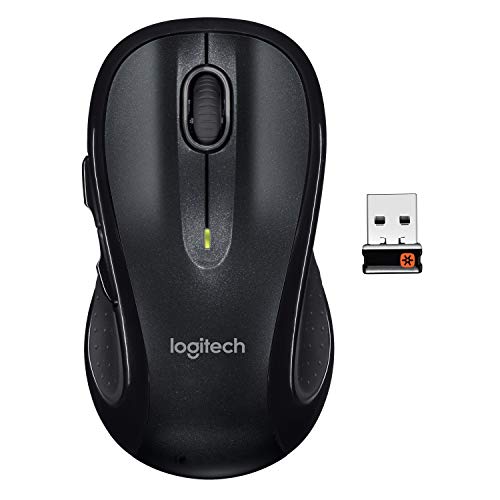 Logitech M510 Wireless Mouse |
| Check price on Amazon |
 Logitech G305 LIGHTSPEED Wireless Gaming Mouse |
| Check price on Amazon |
 Logitech Pebble Mouse 2 M350s |
| Check price on Amazon |
Key takeaways
- Compare five budget wireless mice, from the compact Logitech M185 to the gaming-ready G305, with specs, battery life, and buying tips for every desk.
- Top Pick: Logitech M185 Wireless Mouse
- Runner-up: Logitech M325 Wireless Mouse
- Also consider: Logitech M510 Wireless Mouse
As an Amazon Associate, we earn from qualifying purchases.
Table of Contents
- Short Answer
- How to Choose a Budget Wireless Mouse
- Quick Comparison
- Logitech M185 Wireless Mouse
- Logitech M325 Wireless Mouse
- Logitech M510 Wireless Mouse
- Logitech G305 LIGHTSPEED Wireless Gaming Mouse
- Logitech Pebble Mouse 2 M350s
- Frequently Asked Questions
- Conclusion
- Product and ASIN Reference
Short Answer
The best budget wireless mouse for most people is the Logitech M185. It is compact, ambidextrous, and simple: plug the tiny USB receiver into a laptop and start working. Its 1000 DPI optical sensor tracks smoothly on common desk surfaces, and a single AA battery lasts up to 12 months. The Logitech M510 adds back and forward controls plus side-to-side scrolling for desk work. Gamers on a budget should look at the Logitech G305, with its HERO sensor, LIGHTSPEED wireless, and 250-hour battery life. The Logitech Pebble Mouse 2 M350s is the quiet, slim pick for shared spaces, and the Logitech M325 suits web browsing.
How to Choose a Budget Wireless Mouse
Start with the connection. Most budget wireless mice use a small 2.4 GHz USB receiver that plugs into a USB-A port and works with almost any computer. Bluetooth mice, such as the Pebble Mouse 2 M350s, skip the receiver and pair directly, which suits laptops with few ports, but they need Bluetooth built in.
Size and shape matter. A compact mouse such as the M185 fits easily beside a laptop in a bag and suits mid-size or smaller hands. A full-size mouse such as the M510 fills the palm and supports long work sessions.
Sensor resolution, measured in DPI, sets how far the cursor moves. A 1000 DPI sensor covers everyday browsing, documents, and spreadsheets. Higher sensitivity helps on large displays: the G305 reaches up to 12,000 DPI and adjusts in software, while the Pebble Mouse 2 M350s adjusts from 400 to 4,000 DPI.
Battery life is the other running cost. The M185 is rated for up to 12 months on one AA battery, the M325 for up to 18 months, and the Pebble Mouse 2 M350s for up to 24 months. The M510 ships with two AA batteries, and Logitech lists up to 24 months, while the Amazon listing shows an 18-month average figure. The G305 is rated for up to 250 hours on a single AA battery.
Buttons and scrolling shape the daily feel. The M510 has seven buttons, including back and forward controls and a tilt wheel. The G305 has six programmable buttons. The M325 uses a micro-precise scroll wheel with a defined click at each step. Silent-touch designs, such as the Pebble Mouse 2 M350s, reduce click noise.
Finally, check what is in the box. Receiver-based mice include the USB receiver, usually stored inside the mouse body. Bluetooth-only mice ship without a receiver. The M185, M325, and M510 carry a three-year limited hardware warranty, while the Pebble Mouse 2 M350s carries a one-year limited hardware warranty. Color variants often sit on separate listings with their own ASIN.
Quick Comparison
| Mouse | Connection | Sensor | Battery | Best For |
|---|---|---|---|---|
| Logitech M185 | 2.4 GHz USB receiver | 1000 DPI optical | 1 AA, up to 12 months | Everyday carry |
| Logitech M325 | 2.4 GHz Unifying receiver | 1000 DPI optical | 1 AA, up to 18 months | Web browsing |
| Logitech M510 | 2.4 GHz Unifying receiver | 1000 DPI laser-grade | 2 AA, up to 24 months | Full-size desk work |
| Logitech G305 | LIGHTSPEED USB receiver | HERO, up to 12,000 DPI | 1 AA, up to 250 hours | Budget gaming |
| Logitech Pebble Mouse 2 M350s | Bluetooth | 400 to 4,000 DPI | 1 AA, up to 24 months | Quiet travel |
Logitech M185 Wireless Mouse
everyday carry and smaller hands
The Logitech M185 is the simplest mouse in this roundup. It is compact and ambidextrous, fits mid-size or smaller hands, and slips into a laptop bag. The 2.4 GHz wireless connection runs through a tiny nano receiver that plugs into a USB-A port and can stay there.
The optical sensor tracks at 1000 DPI, which is enough for documents, email, and web browsing. A line-by-line scroll wheel moves through pages in controlled steps, and auto-sleep power-saving mode stretches a single AA battery to up to 12 months. The battery arrives pre-installed. It carries a three-year limited hardware warranty. Buyers should confirm the Black colorway when ordering, because other colors, such as Swift Grey, sit on separate listings.
Specs
- Model: M185, model number 910-003888
- Sensor: 1000 DPI optical tracking
- Connection: 2.4 GHz wireless with USB nano receiver, up to 10 m range
- Battery: 1 AA battery (included), up to 12 months
- Size and weight: 3.9 x 2.36 inches, 2.65 ounces
- Hand orientation: Ambidextrous
- Compatibility: Windows, macOS, Chrome OS, Linux
- Warranty: 3-year limited hardware warranty
- ASIN: B00P43PCI8
Logitech M325 Wireless Mouse
- Best for: web browsing and scrolling through long pages
web browsing and scrolling through long pages
The Logitech M325 is built for precise web scrolling. Its micro-precise scroll wheel has a defined click at each step, so long articles, feeds, and documents move in controlled jumps instead of free-spinning past the target.
The mouse is ambidextrous and compact at 3.74 by 2.24 inches, with a contoured shape that suits either hand. It connects through the Logitech Unifying receiver, which can link up to six compatible Logitech devices. The 1000 DPI optical sensor tracks on common surfaces, and the mouse runs on a single AA battery, pre-installed in the box, with battery life listed at up to 18 months. This listing covers the Red colorway, model 910-002651.
Specs
- Model: M325, model number 910-002651
- Sensor: 1000 DPI optical tracking
- Connection: 2.4 GHz wireless with Logitech Unifying receiver, up to 10 m range
- Battery: 1 AA battery (included), up to 18 months
- Buttons: 3, with micro-precise scroll wheel designed for web scrolling
- Size: 3.74 x 2.24 inches
- Hand orientation: Ambidextrous
- Compatibility: Windows, macOS, Chrome OS, Linux
- Warranty: 3-year limited hardware warranty
- ASIN: B005HQ5138
Logitech M510 Wireless Mouse
full-size comfort at a desk
The Logitech M510 is the full-size option in this roundup. At 4.38 by 2.5 by 1.75 inches and 4.6 ounces, it fills the palm and gives the hand a place to rest during long sessions. Soft rubber grips and a right-handed contoured shape suit long sessions.
Seven buttons set the M510 apart. Back and forward controls sit on the side, and the tilt wheel scrolls side to side as well as up and down, which helps with wide spreadsheets. The laser-grade sensor tracks at 1000 DPI, and the Unifying receiver links up to six compatible Logitech devices. Two AA batteries come in the box.
Specs
- Model: M510, model number 910-001822
- Sensor: 1000 DPI laser-grade tracking
- Connection: 2.4 GHz wireless with Logitech Unifying receiver, up to 10 m range
- Battery: 2 AA batteries (included); Logitech lists up to 24 months
- Buttons: 7, including back and forward controls and tilt wheel
- Size and weight: 4.38 x 2.5 x 1.75 inches, 4.6 ounces
- Hand orientation: Right-handed contoured shape with rubber grips
- Compatibility: Windows, macOS, Linux, Chrome OS
- Warranty: 3-year limited hardware warranty
- ASIN: B003NR57BY
Logitech G305 LIGHTSPEED Wireless Gaming Mouse
- Best for: budget gaming and fast, precise tracking
budget gaming and fast, precise tracking
The Logitech G305 brings gaming hardware into a budget roundup. Its HERO sensor covers 200 to 12,000 DPI with no acceleration or smoothing, and the LIGHTSPEED wireless link reports at 1 millisecond, matching a wired mouse. Six programmable buttons can be set up in Logitech G HUB software for DPI steps, macros, and shortcuts, and the settings save to on-board memory.
The mouse weighs 99 grams with its battery and suits claw and fingertip grips. A single AA battery runs for up to 250 hours of continuous play in performance mode, and the USB receiver stores inside the mouse body. The design is rated for speeds above 400 IPS. The listing is for the Black colorway, model 910-005280.
Specs
- Model: G305, model number 910-005280
- Sensor: HERO optical sensor, 200 to 12,000 DPI
- Connection: LIGHTSPEED wireless with USB receiver, 1 ms report rate
- Battery: 1 AA battery (included), up to 250 hours
- Buttons: 6 programmable, with on-board memory
- Weight: 99 grams with battery
- Max speed: Above 400 IPS
- Compatibility: Windows, macOS
- ASIN: B07CMS5Q6P
Logitech Pebble Mouse 2 M350s
quiet clicks, travel, and shared spaces
The Logitech Pebble Mouse 2 M350s is the slim, quiet pick in this roundup. Its round, minimalist shape measures 4.3 by 3 inches and weighs 76 grams, so it slides into a bag pocket and disappears. Silent Touch Technology removes most of the click noise, which makes it a good fit for libraries, shared offices, and late-night work.
Connection is Bluetooth only, with Easy-Switch pairing for up to three devices across Windows, macOS, iPadOS, Android, and Chrome OS. No receiver comes in the box, and the mouse does not work with the older Unifying receiver, although a Logi Bolt receiver is sold separately. The sensor adjusts from 400 to 4,000 DPI. A single AA battery powers the mouse for up to 24 months, according to Logitech. This listing covers the Tonal White colorway, model 910-007022.
Specs
- Model: Pebble Mouse 2 M350s, model number 910-007022
- Sensor: Optical, 400 to 4,000 DPI adjustable
- Connection: Bluetooth with Easy-Switch for up to 3 devices; no receiver included
- Battery: 1 AA battery (included), up to 24 months
- Buttons: 3, with customizable middle button and Silent Touch quiet clicks
- Size and weight: 4.3 x 3 inches, 76 grams
- Hand orientation: Ambidextrous
- Compatibility: Windows, macOS, iPadOS, Android, Chrome OS
- Warranty: 1-year limited hardware warranty
- ASIN: B0BT48897L
Frequently Asked Questions
Is a wireless mouse as responsive as a wired mouse for everyday work?
For everyday work, yes. A 2.4 GHz receiver link, such as the one in the M185, M325, and M510, feels immediate for browsing, documents, and spreadsheets. Gaming mice such as the G305 report at 1 millisecond, which matches wired responsiveness.
How long does the battery last in a budget wireless mouse?
It depends on the model and on daily use. The M185 is rated for up to 12 months, the M325 for up to 18 months, and the Pebble Mouse 2 M350s for up to 24 months, all on a single AA battery. The M510 ships with two AA batteries and is listed at up to 24 months by Logitech. The G305 is rated for up to 250 hours of continuous play.
Do I need a USB receiver, or does Bluetooth work?
Receiver-based mice, such as the M185, M325, M510, and G305, include a USB receiver in the box and work with any computer that has a free USB-A port. The Pebble Mouse 2 M350s is Bluetooth only and ships without a receiver, so it needs a device with Bluetooth built in, or a Logi Bolt receiver bought separately.
What should I check before ordering a wireless mouse?
Confirm the exact model number and colorway, because each color often sits on its own listing with its own ASIN. Check whether a receiver is included and whether the mouse fits the hand that will use it. For shared desks, look for quiet-click designs such as the Pebble Mouse 2 M350s, and for gaming, look for an adjustable DPI range and programmable buttons.
Conclusion
A budget wireless mouse does not need to feel cheap. The Logitech M185 covers everyday carry with a compact shape and a year of battery life. The Logitech M325 tunes its scroll wheel for the web. The Logitech M510 gives desk workers a full-size body with extra buttons. The Logitech G305 adds gaming-grade tracking and programmable controls without a gaming-grade price tag. The Logitech Pebble Mouse 2 M350s keeps clicks quiet and hops between three Bluetooth devices. Pick the shape and connection that match the hand and the desk, and any of these five will handle daily work without a cable in the way.









