We independently review everything we recommend. When you buy through our links, we may earn a commission. As an Amazon Associate we earn from qualifying purchases.
Best Budget Docking Stations: 5 Picks for Every Desk 2026
Five budget docking stations compared for dual monitors, laptop charging, and everyday ports — find the one-cable desk setup that fits your laptop.
As an Amazon Associate, we earn from qualifying purchases.
Short Answer
The best budget docking station for most desks is the Anker 563 USB-C Docking Station, because it drives three displays, charges a laptop at 100W, and covers the everyday ports in one box. If you want the lowest spend for a working dual-monitor desk, the UGREEN Revodok Pro 210 costs less and still gives you two HDMI outputs with passthrough charging. The Plugable UD-3900 is the pick for an older laptop, since it works over USB 3.0 as well as USB-C, though it does not charge the host laptop. The WAVLINK 13-in-1 suits a Windows desk that needs three displays without a driver download, and the TobenONE UDS020P suits a MacBook desk, with a vertical stand that holds the laptop upright and saves space.
A docking station is worth buying when one cable should connect your laptop to monitors, a keyboard, a mouse, wired internet, and power. A simple hub is enough when you only need a few extra USB ports.
Start with the port on your laptop. A dock that needs a full-featured USB-C port with DisplayPort Alt Mode will not drive a monitor from a charge-only USB-C port, so check the laptop manual for DisplayPort Alt Mode, USB4, or Thunderbolt before you buy. If your laptop only has USB-A ports, the Plugable UD-3900 is the only pick here that works over a plain USB 3.0 connection.
Next, count your monitors. Windows laptops can usually extend two or three displays from a single USB-C dock. MacBooks with Apple silicon are stricter: a base M1, M2, or M3 chip supports only one external display natively, so a second or third display needs a driver-based dock built on DisplayLink or Silicon Motion. The Anker 563 and the TobenONE UDS020P are driver-based, which is why they can drive three displays on those MacBooks, while the UGREEN Revodok Pro 210 has no driver, so on a base Apple silicon Mac both HDMI outputs show the same image.
Finally, check power and ports. A dock that delivers 100W can charge most 13-inch and 14-inch laptops while you work, while a 65W dock, like the TobenONE UDS020P, is fine for smaller laptops but may charge a large laptop slowly under heavy load. A dock with no charging at all, like the Plugable UD-3900, means you still plug in the laptop charger separately. Two HDMI outputs cover most dual-monitor desks, Gigabit Ethernet gives a steadier connection for video calls than Wi-Fi, and SD and microSD slots matter for cameras.
Quick Comparison
Dock
Displays
Laptop Charging
Ports
Best for
Anker 563 USB-C Docking Station
3
100W
10
Most desks
WAVLINK 13-in-1 UMD01
3
100W
13
Windows triple display
UGREEN Revodok Pro 210
2
85W passthrough
10
Lowest spend, dual monitor
Plugable UD-3900
2
None
10
Older laptops, USB 3.0
TobenONE UDS020P
3
65W
14
MacBook desk with stand
Anker 563 USB-C Docking Station
Top Pick
Anker 563 USB-C Docking Station
Best for: most desks, especially a mixed Windows and Mac household that needs three displays.
The Anker 563 is the most complete dock here, and the one to buy when you want a single box that handles three displays, laptop charging, and everyday peripherals. It uses a DisplayLink chipset, so it can drive three external displays even on a MacBook with a base Apple silicon chip. It ships with a 180W power adapter, so it can charge a laptop at 100W while also charging a phone at 30W from the front USB-C port. Two HDMI ports and one DisplayPort cover the video outputs, and Gigabit Ethernet, SD and microSD card slots, and a 3.5mm audio jack round out the panels. Note that the Anker 563 is listed as sold out on the Anker store, so confirm the listing is in stock on Amazon before ordering, and that the DisplayLink driver must be installed on first use.
Specs
Model: A8395
ASIN: B09XH3PD25
Ports: 10 total
Video outputs: 2x HDMI, 1x DisplayPort
Display support: triple display with DisplayLink driver
Laptop charging: 100W USB-C Power Delivery
Phone charging: 30W USB-C
Data ports: 1x USB-C 5 Gbps, 1x USB-A 5 Gbps, plus USB-A ports
The WAVLINK UMD01 is the pick for a Windows desk that needs three displays and does not want to install a driver. It connects over USB-C with DisplayPort Alt Mode and drives one HDMI display plus two DisplayPort displays from the same cable, while a 100W Power Delivery port charges the laptop. Four USB 3.0 ports cover a keyboard, a mouse receiver, a webcam, and a printer, and the SD and TF card slots cover camera cards. The UMD01 is a Windows-first dock: a base Apple silicon Mac will not extend three displays from this dock the way it would from a driver-based one.
The UGREEN Revodok Pro 210 is the cheapest way into a proper dual-monitor desk here. It is a slim aluminum bar with ten ports, two HDMI outputs, Gigabit Ethernet, SD and microSD slots, and a USB-C power input that accepts 100W and passes up to 85W to the laptop, enough to charge most 13-inch and 14-inch laptops while you work. The two HDMI ports support dual 4K at 60Hz on Windows. Two limits matter: no power adapter is included, so you need your own USB-C charger of 65W or higher, and the dock has no driver, so on a MacBook with a base Apple silicon chip both HDMI outputs mirror the same image instead of extending to two desktops.
Specs
Model: 15534
ASIN: B0BXDQS4BD
Ports: 10 total
Video outputs: 2x HDMI
Display support: dual 4K at 60Hz, single 8K at 30Hz on Windows
Laptop charging: 85W passthrough from a 100W USB-C input
The Plugable UD-3900 is the oldest dock here, and it is still the right pick for one situation: a laptop that only has USB-A ports, or a desk where the budget is the deciding factor. It connects over a hybrid USB 3.0 and USB-C cable, so it works with laptops that have no USB-C port at all, and it uses a DisplayLink driver to drive two displays from that single connection. The dock gives you two HDMI outputs, Gigabit Ethernet, two USB 3.0 ports, four USB 2.0 ports, and separate 3.5mm headphone and microphone jacks. The trade-off is power: the UD-3900 does not charge the host laptop at all, so you still plug in the laptop charger separately, and the two displays run at 1080p, below the 4K output of the other docks here.
Specs
Model: UD-3900
ASIN: B00ECDM78E
Ports: 10 total
Video outputs: 2x HDMI, with DVI and VGA by adapter
Display support: dual display at 1080p
Laptop charging: none, use the laptop charger separately
Data ports: 2x USB 3.0, 4x USB 2.0
Network: Gigabit Ethernet
Audio: 3.5mm headphone jack, 3.5mm microphone jack
The TobenONE UDS020P is the only dock here with a built-in vertical laptop stand, and that changes how a small desk feels. The laptop stands upright in the dock, closed, while the dock drives the monitors and charges the machine. The stand fits laptops within its stated size range, so measure your laptop before ordering. The dock is driver-based, using an InstantView driver to extend up to three displays on MacBooks with Apple silicon, including the base M1 and M2 chips that otherwise support only one external display. Two HDMI ports and a VGA port cover the video outputs, and the dock includes a 65W power adapter. The 65W charging is the main limit: it is plenty for a MacBook Air and most 13-inch laptops, but a 16-inch laptop under heavy load may charge slowly.
Specs
Model: UDS020P
ASIN: B0C61Y55LW
Ports: 14 total
Video outputs: 2x HDMI, 1x VGA
Display support: triple display with driver, including base Apple silicon Macs
Some docks need one and some do not. Driver-based docks, such as the Anker 563, the Plugable UD-3900, and the TobenONE UDS020P, use DisplayLink or a similar driver to drive extra displays, and the driver must be installed before the monitors work. Native docks, such as the WAVLINK UMD01 and the UGREEN Revodok Pro 210, need no driver but rely on the laptop to support multiple displays.
Will a budget docking station charge my laptop?
It depends on the dock. The Anker 563 and the WAVLINK UMD01 deliver 100W, the UGREEN Revodok Pro 210 passes up to 85W from your own charger, and the TobenONE UDS020P delivers 65W from its included adapter. The Plugable UD-3900 does not charge the laptop at all, so keep the laptop charger plugged in separately.
Can a budget dock drive two monitors on a MacBook?
It depends on the Mac and the dock. A MacBook with a base M1, M2, or M3 chip supports only one external display natively, so a second display needs a driver-based dock such as the Anker 563 or the TobenONE UDS020P. MacBooks with Pro or Max chips support two or more displays natively.
Is a docking station better than a USB-C hub?
A docking station is better when you want one cable for monitors, charging, wired internet, and several peripherals. A USB-C hub is better when you travel, when you only need a few extra ports, or when you only add one monitor.
Conclusion
A budget docking station turns one laptop port into a full desk, and the right pick depends on your laptop and your monitors rather than on the number of ports alone. The Anker 563 is the best all-round choice, with triple-display support, 100W charging, and a full set of ports. The WAVLINK UMD01 is the pick for a Windows desk that needs three displays without a driver. The UGREEN Revodok Pro 210 is the cheapest route to a dual-monitor desk, as long as you have your own charger and a Windows laptop. The Plugable UD-3900 is the pick for an older laptop, and the TobenONE UDS020P is the pick for a MacBook desk where a vertical stand saves space. Match the dock to your laptop first and confirm the display support for your operating system before you order.
E
Emubox Editorial Team
We compare specs, materials and verified owner reviews before a product earns a spot. Rankings are never paid.
Affiliate disclosure. As an Amazon Associate we earn from qualifying purchases at no extra cost to you. Prices accurate as of the date shown.
Best 2mm 70 cm portable antennas compared: telescopic radio antennas near 70 cm, with connectors, bands and collapsed sizes explained before you buy today.
Find the best thermostat setting for winter and summer, with energy-saving setbacks, humidity tips, and smart schedules for a comfortable home year-round.
The best affordable business computer monitors balance sharp text, eye comfort and lasting value. Compare four reliable office displays built for long workdays.
Looking for the best inexpensive HD TVs non smart? Compare five genuinely non-smart HD televisions with tuners, HDMI inputs and simple setup for any small room.

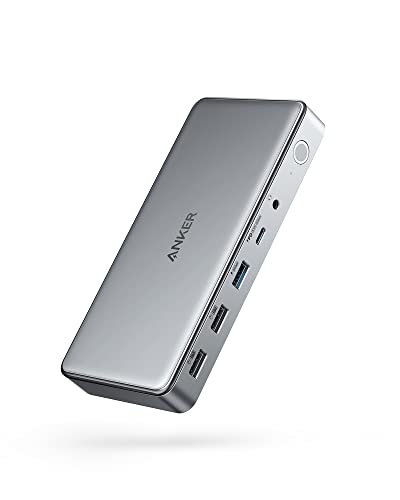


 Plugable UD-3900 Universal Docking Station
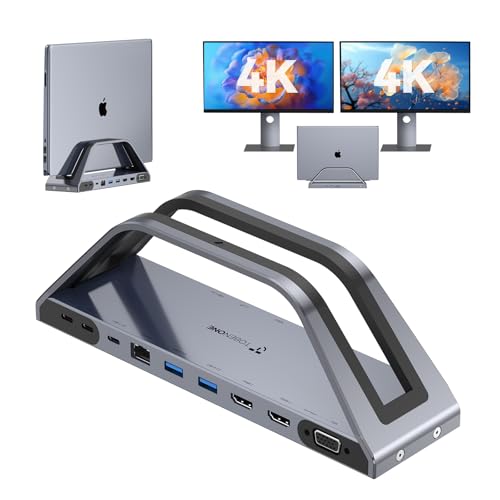 TobenONE UDS020P 14-in-1 Docking Station









