
Our Short List of 3
All 4 Picks at a Glance
| Product | Specs | Action |
|---|---|---|
 Logitech MX Brio |
| Check price on Amazon |
 OBSBOT Tiny 2 |
| Check price on Amazon |
 Elgato Facecam Pro |
| Check price on Amazon |
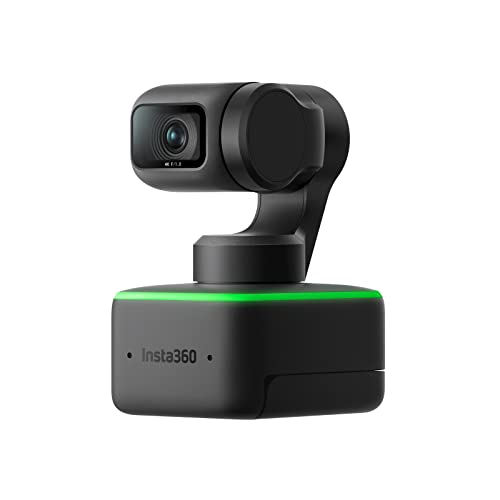 Insta360 Link |
| Check price on Amazon |
Key takeaways
- Compare the best budget 4K webcams for calls, streaming, and teaching. Five real 4K picks with autofocus, AI tracking, and strong mics compared.
- Top Pick: Logitech MX Brio
- Runner-up: OBSBOT Tiny 2
- Also consider: Elgato Facecam Pro
As an Amazon Associate, we earn from qualifying purchases.
Short Answer
The Logitech MX Brio is the best budget 4K webcam for most people because it pairs true 4K video with dual noise-reducing microphones, autofocus, and a built-in privacy shutter. Streamers who want the smoothest motion should look at the Elgato Facecam Pro, which records 4K at 60 frames per second. The OBSBOT Tiny 2 and the Insta360 Link follow the speaker with a motorized mount. The NexiGo N950P Gen 2 is the budget pick, with a remote control and 5x digital zoom.
Table of Contents
- Short Answer
- How to Choose a Budget 4K Webcam
- Quick Comparison
- Logitech MX Brio
- OBSBOT Tiny 2
- Elgato Facecam Pro
- Insta360 Link
- NexiGo N950P Gen 2
- Frequently Asked Questions
- Conclusion
- Product and ASIN Reference
How to Choose a Budget 4K Webcam
A 4K label alone does not guarantee a sharp picture. Start with the sensor. A larger sensor gathers more light, which keeps the image clean in a dim room, so sensor size matters most. The OBSBOT Tiny 2 uses a 1/1.5-inch sensor, the Elgato Facecam Pro uses a Sony STARVIS 1/1.8-inch sensor, and the Insta360 Link uses a 1/2-inch sensor.
Next, check the frame rate at 4K. Most budget 4K webcams record 4K at 30 frames per second. Only the Elgato Facecam Pro in this roundup reaches 4K at 60 frames per second, and that extra smoothness matters most for fast movement on a live stream.
Autofocus is the third thing to check. A fixed-focus webcam keeps everything at one distance sharp and can look soft when the speaker leans in or back. Autofocus models such as the MX Brio, Tiny 2, and N950P Gen 2 track the face and adjust on their own. The Facecam Pro uses manual focus controls instead.
Microphones deserve attention too. A webcam with dual microphones and noise reduction can carry a call on its own, while a camera without a built-in microphone needs a separate mic. The Facecam Pro has no built-in microphone, so buyers should plan for a USB microphone or headset with that one.
Field of view shapes how much of the room appears on screen. A 90-degree view fits one person at a desk comfortably. The N950P Gen 2 reaches 98 degrees, which helps when two people share the frame.
Finally, think about the mount and the connection. Every webcam here clips to a monitor and includes a standard tripod thread for a desk stand. USB-C is the modern connection, while the N950P Gen 2 connects over USB-A, so check the port before ordering.
Quick Comparison
| Product | Resolution | Frame Rate at 4K | Microphone | Best For |
|---|---|---|---|---|
| Logitech MX Brio | 4K UHD | 30 fps | Dual noise-reducing mics | Everyday calls and meetings |
| OBSBOT Tiny 2 | 4K UHD | 30 fps | Dual mics with AI noise canceling | Presenters who move around |
| Elgato Facecam Pro | 4K UHD | 60 fps | None built in | Streamers who want smooth 4K |
| Insta360 Link | 4K UHD | 30 fps | Dual noise-canceling mics | Teaching and whiteboard sessions |
| NexiGo N950P Gen 2 | 4K UHD | 30 fps | Dual stereo mics | Budget video calls with zoom |
Logitech MX Brio
everyday calls and meetings.
The Logitech MX Brio is the most complete webcam in this roundup. It records 4K at 30 frames per second and drops to 1080p at 60 frames per second for smoother motion. Automatic light correction keeps the image sharp in mixed lighting. Autofocus reacts quickly when the speaker leans toward the screen.
Sound is a real strength here. Two beamforming microphones with noise reduction focus on the voice, so the MX Brio can carry a meeting without a separate microphone. Show Mode tilts the view down to the desk to share a document without a second camera. RightSight auto-framing keeps the speaker centered when they shift in the chair. The built-in privacy shutter slides closed with a twist, so there is no need to unplug the camera. The USB-C connection works with modern laptops and desktops and common meeting apps. The MX Brio sits in the mid-range tier, and it suits buyers who want one webcam for calls, interviews, and streaming.
Specs
- ASIN: B0BFJ4CRKD
- Model: 960-001545, Graphite
- Resolution: 4K UHD at 30 fps; 1080p at 60 fps
- Field of view: 90 degrees
- Microphone: Dual beamforming mics with noise reduction
- Focus: Autofocus with RightSight auto-framing
- Connection: USB-C
- Privacy: Built-in shutter
- Compatibility: Windows, macOS, and ChromeOS
- View on Amazon: https://www.amazon.com/dp/B0BFJ4CRKD?tag=trustedtoppicks-20
OBSBOT Tiny 2
presenters who move around.
The OBSBOT Tiny 2 is built around a 1/1.5-inch sensor, the largest sensor in this roundup, and that size shows in dim rooms where smaller sensors turn grainy. It records 4K at 30 frames per second and 1080p at 60 frames per second, with HDR light correction. The two-axis gimbal pans and tilts to follow the speaker, so a teacher can walk across a room without leaving the frame.
AI tracking is the reason to choose this camera. The tracking modes follow the upper body or lock onto a zone of the room, and gesture control starts and stops tracking with a raised hand. The dual omnidirectional microphones use AI noise canceling to cut keyboard clicks. Setup is simple: the camera plugs in over USB-C, clips to a monitor or threads onto a tripod, and tilts down into sleep mode when not in use. The Tiny 2 sits in the premium tier, and it suits creators and teachers who move during a session.
Specs
- ASIN: B0C3B6ZR1V
- Model: TINY 2
- Sensor: 1/1.5-inch CMOS
- Resolution: 4K UHD at 30 fps; 1080p at 60 fps
- Mount: 2-axis PTZ gimbal with AI tracking
- Microphone: Dual omnidirectional mics with AI noise canceling
- Focus: Autofocus with gesture and voice control
- Connection: USB-C
- Privacy: Tilt-down sleep mode
- View on Amazon: https://www.amazon.com/dp/B0C3B6ZR1V?tag=trustedtoppicks-20
Elgato Facecam Pro
streamers who want smooth 4K.
The Elgato Facecam Pro is the only webcam here that records true 4K at 60 frames per second, and that is its defining feature. Motion stays smooth, and uncompressed video keeps fine detail intact for editing and cropping. The Sony STARVIS 1/1.8-inch sensor handles low light well, and the 8.3-megapixel sensor gives room to crop.
The companion software gives DSLR-style manual control over exposure, white balance, shutter speed, and ISO, so the picture can be tuned to studio lights. The field of view adjusts up to 90 degrees, which covers a single streamer or a small group. There is one clear trade-off: the Facecam Pro has no built-in microphone, so buyers need a USB microphone or headset for voice. That suits streamers who already own audio gear. Full 4K at 60 frames per second needs a USB 3.0 port, so buyers should check the computer first. The Facecam Pro sits in the premium tier and is the pick for a dedicated streaming setup.
Specs
- ASIN: B0BJL7Q3SR
- Model: 20WAB9901
- Sensor: Sony STARVIS 1/1.8-inch CMOS, 8.3 MP
- Resolution: 4K UHD at 60 fps; 1080p at 60 fps
- Field of view: Adjustable up to 90 degrees
- Microphone: None built in
- Focus: Manual focus with DSLR-style controls
- Connection: USB-C, USB 3.0 required for 4K at 60 fps
- Mount: Monitor clip and 1/4-inch tripod thread
- View on Amazon: https://www.amazon.com/dp/B0BJL7Q3SR?tag=trustedtoppicks-20
Insta360 Link
teaching and whiteboard sessions.
The Insta360 Link pairs a 1/2-inch sensor with a three-axis gimbal, and that combination makes it the most flexible camera in this roundup for teaching. It records 4K at 30 frames per second, and the gimbal follows the speaker around the room while AI tracking keeps the framing steady. Gesture control starts tracking with a raised palm.
Specialized modes set the Link apart. Whiteboard mode straightens the view of a whiteboard and keeps the speaker visible in front of it. Overhead mode points the camera down at a desk for showing documents or a demonstration. Portrait mode frames a vertical shot, and DeskView mode angles down to a workspace. HDR keeps the picture balanced, and the dual noise-canceling microphones keep the voice clear. The Link clips to a monitor or threads onto a tripod and connects over USB-C. Buyers should confirm the listing is in stock before ordering, since one crawl of the product page showed the camera as currently unavailable. The Link sits in the mid-range tier and it suits teachers who use a whiteboard or desk demonstration.
Specs
- ASIN: B0B826KS4B
- Model: Link
- Sensor: 1/2-inch CMOS
- Resolution: 4K UHD at 30 fps; 1080p at 60 fps
- Mount: 3-axis gimbal with AI tracking
- Microphone: Dual noise-canceling mics
- Focus: Autofocus
- Connection: USB-C
- Modes: Whiteboard, Overhead, Portrait, DeskView
- View on Amazon: https://www.amazon.com/dp/B0B826KS4B?tag=trustedtoppicks-20
NexiGo N950P Gen 2
Best for: budget video calls with zoom.
The NexiGo N950P Gen 2 is the budget pick in this roundup, with a remote control and a 5x digital zoom. The 8.5-megapixel Sony Starvis sensor records 4K at 30 frames per second, and the zoom works at 1080p. An RF remote adjusts zoom, volume, and framing from across the room.
The camera is Zoom Certified and works with Teams and Skype. Dual stereo microphones with noise cancellation handle voice on a call. The field of view adjusts up to 98 degrees, the widest in this roundup, so two people can share the frame. The N950P Gen 2 connects over USB-A and works without extra drivers. The 4K frame rate tops out at 30 frames per second, and digital zoom softens the image at full reach. The NexiGo sits in the budget tier and it suits buyers who want 4K video, a remote, and a wide view on a budget.
Specs
- ASIN:
- Model: N950P-RF
- Sensor: 8.5 MP Sony Starvis
- Resolution: 4K UHD at 30 fps
- Zoom: 5x digital zoom at 1080p with RF remote
- Field of view: Adjustable up to 98 degrees
- Microphone: Dual stereo mics with noise cancellation
- Focus: Autofocus
- Connection: USB-A, plug and play
- Privacy: Built-in privacy cover
- View on Amazon: https://www.amazon.com/dp/
Frequently Asked Questions
Is a 4K webcam worth it for video calls?
Yes, when the goal is a sharper picture and room to crop. A real 4K sensor keeps the face detailed even after the meeting app compresses the video.
Do I need a fast computer for a 4K webcam?
A modern laptop or desktop handles 4K at 30 frames per second without trouble. The Elgato Facecam Pro needs a USB 3.0 port for full 4K at 60 frames per second, and older machines may drop frames at that rate. Running at 1080p at 60 frames per second needs less processing power.
Can a 4K webcam work with Zoom, Teams, and Google Meet?
Yes. Every webcam in this roundup works with the common meeting apps, and the NexiGo N950P Gen 2 carries Zoom certification. The camera appears as a standard video device, so no special software is required for calls.
Should I pick a webcam with a built-in microphone?
A webcam with dual microphones and noise reduction is enough for most calls, and the MX Brio, Tiny 2, Link, and N950P Gen 2 all include one. Streamers and podcasters usually add a separate USB microphone for richer voice, which is why the Facecam Pro ships without one.
Conclusion
A budget 4K webcam no longer means a soft picture or a missing feature. The Logitech MX Brio is the best all-around pick, with true 4K video, dual noise-reducing microphones, autofocus, and a privacy shutter in one device. The OBSBOT Tiny 2 suits presenters who move. The Elgato Facecam Pro is the choice for streamers who want 4K at 60 frames per second, as long as they already own a microphone. The Insta360 Link is the teaching pick, with whiteboard and overhead modes. The NexiGo N950P Gen 2 rounds out the list as the budget pick, with a remote and 5x digital zoom. Match the camera to the room and the job, and confirm the model number on the listing.









