We independently review everything we recommend. When you buy through our links, we may earn a commission. As an Amazon Associate we earn from qualifying purchases.
Best Budget Webcam Light for Sharp Video Calls in 2026
Find the best budget webcam light for video calls. Compare five clip-on and desktop LED panels for brightness, color temperature, mounting, and power.
The best budget webcam light for most people is the Logitech Litra Glow. It is a compact, USB-powered panel that clips to a monitor, spreads soft light across the face with a frameless diffuser, and adjusts brightness and color temperature through a desktop app. It fixes the most common video call problem: a face that looks dark or uneven because the main light in the room sits behind or above the speaker.
The other four lights cover different desk setups. The Logitech Litra Beam suits a larger desk, where a slim bar light on a desktop mount spreads light across a wider area. The Lume Cube Video Conference Lighting Kit suits laptop users who move between rooms, because it clips to a laptop lid and runs on a built-in battery as well as USB power. The NEEWER Basics NL10 suits a small desk, because it is a compact five-inch panel with a stand that fits beside a monitor. The NEEWER Basics BP66 suits a desk that needs a brighter panel on a tripod.
A webcam light is not a ring light or a monitor light bar. A ring light is a circular lamp, often on a tall tripod, that surrounds a camera or phone. A monitor light bar sits across the top of a monitor and shines downward onto the desk, while a webcam light faces the speaker and lights the face directly.
How to Choose a Budget Webcam Light
Start with placement. The light should sit in front of the speaker, near camera height, and close enough that the face is lit evenly. A light clipped to the top of a monitor or laptop lid is the simplest setup, because it stays aligned with the camera and takes no desk space. A stand or tripod panel gives more control over angle and distance. Brightness control matters more than maximum brightness: a light that is too bright washes out the face and creates glare on glasses, so look for one that dims low enough for evening calls and goes bright enough for a dim room.
Color temperature control matters just as much. Warm light suits evening calls and rooms with warm lamps, while cool light suits daylight rooms and helps the image look alert rather than yellow. A bi-color light that moves between warm and cool gives the most flexibility across the day. Diffusion is the difference between soft light and harsh light: a bare LED panel creates hot spots and sharp shadows, while a diffuser, a frosted cover, or an edge-lit design spreads the light and softens the edges of shadows.
Power and control decide how the light fits daily use. USB-powered lights draw power from a computer or a USB port and never need charging, which suits a fixed desk. Battery-powered lights suit a laptop that moves between rooms or a call taken away from the main setup. Finally, check what is in the box, because a clip mount, a stand, a tripod, a diffuser, and a USB cable can add cost when bought separately.
The 5 Best Budget Webcam Lights
Light
Best For
Mount
Power
Tier
Logitech Litra Glow
Most desks and video calls
Monitor mount
USB
Mid-range
Logitech Litra Beam
Larger desks and streaming
Desktop mount
USB
Premium
Lume Cube Video Conference Lighting Kit
Laptop users on the move
Laptop clip mount
Battery and USB
Mid-range
NEEWER Basics NL10
Small desks
Stand
USB
Budget
NEEWER Basics BP66
Brighter tripod setup
Tripod stand
USB
Budget
1. Logitech Litra Glow
Top Pick
1. Logitech Litra Glow
Brand: Logitech for Creators
Model: Litra Glow, model number 946-000001
Light type: LED panel, TrueSoft, frameless diffuser
The Logitech Litra Glow is the best budget webcam light for most desks. It is a small square panel that sits on top of a monitor or on a flat surface, and it draws power from a USB connection, so there is no battery to charge. The frameless diffuser spreads light widely and reduces harsh shadows. Brightness and color temperature adjust from warm candlelight tones to cool blue tones, and settings can be saved as presets in the free Logitech desktop app. The monitor mount adjusts in three ways, with height, tilt, and rotation, so the panel can be aimed at the face. It is a mid-range option with no battery, so it needs a USB port nearby.
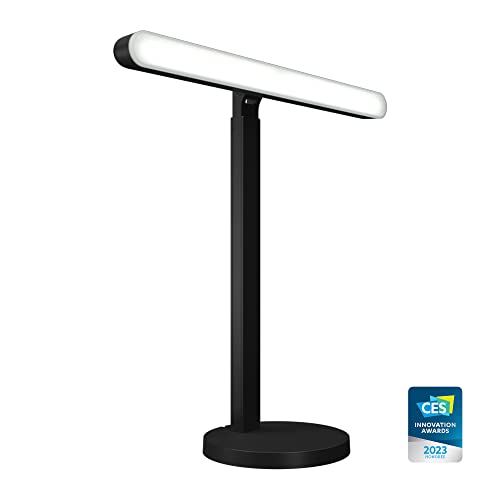
The Logitech Litra Beam is a slim bar light for a larger desk, and it suits speakers who want a wider spread of light than a small square panel provides. It uses the same TrueSoft technology as the Litra Glow, with balanced, full-spectrum LED light that keeps skin tones looking natural on camera. Brightness adjusts across five levels and color temperature adjusts across five levels, from 2700K to 6500K, covering warm evening light through cool daylight. Settings adjust through the free Logitech desktop app, and the light connects by Bluetooth and USB. The desktop mount holds the slim bar beside a monitor without a clip.
3. Lume Cube Video Conference Lighting Kit
The Lume Cube Video Conference Lighting Kit is built for laptop users who take video calls in different rooms. It mounts to a laptop lid with a spring-loaded clip mount, so the light travels with the laptop. The kit includes an LED Panel Mini, the laptop clip mount, a softening silicone diffuser, and a USB-C cable. The panel puts out 300 lumens, and brightness and color temperature adjust to suit the room. It runs on an internal battery as well as USB power, with a listed battery life of 14 hours for calls away from a power outlet. It is a mid-range option, and a 300-lumen mini panel is not as bright as a larger desktop bar.
Specs
Brand: LUME CUBE
Model: Video Conference Lighting Kit, model number LC-VC2
Light type: LED Panel Mini, 300 lumens
Power: Battery and USB-C, listed battery life of 14 hours
Controls: Adjustable brightness and color temperature
Mount: Spring-loaded laptop clip mount
Included: LED Panel Mini, clip mount, silicone diffuser, USB-C cable
Dimensions: 9.06 x 2.36 x 6.3 inches
Tier: Mid-range
4. NEEWER Basics NL10
4. NEEWER Basics NL10
Brand: NEEWER
Model: Basics NL10, model number NL10 with stand
Light type: Bi-color edge-lit USB LED panel, 5 inch, 10W
The NEEWER Basics NL10 is a compact five-inch panel for a small desk, and it is the most affordable way in this guide to add front light to a video call. It is a bi-color, edge-lit USB LED panel with a stand, designed for video conferencing, streaming, and recording at a laptop or desktop. The panel is rated at 10 watts, with a CRI of 95, which describes color accuracy, and a higher CRI means colors and skin tones render more naturally on camera. The bi-color design moves between warm and cool light, so the speaker can match the room or the time of day. The panel measures 5.7 by 5 by 1.1 inches and weighs 10 ounces, so it fits on a crowded desk and stores easily in a drawer. It is a budget option for one speaker at close range.
5. NEEWER Basics BP66
5. NEEWER Basics BP66
Brand: NEEWER
Model: Basics BP66, model number BP66, 1 pack, black
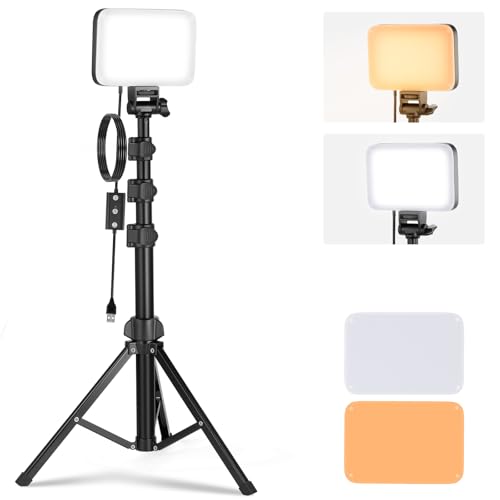
The NEEWER Basics BP66 is a panel kit for a desk that needs a brighter light on a tripod, with filters included to soften the output. It is a bi-color, dimmable LED video light panel, rated at 750 lux, with a color temperature range of 3200K to 5600K and a CRI of 95. The kit includes a tripod stand and filters, so the speaker can set the light at the right height and distance, then soften it with a filter when the bare panel looks too hard. The panel measures 5.87 by 4.06 by 0.67 inches and weighs 1.76 pounds, but the tripod carries the weight, so the desk stays clear. It is a budget option, and the main limit is space: the tripod needs a clear spot on the desk or floor.
Frequently Asked Questions
What is a webcam light, and how is it different from a ring light?
A webcam light is a small LED panel or bar that faces the speaker and lights the face directly during a video call. A ring light is a circular lamp, often on a tall tripod, that surrounds a camera or phone. A webcam light is smaller, sits closer to the desk, and is designed for a single speaker at a computer, while a ring light suits a wider shot or a phone setup.
Where should a webcam light sit for the best result?
Place the light in front of the speaker, near camera height, and close enough that the face is lit evenly. A clip mount on top of the monitor or laptop lid is the simplest placement. A desktop panel should sit beside or behind the webcam, aimed at the face, not behind the speaker. Avoid placing it behind the speaker, which creates a silhouette, or too low, which shadows the eyes and chin.
Is a battery-powered webcam light worth it?
A battery-powered light is worth it when the laptop moves between rooms or the speaker takes calls away from a fixed desk. The Lume Cube kit in this guide runs on a battery as well as USB power, which suits that use. For a fixed desk with a USB port nearby, a USB-powered light is simpler, because there is no battery to charge and the light is always ready.
Do I need to adjust color temperature, or is brightness enough?
Brightness alone is not enough, because the color of the light changes how skin tones look on camera. Warm light suits evening calls and rooms with warm lamps, while cool light suits daylight rooms. A light with adjustable color temperature lets the speaker match the room, so the face does not look yellow or washed out.
Conclusion
The best budget webcam light is the one that fits the desk, the camera, and the way the speaker works. The Logitech Litra Glow is the best choice for most desks, with a soft diffuser, a monitor mount, and app control in a compact panel. The Logitech Litra Beam suits a larger desk where a wider bar light can shape the light across a broader area. The Lume Cube Video Conference Lighting Kit suits laptop users who need a clip-on light with a battery. The NEEWER Basics NL10 suits a small desk where a compact panel is enough. The NEEWER Basics BP66 suits a desk with room for a tripod and a speaker who wants control over light position. Start with placement, then choose brightness and color controls that match the room.
E
Emubox Editorial Team
We compare specs, materials and verified owner reviews before a product earns a spot. Rankings are never paid.
Affiliate disclosure. As an Amazon Associate we earn from qualifying purchases at no extra cost to you. Prices accurate as of the date shown.
Best 2mm 70 cm portable antennas compared: telescopic radio antennas near 70 cm, with connectors, bands and collapsed sizes explained before you buy today.
Find the best thermostat setting for winter and summer, with energy-saving setbacks, humidity tips, and smart schedules for a comfortable home year-round.
The best affordable business computer monitors balance sharp text, eye comfort and lasting value. Compare four reliable office displays built for long workdays.
Looking for the best inexpensive HD TVs non smart? Compare five genuinely non-smart HD televisions with tuners, HDMI inputs and simple setup for any small room.



 5. NEEWER Basics BP66









