We independently review everything we recommend. When you buy through our links, we may earn a commission. As an Amazon Associate we earn from qualifying purchases.
Best Budget Drawing Tablets: 5 Picks for Artists 2026
Compare five affordable drawing tablets for digital art, notes, and photo edits. Real specs for pen tablets and pen displays, plus how to choose.
As an Amazon Associate, we earn from qualifying purchases.
The best budget drawing tablet for most beginners is the Wacom Intuos Small, because it pairs a proven battery-free pen with a compact drawing surface and broad software support at a budget tier. If you want to draw directly on a screen, the XP-Pen Artist 12 is the affordable pen display pick. The other three tablets below cover wireless drawing, a larger work surface, and an ultra-compact travel option, so you can match the tablet to the way you draw.
A drawing tablet is a flat pad that turns pen strokes into digital lines on your computer screen. A pen display adds a built-in screen, so you draw on the image itself. Both types use a battery-free pen that senses how hard you press, which controls line thickness and opacity in drawing software. Budget tablets keep the essentials, which are pressure sensitivity, tilt support, shortcut keys, and a reliable driver.
Start with size. A small active area suits sketching, note-taking, and photo retouching, and it fits easily beside a keyboard. A large active area suits broad arm movements and long drawing sessions, but it needs more desk space.
Pressure levels describe how many steps of pen force the tablet can sense. A tablet with 4096 levels already gives smooth control over line weight, and 8192 levels adds finer steps at the lightest touch. Tilt support lets you angle the pen to shade with the side of a digital brush, which matters for sketching and painting styles. Shortcut keys save time by putting undo, brush size, and zoom under your off hand, so a tablet with more keys suits heavy editing work.
Check the connection and the operating system before you buy. Some tablets connect by USB cable only, while others add Bluetooth for wireless drawing. Most budget tablets work with Windows and macOS, and many also support Chromebook and Android devices, but Android support varies by model, so confirm your device on the listing.
The Wacom Intuos Small is the best budget drawing tablet for beginners who want a dependable first tablet. It uses the same electromagnetic resonance pen technology as larger Wacom tablets, so the pen needs no battery and no charging, and it responds to light and firm strokes with smooth, predictable lines. The compact body leaves room on a crowded desk, and the tablet works with Windows, macOS, Chromebook, and Android devices.
The active area measures 6.0 by 3.7 inches, which suits sketching, handwriting, and photo retouching on a laptop screen. Four customizable ExpressKeys sit along the top edge, and you can assign them to undo, brush size, zoom, or other shortcuts in the Wacom driver. The included software bundle adds drawing and photo editing programs, so you can start creating without buying extra software first.
One trade-off is the wired connection. The Intuos Small connects by USB cable, so it stays tethered to the computer, and there is no Bluetooth option on this model. The tablet measures 7.9 by 6.3 inches overall, so it slips into a laptop bag for travel.
The Huion Inspiroy H640P is the best budget drawing tablet for artists who want a compact tablet with a generous shortcut layout. It packs six customizable hot keys into a body that measures only 0.3 inches thick, and it weighs about 0.61 pounds, so it travels well in a laptop sleeve. The battery-free PW100 pen supports 8192 levels of pressure sensitivity and tilt, which gives fine control over line weight and shading in drawing and painting software.
The active area measures 6 by 4 inches, which is a comfortable size for sketching and note-taking on a laptop. The tablet works with Windows, macOS, Linux, and Android devices. Huion includes an artist glove and spare pen nibs in the box, which helps the pen glide across the surface and covers nib wear for a long stretch of use.
The H640P connects by USB cable, so it is not a wireless tablet, and the compact surface can feel small for artists who prefer large arm movements. The pen has no eraser end, so erasing means switching tools in software or assigning an express key to the eraser.
The Wacom One Small is the best budget drawing tablet for artists who want to cut the cable. It connects by Bluetooth as well as USB-C, so you can draw from the couch or a classroom desk without a cord running to the computer. The tablet is the current generation of the Wacom One pen tablet line, model CTC4110WL, and it pairs a clean, minimal design with the same battery-free pen technology Wacom uses across its range.
The active area measures 6.0 by 3.7 inches, the same compact size as the Intuos Small, and the pen senses 4096 levels of pressure with tilt support up to 60 degrees. That combination handles sketching, handwriting, and light photo editing well, and the tablet works with Windows, macOS, Chromebook, and Android devices.
The trade-off for the wireless design is the lack of shortcut keys. There are no ExpressKeys on the tablet, so every shortcut lives on the keyboard, which slows down heavy editing work. Still, for students and hobbyists who value a tidy desk and the freedom to move around, the Bluetooth connection is the feature that sets this tablet apart from the other budget pen tablets here.
The XP-Pen Artist 12 is the best budget drawing tablet for artists who want to draw directly on a screen. It is a pen display with an 11.6-inch full high definition IPS screen, so you sketch on the image itself instead of looking up at a separate monitor. That direct hand-eye connection makes line work feel natural, and it shortens the learning curve for beginners who find screenless tablets awkward at first.
The display shows 1920 by 1080 pixels, and the battery-free P06 pen senses 8192 levels of pressure with tilt support for shading. Six shortcut keys sit along the side of the display for undo, brush size, and zoom, and the tablet connects to a computer by USB-C. The Artist 12 works with Windows, macOS, and Linux, and it supports common drawing, animation, and photo editing software. A pen holder and a drawing glove come in the box.
A pen display needs more desk space and a video-capable connection than a pen tablet, so check your computer ports before you buy. For artists who want the screen-drawing experience at a budget tier, it is the clear pick.
The UGEE M708 V3 is the best budget drawing tablet for artists who want the largest drawing surface in this roundup. Its active area measures 10 by 6 inches, which gives your hand room for broad strokes and long lines without lifting the pen. Eight customizable hot keys line the side of the tablet, so undo, brush size, zoom, and tool switching stay under your off hand during long sessions.
The battery-free pen senses 8192 levels of pressure, and the tablet reports 5080 lines per inch for precise cursor tracking. The tablet measures 13.8 by 8.3 inches overall and weighs about 1.5 pounds, so it suits a fixed desk setup better than a travel bag. It works with Windows, macOS, Linux, Chromebook, and Android devices.
The size is both the strength and the trade-off. A 10 by 6 inch surface needs real desk space, and mapping it to a small laptop screen can make cursor movement feel slow until you adjust the driver settings. The pen has no eraser end, so erasing means switching tools in software.
Do I need a pen display, or is a pen tablet enough?
A pen tablet is enough for most beginners. You draw on the pad while looking at your computer screen, and most artists adjust within a few sessions. A pen display suits artists who struggle with that hand-eye split or who want to draw directly on the image, but it costs more and needs a video connection.
What pressure sensitivity should a budget drawing tablet have?
Look for at least 4096 levels of pressure sensitivity, which gives smooth control over line weight in drawing software. Tablets with 8192 levels add finer steps at light pressure, which helps with delicate shading.
Can I use a budget drawing tablet with a Chromebook or Android device?
Many budget tablets support Chromebook and Android, but support varies by model, so check the listing for your exact device before you buy. The four pen tablets here list Chromebook and Android support, while the XP-Pen Artist 12 is built for Windows, macOS, and Linux computers.
Do budget drawing tablets work with Photoshop and Clip Studio Paint?
Yes. Budget drawing tablets work as standard pen input devices, so they function in Photoshop, Clip Studio Paint, Krita, MediBang, and other drawing software once the maker driver is installed. Install the driver from the maker website before your first session, and map the pen buttons and shortcut keys inside the driver.
Conclusion
The best budget drawing tablet depends on how you draw. The Wacom Intuos Small is the safest first tablet, with a proven pen, a compact body, and broad device support. The Huion Inspiroy H640P adds more pressure levels and more shortcut keys in a slim travel body. The Wacom One Small cuts the cable with Bluetooth for a tidy desk. The XP-Pen Artist 12 brings a built-in screen for artists who want to draw on the image itself. The UGEE M708 V3 offers the largest drawing surface for broad strokes and teaching work. Pick the size and connection that fit your desk and your device, and confirm the model on the listing.
E
Emubox Editorial Team
We compare specs, materials and verified owner reviews before a product earns a spot. Rankings are never paid.
Affiliate disclosure. As an Amazon Associate we earn from qualifying purchases at no extra cost to you. Prices accurate as of the date shown.
Best 2mm 70 cm portable antennas compared: telescopic radio antennas near 70 cm, with connectors, bands and collapsed sizes explained before you buy today.
Find the best thermostat setting for winter and summer, with energy-saving setbacks, humidity tips, and smart schedules for a comfortable home year-round.
The best affordable business computer monitors balance sharp text, eye comfort and lasting value. Compare four reliable office displays built for long workdays.
Looking for the best inexpensive HD TVs non smart? Compare five genuinely non-smart HD televisions with tuners, HDMI inputs and simple setup for any small room.

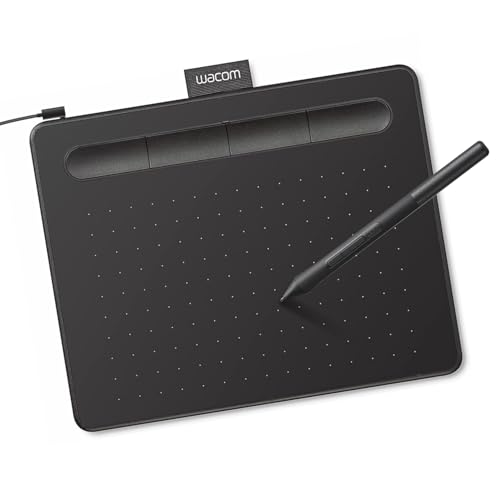 1. Wacom Intuos Small
 2. Huion Inspiroy H640P
 3. Wacom One Small
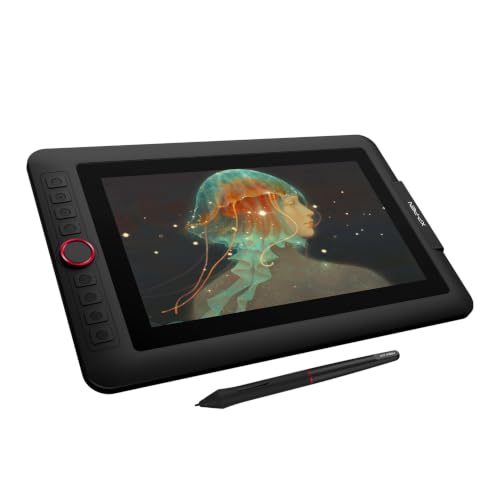 4. XP-Pen Artist 12









