We independently review everything we recommend. When you buy through our links, we may earn a commission. As an Amazon Associate we earn from qualifying purchases.
Best Budget Gaming Controller: 5 Picks That Play Great
Compare five budget gaming controllers for Xbox, PC, and Switch, from wired workhorses to wireless picks, and find the right pad for your setup.
As an Amazon Associate, we earn from qualifying purchases.
The best budget gaming controller for most players is the Xbox Wireless Controller in Carbon Black, because it pairs the standard Xbox layout with Bluetooth and Xbox Wireless, a hybrid D-pad, and up to 40 hours of play on two AA batteries, all in a pad that works across Xbox Series X|S, Xbox One, Windows PCs, and mobile devices. If you want the lowest spend and zero battery worries, the PowerA Wired Controller for Xbox Series X|S in Black is the better value, while the 8BitDo Pro 2 is the pick for Nintendo Switch and PC players who want a retro-styled wireless pad with Hall Effect sticks. The Logitech G F310 suits PC-only players, and the PowerA Advantage Wired Controller in the Fortnite Midas edition is the strongest value for Xbox players who want Hall Effect sticks, mappable back buttons, and trigger locks.
Start with the platform you play on most. Xbox players should look for an officially licensed Xbox pad, because that guarantees the right button layout and plug-and-play behavior on console. PC players have the widest choice, since almost every modern controller works on Windows, and Steam adds broad remapping support. Nintendo Switch players need a pad that works over Bluetooth or USB-C in docked mode.
Connection type is the next decision. A wired controller never needs charging, never drops a wireless signal, and usually costs less than a wireless equivalent, though the cable matters more on a couch than at a desk. A wireless controller gives freedom of movement but needs batteries or recharging.
Stick technology deserves attention at budget prices. Standard potentiometer sticks can develop drift over time, where the character or camera moves without input. Hall Effect sticks use magnets instead of physical contact, so they resist drift and tend to last longer. The 8BitDo Pro 2 and the PowerA Advantage model in this roundup use Hall Effect sticks. Comfort matters too: the Xbox layout with offset sticks suits most adult hands, while the symmetrical layout of the 8BitDo Pro 2 suits players who grew up with that shape. Finally, check what is in the box, since some budget controllers ship with a long detachable cable and others include only a short one or none at all.
The Xbox Wireless Controller in Carbon Black is the default recommendation. It is the official Microsoft pad, so it works exactly as expected on Xbox Series X|S and Xbox One, pairs quickly with Windows PCs over Bluetooth or Xbox Wireless, and connects to Android and iOS devices for cloud gaming. Textured grips on the bumpers, triggers, and back keep the pad secure during long sessions. The hybrid D-pad gives cleaner diagonal inputs for fighting games and platformers.
Battery life is rated at up to 40 hours on two AA batteries. The USB-C port supports wired play, the 3.5mm headset jack connects wired headsets directly, and a dedicated Share button captures screenshots and clips. Button remapping works through the Xbox Accessories app. The compromises are standard potentiometer sticks rather than Hall Effect sticks, no mappable back buttons or trigger locks, and no batteries or USB-C cable in the controller-only box. Even so, first-party compatibility, comfort, and long battery life make this the safest all-round pick.
Specs
Connectivity: Xbox Wireless, Bluetooth, USB-C wired
Platforms: Xbox Series X|S, Xbox One, Windows 10/11, Android, iOS
Battery: Two AA batteries, up to 40 hours of play
D-pad: Hybrid D-pad
Audio: 3.5mm headset jack
Extra buttons: Share button
Model number: QAT-00001
Tier: Mid-range
PowerA Wired Controller for Xbox Series X|S Black
The PowerA Wired Controller for Xbox Series X|S in Black is the cheapest way to get a properly licensed Xbox pad. It is officially licensed for Xbox, so it works on Xbox Series X|S and Xbox One as well as Windows PCs, with the familiar Xbox button layout, dual rumble motors, and impulse triggers that add feedback to racing and shooting games. The wired USB connection means there is no battery to charge and no wireless signal to drop.
The controller includes a 3.5mm stereo headset jack, and the two-year limited warranty from PowerA is longer than the coverage many budget pads offer. For a second controller for local multiplayer, this is an easy choice: it costs little and works immediately. The trade-offs are the ones you would expect at this tier: no mappable back buttons, no trigger locks, and no Hall Effect sticks.
Specs
Connectivity: Wired USB
Platforms: Xbox Series X|S, Xbox One, Windows 10/11
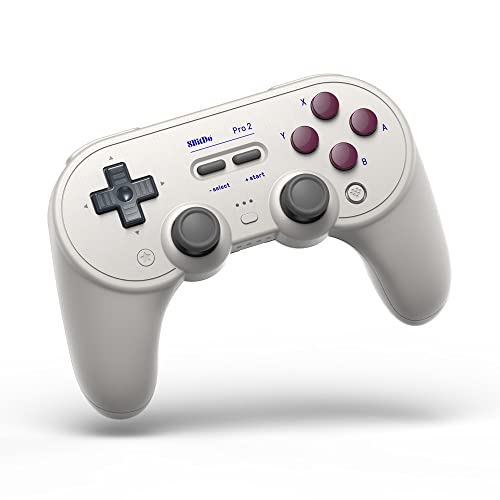
The 8BitDo Pro 2 in the G Classic edition is the most versatile controller in this roundup and the best budget pick for Nintendo Switch players. It connects over Bluetooth to Switch, PC, Android, macOS, and Apple TV, and works wired over USB-C for Steam Deck setups. The symmetrical stick layout echoes classic console pads, and the G Classic color scheme gives it a retro look. Two Pro back paddle buttons sit under the grips and can be remapped without extra software.
Hall Effect joysticks are the headline feature here. Because the sticks sense position with magnets rather than physical contact, they resist drift, and 8BitDo pairs them with a 6-axis motion sensor for Switch games that use gyro aiming. The built-in rechargeable battery is rated for up to 20 hours of play and charges over USB-C. The main limitation is platform coverage: this pad does not work with Xbox consoles, and players with large hands may find the compact body less comfortable than a full-size Xbox pad.
Specs
Connectivity: Bluetooth, USB-C wired
Platforms: Switch, PC, Android, macOS, Apple TV, Steam Deck
Battery: Built-in rechargeable battery, up to 20 hours of play
Sticks: Hall Effect joysticks
Motion: 6-axis motion sensor
Extra buttons: Two Pro back paddle buttons, profile switch
The Logitech G F310 is the oldest design in this roundup and still one of the best budget controllers for PC-only players. It is a wired USB gamepad with a console-style layout, a floating 4-switch D-pad, and ten programmable buttons, and it works with Windows PCs through both XInput and DirectInput, switching between the two with a small selector on the underside. That dual-mode support matters for older PC games that expect DirectInput, and it is a feature most modern controllers have dropped. The 1.8-meter cord is long enough for a desk setup.
The F310 keeps things simple: there is no battery, no wireless pairing, and no software required for basic play. The broad 8-way D-pad suits retro games and platformers, and the programmable buttons can be assigned through the Logitech Profiler software. It is also one of the lightest pads in this roundup. The compromises are clear: there is no vibration feedback, and the pad does not work with Xbox, PlayStation, or Switch consoles, so it is strictly a PC controller.
Specs
Connectivity: Wired USB
Platforms: Windows PC
Cable: 1.8-meter cord
Buttons: 10 programmable buttons
D-pad: 8-way programmable, 4-switch design
Input modes: XInput and DirectInput selector
Vibration: None
Model number: 940-000110
Tier: Budget
PowerA Advantage Wired Controller Fortnite Midas
The PowerA Advantage Wired Controller in the Fortnite Midas edition takes the basic PowerA wired pad and adds the features that competitive players ask for, wrapped in a gold Fortnite-themed finish. It is officially licensed for Xbox, so it works on Xbox Series X|S, Xbox One, and Windows PCs, and it adds two mappable Advanced Gaming Buttons on the back that can be programmed on the fly. The 3-Way Trigger Locks shorten trigger travel for faster shots in shooters, and the pad also includes dual rumble motors and a 3.5mm headset jack.
Hall Effect thumbsticks are the most important upgrade here. Like the 8BitDo Pro 2, this controller uses magnetic sensing to resist stick drift. The detachable 10-foot USB-C cable gives plenty of reach from couch to console, and the wired connection keeps input lag low and removes battery management entirely. The Fortnite theme is also the main caveat: the gold finish and bonus virtual item tie the pad to one game, and players who do not play Fortnite may prefer the plain black model.
Specs
Connectivity: Wired USB-C
Platforms: Xbox Series X|S, Xbox One, Windows 10/11
Cable: Detachable 10-foot USB-C cable
Sticks: Hall Effect thumbsticks
Extra buttons: Two mappable Advanced Gaming Buttons
Triggers: 3-Way Trigger Locks, impulse triggers
Rumble: Dual rumble motors
Audio: 3.5mm headset jack
Warranty: Two-year limited warranty
Tier: Mid-range
Frequently Asked Questions
What is the best budget gaming controller for Xbox?
The Xbox Wireless Controller in Carbon Black is the best budget pick for Xbox, because it is the official Microsoft pad with full console compatibility, Bluetooth and Xbox Wireless, and up to 40 hours of battery life. If you want to spend less and do not mind a cable, the PowerA Wired Controller for Xbox Series X|S in Black is the best budget wired alternative.
Are wired controllers better than wireless controllers?
Wired controllers have lower input delay, never need charging, and usually cost less than wireless equivalents, which makes them a strong choice for competitive play and desk setups. Wireless controllers offer freedom of movement, which matters more on a couch. The best choice depends on where you play: wired for a desk, wireless for a couch.
Do budget controllers work on PC?
Yes, nearly every budget controller in this roundup works on PC. The Xbox Wireless Controller, both PowerA models, and the 8BitDo Pro 2 all connect to Windows PCs over USB-C or Bluetooth, and Steam provides broad remapping support. The Logitech G F310 is a PC-only pad with XInput and DirectInput modes.
What are Hall Effect sticks and why do they matter?
Hall Effect sticks use magnets to sense stick position instead of physical contact between parts, so they do not wear down the way standard potentiometer sticks do. That makes them far less likely to develop drift, where the stick reports movement without any input. The 8BitDo Pro 2 and the PowerA Advantage Wired Controller in this roundup both use Hall Effect sticks.
Conclusion
A good budget gaming controller does not need to copy a premium pad feature for feature; it needs to feel right and last through long sessions. The Xbox Wireless Controller in Carbon Black is the best all-round pick for Xbox and PC players. The PowerA Wired Controller in Black is the best choice for players who want the lowest spend and a simple wired connection, while the 8BitDo Pro 2 is the pick for Switch and PC players who want Hall Effect sticks and wireless freedom. The Logitech G F310 remains the best budget pad for PC-only players, and the PowerA Advantage Wired Controller in the Fortnite Midas edition is the best value for Xbox players who want Hall Effect sticks and mappable back buttons.
E
Emubox Editorial Team
We compare specs, materials and verified owner reviews before a product earns a spot. Rankings are never paid.
Affiliate disclosure. As an Amazon Associate we earn from qualifying purchases at no extra cost to you. Prices accurate as of the date shown.
Best 2mm 70 cm portable antennas compared: telescopic radio antennas near 70 cm, with connectors, bands and collapsed sizes explained before you buy today.
Find the best thermostat setting for winter and summer, with energy-saving setbacks, humidity tips, and smart schedules for a comfortable home year-round.
The best affordable business computer monitors balance sharp text, eye comfort and lasting value. Compare four reliable office displays built for long workdays.
Looking for the best inexpensive HD TVs non smart? Compare five genuinely non-smart HD televisions with tuners, HDMI inputs and simple setup for any small room.

 Xbox Wireless Controller Carbon Black
 8BitDo Pro 2 Bluetooth Controller G Classic
 Logitech G F310 Wired Gamepad









