
Our Short List of 3

- Best for: typing on a laptop, tablet, and phone from one small keyboard.

- Best for: controlling a PC connected to a TV, or a desk with no room for a mouse.

- Best for: backlit typing on a tablet or laptop in a dark room.
All 5 Picks at a Glance
| Product | Specs | Action |
|---|---|---|
| Logitech K380 Multi-Device Bluetooth Keyboard |
| Check price on Amazon |
| Logitech K400 Plus Wireless Touch Keyboard |
| Check price on Amazon |
| Arteck HB030B Universal Backlit Bluetooth Keyboard |
| Check price on Amazon |
 Logitech Signature K650 Comfort Wireless Keyboard |
| Check price on Amazon |
 Arteck HB305-3B Multi-Device Backlit Bluetooth Keyboard |
| Check price on Amazon |
Key takeaways
- Looking for a cheap wireless keyboard that still types well? We compare five budget picks, from compact Bluetooth boards to full-size comfort models.
- Top Pick: Logitech K380 Multi-Device Bluetooth Keyboard
- Runner-up: Logitech K400 Plus Wireless Touch Keyboard
- Also consider: Arteck HB030B Universal Backlit Bluetooth Keyboard
As an Amazon Associate, we earn from qualifying purchases.
Table of Contents
- Short Answer
- How to Choose a Budget Wireless Keyboard
- Quick Comparison
- Logitech K380 Multi-Device Bluetooth Keyboard
- Logitech K400 Plus Wireless Touch Keyboard
- Arteck HB030B Universal Backlit Bluetooth Keyboard
- Logitech Signature K650 Comfort Wireless Keyboard
- Arteck HB305-3B Multi-Device Backlit Bluetooth Keyboard
- Frequently Asked Questions
- Conclusion
- Product and ASIN Reference
Short Answer
The best budget wireless keyboard for most people is the Logitech K380 Multi-Device Bluetooth Keyboard. It pairs with up to three devices, runs for about 24 months on two AAA batteries, and its compact round-key layout fits a small desk or a bag. For a full-size board with a number pad and a wrist rest, step up to the Logitech Signature K650. For couch use, the Logitech K400 Plus adds a built-in touchpad, so no mouse is needed. The two Arteck picks cover backlit typing on a budget.
How to Choose a Budget Wireless Keyboard
Start with the connection. Bluetooth keyboards pair directly with laptops, tablets, and phones, and they can usually switch between several devices. Keyboards with a 2.4 GHz USB receiver work with any computer that has a spare USB port, and pairing is instant. Some boards offer both.
Next, check the layout. Compact boards save desk space and travel well, but they drop the number pad and sometimes shrink the arrow keys. Full-size boards keep the number pad and a standard layout, which matters if you type numbers all day. A wrist rest helps during long sessions, and adjustable tilt feet let you set a comfortable typing angle.
Battery type is the third decision. Replaceable batteries last for months or years and are easy to swap, while rechargeable boards need a cable now and then but never need new batteries. Backlighting is useful in dim rooms, yet it drains a rechargeable battery faster, so makers often quote battery life with the backlight off. Finally, confirm operating system support. Most wireless keyboards work with Windows and macOS, but media keys and shortcut software sometimes only work on one platform.
Quick Comparison
| Keyboard | Connection | Layout | Backlight | Battery |
|---|---|---|---|---|
| Logitech K380 | Bluetooth | Compact, no number pad | No | 2 AAA, about 24 months |
| Logitech K400 Plus | 2.4 GHz USB receiver | Compact with touchpad | No | 2 AA, up to 18 months |
| Arteck HB030B | Bluetooth | Compact, no number pad | Yes, 7 colors | Rechargeable, up to 6 months |
| Logitech Signature K650 | Bluetooth, Logi Bolt receiver | Full-size, number pad | No | 2 AA, up to 36 months |
| Arteck HB305-3B | Bluetooth | Full-size, number pad | Yes, 7 colors | Rechargeable, about 6 months |
Logitech K380 Multi-Device Bluetooth Keyboard
- Best for: typing on a laptop, tablet, and phone from one small keyboard.
typing on a laptop, tablet, and phone from one small keyboard.
The Logitech K380 is the classic budget wireless keyboard, and its strength is simplicity. It connects over Bluetooth to up to three devices at once, and the yellow Easy-Switch keys on the top row move the connection between them with one press. That suits a desk where a laptop sits next to a tablet.
The round keys give the K380 its distinctive look, and the compact frame measures 10.9 x 4.9 x 0.6 inches, so it slides into a laptop bag. Two AAA batteries power the board, and Logitech states battery life of about 24 months, so battery changes are rare. The trade-offs are clear: there is no number pad, no backlight, and the keys use a standard membrane feel rather than a mechanical switch. For everyday typing, email, and notes, that is a fair exchange at this tier. Buyers should confirm the colorway before ordering, since the K380 is sold in several colors under separate listings.
Specs
- ASIN: B0148NPH9I
- Model: 920-007558
- Connectivity: Bluetooth, up to 3 devices
- Layout: Compact, no number pad
- Battery: 2 AAA batteries, about 24 months
- Dimensions: 10.9 x 4.9 x 0.6 inches
- Weight: 14.4 ounces
- Backlight: No
- Compatibility: Windows, Mac, Chrome OS, Android, iOS, iPadOS, Apple TV
- Tier: Budget
Logitech K400 Plus Wireless Touch Keyboard
- Best for: controlling a PC connected to a TV, or a desk with no room for a mouse.
controlling a PC connected to a TV, or a desk with no room for a mouse.
The Logitech K400 Plus takes a different approach: it builds a 3.5-inch touchpad into the keyboard itself. That makes it the right pick for a living-room PC, a media center, or any setup where a mouse has nowhere to sit. The touchpad supports multi-touch gestures, and media keys handle volume and playback.
Connection is by a 2.4 GHz Unifying USB receiver, so there is no Bluetooth pairing step. Plug the receiver in and the keyboard works, with a wireless range of up to 10 meters stated by the maker. Two AA batteries power the board for up to 18 months, according to Logitech, and the quiet keys suit shared rooms. The board is compatible with Windows, Android, and Chrome OS. It is a 2015 listing, so buyers should confirm the listing is current before ordering.
Specs
- ASIN: B014EUQOGK
- Model: 920-007119
- Connectivity: 2.4 GHz USB receiver, no Bluetooth
- Layout: Compact with built-in 3.5-inch touchpad
- Battery: 2 AA batteries, up to 18 months
- Dimensions: 14.0 x 5.5 x 0.9 inches
- Weight: 390 grams
- Backlight: No
- Compatibility: Windows, Android, Chrome OS
- Tier: Budget
Arteck HB030B Universal Backlit Bluetooth Keyboard
- Best for: backlit typing on a tablet or laptop in a dark room.
backlit typing on a tablet or laptop in a dark room.
The Arteck HB030B is the smallest board in this roundup, and the only compact one with a backlight. Its seven backlight colors and two brightness levels make it easy to type in a dim room, and the backlight turns off when idle to save power. The board connects over Bluetooth 3.0 and works with iOS, Android, Windows, and Mac, so it pairs with tablets and phones as well as computers.
A built-in rechargeable battery powers the HB030B, and Arteck states up to 6 months of use per charge. Charging is by micro USB cable, and the board measures 9.7 x 5.9 x 0.24 inches, slim enough to slip into a bag beside a tablet. The maker covers the keyboard with a 24-month warranty. It is a 2015 listing, so buyers should confirm the listing is current before ordering.
Specs
- ASIN: B00X5P8BJO
- Model: HB030B
- Connectivity: Bluetooth 3.0
- Layout: Compact, no number pad
- Battery: Built-in rechargeable, up to 6 months
- Dimensions: 9.7 x 5.9 x 0.24 inches
- Backlight: Yes, 7 colors, 2 brightness levels
- Warranty: 24 months
- Compatibility: iOS, Android, Windows, Mac
- Tier: Budget
Logitech Signature K650 Comfort Wireless Keyboard
- Best for: all-day typing at a fixed desk, with a wrist rest and a number pad.
all-day typing at a fixed desk, with a wrist rest and a number pad.
The Logitech Signature K650 is the comfort pick of this roundup. It is a full-size board with 104 keys, deep-cushioned keys, and a built-in soft-touch palm rest, plus adjustable feet with two tilt angles. Twenty-four shortcut commands cover mic mute, screenshot, and web navigation, which saves time during work calls and research. The board is spill-resistant and easy to wipe clean.
Connection is flexible: Bluetooth Low Energy or the included Logi Bolt USB receiver. Two AA batteries come pre-installed, and Logitech states battery life of up to 36 months. The K650 works with Windows, macOS, Chrome OS, Linux, iPadOS, iOS, and Android. Logi Options+ software, which customizes the shortcut keys, runs only on Windows 10 and macOS 10.15 or later, so buyers on other systems should expect the default key functions.
Specs
- ASIN: B0B4ZWZ89X
- Model: 920-010908
- Connectivity: Bluetooth Low Energy, Logi Bolt USB receiver
- Layout: Full-size, 104 keys, number pad, palm rest
- Battery: 2 AA batteries, up to 36 months
- Dimensions: 18 x 7.62 x 0.96 inches
- Weight: 707.5 grams
- Backlight: No
- Recycled plastic: 28 percent post-consumer (Graphite)
- Warranty: 1-year limited hardware warranty
- Compatibility: Windows, macOS, Chrome OS, Linux, iPadOS, iOS, Android
- Tier: Mid-range
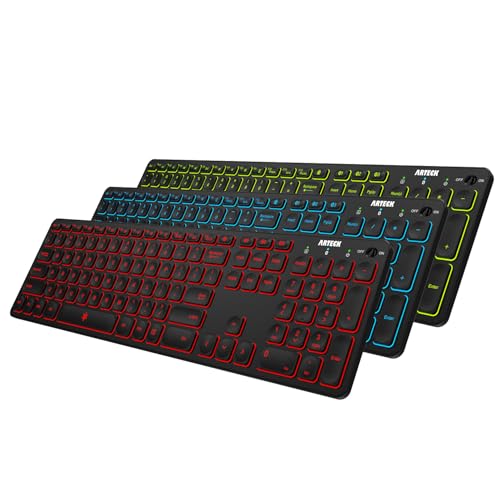
Arteck HB305-3B Multi-Device Backlit Bluetooth Keyboard
- Best for: a full-size backlit board that switches between three devices.
a full-size backlit board that switches between three devices.
The Arteck HB305-3B combines the two features budget buyers ask for most: a full-size layout and a backlight. It has 107 keys, including a number pad, and its seven backlight colors with two brightness levels suit late-night work. Three Bluetooth keys pair the board with up to three devices at once, and a short press switches between them, so one keyboard can serve three machines. It is a 2021 listing, the newest board in this roundup after the K650.
The scissor keys are quiet and low-profile, and Arteck states they are rated for over 3 million uses. A built-in rechargeable lithium-polymer battery charges over USB-C, and the maker states about 6 months of use per charge based on 2 hours of use per day with the backlight off. The board measures 16.7 x 4.5 x 0.24 inches and weighs 1.37 pounds, and it carries a 24-month warranty.
Specs
- ASIN: B09JKDYY3B
- Model: HB305-3B
- Connectivity: Bluetooth, up to 3 devices
- Layout: Full-size, 107 keys, number pad
- Battery: Built-in rechargeable lithium-polymer, about 6 months
- Dimensions: 16.7 x 4.5 x 0.24 inches
- Weight: 1.37 pounds
- Backlight: Yes, 7 colors, 2 brightness levels
- Warranty: 24 months
- Compatibility: Windows, iOS, iPadOS, Android, Mac OS
- Tier: Mid-range
Frequently Asked Questions
Is a Bluetooth keyboard or a USB receiver keyboard better for a budget PC?
Both work well, and the choice depends on the setup. Bluetooth pairs with laptops, tablets, and phones and can switch between several devices, but it needs a pairing step and a Bluetooth radio. A USB receiver keyboard works as soon as the receiver is plugged in, which suits a desktop that never moves. Boards that offer both, like the Logitech Signature K650, cover either case.
Do budget wireless keyboards work with Mac and Windows?
Most do, including all five boards in this roundup. The K380, K650, and both Arteck boards list Windows and macOS support, while the K400 Plus lists Windows, Android, and Chrome OS. Shortcut software is the usual exception: Logitech’s Logi Options+ runs only on Windows 10 and macOS 10.15 or later.
How long do the batteries last in a budget wireless keyboard?
It varies by model and by backlight use. Logitech states about 24 months for the K380 on two AAA batteries, up to 18 months for the K400 Plus on two AA batteries, and up to 36 months for the K650 on two AA batteries. Arteck states up to 6 months per charge for the rechargeable HB030B and about 6 months for the HB305-3B.
Should I choose a compact keyboard or a full-size one?
Choose compact if desk space is tight or the keyboard travels in a bag. The K380 and HB030B are the portable picks here. Choose full-size if you type numbers often or want a standard layout with a number pad and a wrist rest. The K650 and HB305-3B are the full-size picks, and the K400 Plus trades the number pad for a touchpad.
Conclusion
A budget wireless keyboard does not have to feel cheap. The Logitech K380 is the best all-round pick for most people, with three-device Bluetooth switching and about 24 months of battery life in a compact frame. The Logitech K400 Plus is the right choice for a living-room PC, since its built-in touchpad removes the need for a mouse. The Arteck HB030B brings backlighting to a portable board, while the Logitech Signature K650 is the comfort pick for long days at a fixed desk. The Arteck HB305-3B rounds out the list with a full-size backlit layout that switches between three devices. Pick the layout and connection that match the desk.









