We independently review everything we recommend. When you buy through our links, we may earn a commission. As an Amazon Associate we earn from qualifying purchases.
Best Budget Drawing Monitors for Digital Artists 2026
Find the best budget drawing monitor for digital art in 2026. Compare five affordable pen displays for illustration, photo editing, and animation.
The best budget drawing monitor for most digital artists in 2026 is the Huion Kamvas 13 Gen 3. It combines a 13.3 inch full high definition laminated display, 16,384 levels of pen pressure, dual dials, and broad color coverage in a slim body that suits illustration, photo editing, and animation work. Artists who want a larger shortcut layout and an included adjustable stand should look closely at the XP-Pen Artist 13.3 Pro, while artists who value the Wacom pen experience and a simple setup should consider the Wacom One 13.3 inch pen display. For the smallest desk footprint, the XP-Pen Artist 12 and the GAOMON PD1161 both offer 11.6 inch displays with battery free pens and 8,192 levels of pressure sensitivity. Every monitor in this guide is a pen display, which must connect to a computer or a compatible mobile device to run creative software, and none of them works as a standalone tablet.
Screen size, pen pressure, color coverage, lamination, and shortcut controls all shape the drawing experience. A larger screen gives more room for tool panels, while a smaller screen is easier to carry. Higher pressure levels allow finer control over line weight, and full lamination reduces parallax. ## How to Choose a Budget Drawing Monitor
Start with screen size and desk space. A 13.3 inch display is a comfortable middle ground for most artists, because it shows enough detail for illustration and photo retouching without taking over a desk. An 11.6 inch display is better for travel, small desks, and artists who already use a second monitor for reference images. Every model in this roundup uses a full high definition display. Check the connection options before buying, because most budget pen displays use a three in one cable or a USB-C connection, and some computers need an adapter. Confirm that the monitor supports the operating system on the main computer.
Pen performance comes next. Battery free pens are standard in this group. Pressure sensitivity of 8,192 levels is enough for most illustration and sketching, while 16,384 levels give finer control for detailed line work and soft shading. Tilt support helps when shading with a digital brush that mimics a pencil or a marker. A laminated display with an anti glare surface reduces reflections and gives the pen a paper like drag. Shortcut keys, dials, and an included stand are practical extras, because they reduce trips to the keyboard.
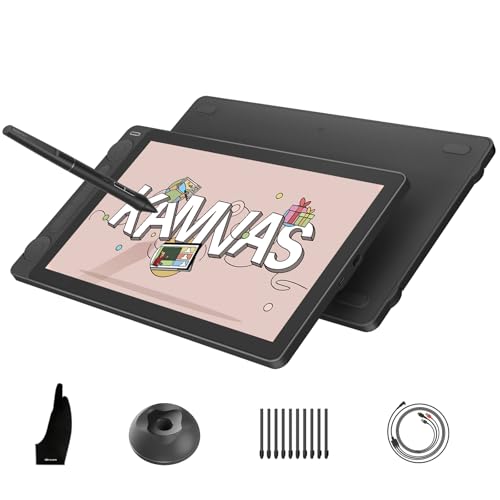
The Huion Kamvas 13 Gen 3 is the strongest all round choice in this roundup, and it suits artists who want modern pen technology and color accuracy without moving into a higher tier. Its 13.3 inch full laminated display uses anti sparkle canvas glass that reduces glare and image noise, and the paper textured surface gives the pen a controlled feel for long sessions. The display covers 99 percent of the sRGB color space and 90 percent of Adobe RGB, which helps colors stay true when artwork moves to a phone, a laptop, or a print. Each unit is factory calibrated, and a calibration report is included.
The PenTech 4.0 pen offers 16,384 levels of pressure sensitivity, so light strokes register cleanly and heavy strokes build up smoothly. Tilt auto alignment reduces parallax, so the cursor stays close to the pen tip even when the pen is held at an angle. Two dial controllers and five silent press keys can adjust canvas rotation, brush size, zoom, and opacity without reaching for the keyboard. At 11.7 millimeters thick and 865 grams, the display is slim enough to carry with a laptop, and it supports a three in one cable or a full featured USB-C to USB-C cable. It works with Windows, macOS, Linux, and Android.
Specs
Display: 13.3 inch full high definition LCD with full lamination and anti sparkle canvas glass
Pen pressure: 16,384 levels with PenTech 4.0 and tilt support
Color coverage: 99 percent sRGB and 90 percent Adobe RGB
Controls: Two dials and five press keys
Compatibility: Windows, macOS, Linux, and supported Android devices
The XP-Pen Artist 13.3 Pro is a strong choice for artists who want a larger shortcut layout, a red dial, and an adjustable stand in the box. Its 13.3 inch full laminated display offers wide viewing angles and covers 123 percent of the sRGB color space, which gives colors a vivid look that suits illustration and concept art. The full lamination keeps the pen tip close to the image. An adjustable stand is included, so the screen can sit at a comfortable angle for sketching, inking, or painting. It connects through a three in one cable, and it works with Windows and macOS.
The battery free pen offers 8,192 levels of pressure sensitivity with tilt support, which is enough for controlled line work, smooth shading, and natural brush strokes. Eight shortcut keys and a red dial sit beside the screen, and they can be set up for undo, brush size, zoom, and canvas rotation. That layout suits artists who like to keep one hand on the pen and the other on the controls.
Specs
Display: 13.3 inch full high definition IPS display with full lamination
Pen pressure: 8,192 levels with tilt support and a battery free pen
The Wacom One 13.3 inch pen display is the simplest and most approachable option in this roundup, and it suits beginners, students, and artists who already trust the Wacom pen experience. Its 13.3 inch full high definition display shows artwork clearly, and the pen offers 4,096 levels of pressure sensitivity with a natural feel for sketching, note taking, photo markup, and early illustration work. The display works with Mac, PC, Chromebook, and supported Android devices.
Wacom includes access to creative software and online training through its registration program. The pen is battery free and light in the hand. There are no shortcut keys or dials on the display itself, so artists will use the computer keyboard for those actions, which keeps the design clean and the learning curve low. The Wacom One is a good fit for artists who want a reliable first pen display, for teachers who need a simple tool for lessons, and for photo editors who want to retouch directly on the image.
Specs
Display: 13.3 inch full high definition display
Pen pressure: 4,096 levels with a battery free pen
Color coverage: Standard sRGB coverage for everyday creative work
Controls: No built in shortcut keys, keyboard shortcuts used instead
Compatibility: Mac, PC, Chromebook, and supported Android devices
Extras: Access to creative software and training through registration
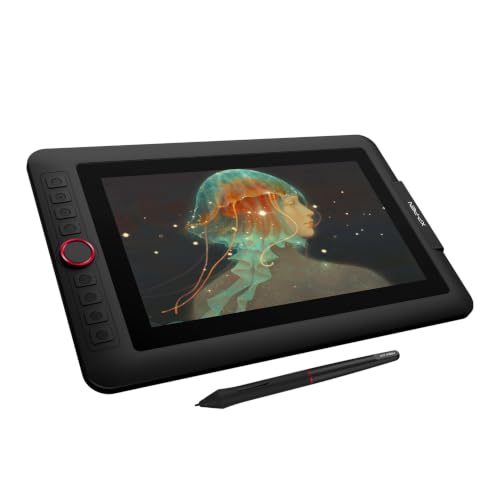
The XP-Pen Artist 12 is the most compact XP-Pen model in this roundup, and it suits artists who want a small and portable pen display for a crowded desk or a travel bag. Its 11.6 inch full high definition IPS display shows line work and color clearly, and the screen size is large enough for sketching, inking, and simple illustration while staying easy to carry. The display uses a battery free pen with 8,192 levels of pressure sensitivity, so line weight and opacity respond smoothly to hand pressure. A multi function pen holder and a drawing glove are included.
The Artist 12 connects through a cable that carries video and data, and it works with Windows and macOS. The compact size makes it a good second display for artists who already have a main monitor, and it also works well as a first pen display for students. The display is light enough to pack with a laptop for work in a library, a studio, or a classroom. Artists who draw comics, fan art, and character sketches will find the size comfortable.
Specs
Display: 11.6 inch full high definition IPS display
Pen pressure: 8,192 levels with a battery free pen
Color coverage: 72 percent NTSC color coverage
Controls: Shortcut keys on selected variants, pen holder included
Compatibility: Windows and macOS
Extras: Drawing glove and multi function pen holder included
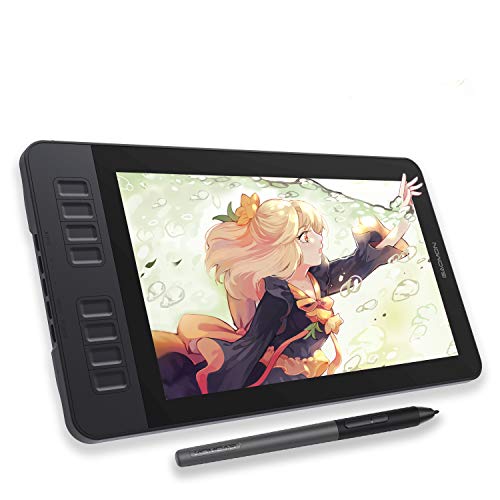
The GAOMON PD1161 is a practical budget choice for artists who want a full pen display experience at the lowest tier in this roundup. Its 11.6 inch full high definition IPS display offers a clear image for sketching, illustration, animation, and online teaching, and the anti glare screen helps reduce reflections in bright rooms. The battery free AP50 pen offers 8,192 levels of pressure sensitivity with tilt support, which gives good control over line weight, shading, and brush opacity. Eight shortcut keys sit beside the screen, and they can be set up for undo, eraser, brush size, and zoom.
The PD1161 connects through USB and HDMI, and it works with Windows and macOS. The display is compact and light, so it fits a small desk and packs easily for travel. The PD1161 suits beginners who want to try drawing directly on screen, hobbyists, and teachers who need a clear tool for lessons. It also works well for photo editing where direct pen input is faster than a mouse.
Specs
Display: 11.6 inch full high definition IPS display with anti glare surface
Pen pressure: 8,192 levels with tilt support and a battery free AP50 pen
Color coverage: Standard sRGB coverage for everyday creative work
Controls: Eight shortcut keys
Compatibility: Windows and macOS
Extras: Drawing glove included with selected bundles
Tier: Budget
Frequently Asked Questions
What size drawing monitor is best for a beginner?
A 13.3 inch display is a good starting point for most beginners, because it shows enough canvas detail for illustration and photo work without taking over a desk. An 11.6 inch display is better for travel and small desks, and it still works well for sketching when a second monitor is available for reference images.
Do budget drawing monitors work without a computer?
No, the pen displays in this roundup are not standalone tablets, and each one must connect to a computer or a compatible mobile device to run creative software. The drawing monitor shows the image from the connected device, so a computer or a supported Android device is needed for every session.
How many pressure levels do digital artists need?
A pen with 8,192 levels is enough for most illustration, sketching, and shading, because it gives smooth control over line weight and opacity. A pen with 16,384 levels offers finer control for detailed line work and soft gradients.
Is color coverage important on a budget drawing monitor?
Color coverage matters most for artists who publish work online or print it, because a display with wider sRGB coverage shows colors closer to the finished result. Artists who draw for practice can work well with standard coverage, while artists who sell prints or client work should favor models with wider coverage and factory calibration.
Conclusion
The best budget drawing monitor for digital artists in 2026 depends on screen size, pen performance, and the way the artist works. The Huion Kamvas 13 Gen 3 leads this roundup with a laminated 13.3 inch display, 16,384 levels of pressure, dual dials, and wide color coverage in a slim body. The XP-Pen Artist 13.3 Pro follows closely with an adjustable stand, eight shortcut keys, and a red dial. The Wacom One offers the simplest setup for beginners and students, while the XP-Pen Artist 12 and the GAOMON PD1161 give compact options for small desks and travel. Choose the screen size that fits the desk, check the connection and operating system support, and favor the pen and color features that match the artwork planned for the year ahead.
E
Emubox Editorial Team
We compare specs, materials and verified owner reviews before a product earns a spot. Rankings are never paid.
Affiliate disclosure. As an Amazon Associate we earn from qualifying purchases at no extra cost to you. Prices accurate as of the date shown.
Best 2mm 70 cm portable antennas compared: telescopic radio antennas near 70 cm, with connectors, bands and collapsed sizes explained before you buy today.
Find the best thermostat setting for winter and summer, with energy-saving setbacks, humidity tips, and smart schedules for a comfortable home year-round.
The best affordable business computer monitors balance sharp text, eye comfort and lasting value. Compare four reliable office displays built for long workdays.
Looking for the best inexpensive HD TVs non smart? Compare five genuinely non-smart HD televisions with tuners, HDMI inputs and simple setup for any small room.

 Huion Kamvas 13 Gen 3
 XP-Pen Artist 12
 GAOMON PD1161









