We independently review everything we recommend. When you buy through our links, we may earn a commission. As an Amazon Associate we earn from qualifying purchases.
Best Budget Mouse for Mac: 5 Picks Worth Your Money
Compare the best budget mouse for Mac, from a silent travel pick to a premium desktop workhorse, and find the right fit for your MacBook or iMac.
As an Amazon Associate, we earn from qualifying purchases.
The Logitech M720 Triathlon is the best budget mouse for Mac for most people, because it pairs with up to three devices over Bluetooth or the included Unifying receiver, runs for up to two years on a single AA battery, and works with macOS through Logi Options+ for button customization. If you want the smallest and quietest option for a MacBook bag, the Logitech Pebble Mouse 2 M350s is the travel pick, while the Apple Magic Mouse suits gesture lovers who want Multi-Touch scrolling built for macOS. The Logitech MX Anywhere 3S for Mac is the compact premium pick for glass desks and travel, and the Logitech MX Master 3S is the full-size workhorse for long workdays.
A mouse that works well on a Mac starts with the connection. Bluetooth is the simplest route for a MacBook, because it needs no dongle and leaves the USB-C ports free, while a 2.4 GHz receiver is useful when Bluetooth is crowded or the mouse also serves a second computer. Look for a listing that names macOS, and check that any companion software runs on macOS, since button customization usually lives in that app.
Size and shape matter as much as the sensor. A full-size contoured mouse suits a desk and a long workday, while a slim pebble-shaped mouse disappears into a laptop bag and suits smaller hands. A 1000 DPI sensor is fine for browsing and documents, but a higher-resolution sensor with adjustable sensitivity feels better on a big external monitor, and a Darkfield sensor tracks on glass. Quiet clicks suit shared rooms, and a free-spin scroll wheel makes long documents easier to move through.
Battery type shapes the daily routine. A mouse that runs on a single AA battery can last for many months and never needs a cable, while a rechargeable mouse charges over USB-C but needs a top-up every few weeks. Check the charging port position too, since a mouse that charges from underneath cannot be used while it is plugged in.
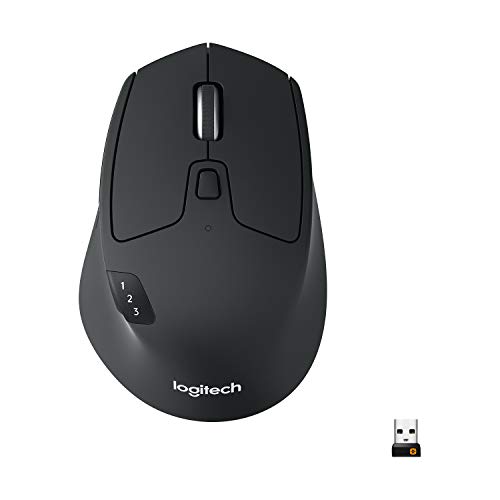
The Logitech M720 Triathlon is the best budget mouse for Mac for most people, and it earns that spot with multi-device switching, long battery life, and a comfortable full-size shape. It connects over Bluetooth or the included Unifying receiver, and the Easy-Switch button moves the cursor between up to three paired computers. The contoured right-handed body fits the palm well.
The hyper-fast scroll wheel is one of the best features in this tier. A flick sends the wheel spinning through a long document or web page, and a press switches it back to precise click-to-click scrolling for spreadsheets and timelines. Six programmable buttons can be customized in Logi Options+ on macOS. The 1000 DPI optical sensor is modest, but it is accurate enough for office work, browsing, and everyday productivity on a Mac. Logitech rates the M720 for up to 24 months on a single AA battery, and it also works with Windows, Linux, ChromeOS, and iPadOS.
Specs
Connectivity: Bluetooth Low Energy, Logitech Unifying receiver
Sensor: High-precision optical tracking, 1000 DPI
Buttons: 8 buttons, 6 programmable in Logi Options+
The Logitech Pebble Mouse 2 M350s is the quietest and most portable mouse in this roundup, and it is the best choice for a MacBook owner who works in libraries, shared offices, and coffee shops. Its smooth pebble shape has no sharp edges, and the slim body slips into a laptop sleeve without adding bulk. Silent clicks keep the noise down to a soft tap.
The M350s connects over Bluetooth Low Energy and pairs with up to three devices, with an Easy-Switch button underneath for moving between a MacBook, an iPad, and a phone. The customizable middle button can be set in Logi Options+ on macOS to open Mission Control or show the desktop. The sensor adjusts from 400 to 4000 DPI, so the cursor speed can be tuned for a small laptop screen or a large external display. Battery life is rated at up to 24 months on a single AA battery.
Specs
Connectivity: Bluetooth Low Energy, compatible with Logi Bolt receiver (not included)
The Apple Magic Mouse is the only mouse in this roundup made by Apple, and it shows in the way it fits into macOS. The entire top surface is a Multi-Touch panel, so a one-finger swipe scrolls, a two-finger swipe moves between web pages, and a swipe across the surface moves between full-screen apps, all without a scroll wheel. It pairs automatically with a Mac and needs no receiver.
The current model charges over USB-C and includes a woven USB-C charge cable, so it shares a cable with a modern MacBook, iPad, or iPhone. Apple rates the rechargeable battery at about a month or more between charges. There are trade-offs to know about: the charging port sits on the underside, so the mouse cannot be used while it is plugged in, and it has no extra programmable buttons, so anyone who relies on side buttons for shortcuts will want a Logitech instead.
Specs
Connectivity: Bluetooth
Sensor: Multi-Touch surface for gestures and scrolling
Buttons: Multi-Touch surface, no physical side buttons
Battery: Rechargeable lithium-ion, about a month per charge
Charging: USB-C port with woven USB-C cable included
The Logitech MX Anywhere 3S for Mac is the compact premium pick in this roundup, built for Mac users who work everywhere. It uses the same 8000 DPI Darkfield sensor as the full-size MX Master 3S, so it tracks on virtually any surface, including glass. The compact shape fits easily in a bag, and the quiet clicks keep it discreet in shared spaces.
This Mac edition is tuned for macOS out of the box, with button defaults set for Mac shortcuts. The MagSpeed scroll wheel spins freely through long documents and stops on a pixel when precision matters, and the six buttons can be customized per app in Logi Options+ on macOS. It pairs with up to three devices over Bluetooth and supports Flow for moving the cursor between a Mac and another computer. Battery life is rated at up to 70 days on a full charge, with a one-minute quick charge adding about three hours of use.
Specs
Connectivity: Bluetooth Low Energy, compatible with Logi Bolt receiver (not included)
Sensor: Darkfield high precision, 200-8000 DPI
Buttons: 6 buttons, customizable per app in Logi Options+
Scroll wheel: MagSpeed electromagnetic scrolling
Battery: Rechargeable Li-Po, rated up to 70 days
Charging: USB-C, one-minute quick charge for about three hours of use
The Logitech MX Master 3S is the full-size desktop workhorse of this roundup, and it is the best choice for a Mac user who spends long hours at a desk. The sculpted right-handed shape supports the palm and thumb, and the thumb wheel adds horizontal scrolling for wide timelines and spreadsheets. Quiet clicks reduce the noise of a full day of clicking.
The 8000 DPI Darkfield sensor tracks on virtually any surface, including glass, and the MagSpeed wheel scrolls a thousand lines in a second when flicked, then stops precisely on a pixel. Seven buttons can be customized in Logi Options+ on macOS, and the gesture button opens Mission Control or switches apps. It pairs with up to three devices over Bluetooth or the included Logi Bolt receiver, and Flow moves the cursor between computers. Battery life is rated at up to 70 days on a full charge, with a one-minute quick charge adding about three hours of use.
Specs
Connectivity: Bluetooth Low Energy, Logi Bolt USB receiver included
Sensor: Darkfield high precision, 200-8000 DPI
Buttons: 7 buttons, customizable in Logi Options+
Scroll wheel: MagSpeed electromagnetic scrolling, thumb wheel for horizontal scrolling
Battery: Rechargeable Li-Po 500 mAh, rated up to 70 days
Charging: USB-C, one-minute quick charge for about three hours of use
Most modern wireless mice work with a Mac over Bluetooth, because macOS includes standard mouse drivers, so left click, right click, and scrolling work without extra software. Button customization and app-specific shortcuts usually need the maker’s macOS app, such as Logi Options+, so check that the app supports macOS before buying a mouse with extra buttons.
Is a Bluetooth mouse or a receiver mouse better for a MacBook?
Bluetooth is usually the better choice for a MacBook, because it needs no dongle and keeps the USB-C ports free for charging and accessories. A 2.4 GHz receiver can be more stable in a room crowded with Bluetooth devices.
How much DPI do I need for a Mac?
A 1000 DPI sensor is enough for everyday browsing, email, and documents on a laptop screen, while a higher-resolution sensor with adjustable sensitivity feels better on a large external display. A sensor that adjusts from 200 to 8000 DPI covers every screen size, and a Darkfield sensor adds tracking on glass.
Should I choose the Apple Magic Mouse or a Logitech mouse for Mac?
Choose the Magic Mouse if you value Multi-Touch gestures, automatic pairing, and a clean Apple look, and you are happy with a flat shape and no extra buttons. Choose a Logitech mouse if you want programmable buttons, a contoured grip, multi-device switching, or tracking on glass.
Conclusion
The best budget mouse for Mac depends on how you work, but the Logitech M720 Triathlon is the safest starting point for most people, with multi-device switching, a two-year battery, and a comfortable shape at a budget tier. Travelers and quiet-room workers should pick the Logitech Pebble Mouse 2 M350s, gesture lovers should pick the Apple Magic Mouse, and anyone who works on glass or on the go should pick the Logitech MX Anywhere 3S for Mac. For a full workday at a desk, the Logitech MX Master 3S is the premium pick for comfort and precision. Pick the shape and connection that match your Mac, and any of these five will serve you well.
E
Emubox Editorial Team
We compare specs, materials and verified owner reviews before a product earns a spot. Rankings are never paid.
Affiliate disclosure. As an Amazon Associate we earn from qualifying purchases at no extra cost to you. Prices accurate as of the date shown.
Best 2mm 70 cm portable antennas compared: telescopic radio antennas near 70 cm, with connectors, bands and collapsed sizes explained before you buy today.
Find the best thermostat setting for winter and summer, with energy-saving setbacks, humidity tips, and smart schedules for a comfortable home year-round.
The best affordable business computer monitors balance sharp text, eye comfort and lasting value. Compare four reliable office displays built for long workdays.
Looking for the best inexpensive HD TVs non smart? Compare five genuinely non-smart HD televisions with tuners, HDMI inputs and simple setup for any small room.

 Logitech M720 Triathlon
 Logitech Pebble Mouse 2 M350s
 Apple Magic Mouse
 Logitech MX Anywhere 3S for Mac
 Logitech MX Master 3S









