
Our Short List of 3
All 3 Picks at a Glance
| Product | Specs | Action |
|---|---|---|
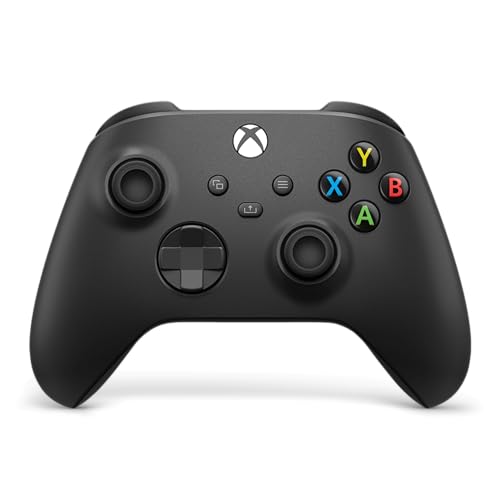 Microsoft Xbox Wireless Gaming Controller (2025), Carbon Black | Check price on Amazon | |
 Backbone One Mobile Gaming Controller, USB-C | Check price on Amazon | |
 8BitDo Ultimate Bluetooth Controller with Charging Dock | Check price on Amazon |
Key takeaways
- Compare the best cloud gaming controllers for low-latency play on phones and tablets, from phone grips to full-size wireless pads with long battery life.
Cloud gaming moves the game itself into a data center, so the controller in your hands becomes the most important piece of hardware you own. A good cloud gaming controller needs a connection that adds as little delay as possible, pairing that works across phones, tablets, smart TVs and computers, and battery life that lasts through long streamed sessions. The five controllers below cover every major service, including Luna, GeForce Now and Xbox Cloud Gaming, with options for phone-first players, living room setups and desk play. Each one is listed with the connection types, battery style and platform support stated on its product page.
As an Amazon Associate, we earn from qualifying purchases.
Quick answer
Start with the Amazon Luna Controller if Luna is your main service, because its Wi-Fi Cloud Direct link skips the streaming device entirely. Xbox Cloud players should take the Microsoft Xbox Wireless controller, phone-first players the wired Backbone One, PC and Steam Deck players the 8BitDo Ultimate Bluetooth, and PlayStation households the DualSense. Match the controller to the screen you stream to most.
Amazon Luna Controller
The Luna Controller is the only gamepad here designed around cloud gaming itself. Its Cloud Direct feature connects the controller straight to Amazon servers over Wi-Fi when you play on Luna, so button presses skip the extra hop through your Fire TV, phone or computer. Amazon describes that Wi-Fi path as the lowest-delay way to play Luna, and it is the reason this controller exists. Away from Luna, it behaves like a normal pad, pairing over Bluetooth or USB with Windows PCs, Macs, Fire TV devices, Fire tablets, iPhones, iPads, Chromebooks and Android phones and tablets, plus select Samsung and LG smart TVs. The layout follows the familiar offset-stick pattern, with a dedicated Luna button and a microphone button for voice commands on Fire TV. It runs on two AA batteries rather than a built-in cell, which means a swap takes seconds and there is no aging internal battery to worry about, though heavy players will want rechargeable cells. The trade-off is focus: the Wi-Fi trick only works with Luna, so households split across several services get less from it. For anyone whose library lives on Luna, though, nothing else on this list removes as much input delay at the source, and the wide device support keeps it useful beyond a single screen.
Microsoft Xbox Wireless Gaming Controller (2025), Carbon Black
Xbox Cloud Gaming is built into Game Pass apps, smart TV apps and browsers, and Microsoft’s own controller is the pad every one of those interfaces expects. This 2025 Carbon Black model pairs over Bluetooth or USB-C and is listed for Xbox Series X and S, Windows, Android, iOS, Fire TV sticks, smart TVs and VR headsets, which makes it the easiest single controller to move between a TV, a laptop and a phone. The hybrid D-pad handles menus and fighting games more precisely than the older cross design, the Share button captures clips on supported platforms, and textured grips on the triggers, bumpers and back case keep it planted during long sessions. A 3.5 mm jack on the bottom edge takes a wired headset for voice chat. Like the Luna Controller, it runs on two AA batteries, so there is no charge cable to manage, but also no included rechargeable pack. Microsoft lists battery life up to 40 hours on standard AA cells, with the usual note that headsets and usage change the result. Because Xbox Cloud, GeForce Now and Luna all recognize standard Xbox pads instantly in browsers and apps, this is the safest recommendation for mixed-service households. Buyers who want back paddles or a rechargeable dock should look at the 8BitDo pick instead.
Backbone One Mobile Gaming Controller, USB-C
The Backbone One attacks the biggest cloud gaming problem on phones: Bluetooth delay. It connects through the phone’s USB-C port instead, so inputs travel over a wire with no wireless hop at all, and it draws power from the phone rather than carrying its own battery. The listing covers Android phones and the iPhone 15 series and later USB-C models; the extendable bridge clamps the phone between two controller halves, turning it into a handheld console. A USB-C pass-through port lets you charge the phone mid-session, and a 3.5 mm jack handles wired headsets. The Backbone app acts as a launcher that gathers Game Pass cloud streaming, GeForce Now, Luna and remote play apps into one library view, which suits players who jump between services. Because it is wired, there is nothing to pair and nothing to charge, and it works the moment it clicks into place. The limits are physical: bulky phone cases usually have to come off, the largest phones sit near the bridge’s maximum extension, and Lightning iPhones need the separate Lightning model. For phone-first cloud players, though, this is the most responsive option here, and the pass-through charging means long sessions do not have to end when the phone runs low.
8BitDo Ultimate Bluetooth Controller with Charging Dock
The 8BitDo Ultimate Bluetooth is the pick for cloud gaming at a desk or on a Steam Deck. It offers three connection routes: Bluetooth, 2.4 GHz wireless through the adapter stored inside its charging dock, and a wired USB-C cable, so you can choose the lowest-delay option each device allows. The listing rates the built-in 1,000 mAh battery for up to 22 hours, and the included dock means the controller is simply picked up charged and dropped back when you finish. Its Hall Effect joysticks use magnets instead of contact pads, a design chosen to resist the stick drift that ends the life of many gamepads, and two pro back paddle buttons can be remapped in the 8BitDo Ultimate Software alongside stored profiles. Compatibility covers Nintendo Switch, Windows PCs and Steam Deck, which lines up well with GeForce Now and Xbox Cloud sessions in a browser or app on those machines. The Switch-style button lettering takes a little adjustment for Xbox Cloud players reading on-screen prompts. Phone and tablet players are better served by the Backbone or the first-party pads, but for PC-based streaming this is the most complete package on the list, with the dock solving the usual problem of a dead controller at the start of a session.
PlayStation DualSense Wireless Controller, White
The DualSense is the natural controller for PlayStation households adding cloud play to the mix. It pairs over Bluetooth or USB-C with the PS5, PCs, Macs and mobile devices, and it is the pad PlayStation Remote Play expects when you stream your own console library to a phone or laptop. Its signature hardware is the haptic feedback system and adaptive triggers, which change resistance under your fingers in supported games. Honest context matters here: those features shine in native PS5 play, and cloud services generally treat the DualSense as a standard controller, so streamed sessions may not use the trigger effects even when the same game supports them locally. What cloud players do get is a comfortable, well-built pad with a built-in rechargeable battery, a built-in microphone for quick voice chat, and a 3.5 mm jack for headsets. The create button handles captures on PlayStation systems. Battery life is the modest part of the package, so daily players will plug in often. If your streaming centers on PlayStation’s ecosystem or you simply prefer this shape, it earns its place; pure Xbox Cloud players are better matched above.
How to choose
Connection type matters more in cloud gaming than in local play, because your inputs already cross the internet. Wired connections and the Luna Controller’s Cloud Direct Wi-Fi remove one wireless hop entirely, standard Bluetooth adds a small amount of delay, and 2.4 GHz adapters sit in between. Match the controller to your screen first: phones favor clamp-on designs like the Backbone One, smart TVs favor Bluetooth pads the TV already supports, and PCs accept almost everything. Check service support before buying, since Xbox Cloud and GeForce Now accept most standard Bluetooth and USB pads, Luna adds its Wi-Fi mode only with its own controller, and PlayStation streaming works best with a DualSense or DualShock 4. Battery style is the last decision: AA-powered pads swap instantly and never wear out a cell, while rechargeable models with docks trade that flexibility for grab-and-play convenience.
Who should skip
Skip this entire category if your internet connection struggles with streaming itself; no controller fixes buffering or compression artifacts, and a local console or PC will serve you better. Players who game on a single console they already own should also pass, since the pad in the box already covers that system’s streaming apps. Competitive players chasing the lowest possible delay for ranked ladders may find even the best cloud setup a step behind local wired play. Finally, owners of Lightning-port iPhones should skip the USB-C Backbone model listed here and look at its Lightning sibling instead.
FAQ
Do cloud gaming controllers reduce lag?
They can reduce the local part of it. Your total delay combines your internet connection, the distance to the streaming server and the controller link. A wired USB connection or the Luna Controller’s direct Wi-Fi path removes the Bluetooth hop between the pad and your device, which is the only slice a controller controls. A weak home network will still dominate the experience.
Can I use one controller for Luna, GeForce Now and Xbox Cloud?
Usually, yes. The Xbox Wireless controller and the DualSense both work across all three services on most phones, tablets, PCs and browsers, because the services accept standard Bluetooth and USB gamepads. The exception is Luna’s Cloud Direct Wi-Fi mode, which only the Luna Controller offers. Check your specific TV app first, since smart TV support varies more than phone or PC support.
Is a wired or Bluetooth controller better for cloud gaming?
Wired is technically better, because a cable adds no wireless delay and never needs charging or pairing. Bluetooth wins on convenience, especially across a living room to a smart TV, and modern Bluetooth pads keep their added delay small. A practical middle ground is a controller like the 8BitDo Ultimate Bluetooth, which offers wired, Bluetooth and 2.4 GHz options in one package.
Do I need a special controller for cloud gaming on a smart TV?
No special controller is required, but the TV decides what works. Most smart TV cloud apps, including Game Pass on supported Samsung and Fire TV models, expect a Bluetooth gamepad such as the Xbox Wireless controller or DualSense. Pair the pad in the TV’s Bluetooth menu first, then open the app. If your TV lacks Bluetooth, a streaming stick with gamepad support is the usual workaround.
Final verdict
Cloud gaming rewards controllers that connect cleanly to many screens and add as little delay as possible. The Luna Controller is the specialist, the Xbox Wireless controller the universal default, the Backbone One the phone player’s wired answer, the 8BitDo Ultimate Bluetooth the PC and Steam Deck all-rounder, and the DualSense the PlayStation household pick. Choose by the screen you stream to most, and every pick here will serve the services you already use. For several services at once, the Xbox pad is the simplest single purchase.
Product and ASIN Reference
| Product | ASIN |
|---|---|
| Amazon Luna Controller | B07P989QTJ |
| Microsoft Xbox Wireless Gaming Controller (2025), Carbon Black | B0F1HX3WXX |
| Backbone One Mobile Gaming Controller, USB-C | B0BMD4KFSL |
| 8BitDo Ultimate Bluetooth Controller with Charging Dock | B0BGWTTC3L |
| PlayStation DualSense Wireless Controller, White | B0CQKLS4RP |









