We independently review everything we recommend. When you buy through our links, we may earn a commission. As an Amazon Associate we earn from qualifying purchases.
Best Budget PCIe WiFi Cards for Faster Desktop Wireless
Compare the best budget PCIe WiFi cards for desktop PCs, covering WiFi 6 and WiFi 6E adapters with Bluetooth, external antennas, and cooling heatsinks.
Compare the best budget PCIe WiFi cards for desktop PCs, covering WiFi 6 and WiFi 6E adapters with Bluetooth, external antennas, and cooling heatsinks.
⭐ Key Takeaways
Quick answer: Our top pick is TP-Link WiFi 6 AX3000 PCIe WiFi Card (Archer TX3000E), with Asus PCE-AX3000 WiFi 6 Adapter as a strong alternative.
A desktop PC is usually the fastest machine in the house and the one most likely to be stuck without wireless, relying on a long Ethernet run or a weak USB dongle. A PCIe WiFi card is the proper fix: it slots into a spare expansion slot, puts full-size antennas outside the case where they can actually work, and adds Bluetooth for controllers and headsets at the same time. This guide compares five budget cards built on proven Intel wireless chips, covering WiFi 6 for most homes and WiFi 6E for anyone with a 6 GHz router.
As an Amazon Associate, we earn from qualifying purchases.
Quick answer
The TP-Link Archer TX3000E is the best all-round budget PCIe WiFi card, pairing WiFi 6 speed with a magnetic antenna base. The Archer TX55E is the value alternative, the Asus PCE-AX3000 covers the same speeds with Asus support, and the Gigabyte GC-WBAX210 and TP-Link Archer TXE75E step up to tri-band WiFi 6E for 6 GHz routers.
The Archer TX3000E is the card that defined this category, and it is still the easiest one to recommend. It is built on Intel’s AX200 chip and delivers WiFi 6 speeds of up to 2402 Mbps on the 5 GHz band and 574 Mbps on 2.4 GHz, with MU-MIMO and OFDMA support so it keeps its pace on busy home networks where several devices compete for airtime. Bluetooth is built in as well, listed at version 5.3 on the current model, and connects through the usual internal USB header cable to your motherboard. The standout hardware feature is the antenna setup: two high-gain antennas mount on a magnetized base connected by a cable, so you can place the antennas on top of the case or a shelf instead of leaving them tucked behind a metal PC under a desk, which is where wireless signals go to die. A heatsink over the main chip helps stability during long transfers. The card supports WPA3 security and runs on 64-bit Windows 10 and 11, with a low-profile bracket in the box for slim cases. If your router is WiFi 6 and you want one card that simply does everything well, this is it.
The PCE-AX3000 is Asus’s entry in the AX3000 class and matches the headline numbers of its rivals: up to 2402 Mbps on 5 GHz and 574 Mbps on 2.4 GHz using WiFi 6 with OFDMA and MU-MIMO, plus Bluetooth 5.0 for peripherals. It is a good fit for buyers who prefer a global brand’s support pages and driver downloads, and for owners of Asus routers who like keeping network gear in one family. Two external antennas attach to the card’s rear bracket, and they are detachable and repositionable, which gives some freedom to angle them around a desk setup. In practice the antennas work best when the PC is not buried in a corner; a magnetized remote base like the TP-Link cards offer is the one feature missing here. The card supports WPA3 encryption and current Windows versions, and it includes a low-profile bracket for compact cases. Installation follows the standard pattern for this class: seat the card in a PCIe x1 slot, connect the Bluetooth cable to a free internal USB 2.0 header, attach the antennas, and install the Intel-based drivers. For a straightforward WiFi 6 upgrade with Bluetooth from a familiar name, the PCE-AX3000 is a sound, uncomplicated choice.
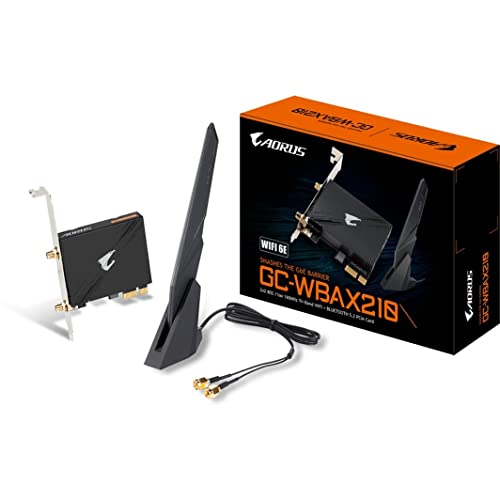
The GC-WBAX210 is Gigabyte’s WiFi 6E card, built around Intel’s AX210 chip, and it is the affordable route into the 6 GHz band. WiFi 6E adds a third, wide-open band on top of 5 GHz and 2.4 GHz, which means less interference from neighbors and room for the fastest short-range links current routers offer, at speeds up to 2402 Mbps on both the 6 GHz and 5 GHz bands. Bluetooth 5.2 is included for controllers, headsets, and mice. The antenna base is magnetic and cabled, like the TP-Link design, so the two antennas can sit on top of the case in clear air, and the card carries a heatsink for sustained transfers. There are two honest caveats. First, the 6 GHz band only helps if your router is also WiFi 6E or WiFi 7; with an older router the card behaves like a good WiFi 6 card, which is still fine. Second, 6 GHz signals fade faster through walls, so this band rewards same-room or near-room placement. For a desktop near a 6E router, or for anyone buying a card to keep through their next router upgrade, the GC-WBAX210 is the future-proof budget pick.
The Archer TX55E is TP-Link’s value entry in the AX3000 class, and it keeps the essentials intact: WiFi 6 speeds up to 2402 Mbps on 5 GHz and 574 Mbps on 2.4 GHz, OFDMA and MU-MIMO support, WPA3 security, and Bluetooth 5.2 for wireless peripherals. Where it differs from the TX3000E is the antenna arrangement. The TX55E uses two multi-directional antennas that mount directly on the card bracket rather than on a remote magnetic base. That keeps the build simpler and the price lower, and for a PC sitting on or near a desk with a clear path to the router, performance is perfectly good. A PC pushed under a desk against a wall is where the bracket antennas lose ground, since the metal case blocks and reflects signal. A heatsink covers the wireless chip, and a low-profile bracket is included for slim cases. The Bluetooth function uses the standard internal USB header connection, and drivers support Windows 10 and 11. If your desk layout is friendly and you want WiFi 6 plus Bluetooth for the least money from a major brand, the TX55E is the sensible buy; if your PC lives in a corner, the TX3000E’s remote antennas are worth the step up.
TP-Link WiFi 6E AXE5400 PCIe WiFi Card (Archer TXE75E)
TP-Link WiFi 6E AXE5400 PCIe WiFi Card (Archer TXE75E)
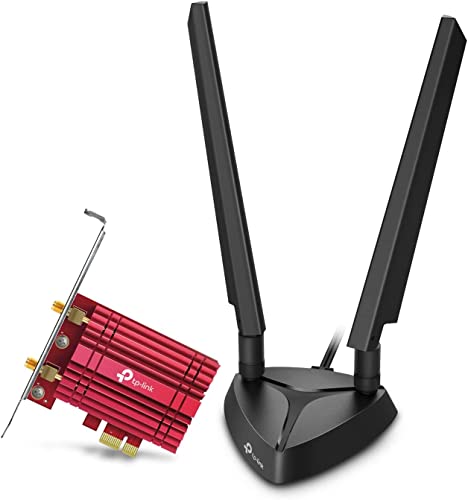
The Archer TXE75E is the flagship of this budget roundup, a WiFi 6E card built on Intel’s AX210 chip with tri-band AXE5400-class speeds: up to 2402 Mbps on the new 6 GHz band, 2402 Mbps on 5 GHz, and 574 Mbps on 2.4 GHz. Bluetooth 5.3 is built in, a generation newer than most cards here, which helps with controller and audio latency and connection stability. The antenna system is the best in this group: two high-gain antennas on a magnetized base with a meter of cable, so placement is flexible even when the PC itself sits in an awkward spot. A substantial heatsink keeps the card stable during long downloads, and WPA3, MU-MIMO, and OFDMA are all supported. A low-profile bracket is included. The same WiFi 6E caveats apply: you need a 6 GHz router to use the headline band, and 6 GHz works best within a room or two of the router. Windows 10 64-bit and Windows 11 are supported. For gamers and streamers on a 6E network who want their desktop on the fastest, least crowded band available, the TXE75E is the card to get, and it still behaves as a strong WiFi 6 card everywhere else.
How to choose
Start with your router, because the card cannot be faster than the network it joins. A WiFi 6 router pairs perfectly with the AX3000 cards; a WiFi 6E or WiFi 7 router justifies the tri-band cards and their 6 GHz band; an older WiFi 5 router will cap every card here, though the card will still work. Next, think about antenna placement, which matters more than small spec differences: if your PC sits under a desk or against a wall, a cabled magnetic antenna base that can sit on top of the case is worth paying for, while bracket antennas are fine for a PC on a desk. Confirm you have a free PCIe x1 slot, or any longer slot, and a free internal USB 2.0 header on the motherboard, because the Bluetooth half of every card here connects through that header. Check the operating system too: these cards target 64-bit Windows 10 and 11, and Linux support depends on the Intel chip’s kernel drivers. Finally, note the security standard: all five cards support WPA3, which is worth enabling on the router if it offers it.
Who should skip
Skip a PCIe card if your motherboard already has good onboard WiFi 6 or 6E; a card would duplicate it and occupy a slot for nothing. Skip this upgrade if your internet plan is slow and your current connection already delivers your full plan speed to the desktop, since a faster card cannot exceed the speed your provider sells you. Laptop owners should skip this entire category, because these cards only fit desktop expansion slots; a USB adapter is the laptop option. And if your router is due for replacement, consider upgrading the router first, because a new card paired with an aging router leaves most of the benefit unrealized.
Frequently Asked Questions
Do PCIe WiFi cards also provide Bluetooth?
Yes, every card in this guide includes Bluetooth as well as WiFi. The Bluetooth radio connects through a cable to a free internal USB 2.0 header on your motherboard, so check that one is available before ordering. Once installed, the same card handles your game controller, headset, mouse, and other Bluetooth peripherals alongside the wireless network connection.
Is a PCIe WiFi card faster than a USB WiFi adapter?
Usually, yes, mainly because of the antennas. A PCIe card uses full-size external antennas placed outside the case, while a USB adapter relies on a small internal antenna squeezed next to a metal chassis. The PCIe cards here also use current Intel chips with WiFi 6 and 6E support, so both speed and connection stability favor the card in most desk setups.
Will a WiFi 6E card work with my WiFi 6 router?
Yes. WiFi 6E cards are fully backward compatible, so the Gigabyte GC-WBAX210 and TP-Link Archer TXE75E will connect to WiFi 6 and older routers on the 5 GHz and 2.4 GHz bands. The 6 GHz band simply stays unused until you pair the card with a WiFi 6E or WiFi 7 router, which makes a 6E card a reasonable future-proofing choice.
How hard is it to install a PCIe WiFi card?
It is one of the easier PC upgrades. Power the PC down, seat the card in a free PCIe slot, connect the included cable to an internal USB header for Bluetooth, attach the antennas, and install the drivers after booting. The whole job typically takes a few minutes with a single screwdriver, and a low-profile bracket is included if your case is slim.
Final verdict
For most desktops, the Archer TX3000E is the card to buy: fast WiFi 6, Bluetooth, and antennas you can place properly. The TX55E trims the price for friendly desk layouts, the Asus PCE-AX3000 is the alternative from a familiar brand, and the GC-WBAX210 and Archer TXE75E add the 6 GHz band for WiFi 6E routers, with the TXE75E offering the newest Bluetooth and the best antenna kit. Match the card to your router, and any of the five will free your desktop from the cable run.
E
Emubox Editorial Team
We compare specs, materials and verified owner reviews before a product earns a spot. Rankings are never paid.
Affiliate disclosure. As an Amazon Associate we earn from qualifying purchases at no extra cost to you. Prices accurate as of the date shown.
Best 2mm 70 cm portable antennas compared: telescopic radio antennas near 70 cm, with connectors, bands and collapsed sizes explained before you buy today.
Find the best thermostat setting for winter and summer, with energy-saving setbacks, humidity tips, and smart schedules for a comfortable home year-round.
The best affordable business computer monitors balance sharp text, eye comfort and lasting value. Compare four reliable office displays built for long workdays.
Looking for the best inexpensive HD TVs non smart? Compare five genuinely non-smart HD televisions with tuners, HDMI inputs and simple setup for any small room.

 TP-Link WiFi 6 AX3000 PCIe WiFi Card (Archer TX3000E)
 Asus PCE-AX3000 WiFi 6 Adapter
 Gigabyte WiFi 6E GC-WBAX210
 TP-Link WiFi 6 PCIe WiFi Card AX3000 (Archer TX55E)
 TP-Link WiFi 6E AXE5400 PCIe WiFi Card (Archer TXE75E)









