We independently review everything we recommend. When you buy through our links, we may earn a commission. As an Amazon Associate we earn from qualifying purchases.
Best Budget PC Tool Kits for Home Builders and Repairs
Compare the best budget PC tool kits for building, upgrading, and repairing desktops and laptops, with precision bits, opening tools, and handy extras.
Compare the best budget PC tool kits for building, upgrading, and repairing desktops and laptops, with precision bits, opening tools, and handy extras.
⭐ Key Takeaways
Quick answer: Our top pick is iFixit Pro Tech Toolkit, with Strebito Electronics Precision Screwdriver Set, 142-Piece as a strong alternative.
Building or upgrading a PC looks simple until you meet a recessed case screw, a tiny M.2 standoff, or a laptop panel held shut by clips instead of screws. A budget tool kit built for electronics solves all of that in one case: precision bits for the fasteners, prying tools for the panels, and small helpers like tweezers and magnetic trays that keep screws from vanishing. The five kits below cover everything from a first build to regular repair work, and each one costs far less than a single visit to a repair shop.
As an Amazon Associate, we earn from qualifying purchases.
Quick answer
For most builders, the iFixit Pro Tech Toolkit is the safest single purchase because it pairs a full 64-bit driver set with opening tools and anti-static gear. The Strebito 142-piece set offers the largest bit library for less money, the iFixit Mako kit suits driver-only work, the Xool 140 in 1 adds a flexible shaft, and the iFixit Essential kit is the compact starter option.
The Pro Tech Toolkit is the kit to buy if you want one purchase to cover PC building, upgrades, and general electronics repair. At its center is a 64-bit driver kit with an aluminum handle, covering Phillips, flathead, Torx, Torx Security, Pentalobe, hex, tri-point, and nut driver sizes, which between them handle case screws, motherboard hardware, drive mounts, and the security screws found on game consoles and phones. Around the driver set, iFixit packs the tools a plain screwdriver kit leaves out: plastic opening tools and picks for prying panels and laptop bases, a small suction cup for lifting screens, nylon-tipped and angled tweezers for connectors and dropped screws, spudgers for ribbon cables, plastic cards, and an anti-static wrist strap for working inside a live build area. Everything rolls up in a compact tool roll that keeps each piece in its own slot, so the kit travels well and nothing rattles loose. The bits are made from S2 steel and the driver handle has a magnetic bit socket with a swivel top cap for controlled torque on small fasteners. iFixit also backs the kit with a lifetime warranty and publishes free repair guides for thousands of devices, which adds real long-term value for anyone who fixes gear regularly.
The Strebito 142-piece set is built around sheer bit count. It includes 120 precision bits, more than any other kit in this roundup, spanning the usual Phillips and Torx sizes plus less common profiles such as Pentalobe, tri-wing, square, U-shaped, and pozidriv bits that show up in consoles, controllers, and small appliances. The bits are chrome vanadium steel with magnetic tips, and they sit in a labeled case so you can find a size quickly instead of test-fitting three wrong ones. The remaining pieces are practical repair accessories: two precision handles, a flexible extension shaft for screws hidden around corners, an extension bar, a magnetizer and demagnetizer block, tweezers, metal and plastic spudgers, opening picks, a suction cup, a SIM eject pin, and a cleaning brush. For PC work specifically, the flexible shaft is genuinely useful for front-panel and drive-cage screws that sit at awkward angles, and the magnetizer lets you refresh bit magnetism as it fades. The trade-off versus the iFixit kits is presentation and support: the case is functional rather than premium, and there is no library of guided repairs behind it. As a pure hardware-per-dollar proposition for builders who want every bit size covered, though, it is hard to beat.
The Mako Driver Kit strips the toolkit idea down to the part PC builders use most: the driver itself. Inside the case are 64 precision bits in S2 steel, driven by a machined aluminum handle with a magnetic socket, a knurled grip, and a free-spinning cap that lets you apply steady downward pressure while turning with your fingers. The bit selection mirrors the Pro Tech kit, covering Phillips, flathead, Torx and Torx Security, Pentalobe, hex, tri-point, triangle, nut driver, and gamebit sizes, so it handles everything from motherboard screws to the tri-point fasteners inside game controllers. A 4.5-inch flexible extension is included for recessed screws. The case deserves a mention of its own: the lid is magnetized and doubles as a sorting tray with compartments, which is exactly what you want when a laptop comes apart into four different screw lengths. What the Mako does not include is any opening or prying tools, tweezers, or anti-static gear, so it is best viewed as the driver half of a repair bench rather than a complete kit. If your work is mostly building desktops, swapping drives, and opening devices that are held together by screws alone, the Mako covers it in a smaller, tidier package than the full-size kits.
The Xool 140 in 1 set follows the same formula as the Strebito kit, with 120 precision bits and 20 accessories, and it earns its place here for builders who want that breadth with a slightly different accessory mix. The bit library covers the standard PC sizes several times over, including multiple Phillips, Torx, hex, and Pentalobe sizes, plus specialty bits for consoles, phones, watches, and glasses. Bits are chrome vanadium steel, magnetic, and stored in a flip-open case with each size marked. The accessory set includes a flexible extension shaft for angled access, a standard extension bar, a magnetizer and demagnetizer, tweezers, several spudgers and pry tools, opening picks, a suction cup, and a metal ruler that helps with prying stubborn covers and measuring standoffs. Two handle styles give you a choice between a slim pen-style grip for light work and a larger handle for stubborn screws. For desktop building, the everyday wins are the magnetic tips that hold M.2 and case screws securely and the deep bit bench that means a stripped or unusual fastener rarely stops a job. Like the Strebito, it skips the guided-repair ecosystem and premium case of the iFixit options, but as an affordable all-in-one bit library it is a sensible pick.
The Essential Electronics Toolkit is the smallest and simplest kit here, aimed at people who open a device a few times a year rather than every week. It combines a magnetic bit driver with 16 precision bits in the sizes that cover the large majority of consumer electronics: Phillips, flathead, Torx, Torx Security, and Pentalobe among them. That is enough for adding a drive to a desktop, opening most laptops, swapping a phone battery, or changing a controller shell. Unlike the Mako, the Essential kit does include basic opening tools: a spudger for connectors, opening picks and an opening tool for clipped panels, a small suction handle for screens, and tweezers for handling screws and cables. The whole set packs into a compact case that fits in a desk drawer, which makes it a good household kit as much as a PC kit. The limits are easy to state: with 16 bits you will eventually meet a fastener it cannot turn, especially on consoles and older hardware, and there is no flexible extension for recessed screws. iFixit’s lifetime warranty and free repair guides still apply, so for light-duty users who value support over bit count, this is the tidy budget option.
How to choose
Start with the fasteners you actually meet. A standard ATX build needs little more than a Phillips number 1 and number 2, but modern hardware adds Torx screws on laptops and consoles, Pentalobe screws on phones, hex sockets on standoffs, and tiny Phillips sizes on M.2 drives, so a kit with 60 or more bits covers far more jobs than a basic screwdriver set. Magnetic tips matter more than they sound: they hold screws over a motherboard where a dropped screw can short a board, and a magnetizer block lets you restore that grip over time. Next, decide whether you need opening tools. Desktops are screw-only, but laptops, phones, tablets, and controllers use clips and adhesive, which call for picks, spudgers, and a suction cup; driver-only kits skip these to save money. Handle quality is worth a look too, since a swivel cap and knurled grip make long disassembly sessions much easier on your hands. Finally, consider the case: a labeled, compartmented case or a lid that doubles as a screw tray keeps different screw lengths separated, which is where beginners most often go wrong when reassembling a laptop.
Who should skip
Skip these kits if you only plan to install one graphics card or one drive in an otherwise finished PC; a single Phillips screwdriver from a household drawer does that job, and a full kit will sit unused. Skip them if your work involves mains-powered equipment, appliances, or anything that calls for insulated, voltage-rated tools, because precision electronics bits are not safety tools and are not rated for electrical work. Professional repair technicians who open devices all day may also find budget kits limiting: the bits are good, but high-volume work wears tips faster, and a shop usually wants powered drivers and bench consumables that none of these sets include. Finally, if your only target is one specific console or phone with a single unusual screw type, buying that one specialty driver costs less than any full kit here.
Frequently Asked Questions
What screwdriver bits do I need to build a PC?
A basic build needs a Phillips number 1 and number 2 for case, motherboard, and drive screws. Adding an SSD uses a small Phillips for the M.2 screw, and many laptops, consoles, and phones add Torx, Torx Security, and Pentalobe fasteners. A kit with a wide bit library covers all of these without buying drivers one at a time.
Are magnetic screwdriver tips safe to use around PC parts?
Yes, for normal assembly work. The magnetism in precision bits is weak and only strong enough to hold a small screw; it does not damage circuit boards, drives, or memory during ordinary handling. Magnetic tips are actually safer in practice, because they stop screws from dropping onto a motherboard, where a loose screw can cause a short circuit.
Do I need an anti-static wrist strap to build a PC?
A strap is cheap insurance rather than a strict requirement. Static discharge can damage components, and the risk rises in dry rooms with carpet. Working on a hard surface, touching the metal case regularly, and handling boards by their edges all help. Kits that include a strap, like the iFixit Pro Tech, simply make the safe habit easier to keep.
What is the difference between a driver kit and a full repair kit?
A driver kit contains only a handle and bits, which is enough for anything held together by screws. A full repair kit adds opening tools such as picks, spudgers, and suction cups for devices sealed with clips or adhesive, plus tweezers and anti-static gear. Desktops usually need only the driver; laptops and phones usually need the full kit.
Final verdict
For a single purchase that covers building, upgrading, and repairing, the iFixit Pro Tech Toolkit is the most complete budget option, with the Mako as its driver-only sibling for screw-only work and the Essential kit as the compact starter choice. The Strebito and Xool sets answer with far larger bit libraries for less money, which suits builders who meet unusual fasteners often. Match the kit to how many different devices you open, and any of the five will pay for itself the first time a repair stays on your desk instead of going to a shop.
E
Emubox Editorial Team
We compare specs, materials and verified owner reviews before a product earns a spot. Rankings are never paid.
Affiliate disclosure. As an Amazon Associate we earn from qualifying purchases at no extra cost to you. Prices accurate as of the date shown.
Best 2mm 70 cm portable antennas compared: telescopic radio antennas near 70 cm, with connectors, bands and collapsed sizes explained before you buy today.
Find the best thermostat setting for winter and summer, with energy-saving setbacks, humidity tips, and smart schedules for a comfortable home year-round.
The best affordable business computer monitors balance sharp text, eye comfort and lasting value. Compare four reliable office displays built for long workdays.
Looking for the best inexpensive HD TVs non smart? Compare five genuinely non-smart HD televisions with tuners, HDMI inputs and simple setup for any small room.

 iFixit Pro Tech Toolkit
 Strebito Electronics Precision Screwdriver Set, 142-Piece
 iFixit Mako Driver Kit, 64 Precision Bits
 Xool 140 in 1 Precision Screwdriver Set
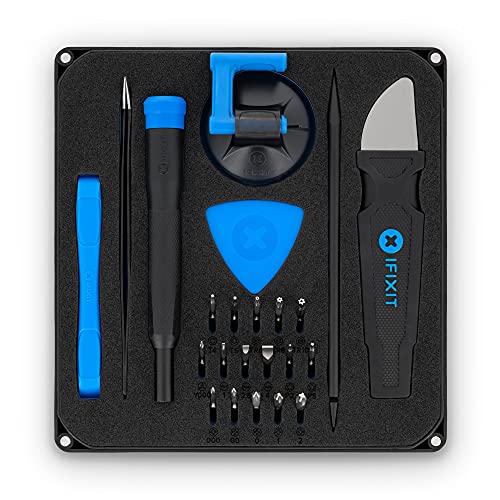 iFixit Essential Electronics Toolkit









