We independently review everything we recommend. When you buy through our links, we may earn a commission. As an Amazon Associate we earn from qualifying purchases.
Best Budget WiFi Routers for Home and Apartment Use
Compare the best budget WiFi 6 routers for homes and apartments, covering range, speeds, mesh options, security features and easy setup tips for buyers.
Compare the best budget WiFi 6 routers for homes and apartments, covering range, speeds, mesh options, security features and easy setup tips for buyers.
⭐ Key Takeaways
Quick answer: Our top pick is TP-Link Archer AX21 AX1800 Dual Band WiFi 6 Router, with TP-Link Archer AX55 AX3000 Dual Band WiFi 6 Router as a strong alternative.
A budget WiFi 6 router is the single most effective upgrade for a home network still running an aging router from an internet provider. WiFi 6 brings OFDMA and MU-MIMO, two technologies that keep speeds steadier when phones, laptops, TVs and smart home gadgets all compete at once. The five routers below cover small apartments through multi-room houses, and all support the WPA3 security standard. Each entry notes the speed class, the app or web setup route, and any mesh expansion options, so the router chosen today can still fit the home a few years from now.
As an Amazon Associate, we earn from qualifying purchases.
Quick answer
Most homes should pick the TP-Link Archer AX55 for its AX3000 speed class and headroom, while smaller apartments are well served by the Archer AX21 or the Asus RT-AX1800S. The Asus RT-AX55 suits buyers who want AiMesh expansion, and the Netgear R6700AX fits households that prefer the Nighthawk app for setup and controls.
TP-Link Archer AX21 AX1800 Dual Band WiFi 6 Router
Top Pick
TP-Link Archer AX21 AX1800 Dual Band WiFi 6 Router
The Archer AX21 is the entry point to WiFi 6 in this lineup, with an AX1800 rating split between the 2.4GHz and 5GHz bands. Four external antennas with beamforming focus signals toward connected devices instead of broadcasting in every direction, which helps in apartments where the router sits at one end of the floor plan. OFDMA lets the router serve several devices in a single transmission window, cutting the lag spikes that appear when a household streams, games and video-calls at the same time. Setup runs through the TP-Link Tether app or a browser, and the router supports WPA3 encryption alongside the older standards for legacy gadgets. A VPN server and client are built in, which is uncommon at this level. The AX21 lacks a USB port and does not join TP-Link’s OneMesh system, so buyers planning a mesh expansion later should look at the AX55 below instead. For a one- or two-bedroom home replacing a provider router, though, the AX21 covers the essentials: modern WiFi 6 radios, gigabit ports, parental controls and a mature app, all in a compact case that disappears onto a shelf.
TP-Link Archer AX55 AX3000 Dual Band WiFi 6 Router
Runner-Up
TP-Link Archer AX55 AX3000 Dual Band WiFi 6 Router
The Archer AX55 steps up to the AX3000 class, roughly doubling the 5GHz throughput of AX1800 models, which matters for homes with gigabit internet plans or heavy local traffic such as game downloads and media servers. It keeps the four-antenna layout with beamforming and adds OFDMA plus MU-MIMO across both bands, so crowded households see steadier speeds at peak hours. A USB 3.0 port allows simple file sharing from an attached drive, a feature missing from most budget rivals. The AX55 supports TP-Link OneMesh, meaning a compatible range extender can later form a single-network mesh instead of a separate network name. HomeShield provides basic network security scanning and parental controls without extra hardware. Setup through the Tether app takes a few minutes, and the web interface remains available for advanced settings like port forwarding and dynamic DNS. Buyers with a large home should still plan router placement centrally, since no single budget router defeats thick masonry walls. Within its class, the AX55 is the most complete package here: faster radios, mesh expandability, a USB port and current security features in one box.
The RT-AX1800S brings Asus networking features to the budget tier, starting with AiMesh support that lets this router pair with other AiMesh models to build a whole-home mesh over time. Its AX1800 radios match the Archer AX21 on paper, with MU-MIMO and OFDMA keeping multiple devices fed on both bands. AiProtection Classic, powered by Trend Micro, adds malicious-site blocking and infected-device detection without a subscription for the core features, which sets it apart from rivals that lock security behind paid tiers. Parental controls include time scheduling and content categories, managed through the Asus Router app or a detailed web interface that advanced users will appreciate for its logging and traffic analysis. The design is a low, wide chassis with four fixed antennas that sits neatly on a media console. Buyers should note there is no USB port, so printer and drive sharing are off the table. For households already owning an Asus router, the RT-AX1800S doubles as an affordable way to add a mesh node or replace an older unit while keeping the same management app and feature set.
The RT-AX55 is the slightly older sibling of the RT-AX1800S, and it remains widely available with the same AX1800 WiFi 6 specification. Four antennas, MU-MIMO and OFDMA cover the fundamentals, and AiMesh support means two of these units, or a mix with other AiMesh routers, can blanket a larger home under one network name with roaming between nodes. AiProtection provides network security assessments and blocking of malicious sites, while the parental controls handle scheduling for children’s devices. The Asus web interface is one of the most detailed in the budget class, exposing adaptive quality-of-service settings that prioritize gaming or streaming traffic, plus a guest network with time limits. There is no USB port on this model either, so buyers needing drive sharing should step up to the TP-Link AX55. Where the RT-AX55 makes sense is value: it frequently anchors Asus-based home networks as either the main router in an apartment or a satellite node in a mesh. Buyers comparing the two Asus models should choose based on which design and firmware generation they prefer, since real-world wireless performance is closely matched.
The R6700AX carries the Netgear Nighthawk lineage into the budget WiFi 6 class with a four-stream AX1800 design. Its radios combine OFDMA, MU-MIMO and beamforming, and Netgear rates the unit for homes that stream to several screens at once. Setup and management run through the Nighthawk app, which presents device lists, speed checks and guest network controls in plain language that suits less technical owners. Netgear Armor, the subscription security service powered by Bitdefender, is offered on this model for households that want threat protection across every connected device, though the router works fully without it. Four gigabit Ethernet ports and a separate gigabit WAN port cover wired needs for a TV, console and desktop. The upright design with four external antennas occupies more shelf presence than the flat Asus and TP-Link units. Buyers who dislike subscription prompts should know the app promotes Armor during setup, but it can be declined. As a straightforward single-router upgrade from a trusted networking brand with a friendly app, the R6700AX is an easy recommendation for apartments and modest houses.
How to choose
Match the speed class to the internet plan and home size first: AX1800 routers suit apartments and plans up to a few hundred megabits, while AX3000 adds headroom for gigabit service and busy households. Count the devices that connect at peak times, because OFDMA and MU-MIMO matter more than headline speed once dozens of gadgets share the air. Decide whether mesh expansion is likely, and pick a router inside that ecosystem now, since OneMesh, AiMesh and standalone systems do not mix. Check for WPA3 support for current security, and confirm enough gigabit ports remain for wired devices like TVs and consoles. Finally, consider the management app, because updates, guest networks and parental controls all live there long after setup day.
Who should skip
Homes larger than about three bedrooms with dead zones should skip single routers entirely and buy a mesh kit designed for whole-home coverage. Gamers chasing the lowest possible latency on WiFi 6E or WiFi 7 hardware should look at higher tiers. Anyone whose provider gateway already delivers WiFi 6 and covers the home well gains little. Buyers needing multi-gig ports for very fast fiber plans should also step up.
Frequently asked questions
Is WiFi 6 noticeably faster than an older WiFi 5 router?
In a quiet single-device setting the difference can be modest, but WiFi 6 pulls ahead as devices multiply. OFDMA and MU-MIMO let a WiFi 6 router talk to several gadgets efficiently instead of queueing them, so video calls stay smooth while someone else streams or downloads. Homes replacing a provider-supplied WiFi 5 box usually feel the improvement most during busy evening hours.
Can one budget router cover a whole house?
It depends on construction and layout. A centrally placed AX1800 or AX3000 router usually covers an apartment or a small single-story house. Thick walls, multiple floors and metal ducting shrink range quickly, and no software setting fixes physics. In those homes, choosing a router with mesh support now makes adding a node later painless instead of starting over.
What is the difference between AX1800 and AX3000?
The number approximates the combined theoretical throughput across both bands. AX1800 models split roughly 574 megabits on 2.4GHz and 1201 on 5GHz, while AX3000 raises the 5GHz side substantially. Real speeds are always lower, but the higher class gives more headroom when several fast devices share the 5GHz band or the internet plan itself is very quick.
Should the router from the internet provider be replaced or kept?
Many households keep the provider modem and replace only the routing and WiFi duties by switching the gateway to bridge mode, or simply connect the new router and turn off the old WiFi. Renting a gateway month after month often costs more than a budget router over a couple of years, and owning the router means settings and updates stay under household control.
Final verdict
The TP-Link Archer AX55 is the strongest all-round pick here for its speed class, USB port and OneMesh expansion. Apartment dwellers can save with the Archer AX21 or either Asus model, both of which bring AiMesh as their expansion route, while the Netgear R6700AX suits buyers who value a guided app experience from a familiar networking brand.
E
Emubox Editorial Team
We compare specs, materials and verified owner reviews before a product earns a spot. Rankings are never paid.
Affiliate disclosure. As an Amazon Associate we earn from qualifying purchases at no extra cost to you. Prices accurate as of the date shown.
Best 2mm 70 cm portable antennas compared: telescopic radio antennas near 70 cm, with connectors, bands and collapsed sizes explained before you buy today.
Find the best thermostat setting for winter and summer, with energy-saving setbacks, humidity tips, and smart schedules for a comfortable home year-round.
The best affordable business computer monitors balance sharp text, eye comfort and lasting value. Compare four reliable office displays built for long workdays.
Looking for the best inexpensive HD TVs non smart? Compare five genuinely non-smart HD televisions with tuners, HDMI inputs and simple setup for any small room.

 TP-Link Archer AX21 AX1800 Dual Band WiFi 6 Router
 TP-Link Archer AX55 AX3000 Dual Band WiFi 6 Router
 Asus RT-AX1800S Dual Band WiFi 6 Router
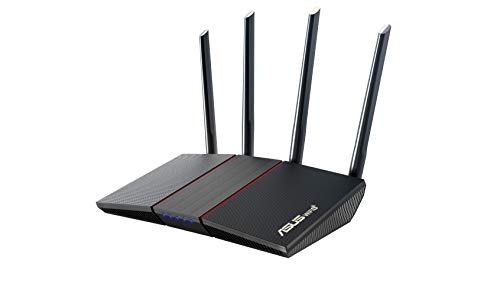 Asus RT-AX55 AX1800 Dual Band WiFi 6 Router
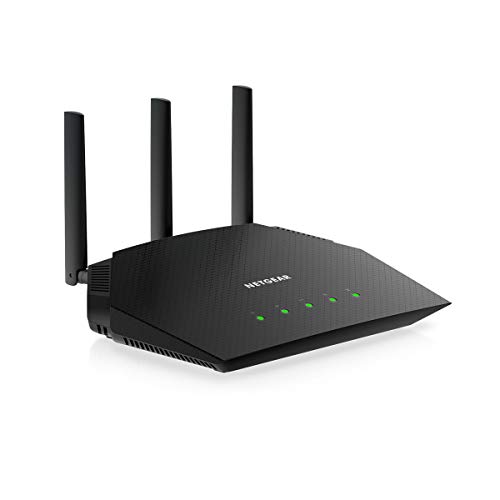 Netgear R6700AX 4-Stream AX1800 WiFi 6 Router









