We independently review everything we recommend. When you buy through our links, we may earn a commission. As an Amazon Associate we earn from qualifying purchases.
Best Budget Routers: 5 Picks for Fast Home WiFi 2026
Compare five budget routers for home WiFi, from an affordable WiFi 5 pick to WiFi 6 models with gigabit ports, mesh support, and parental controls.
As an Amazon Associate, we earn from qualifying purchases.
A slow router shows up everywhere at home: video calls freeze, streams buffer, and a download in one room drags the whole network down. The best budget router for most homes is the TP-Link Archer AX21, because it brings WiFi 6, four gigabit LAN ports, and mesh expansion to a budget tier. If your internet plan is modest and your home is small, the TP-Link Archer AX10 costs less and still covers the basics with WiFi 6. The TP-Link Archer AX55 steps up to AX3000 class, and the NETGEAR R6700AX offers AX1800 class with a different app. The TP-Link Archer A7 rounds out the list as the WiFi 5 value pick for homes that do not need the newest standard yet.
Every router below is a standalone dual-band unit that needs a separate modem for most cable and DSL connections.
Start with the WiFi standard. WiFi 6 routers handle many connected devices more efficiently than WiFi 5 routers, because the newer standard uses OFDMA and MU-MIMO to share airtime between devices instead of serving them strictly one at a time. WiFi 5 still works well for lighter households, and it usually costs less, but WiFi 6 is the safer long-term buy.
Next, match the speed class to your internet plan. The speed class is a combined peak figure across both bands, not a speed you will see on a single device. An AX1500 or AX1800 router suits plans up to gigabit speed for everyday use, while an AX3000 router adds headroom on the 5 GHz band for large downloads and local file transfers.
Then think about coverage. A single router covers a small to medium home well when it sits near the center, out in the open, and away from thick walls and metal shelving. For a large home, pick a router with mesh expansion so you can add a node later instead of replacing the whole unit.
Security and parental controls deserve a look before you order. WPA3 encryption is the current standard, and every WiFi 6 router here supports it. Parental controls let you pause internet access for a device, set schedules, and block categories of sites from the companion app, which is handy in a family home. A guest network is also worth having, because it lets visitors online without giving them access to your shared drives and printers.
Finally, check the setup path and the ports you need. All five routers here are set up through a phone app, with a web interface as a backup, and all of them need a separate modem unless your provider supplies a combined gateway. A USB port for shared storage or a printer is a useful bonus, and the Archer A7, the Archer AX55, and the R6700AX each include one.
TP-Link Archer AX21
Top Pick
TP-Link Archer AX21
WiFi standard: WiFi 6 (802.11ax), dual-band
Speed class: AX1800, up to 574 Mbps on 2.4 GHz and 1201 Mbps on 5 GHz
Antennas: 4 high-gain external antennas
Wired ports: 1 gigabit WAN port, 4 gigabit LAN ports
The TP-Link Archer AX21 is the best budget router for most homes, because it pairs WiFi 6 with gigabit wired ports, four adjustable antennas, and mesh expansion at a budget tier. Its AX1800 class splits into 574 Mbps on the 2.4 GHz band and 1201 Mbps on the 5 GHz band, which covers streaming, video calls, and online gaming on a typical home plan.
Setup runs through the TP-Link Tether app, which walks you through connecting the modem, naming the network, and setting a password in a few minutes. HomeShield adds basic network security, and the router supports VPN server use for reaching your home network while you are away. EasyMesh support means you can add a compatible TP-Link node later if a far bedroom turns into a dead spot.
The TP-Link Archer A7 is the value pick for homes that want a dependable router at the lowest tier in this roundup. It uses WiFi 5, so it skips the efficiency gains of WiFi 6, but its AC1750 class still delivers 450 Mbps on the 2.4 GHz band and 1300 Mbps on the 5 GHz band. That is enough for streaming in high definition, video calls, and everyday browsing on a modest internet plan.
Three external antennas cover a small home or apartment well, and the four gigabit LAN ports handle a wired desktop, a console, and a TV box without a separate switch. The single USB port supports shared storage and printer sharing. OneMesh support lets the A7 join a mesh network with compatible TP-Link extenders, so coverage can grow later without replacing the router. It uses WPA2 rather than WPA3.
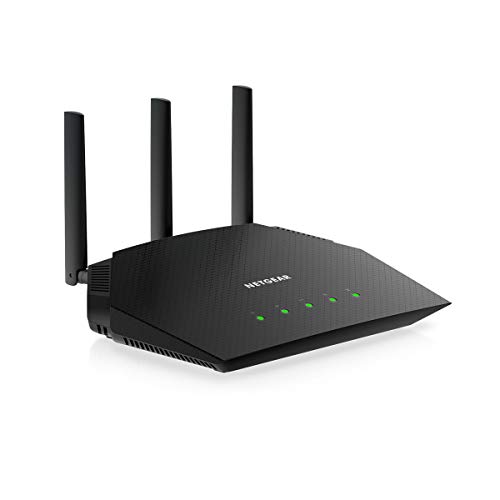
The NETGEAR R6700AX is the pick for buyers who prefer the Nighthawk app and the NETGEAR security bundle over the TP-Link ecosystem. It is a 4-stream AX1800 WiFi 6 router, rated for up to 600 Mbps on the 2.4 GHz band and 1200 Mbps on the 5 GHz band, and NETGEAR rates it for homes up to 1,500 square feet with up to 20 connected devices.
The Nighthawk app handles setup, speed testing, device pausing, and remote management. NETGEAR Armor is included as a 30-day trial, with Smart Parental Controls alongside it, and the router supports WPA3 encryption, a double firewall, and VPN use. A single USB 3.0 port covers shared storage and printer sharing, and the four gigabit LAN ports take care of wired devices such as a desktop or a game console.
The TP-Link Archer AX55 is the fastest budget router in this roundup, moving up to AX3000 class with 2402 Mbps on the 5 GHz band and 574 Mbps on the 2.4 GHz band. The jump comes from 160 MHz channels on the 5 GHz band, which gives large downloads and local transfers more room than the AX1800 models.
Four antennas and beamforming carry the signal across a small to medium home, and the four gigabit LAN ports cover wired devices while the USB 3.0 port handles shared storage and printer sharing. HomeShield provides network security, parental controls, and quality of service, and the router supports both VPN clients and a VPN server. EasyMesh support keeps the door open for adding a mesh node later, and WPA3 encryption is included.
The TP-Link Archer AX10 is the cheapest WiFi 6 router in this roundup, and the right pick when the budget is tight but you still want the newer standard. Its AX1500 class delivers 300 Mbps on the 2.4 GHz band and 1201 Mbps on the 5 GHz band, which covers browsing, streaming, and video calls in a small home or apartment.
WiFi 6 features are all present: OFDMA and MU-MIMO share the network between devices, beamforming aims the signal at connected gear, and WPA3 encryption protects the network. Four antennas provide steady coverage for a small space, and the four gigabit LAN ports handle wired devices such as a desktop or a console. Setup runs through the Tether app, and parental controls and a guest network are included.
Yes, in most cases. The routers in this roundup are standalone routers, so they need a modem or a gateway supplied by your internet provider to reach the internet. Connect the modem to the WAN port with an Ethernet cable, then run the setup app. If your provider gave you a combined modem and router unit, ask whether it can run in bridge mode.
Is WiFi 6 worth it on a budget router?
WiFi 6 is worth it when many devices share the network, because OFDMA and MU-MIMO divide airtime more efficiently than WiFi 5. A single phone or laptop will not show a dramatic difference, but a household with phones, laptops, TVs, and smart home gear will notice fewer stalls at busy times.
What speed class should I buy for my internet plan?
Match the class to the plan and the home, not to the biggest number on the box. An AX1500 or AX1800 router suits most plans up to gigabit speed for everyday streaming, calls, and browsing. An AX3000 router adds headroom on the 5 GHz band for large downloads and local transfers.
Can I extend coverage later with a mesh node?
Yes, when the router supports a mesh system. The TP-Link models in this roundup support EasyMesh or OneMesh, so you can add a compatible node to cover a far bedroom or a home office. Place the node halfway between the router and the dead spot, out in the open, and let the app guide the pairing.
Conclusion
The best budget router for most homes is the TP-Link Archer AX21, because it covers the everyday job with WiFi 6, gigabit ports, and mesh expansion at a budget tier. Buy the TP-Link Archer AX10 when the space is small and the plan is modest, or the TP-Link Archer A7 when the lowest tier matters more than the newest standard. Choose the NETGEAR R6700AX when you prefer the Nighthawk app and the NETGEAR security bundle, and step up to the TP-Link Archer AX55 when you want AX3000 headroom for heavy streaming and large downloads. Place it centrally, keep its firmware updated, and check your modem matches.
E
Emubox Editorial Team
We compare specs, materials and verified owner reviews before a product earns a spot. Rankings are never paid.
Affiliate disclosure. As an Amazon Associate we earn from qualifying purchases at no extra cost to you. Prices accurate as of the date shown.
Best 2mm 70 cm portable antennas compared: telescopic radio antennas near 70 cm, with connectors, bands and collapsed sizes explained before you buy today.
Find the best thermostat setting for winter and summer, with energy-saving setbacks, humidity tips, and smart schedules for a comfortable home year-round.
The best affordable business computer monitors balance sharp text, eye comfort and lasting value. Compare four reliable office displays built for long workdays.
Looking for the best inexpensive HD TVs non smart? Compare five genuinely non-smart HD televisions with tuners, HDMI inputs and simple setup for any small room.



 TP-Link Archer AX55
 TP-Link Archer AX10









