We independently review everything we recommend. When you buy through our links, we may earn a commission. As an Amazon Associate we earn from qualifying purchases.
Best Budget UPS Units for Home PCs and Routers in 2026
Five budget UPS units compared for home PCs and routers: battery capacity, outlets, sine wave output, and runtime, so you can choose the right backup.
As an Amazon Associate, we earn from qualifying purchases.
The best budget UPS for most home setups is the APC Back-UPS BE600M1, because it pairs 600VA of battery backup with seven outlets and a USB charging port in a compact tower, and it keeps a typical desktop and monitor running long enough for a safe shutdown. If you only need to keep a router and modem online, the smaller APC BE425M costs less and does the job, while the CyberPower CP1500AVRLCD3 is the pick for a full workstation with monitors and external drives attached.
A UPS, or uninterruptible power supply, is a battery backup that keeps your electronics running for a few minutes when the power drops, so you can save your work and shut down safely instead of losing it to a sudden cut. Choosing one starts with adding up the wattage of everything you plan to plug into the battery-backed outlets.
Capacity is listed in volt-amps, or VA, and in watts, and the watt figure is the one that matters. A desktop PC with a monitor typically draws between 150 and 300 watts under normal use, a laptop draws far less, and a router with a modem draws only a small amount.
Waveform matters for some equipment. Budget UPS units usually produce a stepped approximated sine wave on battery power, which works fine for most desktop PCs, monitors, and routers. Pure sine wave output, found on the APC BR1000MS in this roundup, is preferred for equipment with active power factor correction power supplies, such as many modern gaming PCs.
Outlets come in two kinds. Battery-backed outlets keep devices running during an outage, while surge-only outlets protect against spikes but go dark when the power fails. Count how many devices need battery backup before you buy, and leave space for bulky power adapters, which can block neighboring outlets. Automatic voltage regulation, or AVR, corrects low or high line voltage without switching to battery power. A USB data port lets the UPS signal your computer to shut down automatically when the battery runs low.
The APC Back-UPS BE425M is the smallest UPS in this roundup, and it is the sensible pick when your goal is simply to keep a router, modem, and a small piece of home office equipment online through a short outage. Its 425VA rating and 255-watt output ceiling rule out a full desktop tower, but it is a compact standby UPS built for low-power electronics, and it does that job without taking up much desk or floor space.
APC rates the BE425M for up to 15 minutes of runtime at a 100-watt load, enough to ride out most brief interruptions and keep a home network running while you wait for the power to return. Six outlets split into four battery-backed and two surge-only, so the router and modem get backup power while a printer or lamp gets surge protection only. The unit carries a three-year warranty with a connected-equipment protection policy, but its battery is not user replaceable, so the whole unit needs replacing when the battery eventually wears out.
Specs
Capacity: 425VA / 255W
Outlets: 6 total, 4 battery backup and surge, 2 surge-only
The APC Back-UPS BE600M1 is the best budget UPS for most home setups, because it hits the sweet spot between capacity, outlet count, and size. Its 600VA rating and 330-watt output cover a modest desktop PC with a monitor, or a router, modem, and laptop together, and its compact tower fits easily under a desk or beside a media console.
APC rates the BE600M1 for up to 23 minutes of runtime at a 100-watt load, a generous window for saving work and shutting down in an orderly way. Five of the seven outlets provide battery backup and surge protection, while the remaining two are surge-only. A built-in USB charging port is a practical extra during an outage, letting you keep a phone topped up while the network stays online. The unit is ENERGY STAR certified, and its battery cartridge is user replaceable. It uses a stepped approximated sine wave on battery power, which suits standard desktop PCs, monitors, and routers, though it does not include automatic voltage regulation.
Specs
Capacity: 600VA / 330W
Outlets: 7 total, 5 battery backup and surge, 2 surge-only
Topology: Standby
Runtime: Up to 23 minutes at a 100-watt load
Battery: Sealed lead-acid, user replaceable, cartridge APCRBC154
The CyberPower EC850LCD Ecologic is a strong mid-range choice for a home office that runs a desktop, a monitor, and several peripherals. Its 850VA rating and 510-watt output give it noticeably more headroom than the two APC units above, and its twelve outlets, six battery-backed and six surge-only, suit a desk where a PC, monitor, and external drive need backup power while a printer, speakers, and lamp only need surge protection.
The EC850LCD includes an LCD panel that shows load level, battery capacity, and estimated runtime. Its ECO mode automatically cuts power to peripheral outlets when the connected computer enters sleep or shutdown, which reduces standby power draw from accessories that would otherwise sit idle. The unit works with CyberPower PowerPanel Personal software, which can trigger an automatic graceful shutdown of your computer when the battery runs low. This is a standby UPS with a simulated sine wave output, so it suits standard desktop equipment rather than systems that demand pure sine wave power.
Specs
Capacity: 850VA / 510W
Outlets: 12 total, 6 battery backup and surge, 6 surge-only
Topology: Standby
Display: Multifunction LCD showing load and runtime
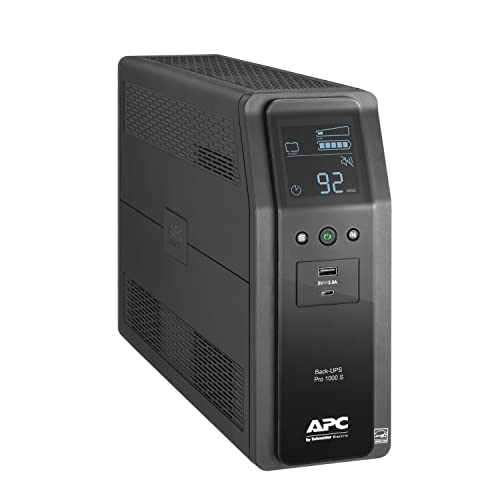
The APC Back-UPS Pro BR1000MS is the pick in this roundup for anyone whose PC needs pure sine wave power. Its 1000VA rating and 600-watt output handle a gaming PC or a workstation with a monitor and external storage, and its pure sine wave output is compatible with active power factor correction power supplies that can struggle with the stepped waveform of cheaper units. Automatic voltage regulation corrects sags and surges without draining the battery.
Ten outlets split into six battery-backed and four surge-only, and the unit adds both USB-C and USB-A charging ports for phones and tablets during an outage. An LCD display shows load, runtime, and voltage, and the battery cartridge is user replaceable, so the unit can stay in service for years. The BR1000MS is a tower unit with a larger footprint than the budget APC models, so measure your space before ordering. Its capacity is more than a router-only setup needs, but for a performance PC, the pure sine wave output and AVR justify the step up to the premium tier.
Specs
Capacity: 1000VA / 600W
Outlets: 10 total, 6 battery backup and surge, 4 surge-only
Topology: Line interactive with automatic voltage regulation
Waveform: Pure sine wave
Display: LCD showing load, runtime, and voltage
Battery: Sealed lead-acid, user replaceable, cartridge APCRBC160
The CyberPower CP1500AVRLCD3 is the highest-capacity UPS in this roundup, and it is the right choice for a full workstation that you cannot afford to lose to a power cut. Its 1500VA rating and 900-watt output cover a powerful desktop, two monitors, an external drive, and networking gear at the same time, with headroom to spare. Twelve outlets, six battery-backed and six surge-only, give you room to protect everything on the desk without juggling plugs.
Automatic voltage regulation smooths out brownouts and overvoltage without switching to battery, which preserves battery life and keeps the unit ready for a real outage. The multifunction LCD displays load level, battery capacity, and estimated runtime, and two USB charging ports keep phones and tablets powered during a blackout. PowerPanel Personal software connects over USB and can shut the computer down automatically when the battery runs low. The CP1500AVRLCD3 is a mini-tower unit with a substantial footprint, so it belongs on the floor beside a desk rather than on top of it. Its simulated sine wave output suits most desktop equipment.
Specs
Capacity: 1500VA / 900W
Outlets: 12 total, 6 battery backup and surge, 6 surge-only
Topology: Line interactive with automatic voltage regulation
Display: Multifunction LCD showing load, battery, and runtime
Battery: Sealed lead-acid, user replaceable
Waveform: Simulated sine wave
Charging: 2 USB charging ports
Software: PowerPanel Personal Edition
Tier: Premium
Which Budget UPS Should You Buy
Start by adding up the wattage of the devices you need to keep running, then pick a UPS whose watt rating exceeds that total with room to spare. For a router and modem only, the APC BE425M is enough and takes up the least space. For a home office with a desktop and monitor, the APC BE600M1 is the balanced pick, and the CyberPower EC850LCD is the better choice if you have many peripherals. If your PC has an active power factor correction power supply, choose the APC BR1000MS for its pure sine wave output. If you run a powerful workstation with multiple monitors, the CyberPower CP1500AVRLCD3 gives you the most capacity and the most outlets. Whichever unit you choose, plug only the devices that must stay on into the battery-backed outlets.
Frequently Asked Questions
How long will a budget UPS keep my computer running?
Runtime depends on the load. A budget UPS typically keeps a desktop and monitor running for several minutes, and a router and modem for much longer, because the load is far smaller. Manufacturers publish runtime at a fixed load, such as a 100-watt load, so use that figure as a planning reference.
What size UPS do I need for a home PC?
Add up the wattage of your PC, monitor, and any other device you want on battery backup, then choose a UPS whose watt rating is higher than that total. A basic desktop with one monitor usually fits within a 600VA unit, while a gaming PC with a large monitor and external drives needs 1000VA or more.
Is a pure sine wave UPS better than a simulated sine wave UPS?
Pure sine wave output is smoother and is the safer choice for equipment with active power factor correction power supplies, which some modern PCs and workstations use. Simulated sine wave output, also called stepped approximated sine wave, works fine for most standard desktop PCs, monitors, routers, and home entertainment gear.
Do I need to replace the battery in my UPS?
Yes, the sealed lead-acid battery inside a UPS wears out after a few years of use, and runtime will shorten as it ages. Most of the units in this roundup have user-replaceable batteries, so you can swap in a new cartridge and keep using the same UPS. The APC BE425M is the exception here, because its battery is not user replaceable.
Conclusion
A budget UPS is one of the most practical upgrades for a home PC or network setup, because it turns a sudden blackout from a data-loss event into a calm, orderly shutdown. The APC BE600M1 is the best all-round pick for most homes, the APC BE425M covers a router and modem at the lowest tier, and the CyberPower EC850LCD adds outlet count and an LCD display for busier desks. For demanding systems, the APC BR1000MS brings pure sine wave output and automatic voltage regulation, while the CyberPower CP1500AVRLCD3 delivers the most capacity and outlets in this roundup. Measure your load, count your outlets, and choose the unit that fits your equipment.
E
Emubox Editorial Team
We compare specs, materials and verified owner reviews before a product earns a spot. Rankings are never paid.
Affiliate disclosure. As an Amazon Associate we earn from qualifying purchases at no extra cost to you. Prices accurate as of the date shown.
Best 2mm 70 cm portable antennas compared: telescopic radio antennas near 70 cm, with connectors, bands and collapsed sizes explained before you buy today.
Find the best thermostat setting for winter and summer, with energy-saving setbacks, humidity tips, and smart schedules for a comfortable home year-round.
The best affordable business computer monitors balance sharp text, eye comfort and lasting value. Compare four reliable office displays built for long workdays.
Looking for the best inexpensive HD TVs non smart? Compare five genuinely non-smart HD televisions with tuners, HDMI inputs and simple setup for any small room.

 APC Back-UPS BE425M
 APC Back-UPS BE600M1
 CyberPower EC850LCD Ecologic
 APC Back-UPS Pro BR1000MS
 CyberPower CP1500AVRLCD3









