We independently review everything we recommend. When you buy through our links, we may earn a commission. As an Amazon Associate we earn from qualifying purchases.
Best Budget NAS Drives: 5 Top Picks for Home Storage 2026
Compare the best budget NAS enclosures for home backups, media streaming, and private cloud storage. Five diskless models, key specs, and buying tips.
A network attached storage enclosure turns a pair of hard drives into a private cloud on your home network, and the best budget NAS for most homes is the Synology DiskStation DS223j, because it pairs the polished DiskStation Manager software with a simple two-bay design at a budget tier. If you want faster networking, the Asustor Drivestor 2 Gen2 AS1202T adds a 2.5GbE port, while the UGREEN NASync DXP2800 adds an Intel processor, generous memory, and M.2 slots for heavier media and app duties. Every model below is a diskless desktop enclosure, so you buy the drives separately.
A NAS earns its place when it quietly handles backups, photo storage, and media streaming without demanding constant attention. The five enclosures below cover that job from the cheapest polished option to the most capable two-bay Synology.
Quick Comparison
Model
Bays
Processor
Memory
Network
Tier
Synology DiskStation DS223j
2
Realtek RTD1619B quad-core
1 GB DDR4
1GbE
Budget
TerraMaster F2-212
2
Realtek RTD1619B quad-core
1 GB DDR4
1GbE
Budget
Asustor Drivestor 2 Gen2 AS1202T
2
Realtek RTD1619B quad-core
1 GB DDR4
2.5GbE
Budget
UGREEN NASync DXP2800
2 plus 2 M.2 slots
Intel N100 quad-core
8 GB DDR5
2.5GbE
Mid-range
Synology DiskStation DS225+
2 plus 2 M.2 slots
Intel Celeron J4125 quad-core
2 GB DDR4, expandable to 6 GB
2.5GbE
Premium
How to Choose a Budget NAS
Start with the number of drive bays. Two bays suit most homes, because a mirrored pair protects your files if one drive fails, and two high-capacity drives hold years of photos, documents, and video. Four-bay units cost more and make sense only when your library is already large or several people store big media collections on the same box.
Next, look at the processor and memory. ARM-based models with 1 GB of memory handle file storage, backups, and light media streaming without trouble, and they draw little power while doing it. An Intel-based model with more memory is the better pick when you want to run a media server that transcodes video, host containers or virtual machines, or serve several users at the same time.
Networking is the third decision. A 1GbE port moves files fast enough for backups and photo libraries, and it matches the wired network in most homes. A 2.5GbE port moves data noticeably faster when the rest of your network supports it. Software matters as much as hardware: check that the apps you need are available on the platform you choose, and remember that every enclosure here ships diskless, so budget for two NAS-rated drives.
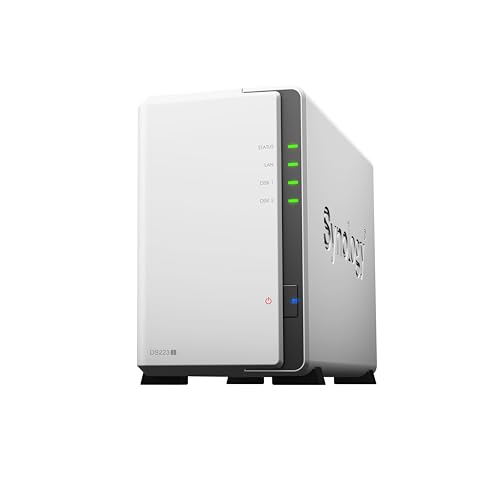
The Synology DiskStation DS223j is the simplest route into a proper home NAS, and it is the pick for households that want reliable backups and file sharing without a learning curve. DiskStation Manager is the most polished NAS software in this roundup, with clear setup wizards, automatic phone photo backup, and a wide library of add-on packages for media, surveillance, and cloud sync.
Two drive bays accept 3.5-inch SATA hard drives or 2.5-inch SATA SSDs, with up to 44 TB of raw capacity across the pair. The single 1GbE port matches the wired network in most homes, and two USB 3.2 Gen 1 ports take an external drive for extra backups. Btrfs snapshots guard against accidental deletion and ransomware. Memory is fixed at 1 GB, so heavy multitasking and video transcoding are outside its comfort zone, and there is no 2.5GbE port or M.2 slot. For plain file storage, scheduled backups, and direct media playback, none of that matters.
Specs
Drive bays: 2 x 3.5-inch or 2.5-inch SATA, diskless
Processor: Realtek RTD1619B quad-core, 1.7 GHz
Memory: 1 GB DDR4, non-upgradeable
Network: 1 x 1GbE RJ-45 port
USB ports: 2 x USB 3.2 Gen 1
File systems: Btrfs and EXT4, with snapshot support
The TerraMaster F2-212 is the budget pick for buyers who want flexible storage options and do not mind learning a slightly less polished interface. Its headline feature is TRAID, TerraMaster’s flexible RAID system, which lets you mix drive capacities and expand the array later without rebuilding it from scratch.
Under the lid sits the same Realtek RTD1619B quad-core processor found in several budget rivals, paired with 1 GB of DDR4 memory. Two tool-free drive trays accept 3.5-inch and 2.5-inch SATA drives, with up to 44 TB of raw capacity across the pair, and the TOS 5 operating system supports Btrfs, snapshots, and two-way sync with public cloud services such as Google Drive and Dropbox. A 1GbE port handles everyday file transfers and backups. Its app library covers the basics, including media serving and surveillance, though it is smaller than the catalogs offered by the bigger NAS brands.
Specs
Drive bays: 2 x 3.5-inch or 2.5-inch SATA, diskless
Processor: Realtek RTD1619B quad-core, 1.7 GHz
Memory: 1 GB DDR4, non-upgradeable
Network: 1 x 1GbE RJ-45 port
File systems: Btrfs and EXT4, with snapshot support
The Asustor Drivestor 2 Gen2 AS1202T is the budget pick for households that want faster networking without paying a mid-range tier. Its single 2.5GbE port moves files more than twice as fast as a standard gigabit connection when the rest of your network supports it, which makes a real difference when you back up large photo libraries or move video projects between computers.
The hardware follows the familiar budget formula, with a Realtek RTD1619B quad-core processor and 1 GB of DDR4 memory, but Asustor pairs it with a three-year warranty, which is longer than the coverage on most rivals at this tier. The ADM operating system supports Btrfs snapshots, hardware encryption, and a solid range of apps for backup, media, and surveillance. Two bays accept 3.5-inch hard drives, so a mirrored pair gives you protected storage for years of family photos and documents.
Specs
Drive bays: 2 x 3.5-inch SATA, diskless
Processor: Realtek RTD1619B quad-core, 1.7 GHz
Memory: 1 GB DDR4, non-upgradeable
Network: 1 x 2.5GbE RJ-45 port
USB ports: 3 x USB 3.2 Gen 1, 5 Gbps
File systems: EXT4 and Btrfs, with snapshot support
The UGREEN NASync DXP2800 is the mid-range pick for homes that want a NAS to do more than store files. An Intel N100 quad-core processor and 8 GB of DDR5 memory give it the headroom to run a media server, host Docker containers, and serve several users at once, and the 2.5GbE port keeps large transfers moving. Two M.2 NVMe slots add SSD caching or extra fast storage alongside the two SATA bays, and a 4K HDMI port lets the unit connect directly to a TV for local playback.
UGREEN’s UGOS operating system covers the essentials: automatic phone and computer backups, photo management, remote access, and file sharing, with app support for media servers and virtual machines. The DXP2800 suits a household that streams a large media library, keeps a home lab, or backs up several computers every night. The UGOS app catalog is still growing compared with the long-established Synology and Asustor stores, so buyers who want the widest app choice should weigh that trade.
Specs
Drive bays: 2 x 3.5-inch or 2.5-inch SATA, diskless
M.2 slots: 2 x M.2 NVMe
Processor: Intel N100 quad-core
Memory: 8 GB DDR5
Network: 1 x 2.5GbE RJ-45 port
Video output: 1 x 4K HDMI
USB ports: USB ports for external drives and peripherals
Features: Docker and virtual machine support, media server apps
The Synology DiskStation DS225+ is the premium pick in this roundup and the successor to the popular DS224+, built for households that want the full DiskStation Manager experience with room to grow. An Intel Celeron J4125 quad-core processor with integrated graphics handles media transcoding, while 2 GB of DDR4 memory expands to 6 GB when you want to run more services side by side. Two M.2 NVMe slots support SSD caching or extra storage volumes, and a 2.5GbE port moves large backups and media files quickly.
Two drive bays accept 3.5-inch SATA hard drives or 2.5-inch SATA SSDs, and Btrfs snapshots, Active Backup, and Surveillance Station turn the box into a backup hub, a photo library, and a camera recorder in one. The DS225+ makes sense when a NAS is central to the household rather than a side project, and buyers who only need plain file storage will get everything they need from the DS223j for less.
Specs
Drive bays: 2 x 3.5-inch or 2.5-inch SATA, diskless
M.2 slots: 2 x M.2 NVMe
Processor: Intel Celeron J4125 quad-core, 2.0 GHz with burst up to 2.7 GHz
Memory: 2 GB DDR4, expandable to 6 GB
Network: 1 x 2.5GbE RJ-45 port
USB ports: 2 x USB 3.2 Gen 1
File systems: EXT4 and Btrfs, with snapshot support
Two high-capacity drives in a mirrored RAID 1 array suit most households, because the mirror protects your files if one drive fails, and you can replace the drives with larger ones later.
Do budget NAS enclosures come with hard drives?
No, every enclosure in this roundup ships diskless, so the drives are a separate purchase. Check the maker’s compatibility list before ordering, and choose NAS-rated drives built for always-on use.
Is a 2.5GbE port worth it on a budget NAS?
A 2.5GbE port is worth it when the rest of your network can use it, such as a 2.5GbE switch or a computer with a matching network adapter. Transfers of large video files and multi-computer backups finish noticeably faster. If every device in your home connects at gigabit speed or over Wi-Fi, a 1GbE port is enough.
Can a budget NAS stream video to a TV?
Yes, most budget NAS units can stream video to a TV, a media player, or a phone through apps such as Plex or the maker’s own media software. Direct playback of common formats works well even on ARM-based models, while transcoding video into a different format on the fly needs an Intel-based model such as the UGREEN DXP2800 or the Synology DS225+.
Conclusion
The best budget NAS for most homes is the Synology DiskStation DS223j, because it combines the most polished software in this roundup with a simple two-bay design at a budget tier. The TerraMaster F2-212 suits buyers who value flexible TRAID storage, and the Asustor Drivestor 2 Gen2 AS1202T is the pick when faster 2.5GbE networking and a longer warranty matter most. Households that want to run media servers, containers, or several services at once should step up to the UGREEN NASync DXP2800, while the Synology DiskStation DS225+ is the most capable two-bay option for a home that wants one box to handle it all.
Whichever model you choose, buy two NAS-rated drives, set up a mirrored array, and turn on automatic backups for every phone and computer in the house. A budget NAS pays for itself the first time it saves a photo library or a work folder that would otherwise be gone.
E
Emubox Editorial Team
We compare specs, materials and verified owner reviews before a product earns a spot. Rankings are never paid.
Affiliate disclosure. As an Amazon Associate we earn from qualifying purchases at no extra cost to you. Prices accurate as of the date shown.
Best 2mm 70 cm portable antennas compared: telescopic radio antennas near 70 cm, with connectors, bands and collapsed sizes explained before you buy today.
Find the best thermostat setting for winter and summer, with energy-saving setbacks, humidity tips, and smart schedules for a comfortable home year-round.
The best affordable business computer monitors balance sharp text, eye comfort and lasting value. Compare four reliable office displays built for long workdays.
Looking for the best inexpensive HD TVs non smart? Compare five genuinely non-smart HD televisions with tuners, HDMI inputs and simple setup for any small room.

 Synology DiskStation DS223j
 TerraMaster F2-212
 UGREEN NASync DXP2800
 Synology DiskStation DS225+









