
Our Short List of 3
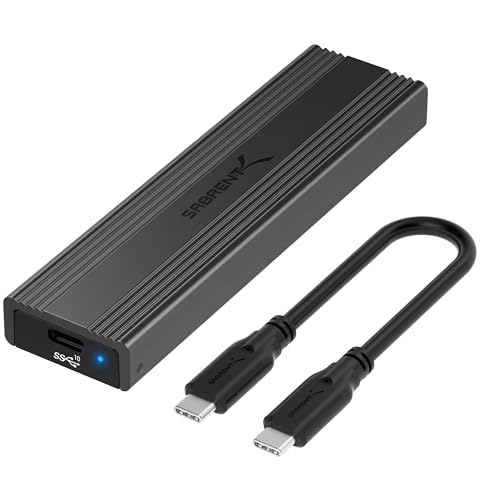
- Best for: One enclosure that reads both NVMe and SATA M.2 drives.

- Best for: A dual-protocol enclosure with a screw-secured drive mount.

- Best for: A rugged, water-resistant enclosure for travel and field use.
All 4 Picks at a Glance
| Product | Specs | Action |
|---|---|---|
| SABRENT EC-SNVE Tool-Free M.2 Enclosure |
| Check price on Amazon |
| SSK SHE-C325 PRO M.2 NVMe and SATA Enclosure |
| Check price on Amazon |
| ASUS Cobble M.2 SSD Enclosure |
| Check price on Amazon |
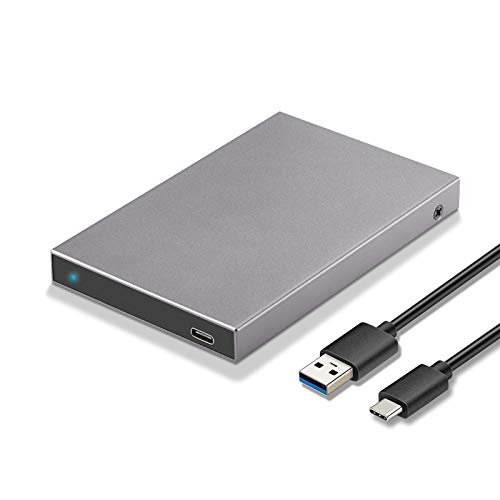 SSK HE-C600 2.5-Inch SATA Enclosure |
| Check price on Amazon |
Key takeaways
- Turn a spare SSD into fast portable storage with these five budget SSD enclosures, covering M.2 NVMe, M.2 SATA, and 2.5-inch drives over USB-C.
- Top Pick: SABRENT EC-SNVE Tool-Free M.2 Enclosure
- Runner-up: SSK SHE-C325 PRO M.2 NVMe and SATA Enclosure
- Also consider: ASUS Cobble M.2 SSD Enclosure
As an Amazon Associate, we earn from qualifying purchases.
The best budget SSD enclosure for most people is the SABRENT EC-SNVE, because it reads both M.2 NVMe and M.2 SATA drives, installs without tools, and connects over USB 3.2 Gen 2 at up to 10Gbps. For a 2.5-inch SATA SSD, the SSK HE-C600 is the pick, and the ASUS Cobble is the premium choice for a rugged, water-resistant case. Every enclosure below holds a bare drive you already own.
Table of Contents
- How to Choose a Budget SSD Enclosure
- Quick Comparison
- SABRENT EC-SNVE Tool-Free M.2 Enclosure
- UGREEN 10Gbps M.2 NVMe Enclosure
- SSK SHE-C325 PRO M.2 NVMe and SATA Enclosure
- ASUS Cobble M.2 SSD Enclosure
- SSK HE-C600 2.5-Inch SATA Enclosure
- Frequently Asked Questions
- Conclusion
- Product and ASIN Reference
How to Choose a Budget SSD Enclosure
Start with the drive, because the enclosure must match its shape and protocol. M.2 drives use either NVMe, which runs over PCIe, or SATA. An NVMe-only enclosure cannot read a SATA M.2 drive, so buyers with an older laptop drive should pick a dual-protocol enclosure such as the SABRENT EC-SNVE. Length matters too: most M.2 drives are 2280, or 22 mm wide and 80 mm long, but shorter 2242, 2260, and 2230 drives exist, and the SSK SHE-C325 PRO fits 2242, 2260, and 2280, while the SABRENT EC-SNVE and the UGREEN 90541 also accept 2230 drives.
Next, check the USB interface. A USB 3.2 Gen 2 port runs at up to 10Gbps, and an enclosure rated for that speed can move data at around 1,000 MB/s with a fast NVMe drive, while a Gen 1 port caps the same enclosure at 5Gbps. For a 2.5-inch SATA drive, the ceiling is 6Gbps by design, and the SSK HE-C600 matches it. UASP support helps the enclosure use the available bandwidth, and TRIM support keeps write speeds healthy over time.
Cooling matters during long transfers. An aluminum shell acts as a heat sink, and a thermal pad inside the case moves heat from the drive into the shell. The UGREEN 90541 adds a silicone sleeve for grip, while the ASUS Cobble adds an IP55 rating for dust and water resistance. Tool-free designs open with a latch or a sliding cover, while screw-secured designs such as the SSK SHE-C325 PRO need the included screwdriver.
Quick Comparison
| Enclosure | Drive Type | Interface | Max Speed | Install |
|---|---|---|---|---|
| SABRENT EC-SNVE | M.2 NVMe and SATA | USB 3.2 Gen 2 | 10Gbps | Tool-free |
| UGREEN 90541 | M.2 NVMe only | USB 3.2 Gen 2 | 10Gbps | Tool-free |
| SSK SHE-C325 PRO | M.2 NVMe and SATA | USB 3.2 Gen 2 | 10Gbps | Screw-secured |
| ASUS Cobble | M.2 NVMe and SATA | USB 3.2 Gen 2 | 10Gbps | Tool-free |
| SSK HE-C600 | 2.5-inch SATA | USB 3.2 Gen 2 | 6Gbps | Slide-in |
SABRENT EC-SNVE Tool-Free M.2 Enclosure
- Best for: One enclosure that reads both NVMe and SATA M.2 drives.
One enclosure that reads both NVMe and SATA M.2 drives.
The SABRENT EC-SNVE is the most flexible enclosure in this roundup. It accepts M.2 NVMe and M.2 SATA drives in 2230, 2242, 2260, and 2280 lengths, so one case covers the drive from an older SATA laptop and the NVMe drive from a newer machine. The Realtek RTL9210B bridge chip handles both protocols, the USB 3.2 Gen 2 connection runs at up to 10Gbps, and installation is fully tool-free: the case opens like a clamshell, the drive drops into the slot, and the cover closes over it, with a thermal pad inside pressing against the drive to move heat into the aluminum shell. The case measures about 118 mm long, 32 mm wide, and 9 mm thick, weighs 63 grams, and supports drives up to 8TB. Note that one product description in circulation says this model does not support SATA drives, but Sabrent lists the EC-SNVE for both protocols. Confirm the listing names model EC-SNVE, because the close sibling EC-TFNE reads NVMe drives only.
Specs
- Model: EC-SNVE
- ASIN: B08RVC6F9Y
- Drive support: M.2 NVMe and M.2 SATA, 2230/2242/2260/2280
- Interface: USB 3.2 Gen 2, up to 10Gbps
- Bridge chip: Realtek RTL9210B
- Max drive capacity: Up to 8TB
- Body: Aluminum shell with ABS frame
- Dimensions: 118 x 32 x 9 mm
- Weight: 63 grams
- Install: Tool-free clamshell, thermal pad included
UGREEN 10Gbps M.2 NVMe Enclosure
Best for: A simple, low-cost home for a spare NVMe drive.
The UGREEN 10Gbps M.2 NVMe Enclosure, model 90541, is the straightforward pick for a bare NVMe drive. It connects over USB 3.2 Gen 2 at up to 10Gbps and accepts M-key and B+M-key NVMe drives in 2230, 2242, 2260, and 2280 sizes up to 8TB. The Realtek RTL9210 bridge chip supports UASP and TRIM, the aluminum shell works as a heat sink, and installation is tool-free: the drive slides into the slot and the short buckle cover snaps shut. UGREEN includes both a USB-C to USB-C cable and a USB-C to USB-A cable, so it works with newer laptops and older machines with only USB-A ports. A thermal pad and a silicone sleeve are in the box, and the sleeve adds grip and bump protection. The one hard limit is protocol: this model reads NVMe drives only and does not support SATA NGFF or mSATA drives, so anyone reusing an older SATA M.2 drive should pick the SABRENT EC-SNVE or the SSK SHE-C325 PRO. Confirm model number 90541 on the listing, because UGREEN sells similar 20Gbps and 40Gbps enclosures under close names.
Specs
- Model: 90541
- ASIN: B09T97Z7DM
- Drive support: M.2 NVMe, M-key and B+M key, 2230/2242/2260/2280
- Interface: USB 3.2 Gen 2, up to 10Gbps
- Bridge chip: Realtek RTL9210
- Max drive capacity: Up to 8TB
- Body: Aluminum shell with silicone sleeve
- Cables: USB-C to USB-C and USB-C to USB-A included
- Install: Tool-free, thermal pad included
- Systems: Windows, macOS, Linux, Android, iOS
SSK SHE-C325 PRO M.2 NVMe and SATA Enclosure
- Best for: A dual-protocol enclosure with a screw-secured drive mount.
A dual-protocol enclosure with a screw-secured drive mount.
The SSK SHE-C325 PRO is the only enclosure in this roundup whose ASIN was confirmed on a live Amazon product page, and it is the longest-running model here, first listed in December 2018. It reads both M.2 NVMe and M.2 SATA drives in 2242, 2260, and 2280 lengths, at up to 10Gbps for NVMe and 6Gbps for SATA. The improved RTL9210B chip supports UASP and TRIM, and the aluminum case measures 115 x 39 x 11 mm and weighs 3.52 ounces. Installation uses screws rather than a tool-free latch, and a screwdriver, screws, washer, thermal pads, and two data cables are in the box. The screw mount holds the drive firmly, which suits a drive that stays in the enclosure for months at a time. A copper strip and a thermal pad press the drive against the aluminum shell, and a plastic spring inside the case lifts the drive slightly so the pad makes contact. It supports plug and play and hot-swapping on Windows and macOS. Short 2230 drives do not fit, so buyers with a 2230 drive should pick the SABRENT EC-SNVE or the UGREEN 90541. One crawled copy of the listing showed no featured offers available, so confirm the listing is in stock before ordering.
Specs
- Model: SHE-C325 PRO
- ASIN: B07MNFH1PX
- Drive support: M.2 NVMe and M.2 SATA, 2242/2260/2280
- Interface: USB 3.2 Gen 2, up to 10Gbps
- Bridge chip: Realtek RTL9210B
- Max drive capacity: 4TB
- Body: Aluminum alloy
- Dimensions: 115 x 39 x 11 mm
- Weight: 3.52 ounces
- Install: Screw-secured, screwdriver and thermal pads included
ASUS Cobble M.2 SSD Enclosure
- Best for: A rugged, water-resistant enclosure for travel and field use.
A rugged, water-resistant enclosure for travel and field use.
The ASUS Cobble is the premium pick in this roundup, and it earns that spot with durability rather than raw speed. The tool-free case carries an IP55 rating for water and dust resistance, so rain and dusty bags are less of a worry. The built-in dual-protocol chip reads both NVMe and SATA M.2 drives in 2230, 2242, 2260, and 2280 sizes, and the USB-C 3.2 Gen 2 connection runs at up to 10Gbps. The aluminum body doubles as a cooling surface, and screw-free installation swaps a drive in seconds. ASUS lists the Cobble for PS5, MacBook, and Windows machines, which makes it practical for moving game captures or project files between a console and a computer. The model number is ESD-A1A, and the black colorway is the listing covered here. Confirm the listing names the Cobble and the ESD-A1A model, because ASUS sells other storage products under similar names.
Specs
- Model: ESD-A1A (ASUS Cobble, Black)
- ASIN: B0F1DXBGGK
- Drive support: M.2 NVMe and M.2 SATA, 2230/2242/2260/2280
- Interface: USB-C 3.2 Gen 2, up to 10Gbps
- Body: Aluminum, IP55 water and dust resistant
- Install: Tool-free, screw-free
- Systems: PS5, MacBook, Windows
- Warranty: 1 year
SSK HE-C600 2.5-Inch SATA Enclosure
- Best for: Reusing a 2.5-inch SATA SSD or hard drive from an old laptop.
Reusing a 2.5-inch SATA SSD or hard drive from an old laptop.
The SSK HE-C600 covers the drive type the M.2 enclosures cannot: the 2.5-inch SATA SSD or hard drive. It accepts 7 mm and 9.5 mm thick 2.5-inch SATA drives and connects over USB-C 3.2 Gen 2 at up to 6Gbps, matching the SATA interface speed. UASP support is included, and the aluminum case protects the drive in a bag. The enclosure is listed as compatible with drives from WD and Seagate and with PS4, PS5, and Xbox consoles, so an old laptop drive can become game storage or a backup. The HE-C600 is the second SSK product here, and the two serve different jobs: the SHE-C325 PRO holds M.2 drives, while the HE-C600 holds 2.5-inch drives. Measure the drive before ordering, because thicker 12.5 mm and 15 mm laptop drives do not fit the 7 mm and 9.5 mm bay. The listing was first available in August 2019.
Specs
- Model: HE-C600
- ASIN: B08TQMWC2X
- Drive support: 2.5-inch SATA SSD or HDD, 7 mm and 9.5 mm thick
- Interface: USB-C 3.2 Gen 2, up to 6Gbps
- Body: Aluminum
- Features: UASP support
- Systems: Windows, macOS, PS4, PS5, Xbox
Frequently Asked Questions
Do I need to buy a drive with the enclosure?
No. Every enclosure in this roundup is an empty case that holds a bare drive you already own, and it connects to a computer over USB. A new drive must be initialized, partitioned, and formatted before it appears.
Will an NVMe enclosure work with a SATA M.2 drive?
Only a dual-protocol enclosure reads both. The SABRENT EC-SNVE, the SSK SHE-C325 PRO, and the ASUS Cobble accept NVMe and SATA M.2 drives. while the UGREEN 90541 reads NVMe drives only.
What speed should I expect from a budget enclosure?
A USB 3.2 Gen 2 enclosure runs at up to 10Gbps, or around 1,000 MB/s with a fast NVMe drive, while a USB 3.2 Gen 1 port caps the same enclosure at 5Gbps. A 2.5-inch SATA enclosure tops out at 6Gbps because the SATA interface itself sets the limit.
Does the enclosure need drivers or extra power?
No. These enclosures are plug and play on Windows and macOS and draw power from the USB port, so no power adapter is needed. A new drive still needs formatting before first use, and buyers should always eject the drive safely before unplugging it.
Conclusion
A budget SSD enclosure is a cheap way to give a spare drive a second life. The SABRENT EC-SNVE is the best all-around pick because it reads both NVMe and SATA M.2 drives without tools. The UGREEN 90541 is the simple choice for a spare NVMe drive, the SSK SHE-C325 PRO is the sturdy dual-protocol option with a screw-secured mount, the ASUS Cobble adds water and dust resistance for travel, and the SSK HE-C600 covers 2.5-inch SATA drives. Match the enclosure to the drive shape and protocol first, and confirm the model number before ordering.









