We independently review everything we recommend. When you buy through our links, we may earn a commission. As an Amazon Associate we earn from qualifying purchases.
Best Budget Portable SSDs for Fast, Reliable Storage
Compare the best budget portable SSDs, from pocketable drives to rugged travel models, and find fast, reliable storage for files, photos, and games.
Compare the best budget portable SSDs, from pocketable drives to rugged travel models, and find fast, reliable storage for files, photos, and games.
⭐ Key Takeaways
Quick answer: Our top pick is Samsung T7 Portable SSD 1TB, Gray (MU-PC1T0T/AM), with Samsung T7 Shield Portable SSD 1TB, Black (MU-PE1T0S/AM) as a strong alternative.
A portable SSD is the fastest simple way to move large files between computers, back up a photo library, or expand a laptop that is running out of space. Compared with portable hard drives, SSDs transfer files several times faster, survive drops without moving parts to damage, and fit in a pocket. Budget models have settled around a common speed class, so the real differences are ruggedness, size, encryption, and how fast a drive can go when paired with a newer computer.
The five drives below come from Samsung, SanDisk, and Crucial, the brands that dominate this category. Four share the same everyday speed class, while the Samsung T9 shows what the next interface generation adds for computers that support it.
As an Amazon Associate, we earn from qualifying purchases.
Quick answer
The Samsung T7 is the best budget portable SSD for most people: it is fast over the USB ports almost every computer already has, small enough for any pocket, and protected by a metal shell and optional password encryption. Buyers who work outdoors or travel hard should step up to the armored Samsung T7 Shield instead.
The Samsung T7 is the drive that defined the modern budget portable SSD. Its aluminum unibody is about the size of a credit card and weighs 58 grams, yet Samsung rates it to survive drops of up to two meters onto hard surfaces. Over its USB 3.2 Gen 2 connection it reaches sequential read speeds of up to 1,050 MB/s and write speeds of up to 1,000 MB/s when paired with a compatible computer, which means a typical game install or a folder of camera raw files moves in a fraction of the time a portable hard drive needs. Optional password protection with AES 256-bit hardware encryption keeps the contents private if the drive is lost. Both USB-C to C and USB-C to A cables are included, so it connects to modern laptops and older desktops alike. This drive suits students, office workers, and photographers who want one fast, pocketable drive for daily carry. The trade-offs are a smooth metal shell that can slide off a desk and pick up scratches, no water or dust resistance rating for outdoor work, and speeds that drop on older USB ports, as with every drive in this class.
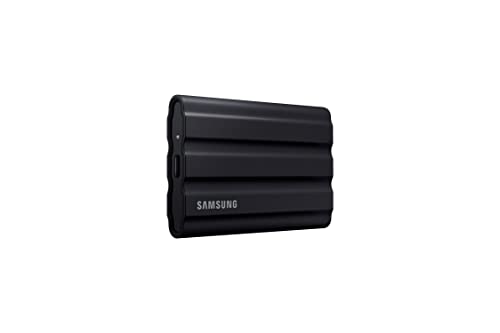
Samsung T7 Shield Portable SSD 1TB, Black (MU-PE1T0S/AM)
Runner-Up
Samsung T7 Shield Portable SSD 1TB, Black (MU-PE1T0S/AM)
The Samsung T7 Shield takes the same core performance as the standard T7 and wraps it in armor for rougher use. Its elastomer rubber shell carries an IP65 rating against dust and water jets, and Samsung rates the drive for drops of up to three meters, a meter more than the standard model. Inside, the numbers match its sibling: read speeds up to 1,050 MB/s and writes up to 1,000 MB/s over USB 3.2 Gen 2, with the same optional password protection and AES 256-bit hardware encryption. The textured rubber exterior also solves the standard T7’s slipperiness, gripping the hand and the desk instead of skating across both. The Shield weighs a little more and is slightly thicker, but it remains an easy pocket carry. This is the version to choose for field work, construction sites, outdoor photography, festival production, or a bag that gets thrown into trucks and checked luggage. The trade-offs are the bulkier shell, a surface texture that attracts dust and lint in a pocket, and no benefit at all for buyers whose drive will simply live on a desk, where the standard T7 covers the same job in a slimmer body.
The SanDisk Extreme Portable SSD is the T7 family’s most direct rival, and it answers with a rubberized, travel-ready design of its own. It matches the class-standard speeds, up to 1,050 MB/s reads and 1,000 MB/s writes over USB 3.2 Gen 2, and adds an IP55 rating against dust and water along with drop protection rated to two meters. A built-in carabiner loop in the corner lets the drive clip to a camera bag or backpack strap, a small detail that frequent travelers appreciate. Password protection with 256-bit AES hardware encryption is available through SanDisk’s software for Windows and Mac. The drive is compact and light, with a soft-touch finish that resists scratches better than bare aluminum. This model suits photographers, videographers, and travelers who want a drive that tolerates weather and baggage handling while staying small. The trade-offs are a slightly lower water and dust rating than the T7 Shield, a short included cable that can be awkward with desktop towers, and encryption that relies on the companion software being installed on each computer where the feature is used.
Crucial X9 Pro 2TB Portable SSD (CT2000X9PROSSD902)
Crucial X9 Pro 2TB Portable SSD (CT2000X9PROSSD902)
The Crucial X9 Pro stands out in this guide for capacity and size. This configuration doubles the storage of the other drives here to 2TB, inside an anodized aluminum enclosure that measures only about 65 by 50 millimeters, small enough to disappear into a coin pocket. Performance matches the class standard, with read and write speeds up to 1,050 MB/s over USB 3.2 Gen 2, and Crucial rates the drive for drops up to two meters. A lanyard hole is built into the corner for clipping or tying the drive down in a busy workspace. It works across Windows, Mac, Linux, Android, and game consoles, and ships with a USB-C cable. This drive suits anyone whose library has outgrown 1TB, such as video editors keeping project archives, console gamers storing a full library, or families backing up several computers onto one device. The trade-offs are the absence of a water or dust resistance rating, no hardware encryption feature for sensitive files, and a single short USB-C cable in the box, so owners of older USB-A computers will need an adapter or a separate cable before the drive can connect.
The Samsung T9 is the speed option in this guide, built for computers with the newest USB ports. It uses a USB 3.2 Gen 2×2 interface to reach sequential read and write speeds of up to 2,000 MB/s, roughly double the other drives here, when the host computer supports that standard. A carbon-patterned rubberized shell protects against drops of up to three meters and spreads heat during long transfers, and the drive keeps the T7 family’s optional password protection with AES 256-bit hardware encryption. Samsung includes USB-C to C and USB-C to A cables, and the T9 works with computers, tablets, cameras, and consoles. This drive suits video editors moving footage daily, anyone with a recent desktop or laptop confirmed to have a Gen 2×2 port, and buyers who want the fastest transfers available in a pocket drive today. The trade-off is important and easy to miss: most laptops, including many current models, lack Gen 2×2 ports, and on a standard Gen 2 port the T9 performs at the same level as the cheaper T7. It also gives up the Shield’s water resistance rating despite the rugged shell.
How to choose
Check the ports on your computer before anything else. A USB 3.2 Gen 2 port unlocks the full speed of the T7, T7 Shield, SanDisk Extreme, and X9 Pro. The T9’s double speed needs the rarer Gen 2×2 port, so confirm your machine actually has one before paying for that headroom; on other ports it runs at Gen 2 pace. Older USB-A ports still work with the right cable but cap every drive well below its rating.
Capacity is the next decision. One terabyte handles documents, photos, and a working set of games comfortably, while video projects and full game libraries justify the X9 Pro’s 2TB. Remember that a backup drive should be larger than the data it protects.
Then match ruggedness to the job. Desk-bound drives need no rating at all. Regular travel argues for drop protection, and outdoor or jobsite use argues for the T7 Shield’s IP65 seal. Finally, decide whether hardware encryption matters: the Samsung and SanDisk drives offer password protection, while the Crucial trades that feature away for size and capacity.
Who should skip
A portable SSD is not always the right purchase. Anyone who only stores documents and a modest photo collection will be served for years by a far simpler USB flash drive or a cloud plan. Archival storage that will sit untouched in a drawer is more economical on a portable hard drive, which still offers more terabytes for the money. Console owners should also confirm their system actually plays games from external storage rather than only storing them, since that limitation is set by the console, not the drive. And if the goal is backing up a computer, a single portable drive is a copy, not a backup strategy; important data deserves a second copy somewhere else.
FAQ
Will a portable SSD work with an older computer that only has USB-A ports?
Yes. The Samsung and SanDisk drives in this guide include a USB-C to A cable, and adapters or cables are widely available for the Crucial X9 Pro. The drive will simply run at the speed of the older port, which is still much faster than a portable hard drive, and it will speed up automatically when connected to a newer machine later.
What is the difference between the Samsung T7 and T7 Shield?
They share the same core performance, capacity options, and encryption. The Shield adds an IP65 dust and water resistance rating, a higher three-meter drop rating, and a grippy rubber shell, in exchange for a slightly larger and heavier body. Desk users can save the difference with the standard T7; travelers and outdoor workers get real value from the Shield’s protection.
Can a portable SSD store and play console games?
It depends on the console and the game generation. External SSDs are widely used to store games and to play titles built for older console generations, while many current-generation games must run from internal storage or an approved expansion card and can only be archived externally. Check the console maker’s current rules for the specific games in your library before buying a drive for that purpose.
How long will a portable SSD last?
Portable SSDs have no moving parts, so they tolerate travel and drops far better than hard drives, and typical consumer use rarely wears the flash memory out within the useful life of the drive. Longevity depends more on keeping the drive dry, avoiding extreme heat, and maintaining a second copy of important files, since any single device can be lost or damaged regardless of its technology.
Final verdict
The Samsung T7 is the default recommendation for fast, pocketable storage, and the T7 Shield is the same idea hardened for travel and outdoor work. The SanDisk Extreme matches them closely with a travel-friendly loop and finish, the Crucial X9 Pro is the pick when 2TB and the smallest body matter most, and the Samsung T9 is worth it only when a computer with a Gen 2×2 port can use its double speed.
E
Emubox Editorial Team
We compare specs, materials and verified owner reviews before a product earns a spot. Rankings are never paid.
Affiliate disclosure. As an Amazon Associate we earn from qualifying purchases at no extra cost to you. Prices accurate as of the date shown.
Best 2mm 70 cm portable antennas compared: telescopic radio antennas near 70 cm, with connectors, bands and collapsed sizes explained before you buy today.
Find the best thermostat setting for winter and summer, with energy-saving setbacks, humidity tips, and smart schedules for a comfortable home year-round.
The best affordable business computer monitors balance sharp text, eye comfort and lasting value. Compare four reliable office displays built for long workdays.
Looking for the best inexpensive HD TVs non smart? Compare five genuinely non-smart HD televisions with tuners, HDMI inputs and simple setup for any small room.

 Samsung T7 Portable SSD 1TB, Gray (MU-PC1T0T/AM)
 Samsung T7 Shield Portable SSD 1TB, Black (MU-PE1T0S/AM)
 Crucial X9 Pro 2TB Portable SSD (CT2000X9PROSSD902)
 Samsung T9 Portable SSD 1TB, Black (MU-PG1T0B/AM)









