We independently review everything we recommend. When you buy through our links, we may earn a commission. As an Amazon Associate we earn from qualifying purchases.
Best Budget Ergonomic Mice: 5 Picks That Ease Wrist Strain
Compare five budget ergonomic mice, from vertical wireless picks to the contoured Sculpt, and find the shape, grip, and DPI range that fit your desk.
As an Amazon Associate, we earn from qualifying purchases.
The best budget ergonomic mouse is the Anker 2.4G Wireless Vertical Ergonomic Optical Mouse, because it puts the hand in a natural handshake position and covers everyday office work with three DPI levels and five buttons. If you want Bluetooth multi-device switching, the TECKNET TK-MS007 adds that plus six DPI levels, while the Microsoft Sculpt Ergonomic Mouse suits buyers who prefer a contoured horizontal shape instead of a vertical grip. The Logitech Lift Vertical steps up to a quieter click and a 57-degree angle for small to medium hands, and the Logitech MX Vertical is the premium pick, with a rechargeable battery, a 4000 DPI sensor, and a cursor speed switch.
An ergonomic mouse changes the angle of your hand, not the way you work. A vertical mouse rotates the forearm into a handshake position, keeping the wrist closer to neutral. A contoured mouse keeps a familiar flat orientation but shapes the shell so the palm rests higher and the thumb sits in a scoop. The five mice below cover both shapes and a range of hand sizes.
Match the shape to your hand first. A vertical mouse holds the hand upright, which suits buyers whose wrist feels twisted flat on a desk. A contoured mouse such as the Sculpt keeps the hand lower and adds a thumb scoop, which suits buyers who want support without learning a new grip. Small to medium hands fit a compact design like the Lift; larger hands fit the taller MX Vertical. Check the published dimensions against your own hand.
Next, weigh the connection. A 2.4 GHz USB receiver gives a simple plug-and-play link with one computer and no pairing step. Bluetooth lets one mouse pair with a laptop, a tablet, and a desktop, and switch between them. Dual-mode mice cover both. Rechargeable mice charge over USB-C, while a mouse that runs on a single AA battery can keep going for months on one cell.
DPI range decides how far the cursor travels for a given hand movement. A 1600 DPI ceiling is enough for documents, email, and browsing on a single display. A 4000 or 4800 DPI ceiling gives finer control on large displays and a slower setting for precise work. Extra buttons help too: forward and back buttons speed up browsing, and a dedicated DPI button changes sensitivity without opening software. Finally, confirm the exact listing before you buy, because makers sell similar model names in several colors and revisions, and the model number is the reliable identifier.
The Anker 2.4G Wireless Vertical Ergonomic Optical Mouse is the simplest way into a vertical grip. The upright shape holds the hand in a handshake position, so the forearm stays closer to neutral while you work. It connects over a 2.4 GHz wireless link with an included USB receiver, so setup is plug-and-play. Three DPI levels, 800, 1200, and 1600, cover everyday office work, and five buttons include forward and back controls.
The optical sensor tracks on most desk surfaces, and the listing covers Windows and Mac computers. This is a right-hand mouse, so left-handed buyers should look elsewhere. The design is long-running, first available in early 2013. Its limits are modest: there is no Bluetooth, so it pairs with one computer at a time, and the DPI ceiling is lower than newer vertical mice.
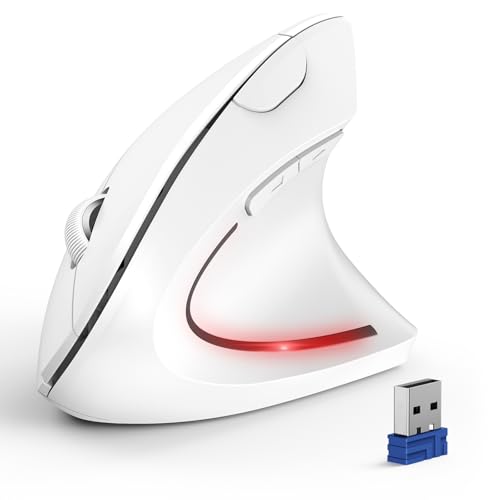
The TECKNET Ergonomic Mouse TK-MS007 is the budget pick for buyers who want modern wireless flexibility. It pairs over Bluetooth or a 2.4 GHz USB-A receiver and connects to up to three devices, which suits a desk shared by a work laptop and a home computer. Six adjustable DPI levels reach up to 4800, giving finer control on large displays and a slower setting for precise work. Quiet clicks keep the sound down in shared rooms.
The vertical shape holds the hand upright, and the listing states a battery life of up to 12 months. Buyers should confirm the exact model number before ordering, because TECKNET sells the same TK-MS007 model name under more than one listing. The shape is right-hand only, and the listing does not describe a rechargeable battery, so plan on replaceable cells.
The Microsoft Sculpt Ergonomic Mouse L6V-00001 is the pick for buyers who want ergonomic support without switching to a vertical grip. Its contoured shell raises the palm and adds a thumb scoop, so the hand rests in a more neutral position while the mouse stays in a familiar horizontal orientation. A four-way scroll wheel moves through documents and spreadsheets in any direction, and a dedicated Windows button opens the Windows menu with one press.
The Sculpt runs on two AA batteries, and the listing covers Windows computers and laptops. Because the shape is contoured rather than vertical, the adjustment period is shorter. One caution matters: the Amazon listing carries an “Is Discontinued By Manufacturer” field, so buyers should confirm the listing is in stock and sold as new before ordering. The mouse is also a right-hand design.
The Logitech Lift Vertical Ergonomic Mouse is the mid-range pick for small to medium hands. Its 57-degree angle holds the hand in a natural handshake position, the same angle as the premium MX Vertical, but the body is shorter and lighter, which suits hands that find the MX Vertical too tall. Quiet clicks soften the sound of every press, and the SmartWheel scrolls precisely and switches to fast scrolling for long pages. Four of the six buttons are customizable through Logitech software.
It connects over Bluetooth or the included Logi Bolt USB receiver and pairs with up to three devices. The sensor reaches up to 4000 DPI, and a single AA battery powers it for up to 24 months per the listing. The Graphite colorway is the standard right-hand model, model number 910-006466. There is no rechargeable battery, and the smaller body can feel cramped for very large hands.
The Logitech MX Vertical Wireless Mouse is the premium pick, with the most complete feature set in this roundup. The 57-degree vertical angle and textured rubber surface hold medium to large right hands in a natural handshake position, and the listing notes the design was shaped with criteria set out by leading ergonomists. A 4000 DPI high-precision sensor tracks with less hand movement than a standard sensor, and a cursor speed switch changes DPI instantly without opening software.
It connects over Bluetooth or the included USB receiver and moves content between three computers with Logitech Flow. The rechargeable battery lasts up to four months on a full charge, and a one-minute quick charge gives up to three hours of use. Four buttons are customizable, and the precision scroll wheel suits detailed work. The Graphite colorway is model number 910-005447. The tall body suits medium to large hands and can feel bulky for small hands.
Battery: Rechargeable, up to 4 months per the listing
Charging: USB-C, with quick charge for up to 3 hours from 1 minute
Multi-device: Up to 3 computers with Logitech Flow
Compatibility: Windows, macOS, iPadOS, Chrome OS, and Linux
Model number: 910-005447
UPC: 097855144461
ASIN: B07FNJB8TT
Frequently Asked Questions
Is a vertical mouse better than a contoured ergonomic mouse?
Neither shape is better for everyone. A vertical mouse rotates the forearm into a handshake position, which suits buyers whose wrist feels twisted when flat on a desk. A contoured mouse keeps a familiar horizontal orientation and shapes the shell around the palm. Try the angle that feels natural for your hand.
How long does it take to get used to a vertical mouse?
Most buyers adjust within a few days of regular use, because the grip is new even though the buttons and scroll wheel work the same way. Give it a full work week before deciding, and keep your old mouse nearby during the first days.
Do ergonomic mice work with Mac computers?
Most of the mice in this roundup list Windows and Mac compatibility, and the Logitech models also cover iPadOS and Chrome OS. Bluetooth models pair directly with a Mac, while 2.4 GHz models use the included USB receiver, which may need a USB-C adapter.
Can I use a budget ergonomic mouse for gaming?
A budget ergonomic mouse works for casual play, but it is built for office comfort rather than fast competitive play. Vertical mice prioritize wrist angle over flick speed, and their sensors are tuned for documents and browsing. If you play fast-paced games often, keep a dedicated gaming mouse for play.
Conclusion
The best budget ergonomic mouse for most buyers is the Anker 2.4G Wireless Vertical, which delivers the core vertical grip, simple wireless setup, and enough DPI range for office work at a budget grouping. The TECKNET TK-MS007 adds Bluetooth multi-device switching and a higher DPI ceiling. The Microsoft Sculpt suits buyers who prefer a contoured shape, while the Logitech Lift is the quiet mid-range pick for small to medium hands. The Logitech MX Vertical is the premium step up, with rechargeable power, Flow control, and a cursor speed switch. Match the shape to your hand and confirm the model number on the listing.
E
Emubox Editorial Team
We compare specs, materials and verified owner reviews before a product earns a spot. Rankings are never paid.
Affiliate disclosure. As an Amazon Associate we earn from qualifying purchases at no extra cost to you. Prices accurate as of the date shown.
Best 2mm 70 cm portable antennas compared: telescopic radio antennas near 70 cm, with connectors, bands and collapsed sizes explained before you buy today.
Find the best thermostat setting for winter and summer, with energy-saving setbacks, humidity tips, and smart schedules for a comfortable home year-round.
The best affordable business computer monitors balance sharp text, eye comfort and lasting value. Compare four reliable office displays built for long workdays.
Looking for the best inexpensive HD TVs non smart? Compare five genuinely non-smart HD televisions with tuners, HDMI inputs and simple setup for any small room.

 1. Anker 2.4G Wireless Vertical Ergonomic Optical Mouse
 2. TECKNET Ergonomic Mouse TK-MS007
 3. Microsoft Sculpt Ergonomic Mouse L6V-00001
 4. Logitech Lift Vertical Ergonomic Mouse, Graphite
 5. Logitech MX Vertical Wireless Mouse, Graphite









