We independently review everything we recommend. When you buy through our links, we may earn a commission. As an Amazon Associate we earn from qualifying purchases.
Best Budget Wireless Presenters for Smooth Presentations
Compare the best budget wireless presenters, from simple slide clickers to digital highlighting remotes, and find the range and controls for any room.
Compare the best budget wireless presenters, from simple slide clickers to digital highlighting remotes, and find the range and controls for any room.
⭐ Key Takeaways
Quick answer: Our top pick is Logitech Wireless Presenter R400, Presentation Remote Clicker with Laser…, with Logitech Spotlight Presentation Remote with Advanced Digital Highlighting… as a strong alternative.
A wireless presenter frees the speaker from the laptop. Instead of walking back to the keyboard for every slide, the presenter advances slides, blanks the screen, and points out details from anywhere in the room, which makes talks feel calmer and more connected. Budget models have covered the basics well for years, and the differences now come down to range, pointer type, and how the remote connects.
The five remotes below span the main options: two long-running Logitech designs, a feature-rich DinoFire clicker, and two Norwii models with red and green lasers. All of them work with standard presentation software on Windows and Mac without complicated setup.
As an Amazon Associate, we earn from qualifying purchases.
Quick answer
The Logitech R400 is the best budget wireless presenter for most people: it is plug and play, the buttons are easy to find without looking, and the red laser covers classroom and meeting-room duty well. Presenters who show slides on TVs and LED screens instead of projectors should consider the Logitech Spotlight and its digital pointer.
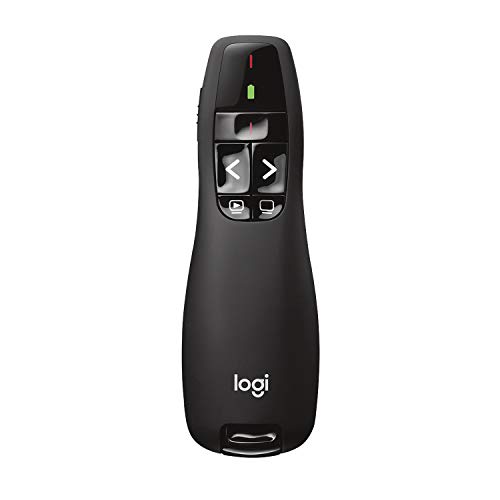
Logitech Wireless Presenter R400, Presentation Remote Clicker with Laser Pointer for PowerPoint, Black
Top Pick
Logitech Wireless Presenter R400, Presentation Remote Clicker with Laser Pointer for PowerPoint, Black
The Logitech R400 is the reference point for simple presentation remotes, and its design explains why it has stayed in production so long. The contoured body fits the palm, and the buttons are shaped and spaced so slide forward, slide back, start slideshow, and black screen can be found by touch while facing an audience. A red laser pointer handles highlighting on projector screens, and the 2.4GHz wireless connection is rated for a range of up to 50 feet, which covers most classrooms and meeting rooms. The USB receiver stores inside the remote body when not in use, so it travels safely in a laptop bag, and setup is genuinely plug and play on Windows and Mac with no software to install. Power comes from two AAA batteries with long service life, helped by an on-off switch and a battery indicator. This remote suits teachers, trainers, and office presenters who want reliability without configuration. The trade-offs are the red laser, which washes out on bright television and LED wall displays, the lack of Bluetooth for devices without a free USB port, and no extras such as a timer or digital highlighting tools.
Logitech Spotlight Presentation Remote with Advanced Digital Highlighting, Bluetooth, Black
Runner-Up
Logitech Spotlight Presentation Remote with Advanced Digital Highlighting, Bluetooth, Black
The Logitech Spotlight replaces the physical laser dot with a digital pointer that works on any screen, including the TVs and LED walls where laser pointers disappear. Paired with the Logitech Presentation software, it can highlight a circle of the slide, magnify details, and show a digital laser outline, all rendered by the computer rather than projected light. It connects over Bluetooth or its USB receiver, with a rated range of up to 100 feet, and it recharges over USB-C, with a one-minute charge providing hours of presenting. A built-in timer vibrates the remote at set points during a talk, which helps pacing without glancing at a clock. The slim metal body has just three buttons, keeping operation simple while the software handles the advanced features. This remote suits presenters who regularly speak in rooms with large modern displays, record talks, or present over video calls where a physical laser would never be seen. The trade-offs are real: the highlighting features depend on the companion software being installed and configured, the digital pointer cannot mark a plain projected wall without the app running, and it costs more effort to set up than a basic clicker.
The DinoFire D05 is a budget clicker that packs in more controls than most rivals at its level. Alongside the standard slide advance buttons and red laser pointer, it adds volume control, a hyperlink button for opening links inside PowerPoint decks, window switching, and full-screen and black-screen functions. That makes it genuinely useful for teachers and trainers whose presentations jump between slides, videos, and web pages. The 2.4GHz connection is rated for up to 100 feet of wireless range, and the laser is rated to reach much farther across large halls. The USB receiver stores in the body and works straight out of the box on Windows and Mac, with support for PowerPoint, Keynote, and Google Slides style workflows. Power comes from a single AAA battery, which is cheap and easy to replace before a big talk. This remote fits presenters who run media-heavy sessions and want one remote for everything. The trade-offs are a busier button layout that takes a session or two to learn by touch, a lightweight plastic build, and a USB-A receiver only, so newer laptops may need an adapter for the port.
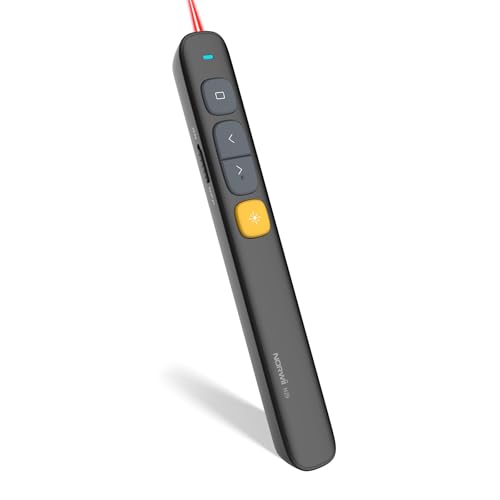
Norwii N29 Presentation Clicker with Red Laser Pointer, Black
Norwii N29 Presentation Clicker with Red Laser Pointer, Black
The Norwii N29 keeps the formula simple: a compact 2.4GHz clicker with slide controls, a red laser pointer, and plug-and-play setup through its USB receiver. The receiver tucks into the remote for storage, and the body is small and light enough to disappear into a pocket or pencil case between classes. Buttons cover the essentials, including page up and down, full screen, and black screen, so a presenter can manage a standard deck without touching the laptop. Norwii rates the wireless range generously for classroom and office distances, and the laser works on conventional projector screens and whiteboards. It runs on a single AAA battery, keeping spares cheap and easy to carry. This clicker suits students, occasional presenters, and anyone who wants a spare remote for a shared meeting room without paying for features that will never be used. The trade-offs match its simplicity: the red laser struggles on bright modern displays, there is no Bluetooth or digital highlighting, and the control set stops at the basics, so media-heavy presentations with video and links are better served by the DinoFire model above.
Norwii N95 Presentation Clicker with Green Laser Pointer
Norwii N95 Presentation Clicker with Green Laser Pointer
The Norwii N95 builds its case around a green laser pointer. Green light appears far brighter to the human eye than red at the same power, so the dot stays visible on bright projector screens, in sunlit rooms, and on many television displays where red pointers fade. That single difference makes the N95 a practical pick for lecture halls, trade show floors, and classrooms with strong ambient light. The remote itself follows the proven clicker formula: 2.4GHz wireless through a USB receiver, plug-and-play pairing with Windows and Mac, slide advance and screen controls on the body, and the receiver stored inside the remote between uses. Battery power comes from a single AAA cell. Norwii also sells versions of this model family with rechargeable batteries, so buyers should check the exact variant on the listing before ordering. This remote suits frequent presenters who work in bright spaces and have struggled to follow a red dot. The trade-offs are that a green laser still cannot match the on-screen flexibility of the Spotlight’s digital pointer, the feature set beyond the laser is basic, and like all laser pointers it should never be aimed at eyes or aircraft.
How to choose
Match the pointer to the screen first. Red lasers work well on matte projector screens in dim rooms and cost the least. Green lasers stay visible in brighter rooms and on many TV panels. Digital pointers, like the Spotlight’s, are the only option that works on every display type and on recorded or streamed presentations, but they need companion software running on the presenting computer.
Range comes next. A 50-foot rating covers most meeting rooms and classrooms; lecture halls, churches, and conference stages justify the 100-foot class. Remember that walls, podiums, and audience bodies reduce real-world range, so a receiver plugged into the front of the room helps.
Then check the controls and connection. Media-heavy talks benefit from volume and hyperlink buttons, while simple decks need only forward and back. Confirm the receiver type against the laptop: USB-A receivers may need an adapter on newer machines, while Bluetooth models avoid the dongle entirely. Finally, decide between AAA batteries, which swap in seconds, and USB-C recharging, which removes spares from the bag but needs planning before a big day.
Who should skip
Not every speaker needs a presenter remote. Anyone who presents from a lectern, shares a screen over video calls using the software’s built-in controls, or advances slides with a colleague acting as operator can skip the purchase entirely. Presenters in venues that ban laser pointers, such as some schools and event spaces, should choose a digital pointer or a laser-free clicker instead. If the presenting laptop only has USB-C ports and no adapter is available, USB-A receiver models will not connect, so a Bluetooth remote is the safer route. And for a single one-off talk, borrowing a remote or using a phone app may be more sensible than buying hardware.
FAQ
Do wireless presenters work with Google Slides and Keynote?
Yes. Standard clickers send the same page up and page down keystrokes that PowerPoint, Keynote, and Google Slides all use for slide changes, so the core functions work across all three without configuration. Extra buttons such as volume or hyperlink control can vary by program, and browser-based decks sometimes need the presentation window focused before the remote responds.
Why does a laser pointer not show up on a TV screen?
A laser dot is light projected onto a surface, and bright self-lit displays simply outshine it, especially red lasers. Camera recordings and streams also miss the dot for the same reason. Green lasers remain visible on more displays because the eye is more sensitive to green, while digital pointers like the Spotlight draw the highlight on screen through software, so they appear on every display and in recordings.
How far can a presenter remote work from the laptop?
Budget clickers are typically rated between 50 and 100 feet in open space. Real range drops with walls, metal podiums, and crowds between the remote and the receiver. For large rooms, plug the receiver into a USB port with a clear line to the stage area, and test the farthest point of the room during setup rather than discovering a dead zone mid-talk.
What batteries do presenter remotes use?
Most budget models run on one or two AAA batteries, which last for months of typical presenting and are easy to replace anywhere. Premium models such as the Spotlight use a built-in rechargeable battery charged over USB-C. Either approach works; the practical difference is whether the bag carries spare AAA cells or a charging cable and a reminder to top up before events.
Final verdict
The Logitech R400 remains the safest all-round choice for projector-based presenting, while the Spotlight is the upgrade for screens, recordings, and large modern rooms. The DinoFire D05 packs the most controls into a budget clicker, the Norwii N29 is the simple spare-remote pick, and the Norwii N95 earns its place wherever a bright green laser dot matters more than extra features.
E
Emubox Editorial Team
We compare specs, materials and verified owner reviews before a product earns a spot. Rankings are never paid.
Affiliate disclosure. As an Amazon Associate we earn from qualifying purchases at no extra cost to you. Prices accurate as of the date shown.
Best 2mm 70 cm portable antennas compared: telescopic radio antennas near 70 cm, with connectors, bands and collapsed sizes explained before you buy today.
Find the best thermostat setting for winter and summer, with energy-saving setbacks, humidity tips, and smart schedules for a comfortable home year-round.
The best affordable business computer monitors balance sharp text, eye comfort and lasting value. Compare four reliable office displays built for long workdays.
Looking for the best inexpensive HD TVs non smart? Compare five genuinely non-smart HD televisions with tuners, HDMI inputs and simple setup for any small room.


 Norwii N29 Presentation Clicker with Red Laser Pointer, Black
 Norwii N95 Presentation Clicker with Green Laser Pointer









