We independently review everything we recommend. When you buy through our links, we may earn a commission. As an Amazon Associate we earn from qualifying purchases.
Best Budget RGB Fan Kit: 5 Picks for a Brighter PC 2026
Find the best budget RGB fan kit for your build. Compare five 120mm RGB fan kits with ARGB sync, quiet PWM control, and hub or remote lighting in 2026.
Find the best budget RGB fan kit for your build. Compare five 120mm RGB fan kits with ARGB sync, quiet PWM control, and hub or remote lighting in 2026.
⭐ Key Takeaways
Quick answer: Our top pick is upHere RGB123-3 3-Pack, with Antec F12 RGB 3-Pack as a strong alternative.
The best budget RGB fan kit is the upHere RGB123-3 3-Pack. It covers the three most common case positions with quiet 120mm fans, a double RGB ring on every fan, and a SATA-powered hub that keeps wiring simple. If you want a larger kit for a full build, the EZDIY-FAB Moonlight 6-Pack gives you six fans with a hub and remote. For software-controlled lighting and stronger airflow, step up to the Corsair iCUE SP120 RGB Elite Triple Fan Kit or the Cooler Master MF120 Halo² White 3in1. Every kit below is a multi-fan RGB set built for standard 120mm case mounts, so any of them can light up a budget build without a separate controller purchase.
How to Choose a Budget RGB Fan Kit
A fan kit is different from a single fan. You get three or more matching fans in one box, plus the hub, remote, or controller that runs the lighting. That matters on a budget because buying fans one at a time costs more and leaves you mixing models. Start by counting the fan mounts in your case. Most mid-tower cases take three fans at the front, two or three at the top, and one at the rear. A three-pack covers the front intake or a front-plus-rear layout, while a five-pack or six-pack can fill a whole case in one purchase.
Standard RGB lighting changes the whole fan to one color at a time. Addressable RGB, usually written as ARGB, controls individual LEDs, so effects can flow, pulse, and fade across the fan. ARGB kits need a 5V 3-pin header on the motherboard or a hub that supplies the signal, while standard RGB kits use a 12V 4-pin header. The two voltages are not interchangeable, so check which header your motherboard has before you buy. If your board has neither, pick a kit with its own remote and hub, such as the upHere or EZDIY-FAB kits below, because the lighting runs without motherboard software.
Airflow is measured in cubic feet per minute, and higher airflow moves more warm air out of the case. Noise is measured in decibels, and lower numbers mean a quieter fan. PWM control lets the motherboard change fan speed with temperature, so fans spin slowly at idle and faster under load. A good kit also includes mounting screws for every fan, the cables to link the fans together, and the hub or controller that powers the lighting.
The upHere RGB123-3 is the simplest way to add RGB lighting to a budget build. Three 120mm fans arrive with a SATA-powered hub, so the lighting works even on a motherboard with no RGB header. Each fan carries a double RGB ring that stays visible from either side of the case, which keeps the glow even when some fans face inward as intake and others face outward as exhaust. The hydraulic bearing and rubber pads keep vibration low, and the listed noise level of 17.6 dB(A) is among the quietest figures in this roundup. The fixed speed of 1100 RPM keeps operation steady and predictable, though it gives up the fine control that PWM kits offer. For a first build or a simple refresh of an older case, this kit covers the essentials at the lowest tier in this guide.
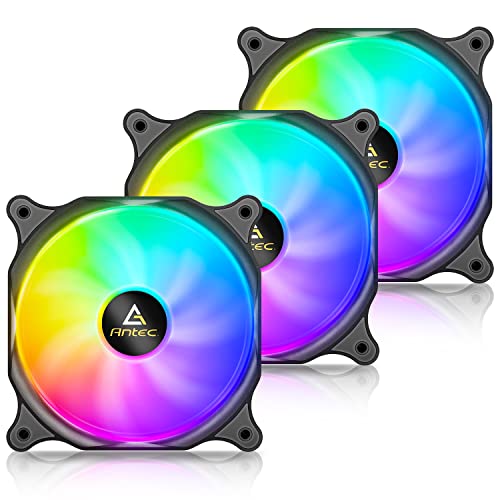
The Antec F12 RGB 3-Pack is a straightforward three-fan kit from a long-running case and cooling brand. It uses a standard 4-pin RGB connector, which suits motherboards with a 12V RGB header and builders who prefer one color across the whole case rather than flowing addressable effects. The three 120mm fans fit the usual front, top, and rear mounts in a mid-tower case, and the kit format means all three fans match in frame, blade, and lighting tone. Antec lists the kit under its F12 series, its first generation of RGB case fans, and the pack is aimed squarely at desktop PC cooling. This is the right pick when you want a no-fuss RGB kit from a familiar brand and your motherboard already has a 4-pin RGB header to drive it.
Specs
Fan size: 120mm
Pack size: 3 fans
Lighting: RGB, 4-pin connector
Series: Antec F12 Series
Compatibility: Desktop PC cases
Brand: Antec
UPC: 761345775502
Tier: Budget
EZDIY-FAB Moonlight 6-Pack
The EZDIY-FAB Moonlight 6-Pack is the value pick for builders who want to fill a whole case with matching ARGB fans in a single purchase. Six 120mm fans arrive with the Fan Hub X and a 21-key remote, so lighting and speed can be adjusted without opening the case or installing software. The fans sync with motherboard lighting through a 5V 3-pin ARGB header for ASUS Aura, ASRock RGB, Gigabyte Fusion, and MSI RGB, and the hub takes over when the board has no ARGB header at all. The tri-aperture light design glows from the inside and outside of the frame, which gives the kit a bright look from any viewing angle. With six fans in the box, this kit covers front intake, top exhaust, and rear exhaust at once, and it is the only kit in this roundup that outfits a full mid-tower or full-tower case on its own.
Specs
Fan size: 120mm
Pack size: 6 fans with Fan Hub X and remote
Lighting: ARGB, tri-aperture inside and outside glow
Sync: 5V 3-pin motherboard ARGB header
Compatible software: ASUS Aura, ASRock RGB, Gigabyte Fusion, MSI RGB
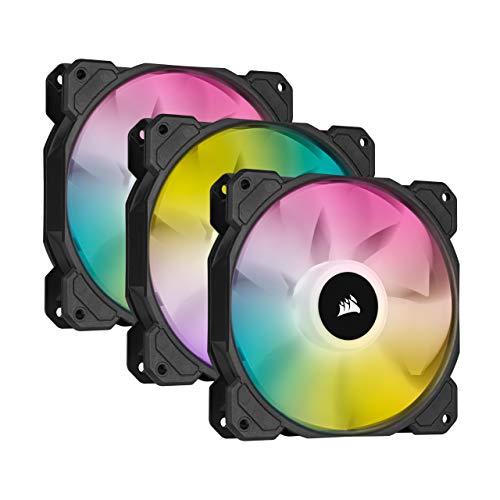
The Corsair iCUE SP120 RGB Elite Triple Fan Kit is the mid-range pick for builders who want software control over both airflow and lighting. Each of the three 120mm fans carries eight individually addressable RGB LEDs around the hub, and the included iCUE Lighting Node CORE connects all three to Corsair iCUE software for custom effects and sync with other Corsair parts. AirGuide technology uses anti-vortex vanes to focus airflow toward components instead of scattering it inside the case. The translucent blades diffuse the light for a soft glow rather than a harsh point of color. This kit suits a gaming build where the lighting is part of the setup and the fans need to stay quiet during light work and ramp up under load.
Specs
Fan size: 120mm x 120mm x 25mm
Pack size: 3 fans with iCUE Lighting Node CORE
Fan speed: PWM, 400 to 1500 RPM
Airflow: 47.7 CFM per fan
Noise level: 7 dBA minimum, 18 dBA listed
Lighting: 8 individually addressable RGB LEDs per fan
The Cooler Master MF120 Halo² White 3in1 is the premium pick in this roundup and the only white kit here, which makes it the natural choice for a white-themed build. The updated Halo² design uses fan blades that are larger than the previous generation, and the dual-loop ARGB rings use Gen 2 addressable lighting for brighter, more even illumination. Frosted blades spread the light across the fan instead of concentrating it at the hub. PWM control runs from 0 to 2050 RPM, so the fans can stop completely at idle and spin up to full speed under load, and airflow is listed at 51.8 CFM per fan with a maximum noise level of 27 dBA. An ARGB header extender is included for daisy-chain connections to the motherboard or a splitter. The hybrid frame adds stability while keeping the fan light, and the white finish matches white cases, white motherboards, and white memory kits.
Specs
Fan size: 120mm x 120mm x 25mm
Pack size: 3 fans with ARGB header extender
Fan speed: PWM, 0 to 2050 RPM
Airflow: 51.8 CFM per fan
Noise level: 27 dBA maximum
Lighting: Dual-loop ARGB Gen 2 rings
Blades: Frosted, enlarged blades
Frame: Hybrid frame design
Control: PWM with zero-RPM mode
Tier: Premium
Frequently Asked Questions
How many fans does a budget RGB fan kit usually include?
Most budget RGB fan kits include three fans, which covers the front intake of a mid-tower case or a front-plus-rear layout. Five-pack and six-pack kits cost more per box but less per fan, and they can fill a whole case in one purchase. Count the 120mm mounts in your case before you buy, and match the kit size to that count.
Do I need an RGB header on my motherboard for a budget RGB fan kit?
Not always. Kits with their own hub and remote, such as the upHere RGB123-3 and the EZDIY-FAB Moonlight 6-Pack, run their lighting without a motherboard header. ARGB kits that sync with motherboard software need a 5V 3-pin header, while standard RGB kits need a 12V 4-pin header. Check your motherboard manual for the header type before choosing between RGB and ARGB.
What is the difference between RGB and ARGB fan kits?
Standard RGB lighting sets every LED in a fan to the same color at the same time. ARGB lighting controls LEDs individually, so effects can flow, chase, and fade across the fan. ARGB kits give you more lighting effects and finer control, while standard RGB kits are simpler and often cheaper. Both types light up a case well, so the choice comes down to how much control you want.
Are PWM fans worth it in a budget RGB fan kit?
Yes, when the budget allows. PWM fans change speed with temperature, so they run quietly at idle and move more air under load. Fixed-speed fans are simpler and cheaper, and they work fine in a case with good natural airflow. In this roundup, the Corsair and Cooler Master kits offer PWM control, while the budget kits use fixed or hub-based speed control.
Conclusion
A budget RGB fan kit is one of the cheapest ways to improve both cooling and looks in a PC build, because one box covers several case positions with matching fans and lighting. The upHere RGB123-3 3-Pack is the best overall pick for most builders, with quiet fans, a double RGB ring, and a hub that works without a motherboard RGB header. The Antec F12 RGB 3-Pack is a solid alternative from a familiar brand for boards with a 4-pin RGB header. The EZDIY-FAB Moonlight 6-Pack is the best choice for filling a whole case at once. Builders who want software control should pick the Corsair iCUE SP120 RGB Elite Triple Fan Kit, and white-themed builds suit the Cooler Master MF120 Halo² White 3in1. Match the kit to your case size, your motherboard headers, and the look you want, and any of these five kits will do the job.
E
Emubox Editorial Team
We compare specs, materials and verified owner reviews before a product earns a spot. Rankings are never paid.
Affiliate disclosure. As an Amazon Associate we earn from qualifying purchases at no extra cost to you. Prices accurate as of the date shown.
Best 2mm 70 cm portable antennas compared: telescopic radio antennas near 70 cm, with connectors, bands and collapsed sizes explained before you buy today.
Find the best thermostat setting for winter and summer, with energy-saving setbacks, humidity tips, and smart schedules for a comfortable home year-round.
The best affordable business computer monitors balance sharp text, eye comfort and lasting value. Compare four reliable office displays built for long workdays.
Looking for the best inexpensive HD TVs non smart? Compare five genuinely non-smart HD televisions with tuners, HDMI inputs and simple setup for any small room.

 upHere RGB123-3 3-Pack
 Antec F12 RGB 3-Pack
 Corsair iCUE SP120 RGB Elite Triple Fan Kit
 Cooler Master MF120 Halo² White 3in1









