We independently review everything we recommend. When you buy through our links, we may earn a commission. As an Amazon Associate we earn from qualifying purchases.
Best Budget PC Fan Controllers: 5 Picks for Cool Builds
Compare five budget PC fan controllers and hubs for quieter, cooler builds. Find the right PWM hub, manual dial, or software controller for your case.
As an Amazon Associate, we earn from qualifying purchases.
The ARCTIC Case Fan Hub is the best budget PC fan controller for most builders, because it turns one motherboard PWM header into ten fan connections, draws power straight from the power supply through a SATA cable, and keeps setup simple enough for a first build. If you want a physical dial instead of software, the Noctua NA-FC1 gives you manual speed control with a no-stop mode. For full software control with lighting, the Corsair iCUE Commander CORE XT is the premium pick, while the Thermalright and Thermaltake hubs cover the same ten-fan job at a lower tier.
A fan controller or hub solves one of two problems. Either your motherboard has fewer fan headers than your case has fans, or you want to change fan speeds without opening the BIOS every time. A hub expands one header into many connections, while a true controller adds a dial or software control. Decide which problem you have first, because a hub alone will not give you a manual dial, and a dial controller will not expand ten fans by itself.
Start by counting your fans and checking their connectors. Four-pin PWM fans are the standard for speed control, and every product here is built around them. Three-pin fans will still spin on most of these hubs, but they will run at full speed because they cannot read a PWM signal. Every hub here except the Noctua NA-FC1 draws power from the power supply through a SATA connector, so a full set of fans can run from one header without overloading it. Check that your power supply has a free SATA connector, and a hub shares one PWM signal across all of its fans, so every fan follows the same curve and the motherboard only reads the speed of the fan in the marked first port.
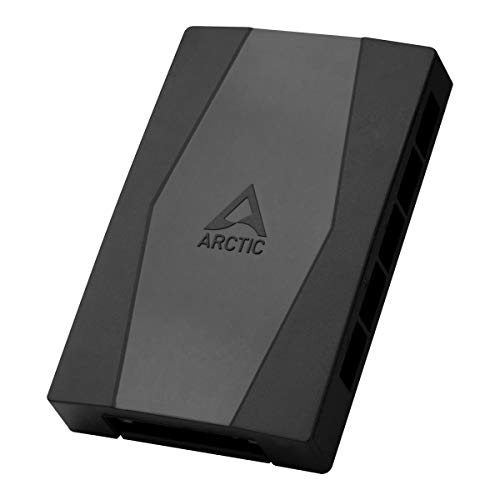
The ARCTIC Case Fan Hub is the simplest way to run a lot of fans from one header, and the pick most budget builders should start with. It takes a single four-pin PWM signal from the motherboard and distributes it to ten fan sockets, while a SATA connector from the power supply carries the load, so the header only sends the control signal. The slim board tucks behind the motherboard tray, one socket is marked as the speed-reporting port for the motherboard to read, and the other nine sockets follow the same PWM signal. It accepts three-pin fans, although they run at full speed, and ARCTIC backs it with a six-year warranty. The shared signal is the main limit: it suits fan groups that should rise and fall together, not fans that need independent curves.
Specs
Fan connections: 10 four-pin PWM sockets
Power input: SATA from the power supply
Control: PWM signal from one motherboard header
Model number: ACFAN00175A
Speed reporting: first socket reports fan speed to the motherboard
The Noctua NA-FC1 is the only true manual controller in this roundup, and it is the right pick if you want to turn a dial and hear your fans respond right away. The compact unit sits between your motherboard and your fans, and a small knob adjusts the PWM duty cycle from full speed down to a low idle. Pressing the knob engages No-Stop mode, which holds fans at a minimum speed so they never drop below the threshold where some motherboards report a fan error. It ships with a three-way splitter cable for up to three four-pin PWM fans, with a 3-amp total current limit, and it measures 48 by 25 by 21 mm. It can also sit in line with your motherboard’s PWM signal to trim speeds below the lowest curve, and it pairs with the Noctua NA-FH1 hub for expansion to eight fans. The six-year warranty matches the rest of the Noctua range; the three-fan capacity and lack of software curves are the main limits.
Specs
Fan connections: 3 four-pin PWM fans via included splitter cable
Control: manual dial with No-Stop mode, minimum fan speed 300 RPM
Current limit: 3 amps total
Dimensions: 48 x 25 x 21 mm
Power: motherboard header or separate 12 V adapter
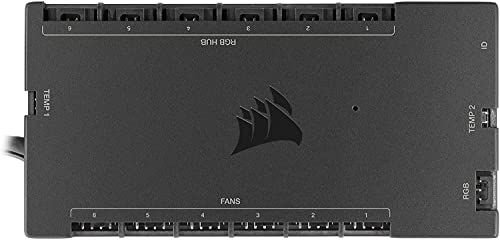
The Corsair iCUE Commander CORE XT is the premium pick in this roundup and the only one that controls fans and lighting from the same box. It manages six four-pin PWM fans and six RGB devices, with support for up to 264 LEDs, and connects through an internal USB 2.0 header and a SATA power lead. Two repositionable temperature sensors let fan curves respond to air temperature inside the case, and a USB 2.0 pass-through port gives you back the header it uses. In iCUE, each fan channel gets its own curve, and Zero RPM mode lets fans stop completely at low loads for silent idle. Installation needs a flat mounting spot, a free SATA connector, and a free internal USB 2.0 header, and the RGB channels use Corsair’s own connector standard, so the lighting side works best with Corsair RGB fans while standard PWM fans from any brand work on the fan channels.
Specs
Fan connections: 6 four-pin PWM channels
RGB connections: 6 channels, up to 264 LEDs
Control: iCUE software with per-channel curves and Zero RPM mode
Temperature sensors: 2 repositionable sensors included
Connections: SATA power, internal USB 2.0 header with pass-through
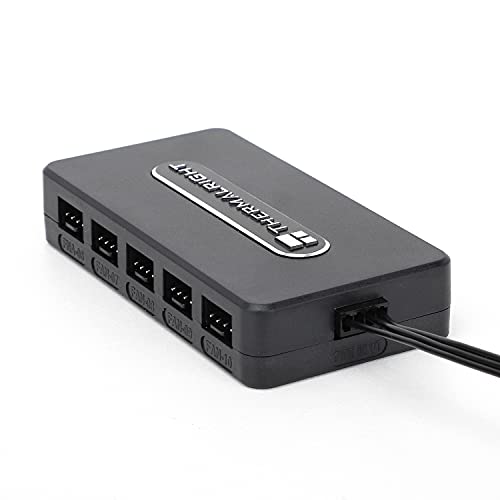
The Thermalright Integrated Fan Hub is the value alternative to the ARCTIC hub, offering the same ten-port layout with direct SATA power input at the budget tier. It connects to a single motherboard PWM header and distributes the signal to ten four-pin fan sockets, with one red socket marked for speed reporting so the motherboard can read a fan speed. The board mounts with a strong adhesive pad and fits behind the motherboard tray or flat against the power supply shroud. SATA power carries the load, the motherboard supplies only the PWM signal, and all ten fans follow the same curve, so setup needs no software or dial. The red socket is the one detail to get right: plugging a fan into any other socket first leaves the motherboard with no speed reading and can trigger a fan warning at startup. Three-pin fans will spin at full speed, as with other hubs of this type, and its central position helps cable management, with front, top, and rear fan cables all reaching one board.
Specs
Fan connections: 10 four-pin PWM sockets
Power input: SATA direct input from the power supply
Control: PWM signal from one motherboard header
Speed reporting: red socket reports fan speed to the motherboard
Model number: TL-FAN-HUB-Controller
Mounting: adhesive pad
Tier: Budget
5. Thermaltake Commander FP
The Thermaltake Commander FP is the longest-running ten-port hub in this roundup, and it remains a solid mid-range choice for builders who want a proven design with useful extras in the box. It offers ten four-pin PWM fan connections powered from the power supply through a SATA input, with a PWM signal cable that links it to a single motherboard header. The package includes reusable cable ties and Velcro tabs for routing fan cables, plus a blue power indicator that confirms the hub is receiving power at a glance. At 3.2 by 1.7 by 0.7 inches, it fits in most mounting spots behind the motherboard tray. Like the other hubs here, it shares one PWM signal across all ten fans, and the motherboard reads the speed from the fan in the marked first port. Three-pin fans will run at full speed, since they cannot use the PWM signal. The accessories and the longer track record are what the small step up in tier buys over the budget hubs.
Specs
Fan connections: 10 four-pin PWM sockets
Power input: SATA direct input from the power supply
Control: PWM signal from one motherboard header
Model number: AC-023-AN1NAN-A1
Dimensions: 3.2 x 1.7 x 0.7 inches
Included: PWM signal cable, reusable cable ties, Velcro tabs, blue power LED
Tier: Mid-range
Frequently Asked Questions
How many fans can I connect to one fan hub?
Most hubs here support ten fans from one motherboard header, because they draw power from the power supply through a SATA connector. Only the fan in the marked first port reports its speed back to the motherboard. The Noctua NA-FC1 is the exception, with a three-fan limit, while the Corsair Commander CORE XT supports six fans with individual control.
Do fan hubs work with three-pin fans?
Three-pin fans will spin when plugged into a PWM hub, but they will run at full speed because they cannot read the PWM speed signal. A hub can only control the speed of four-pin PWM fans, so a build with three-pin fans needs either PWM replacements or a voltage-based controller. The Corsair Commander CORE XT is the partial exception, since its software curves drive each fan channel on its own, though the fans still need to be four-pin PWM models.
Can a fan hub damage my motherboard?
A SATA-powered hub protects the motherboard header because the header only sends the PWM control signal while the power supply carries the electrical load for all connected fans. Problems arise mainly when a hub without external power is overloaded, or when a fan is plugged into the wrong port so the motherboard reads no speed. Use the marked speed-reporting port for one fan and keep the total fan count within the hub’s stated limit.
Is a manual controller better than a software controller?
A manual controller such as the Noctua NA-FC1 is better when you want instant control without software, a small form factor build, or a test bench where you adjust speeds by hand. A software controller such as the Corsair iCUE Commander CORE XT is better when you want temperature-based curves, different speeds per fan, silent idle, and lighting control from one screen. A plain hub is better than either when you only need more fan connections and are happy with the motherboard’s own fan curves.
Conclusion
The best budget PC fan controller depends on how many fans you run and how you want to control them. The ARCTIC Case Fan Hub is the best starting point for most builders, because ten SATA-powered PWM sockets solve the header shortage for a full case of fans at the budget tier. The Thermalright Integrated Fan Hub does the same job as a value alternative, and the Thermaltake Commander FP adds cable accessories and a longer track record. If you want your hand on the speed, the Noctua NA-FC1 manual dial with No-Stop mode is the most direct option, and if you want software curves, per-fan control, and lighting in one box, the Corsair iCUE Commander CORE XT is the premium pick. Match the controller to your fan count, your fan connectors, and your appetite for software, and your case will run cooler and quieter.
E
Emubox Editorial Team
We compare specs, materials and verified owner reviews before a product earns a spot. Rankings are never paid.
Affiliate disclosure. As an Amazon Associate we earn from qualifying purchases at no extra cost to you. Prices accurate as of the date shown.
Best 2mm 70 cm portable antennas compared: telescopic radio antennas near 70 cm, with connectors, bands and collapsed sizes explained before you buy today.
Find the best thermostat setting for winter and summer, with energy-saving setbacks, humidity tips, and smart schedules for a comfortable home year-round.
The best affordable business computer monitors balance sharp text, eye comfort and lasting value. Compare four reliable office displays built for long workdays.
Looking for the best inexpensive HD TVs non smart? Compare five genuinely non-smart HD televisions with tuners, HDMI inputs and simple setup for any small room.

 1. ARCTIC Case Fan Hub
 2. Noctua NA-FC1
 3. Corsair iCUE Commander CORE XT
 4. Thermalright Integrated Fan Hub









