We independently review everything we recommend. When you buy through our links, we may earn a commission. As an Amazon Associate we earn from qualifying purchases.
Best Budget Servers: 5 Picks for Home Labs in 2026
Compare five budget servers for home labs and small offices, from quiet mini PCs to compact HPE MicroServers, and pick the right always-on machine.
As an Amazon Associate, we earn from qualifying purchases.
The best budget server for most home labs is the Beelink Mini S12 Pro, because it pairs a power-sipping Intel N100 processor with 16GB of memory and a 500GB solid-state drive in a silent box that can run file sharing, media streaming, and a home automation hub around the clock. If you need a real server with drive bays and error-correcting memory, the HPE ProLiant MicroServer Gen10 Plus v2 is the stronger pick, while the Minisforum UM790 Pro suits virtual machines and transcoding.
Start with the workload, not the hardware. A file server, a backup target, a media streamer, and a home automation hub all run happily on four efficient cores and 8GB to 16GB of memory. Virtual machines change the math: each guest needs its own slice of processor cores and memory, so a machine that hosts several virtual machines at once wants eight cores and 32GB of memory or more.
Power draw matters more than raw speed for a machine that never sleeps. An Intel N100 mini PC idles on a handful of watts, while a Xeon tower with spinning drives draws several times more. Over a year of continuous operation, that gap adds up on the electricity bill and as heat in a small room.
Storage flexibility is the next decision. Mini PCs ship with a single fast solid-state drive and sometimes a second slot for expansion, which suits media libraries stored on an external drive or a network share. A true MicroServer offers four 3.5-inch drive bays, so you can start with one drive and add mirrored pairs later without replacing the machine. If backups and large media collections are the goal, bays beat slots.
Networking shapes what a server can do. Dual Ethernet ports separate a home network from a lab network, while a 2.5-gigabit port moves large files faster than a standard gigabit port. All five machines run Windows, common Linux distributions, and hypervisors such as Proxmox, which turns one box into several virtual servers.
The Beelink Mini S12 Pro is the best budget server for most people starting a home lab, and the reason is balance: it is cheap to buy, cheap to run, and capable enough for a first lab. Its Intel N100 processor has four efficient cores that boost to 3.4 GHz, which is ample for a file server, a media server, a backup target, and a home automation hub running side by side. The 16GB of DDR4 memory leaves room for a couple of lightweight virtual machines or containers.
The N100 sips power at idle, so the box can stay on around the clock without turning a shelf into a heater. The four-inch-square chassis disappears behind a monitor or on a bookshelf. A 2.5-gigabit Ethernet port gives wired transfers more headroom than a standard gigabit link. Storage starts with a 500GB M.2 solid-state drive, and the machine supports a second drive for extra capacity. Windows 11 Home arrives preinstalled, and the box also runs Linux and Proxmox.
Specs
Processor: Intel N100, 4 cores and 4 threads, up to 3.4 GHz
Memory: 16GB DDR4
Storage: 500GB M.2 SSD
Networking: 2.5-gigabit Ethernet, Wi-Fi 6, Bluetooth 5.2
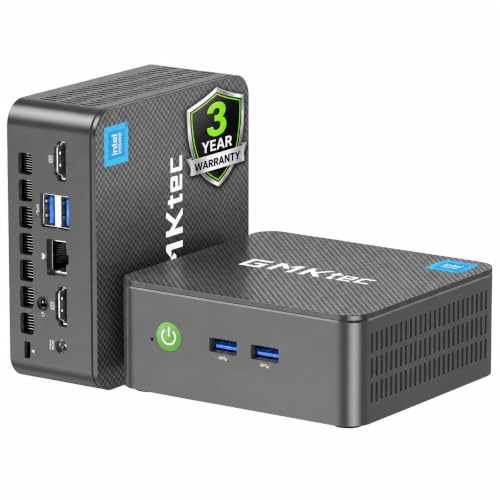
The GMKtec NucBox G3 Pro is the simplest way to put a dedicated server on a home network, and it suits light workloads. Its Intel Core i3-10110U processor has two cores and four threads that boost to 4.1 GHz, which handles a file share, a print server, a DNS filter, or a single media server without strain. The 8GB of memory and 256GB drive are modest, but they match the mission: one or two always-on services.
The G3 Pro is smaller than a paperback book, measuring about 114 by 106 by 44 millimeters, and it includes a VESA mount so it can hide behind a monitor or under a desk. Its Intel i226-V Ethernet controller has broad driver support across Linux distributions and hypervisors. The trade-offs are headroom: 8GB of memory limits how many services can run at once, and the 256GB drive fills quickly if media files live on the server itself. For a first always-on box, the G3 Pro delivers the essentials without excess.
Specs
Processor: Intel Core i3-10110U, 2 cores and 4 threads, up to 4.1 GHz
Memory: 8GB DDR4
Storage: 256GB SSD
Networking: Gigabit Ethernet with Intel i226-V controller, Wi-Fi 6, Bluetooth 5.2
Display: Dual HDMI, 4K
Ports: 4 USB 3.2
Operating system: Windows 11 Pro
Form factor: Mini PC, 114 by 106 by 44 millimeters, VESA mount included
The Minisforum Venus UM790 Pro is the performance pick of this roundup, built for home labs that run several virtual machines or transcode media. Its AMD Ryzen 9 7940HS processor packs eight cores and sixteen threads that boost to 5.2 GHz. The 32GB of DDR5 memory runs in dual channel and can expand to 64GB, so multiple virtual machines each get a comfortable share.
Storage is equally generous: a 1TB PCIe 4.0 solid-state drive comes installed, and a second M.2 slot supports another drive, with RAID 0 and RAID 1 configurations available for speed or redundancy. Connectivity is the strongest here, with four USB 3.2 ports, two USB4 ports, two HDMI 2.1 outputs, a 2.5-gigabit Ethernet port, Wi-Fi 6E, and Bluetooth 5.3. The UM790 Pro is a premium-tier machine: it draws more power and makes more heat than the N100 boxes, and its compact chassis leaves no room for 3.5-inch hard drives. It is the right choice when the workload is the priority, especially for virtualization labs and media servers that transcode several streams.
Specs
Processor: AMD Ryzen 9 7940HS, 8 cores and 16 threads, up to 5.2 GHz
Memory: 32GB DDR5, expandable to 64GB
Storage: 1TB PCIe 4.0 SSD, second M.2 slot, RAID 0 and RAID 1 support
Graphics: AMD Radeon 780M
Networking: 2.5-gigabit Ethernet, Wi-Fi 6E, Bluetooth 5.3
Ports: 4 USB 3.2, 2 USB4, 2 HDMI 2.1
Form factor: Mini PC, about 5.1 by 5.1 by 1.9 inches
The HPE ProLiant MicroServer Gen10 Plus v2 is the only machine here that is a server first and a computer second. Its Intel Xeon E-2314 processor has four cores that boost to 4.5 GHz, and it pairs with error-correcting DDR4 memory, which guards stored data against single-bit memory errors.
Four 3.5-inch drive bays are the headline feature. They accept large hard drives for file storage and backups, and the VROC controller supports RAID configurations that protect data when a drive fails. The embedded four-port gigabit network controller provides plenty of wired connectivity for a small office, and a PCIe expansion slot accepts add-in cards such as a faster network adapter. This is a mid-range server in both capability and complexity: it arrives ready for a server operating system rather than a desktop one. The Xeon processor and error-correcting memory make it the most dependable machine here for small-business file sharing, backups, and light virtualization, and the drive bays give it a storage ceiling the mini PCs cannot match.
Specs
Processor: Intel Xeon E-2314, 4 cores, up to 4.5 GHz
Memory: 32GB DDR4 ECC UDIMM, expandable to 64GB
Storage: 1TB drive, four 3.5-inch drive bays, VROC RAID support
Networking: Embedded 4-port gigabit Ethernet
Expansion: 1 PCIe slot
Power supply: 180-watt external
Form factor: Ultra-micro tower, about 4.7 inches tall
The HPE ProLiant MicroServer Gen11 is the entry point into HPE’s current MicroServer line, and it brings the newest platform of the two HPE picks. Its Intel Pentium Gold G7400 processor has two cores that boost to 3.7 GHz, which is enough for file sharing, backups, and light applications in a small office or a home lab that values reliability over raw speed.
The Gen11 platform adds DDR5 memory support, a newer chipset, and HPE’s iLO 6 management silicon, which strengthens the server’s built-in security and remote management foundations. Like its predecessor, it is a genuine server: it expects a server operating system, supports error-correcting memory configurations, and is built to stay powered on for years. The Pentium processor is the limiting factor. It handles file services and backups well, but it is not the choice for several virtual machines or heavy transcoding. For a small office that needs dependable shared storage and scheduled backups, the Gen11 Pentium configuration is a solid foundation with a modern platform underneath.
Specs
Processor: Intel Pentium Gold G7400, 2 cores, up to 3.7 GHz
Memory: 16GB DDR5
Storage: 1TB HDD, four large-form-factor drive bays
Networking: Gigabit Ethernet
Management: HPE iLO 6 silicon root of trust
Power supply: 180-watt external
Form factor: Ultra-micro tower
Frequently Asked Questions
What is the best budget server for a first home lab?
The Beelink Mini S12 Pro is the best starting point for most first home labs. Its Intel N100 processor and 16GB of memory handle file sharing, media streaming, backups, and a home automation hub at the same time, while its low power draw keeps running costs and heat down.
Can a mini PC really work as a server?
Yes, a mini PC works well as a server for home and small-office workloads. Modern mini PCs have efficient multi-core processors, solid-state storage, and gigabit or faster networking, which cover file sharing, media streaming, backups, and smart-home software. Memory ceilings and a lack of large drive bays are the limits, so heavy virtualization and mirrored storage suit a MicroServer better.
How much memory does a budget server need?
For file sharing, media streaming, and a home automation hub, 16GB of memory is a comfortable amount. Light single-purpose servers run well on 8GB. Virtual machines change the requirement: allow at least 4GB per guest plus memory for the host system, so virtualization labs should start at 32GB.
Do budget servers need error-correcting memory?
Error-correcting memory is not required for a home media or file server, but it is valuable when data integrity matters. It detects and corrects single-bit memory errors before they can corrupt files or crash services. The two HPE MicroServers in this roundup support error-correcting memory, while the mini PCs use standard memory.
Conclusion
The best budget server depends on the workload. The Beelink Mini S12 Pro is the best budget server for most home labs because it balances a capable processor, 16GB of memory, and very low power draw in a silent box. The GMKtec NucBox G3 Pro covers the lightest workloads at the lowest entry point, and the Minisforum UM790 Pro brings eight fast cores and 32GB of memory to virtualization and transcoding. The HPE ProLiant MicroServer Gen10 Plus v2 adds genuine server hardware, error-correcting memory, and four drive bays for small businesses, while the MicroServer Gen11 offers the newest platform for buyers who want a modern foundation. Pick the machine that matches the services you will run this year, and leave room for the ones you will add next year.
E
Emubox Editorial Team
We compare specs, materials and verified owner reviews before a product earns a spot. Rankings are never paid.
Affiliate disclosure. As an Amazon Associate we earn from qualifying purchases at no extra cost to you. Prices accurate as of the date shown.
Best 2mm 70 cm portable antennas compared: telescopic radio antennas near 70 cm, with connectors, bands and collapsed sizes explained before you buy today.
Find the best thermostat setting for winter and summer, with energy-saving setbacks, humidity tips, and smart schedules for a comfortable home year-round.
The best affordable business computer monitors balance sharp text, eye comfort and lasting value. Compare four reliable office displays built for long workdays.
Looking for the best inexpensive HD TVs non smart? Compare five genuinely non-smart HD televisions with tuners, HDMI inputs and simple setup for any small room.

 Beelink Mini S12 Pro
 GMKtec NucBox G3 Pro
 Minisforum Venus UM790 Pro
 HPE ProLiant MicroServer Gen10 Plus v2









