We independently review everything we recommend. When you buy through our links, we may earn a commission. As an Amazon Associate we earn from qualifying purchases.
Best Budget Thin Clients: 5 Picks for Home and Office
Compare five budget thin clients for remote desktops, home labs, and offices, from the tiny Dell Wyse 3040 to the powerful HP t740, and pick the right one.
Compare five budget thin clients for remote desktops, home labs, and offices, from the tiny Dell Wyse 3040 to the powerful HP t740, and pick the right one.
⭐ Key Takeaways
Quick answer: Our top pick is Dell Wyse 5070 Thin Client, with Dell Wyse 3040 Thin Client as a strong alternative.
As an Amazon Associate, we earn from qualifying purchases.
The best budget thin client is the Dell Wyse 5070 with the Intel Celeron J4105 processor, because it combines a quad-core chip, two memory slots, room for a solid-state drive, and support for two 4K displays. If you want the smallest endpoint for a single remote desktop, the Dell Wyse 3040 is the better fit, while the HP t740 is the pick when you need more processing power and support for up to six displays.
A thin client is an endpoint, not a general-purpose desktop computer. It connects to a virtual desktop or a remote server, and the heavy work happens on that server rather than on the device in front of you. That changes what matters when you shop: memory, display support, and remote desktop software matter at least as much as processor speed.
Start with the processor and memory. A quad-core chip with 4GB of memory handles a standard office desktop, a browser session, and video calls without strain, while dual-core models with 2GB suit a single task at a time, such as a point-of-sale terminal. Check whether the memory can be upgraded: two slots leave room to grow.
Next, count your displays and check storage. Most budget thin clients drive two monitors, which covers most office desks; if you need three or more screens, look for extra DisplayPort outputs or an optional graphics card. Storage holds the operating system and a small local cache, so 16GB of flash suits a locked-down thin operating system, while 32GB or more leaves room for a fuller Windows IoT image. Finally, confirm connectivity and protocols: Gigabit Ethernet is the most reliable link, and ThinOS and ThinPro cover Citrix, VMware, and Microsoft remote desktops out of the box.
The Dell Wyse 5070 is the best budget thin client for most buyers, because it covers the widest range of uses without asking for a premium-tier outlay. Its Intel Celeron J4105 processor has four cores running at 1.5 GHz with a burst up to 2.5 GHz, which is enough for everyday virtual desktops, browser work, and video conferencing. The two SO-DIMM slots accept up to 8GB of DDR4 memory, so you can start with the base 4GB and add more later.
Display support is a strong point: the 5070 drives two 4K displays through its DisplayPort outputs, and the USB-C port adds another way to connect a modern monitor or dock. Dell ships it with a choice of Wyse ThinOS, ThinLinux, and Windows 10 IoT Enterprise, so it slots into Citrix, VMware Horizon, Microsoft RDS, and Amazon WorkSpaces environments. The slim chassis measures 184 mm tall and 35.6 mm wide, so it stands neatly beside a monitor or mounts behind one with a VESA bracket.
Specs
Processor: Intel Celeron J4105 quad-core, 1.5 GHz base, up to 2.5 GHz burst
Memory: 4GB DDR4-2400, two SO-DIMM slots, up to 8GB supported
Storage: 16GB eMMC flash, M.2 slot for SSD upgrades
Displays: Two DisplayPort outputs, dual 4K support, plus USB-C
Connectivity: Gigabit Ethernet, USB 3.0 ports, optional Wi-Fi and Bluetooth
Operating system: Wyse ThinOS, ThinLinux, or Windows 10 IoT Enterprise
The Dell Wyse 3040 is the smallest and lightest thin client in this roundup, and it is the right pick when the job is simple and the desk space is tight. It measures just 101.6 mm on each side and weighs 0.24 kg, so it hides behind a monitor or sits unnoticed on a shelf. Its Intel Atom x5-Z8350 quad-core processor runs at 1.44 GHz with a burst up to 1.92 GHz, and Dell rates its idle power draw at 3.3 watts.
This is a purpose-built endpoint for virtual desktops. It runs Wyse ThinOS and connects to Citrix, VMware, and Microsoft remote desktop brokers right out of the box, with an optional PCoIP configuration for Amazon WorkSpaces. The two DisplayPort outputs support two displays at up to 2560 x 1600 resolution. The trade-offs are clear: memory is 2GB of soldered DDR3L with no upgrade path, and storage is 8GB of eMMC flash, so this is not the client for heavy local applications. But for a single remote desktop session, a reception desk, a classroom, or a call-center seat, it delivers exactly what is needed at a budget tier.
Specs
Processor: Intel Atom x5-Z8350 quad-core, 1.44 GHz base, up to 1.92 GHz burst
Memory: 2GB DDR3L-1600, soldered
Storage: 8GB eMMC flash
Displays: Two DisplayPort outputs, up to 2560 x 1600 at 60 Hz each
Connectivity: Gigabit Ethernet, 802.11ac Wi-Fi, 3 x USB 2.0, 1 x USB 3.1
The HP t630 is a strong mid-range option for buyers who want quad-core AMD performance and dual 4K display support at a budget tier. Its AMD GX-420GI system-on-chip runs four cores at 2.0 GHz with a boost up to 2.2 GHz, paired with Radeon R7E graphics that drive two UHD displays. That combination handles video playback and graphics-heavy remote sessions more comfortably than the entry-level dual-core models.
Memory and storage are more flexible here than on the smallest clients. The t630 ships with 4GB of DDR4 memory in two SO-DIMM slots, and HP supports up to 32GB, so you can scale the box to match a demanding virtual desktop image. Storage uses M.2 flash modules, with room for two modules and capacities up to 128GB. The chassis includes six USB ports, two DisplayPort outputs, and Gigabit Ethernet, with an optional VGA port and optional Wi-Fi, and HP backs it with a three-year limited hardware warranty.
Specs
Processor: AMD GX-420GI quad-core, 2.0 GHz base, up to 2.2 GHz boost
Memory: 4GB DDR4, two SO-DIMM slots, up to 32GB supported
Storage: 32GB M.2 flash, two M.2 slots, up to 128GB total
Displays: Two DisplayPort 1.2 outputs, dual UHD 4K support
Connectivity: Gigabit Ethernet, 6 x USB ports, optional VGA and Wi-Fi
Operating system: HP ThinPro, Smart Zero, or Windows 10 IoT Enterprise
The HP t740 is the premium pick in this roundup, and it earns that position with the fastest processor and the widest display support of the five. Its AMD Ryzen Embedded V1756B quad-core chip runs at 3.25 GHz with Radeon Vega graphics, and HP rates it as the most powerful desktop thin client in its lineup. If your virtual desktop sessions involve large spreadsheets, design tools, or video editing timelines, the t740 keeps the interface responsive where lighter clients start to lag.
Display support is the headline feature: the t740 drives four UHD 4K displays from its built-in outputs, and with the optional AMD Radeon E9173 graphics card it supports up to six 4K screens. The 8GB of DDR4 memory and the M.2 solid-state drive give local applications room to breathe, and the PCIe expansion slot adds options that no other client here offers. AMD Memory Guard encrypts system memory in real time, and the t740 runs HP ThinPro or Windows 10 IoT Enterprise under HP Device Manager.
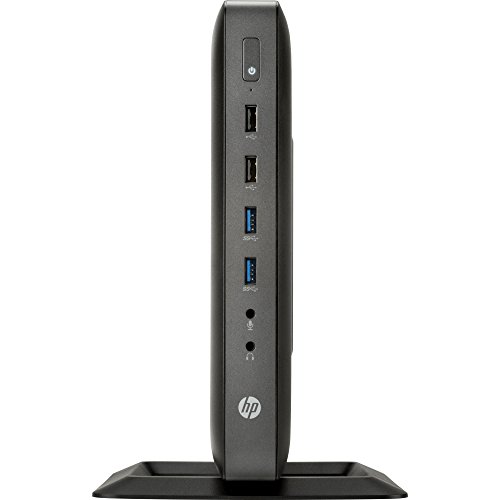
The HP t620 Flexible Thin Client is the entry-level pick for buyers who need a basic, dependable endpoint and nothing more. Its AMD GX-217GA dual-core processor runs at 1.65 GHz with Radeon HD 8280E graphics, and it ships with 4GB of DDR3L memory and a 16GB mSATA solid-state drive. That hardware is modest by current standards, but it is enough for a single virtual desktop session running office software, a browser, and standard business applications.
What the t620 lacks in speed it makes up for in ports and flexibility. It offers eight USB ports in total, split between USB 2.0 and USB 3.0, plus two DisplayPort outputs, Gigabit Ethernet, and 802.11ac Wi-Fi with Bluetooth. The flexible chassis comes in a standard form and a PLUS version with room for an optional discrete graphics card. It runs Windows Embedded Standard 7E, HP ThinPro, or Smart Zero, and it suits legacy deployments, spare desks, and single-purpose terminals where the workload is light and the budget is tight.
Displays: Two DisplayPort outputs with multi-stream support
Connectivity: Gigabit Ethernet, 802.11ac Wi-Fi, Bluetooth, 8 x USB ports
Operating system: Windows Embedded Standard 7E, HP ThinPro, or Smart Zero
Frequently Asked Questions
What is a thin client used for?
A thin client is an endpoint that connects you to a virtual desktop or applications running on a remote server. You plug in a monitor, keyboard, and mouse, sign in, and your desktop session streams from the server. The device itself stores little data, which makes it easier to manage, more secure, and cheaper to run.
Is a thin client the same as a mini PC?
No. A mini PC is a complete computer that runs applications locally from its own processor and storage. A thin client is built to connect to remote desktops, so it has a lighter processor, less memory, and less storage, and its strength is remote access, central management, and low power use.
How much memory does a budget thin client need?
For a single remote desktop session with office software and a browser, 4GB of memory is a comfortable minimum. Models with 2GB work best for one task at a time, such as a reception terminal. If you keep many windows open, choose 8GB or a model with memory slots you can upgrade later.
Can a thin client drive two monitors?
Yes, most budget thin clients support two monitors through DisplayPort or HDMI outputs. Check the maximum resolution for each output before you buy, because some entry-level models top out below 4K. If you need three or more displays, look for a model with extra outputs or an optional graphics card.
Conclusion
The best budget thin client for most buyers is the Dell Wyse 5070, because it balances a quad-core processor, upgradeable memory, dual 4K display support, and a compact chassis at a budget tier. The Dell Wyse 3040 is the pick for the smallest desks and the simplest jobs, while the HP t630 adds AMD quad-core power for offices that standardize on HP. The HP t740 is the premium choice for workstation-class performance and up to six displays, and the HP t620 covers basic endpoints where the workload is light.
E
Emubox Editorial Team
We compare specs, materials and verified owner reviews before a product earns a spot. Rankings are never paid.
Affiliate disclosure. As an Amazon Associate we earn from qualifying purchases at no extra cost to you. Prices accurate as of the date shown.
Best 2mm 70 cm portable antennas compared: telescopic radio antennas near 70 cm, with connectors, bands and collapsed sizes explained before you buy today.
Find the best thermostat setting for winter and summer, with energy-saving setbacks, humidity tips, and smart schedules for a comfortable home year-round.
The best affordable business computer monitors balance sharp text, eye comfort and lasting value. Compare four reliable office displays built for long workdays.
Looking for the best inexpensive HD TVs non smart? Compare five genuinely non-smart HD televisions with tuners, HDMI inputs and simple setup for any small room.

 Dell Wyse 5070 Thin Client
 Dell Wyse 3040 Thin Client
 HP t630 Thin Client
 HP t740 Thin Client
 HP t620 Flexible Thin Client









