We independently review everything we recommend. When you buy through our links, we may earn a commission. As an Amazon Associate we earn from qualifying purchases.
Best Budget Laptop Screen Extenders: 5 Picks for 2026
Compare five budget laptop screen extenders that turn one laptop into a triple-screen workstation. Check size, resolution, ports, and fit first.
As an Amazon Associate, we earn from qualifying purchases.
The KYY X90D is the best budget laptop screen extender for most people, because it adds two 15.6-inch Full HD IPS panels through a single USB-C cable, folds into an alloy frame with a built-in handle, and rotates a full 360 degrees on its kickstand for solo work or sharing with someone across a desk. If a lighter carry matters more than the largest panels, the FOPO S7 is the pick, while the FOPO S9 suits anyone with a 15.6-inch or 17.3-inch laptop who wants the same screen size on every display. The KEFEYA S3 is the classic 14-inch pick with no driver to install, and the kasorey T2Pro suits a 13-inch to 17-inch laptop.
A laptop screen extender is a folding frame with two extra panels that clip behind a laptop lid, turning one screen into three. The choice comes down to panel size, connection type, laptop fit, and weight.
Start with panel size. A 15.6-inch extender matches a 15.6-inch laptop so all three screens sit at the same height and scale. A 14-inch extender is the better match for a 13-inch or 14-inch laptop, because it keeps the folded package smaller and lighter. The FOPO S7 goes further with a 1920 x 1200 resolution and a 16:10 aspect ratio, so each added panel shows more vertical space than a standard 1920 x 1080 panel.
Next, check the ports on the laptop. Most extenders connect with a full-featured USB-C port that carries video and power, or with an HDMI cable plus a USB-A cable for power. A laptop with two full-featured USB-C ports is the easiest case, since each added panel can take one cable. MacBook models with base M1, M2, M3, or M4 chips need a separate adapter cable, because those chips limit the number of external displays they drive at once. Confirm whether the extender needs a driver: the KYY X90D does, while the other four picks here are driver-free.
KYY X90D 15.6-Inch Laptop Screen Extender
The KYY X90D pairs the largest panels in this roundup with the simplest cable setup. Two 15.6-inch Full HD IPS screens attach to laptops from 12 to 17 inches, and a single USB-C cable carries both power and video when the laptop port supports DisplayPort Alt Mode. The alloy frame feels rigid when open, and the built-in handle makes the folded package easy to carry.
Each panel uses a 1920 x 1080 IPS display with a 178-degree viewing angle, so text stays readable from the side during a meeting, and the 300-nit brightness suits indoor work. The 360-degree rotation and kickstand let the panels fold flat, stand upright, or angle toward someone sitting opposite, which is handy for presentations.
Specs
Added screens: two 15.6-inch IPS panels
Resolution: 1920 x 1080 Full HD per panel
Brightness: 300 nits
Viewing angle: 178 degrees
Rotation: 360 degrees with kickstand
Laptop fit: 12 to 17 inches
Connection: one USB-C cable, driver needed
Compatibility: Windows, macOS, Chrome OS, Android, Linux
The FOPO S9 is the straightforward choice for a larger laptop. It adds two 15.6-inch Full HD IPS panels and fits laptops from 15.6 to 17.3 inches, so owners of big notebooks get matching screen sizes across all three displays. The connection is plug and play with USB-C and HDMI, and no driver is needed.
The panels use a 16:9 aspect ratio at 1920 x 1080, with IPS technology for wide viewing angles. The frame folds down to a slim package that fits in a laptop bag, and because it is sized for a wide lid, it sits securely on a 15.6-inch or 17-inch machine.
Specs
Added screens: two 15.6-inch IPS panels
Resolution: 1920 x 1080 Full HD per panel
Aspect ratio: 16:9
Panel type: IPS
Laptop fit: 15.6 to 17.3 inches
Connection: USB-C and HDMI, plug and play
Driver: none needed
Compatibility: Windows and Mac, not base M1, M2, or M3 chips
The KEFEYA S3 is the classic 14-inch extender, on sale since early 2024. It adds two 14-inch Full HD IPS panels to laptops from 13 to 17 inches, and it ships with every cable needed: two USB-C to USB-C cables, two HDMI to USB-C cables, and two USB-C to USB-A cables. No driver is needed, so setup is a matter of connecting the cables and choosing extend mode.
Each panel runs at 1920 x 1080 with a 300-nit brightness, a 72 NTSC color gamut, a 1000:1 contrast ratio, and a 178-degree viewing angle. Brightness, contrast, and backlight can be adjusted on each panel independently. The panels rotate 180 degrees, and the unit supports mirror, extension, and portrait modes, so the extra screens can face the owner, face outward, or stand upright for long documents.
The kasorey T2Pro is the newest design in this roundup. The 14.1-inch panels use a matte finish that cuts glare under office lights and near windows, and the upgraded stand uses a one-button stretch design that makes the base wider and more stable than the earlier T2 model. It fits laptops from 13 to 17 inches and works attached to the laptop, or as a standalone screen on its own.
Each panel runs at 1920 x 1080 with a 16:9 aspect ratio, a 60 Hz refresh rate, a 2000:1 contrast ratio, and a 2-millisecond response time. Brightness, sound, and contrast can be adjusted on each panel independently, and the connection uses Mini HDMI and Type-C ports, so a laptop with a full-featured Type-C port can drive a panel with a single cable. When HDMI is used, an extra USB-A to USB-C cable supplies power.
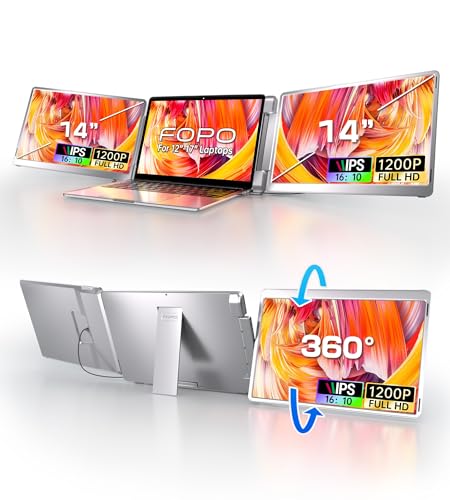
The FOPO S7 is the lightest extender in this roundup, and the only one with taller 16:10 panels. Each added screen measures 14 inches at 1920 x 1200, so documents, web pages, and spreadsheets show more lines at once than on a standard 1920 x 1080 panel. At 3.52 pounds it weighs about half as much as the heaviest pick here.
The left screen flips a full 360 degrees and senses the flip automatically, so it can face the laptop owner for solo work or turn around to face someone across the table for a presentation. The matte finish keeps reflections down, and the plug-and-play connection uses HDMI and USB-C with no driver to install. It fits laptops from 12 to 16.5 inches.
Specs
Added screens: two 14-inch IPS panels
Resolution: 1920 x 1200 Full HD per panel
Aspect ratio: 16:10
Screen finish: matte
Laptop fit: 12 to 16.5 inches
Connection: HDMI and USB-C, plug and play
Driver: none needed
Left screen: 360-degree flip with auto sensing
Dimensions: 1.55 x 13.62 x 8.62 inches
Weight: 3.52 pounds
Total USB ports: 4
Tier: mid-range
Frequently Asked Questions
Do laptop screen extenders work with MacBooks?
Most extenders here work with MacBooks, but base M1, M2, M3, and M4 chips limit how many external displays a MacBook can drive at once. Pro and Max versions of those chips do not have the same limit. Check the listing for the exact MacBook model, and plan on a separate adapter cable if one is needed for a base M-series chip.
Do I need to install a driver for a laptop screen extender?
It depends on the model. The KYY X90D needs a driver installed before both added screens work, and the driver ships on a USB drive in the box. The FOPO S9, FOPO S7, KEFEYA S3, and kasorey T2Pro are driver-free and work as soon as the cables are connected. A driver can be a blocker on a locked work laptop, so check before buying for office use.
What size laptop fits a screen extender?
Each extender lists a laptop size range, and the range matters because the frame clamps to the laptop lid. The KYY X90D fits 12-inch to 17-inch laptops, the FOPO S9 fits 15.6-inch to 17.3-inch laptops, the KEFEYA S3 and kasorey T2Pro fit 13-inch to 17-inch laptops, and the FOPO S7 fits 12-inch to 16.5-inch laptops. Measure the laptop lid and compare it with the stated range.
Can I use a laptop screen extender without the laptop attached?
Some models can stand on their own, and some cannot. The kasorey T2Pro is designed to work as a standalone screen without the laptop attached, thanks to its stretch stand. The other picks here are built to clip onto a laptop lid, so they are best used attached. Check the listing for a kickstand or a standalone mode if using the extender away from the laptop matters.
Conclusion
A budget laptop screen extender turns a single laptop into a three-screen workstation, and the right pick depends on laptop size, ports, and weight. The KYY X90D is the best overall choice for most people, with two 15.6-inch panels, a one-cable USB-C connection, and a sturdy alloy frame, as long as installing its driver is not a problem. The FOPO S9 is the best match for a 15.6-inch or 17.3-inch laptop, the KEFEYA S3 is the most complete out-of-the-box kit with its bag and six cables, the kasorey T2Pro has the freshest design and the most stable stand, and the FOPO S7 is the lightest pick with the tallest panels and a flip screen for presentations. Measure the laptop, confirm the ports and the chip, and pick the matching extender.
E
Emubox Editorial Team
We compare specs, materials and verified owner reviews before a product earns a spot. Rankings are never paid.
Affiliate disclosure. As an Amazon Associate we earn from qualifying purchases at no extra cost to you. Prices accurate as of the date shown.
Best 2mm 70 cm portable antennas compared: telescopic radio antennas near 70 cm, with connectors, bands and collapsed sizes explained before you buy today.
Find the best thermostat setting for winter and summer, with energy-saving setbacks, humidity tips, and smart schedules for a comfortable home year-round.
The best affordable business computer monitors balance sharp text, eye comfort and lasting value. Compare four reliable office displays built for long workdays.
Looking for the best inexpensive HD TVs non smart? Compare five genuinely non-smart HD televisions with tuners, HDMI inputs and simple setup for any small room.

 KEFEYA S3 14-Inch Laptop Screen Extender
 kasorey T2Pro 14.1-Inch Laptop Screen Extender
 FOPO S7 14-Inch Triple Monitor Laptop Screen Extender









