We independently review everything we recommend. When you buy through our links, we may earn a commission. As an Amazon Associate we earn from qualifying purchases.
Best Budget Laptop Risers: 5 Picks for Every Desk 2026
Find the best budget laptop riser for your desk. Compare five affordable laptop stands by height, adjustability, portability, and laptop size.
As an Amazon Associate, we earn from qualifying purchases.
The best budget laptop riser for most people is the Nulaxy C3, because its fixed aluminum frame lifts the screen to a comfortable height, holds laptops from 10 to 16 inches, and supports up to 22 pounds without any moving parts to wear out. If you want to change the height through the day, the Lamicall LN09 adjusts through six positions and folds flat for travel, while the BoYata height-adjustable riser moves from 3.9 to 7.4 inches with a simple rear button. For a permanent desk, the Rain Design mStand raises the screen 5.9 inches and doubles as a heat sink. The right pick depends on your laptop size, how often you move your setup, and whether you want a fixed riser or an adjustable one.
A laptop riser earns its place by raising the screen toward eye level, letting air flow under the laptop, and holding the machine steady while you type. Measure your laptop first, because a riser built for a 13-inch machine can feel cramped under a 17-inch one. A separate keyboard and mouse make any riser more comfortable, since typing on a raised keyboard for hours can strain your wrists.
Start with laptop size. Check the screen size and the depth of your laptop, then compare both numbers with the riser listing, because a wide 17-inch laptop can overhang a riser built for smaller machines. Weight matters just as much: a thin ultrabook needs far less support than a gaming laptop, so look for the stated load capacity and leave some headroom above your laptop weight.
Next, decide between fixed and adjustable. A fixed riser has no hinges or levers, so nothing loosens over time, and it suits a desk that never moves. An adjustable riser lets you change the height and angle for sitting, standing, or sharing the screen, which helps when more than one person uses the same desk.
Material shapes both stability and cooling. Aluminum frames stay rigid, spread heat away from the laptop base, and resist bending under heavy machines. Plastic and nylon frames weigh less and travel better, but they flex more under load and do not shed heat the same way. Open frames with a gap under the laptop move more air than solid decks, which matters for laptops that run warm during long sessions.
The Nulaxy C3 is the simplest riser in this roundup, and that simplicity is the point. It is a fixed aluminum frame with no hinges, no levers, and no height settings to adjust, so it does the same job every day without anything to loosen. The open frame leaves the underside of the laptop exposed to airflow, and the aluminum body draws heat away from the base during long work sessions.
Compatibility covers laptops from 10 to 16 inches, including MacBook Air and MacBook Pro models, Dell XPS machines, HP and Lenovo notebooks, and Chromebooks in that size range. The stated support capacity reaches 22 pounds, which covers heavy 15-inch and 16-inch laptops with room to spare. At a fixed elevation of roughly six to seven inches, the screen sits high enough to ease neck strain for most seated users, especially when paired with an external keyboard and mouse. Silicone pads protect the laptop base from scratches and stop the machine from sliding.
Specs
Material: Aluminum alloy frame with silicone pads
Laptop compatibility: 10 to 16 inches
Weight capacity: Up to 22 pounds
Elevation: Fixed height of roughly 6 to 7 inches
Design: Two-piece detachable open frame for airflow
The Rain Design mStand is the premium fixed riser in this roundup, built from a single piece of aluminum with an elegant curved profile. It raises the screen 5.9 inches to meet eye level and tilts the laptop slightly forward, which brings the screen closer for easier viewing. The aluminum panel acts as a heat sink, pulling warmth away from the laptop base, and a cable hole in the back routes wires to reduce clutter on the desk.
Compatibility covers all sizes of Apple MacBook and MacBook Pro, along with most 14-inch standard PCs and 15-inch widescreen PCs with depths of no more than 10.4 inches. The single-piece design has no joints to tighten and no parts to lose, and at three pounds it stays planted on the desk even when you plug and unplug cables. The silver anodized finish matches Apple laptops closely, which makes it a natural fit for Mac-based desks. It does not fold or adjust, so travelers should look at a foldable riser instead.
Specs
Material: Single-piece aluminum with silver anodized finish
Laptop compatibility: All MacBook sizes, most 14-inch PCs and 15-inch widescreen PCs up to 10.4 inches deep
Weight: 3 pounds
Elevation: Raises the screen 5.9 inches
Dimensions: 8.82 x 5.98 x 9.92 inches
Features: Cable hole in the back, aluminum heat-sink panel
The Lamicall LN09 is the most flexible riser in this roundup, adjusting through six height positions from 2.4 to 7.5 inches with a tool-free locking mechanism. That range covers sitting at a desk, perching at a kitchen counter, and raising the screen for a standing setup, all with the same stand. It folds flat to a 0.4-inch profile and weighs 1.1 pounds, so it slips into a laptop bag side pocket.
Compatibility runs from 10 to 17.3 inches, which includes large Windows gaming laptops and 16-inch MacBook Pro models that smaller stands cannot hold. The aluminum frame stays rigid at full extension, and padded surfaces protect the laptop bottom from scratches during height changes. Silicone pads on the base keep the stand from sliding on smooth desks, and the open design leaves room for air to circulate under the laptop. Students can carry it between the dorm, the library, and class, while home workers can switch between sitting and standing without buying a second stand.
Specs
Material: Aluminum frame with silicone pads
Laptop compatibility: 10 to 17.3 inches
Height adjustment: 6 positions from 2.4 to 7.5 inches
Weight: 1.1 pounds
Folded profile: 0.4 inches flat
Design: Foldable portable frame with locking mechanism
Tier: Mid-range
BoYata N19 Multi-Angle Laptop Stand
The BoYata N19 is a foldable multi-angle riser that trades a fixed height for viewing flexibility. It opens to several angles, so you can set the screen low for typing or steep for watching video, then fold it flat when you pack up. The heat-vent design leaves the laptop base open to airflow, and slide-proof silicone pads plus protective hooks keep the machine from slipping forward at steeper angles.
Compatibility covers laptops up to 17 inches, including MacBook Pro and MacBook Air, Surface Laptop models, and Windows notebooks from Dell, HP, and Lenovo. The metal frame stays steady under full-size laptops, and it folds flat for travel. It does not lift the screen as high as the tallest adjustable stands, so users who need a full standing-desk lift should look at a taller model.
Specs
Material: Metal frame with silicone pads and protective hooks
Laptop compatibility: Up to 17 inches
Design: Foldable multi-angle stand with heat-vent opening
Compatibility: MacBook Pro and MacBook Air, Surface Laptop, Dell, HP, Lenovo
Features: Slide-proof silicone, protective front hooks
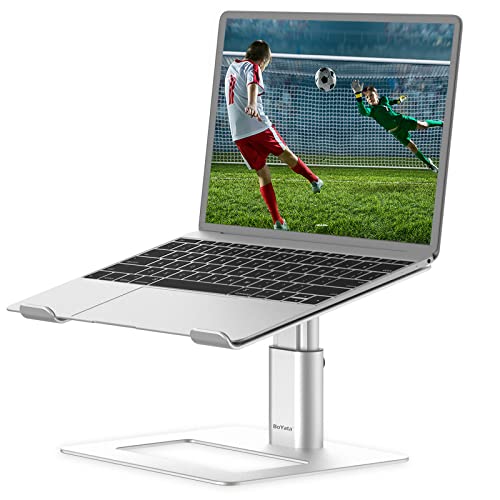
The BoYata height-adjustable riser uses a rear button release to move the laptop platform from 3.9 to 7.4 inches, so you can find a comfortable height without tools or levers. Two 3mm metal base plates form a sturdy U-shaped open frame, and the open design keeps air moving under the laptop while the silicone surfaces protect the base from scratches. The stand supports up to 11 pounds, which covers most ultrabooks and mainstream 13-inch and 15-inch laptops.
Compatibility runs from 11 to 17 inches, including MacBook Pro and MacBook Air, Dell, Lenovo, HP, and Samsung laptops. The button release is simple enough to use one-handed: press, lift or lower the platform, and release to lock the height. At its lowest setting the riser works for typing, while the highest setting brings the screen close to eye level for reading and video calls. The U-shaped frame also leaves the front edge of the laptop clear, so ports and card slots stay easy to reach. Buyers with very heavy gaming laptops should check the 11-pound capacity against their machine first.
Specs
Material: Metal base plates with silicone protection
Laptop compatibility: 11 to 17 inches
Height adjustment: 3.9 to 7.4 inches with rear button release
Weight capacity: Up to 11 pounds
Design: U-shaped open frame for ventilation
Compatibility: MacBook Pro and MacBook Air, Dell, Lenovo, HP, Samsung
Tier: Mid-range
How to Set Up a Laptop Riser
Place the riser on a flat, stable part of the desk with enough depth for the laptop and the base. Set the height before you put the laptop on, then lower the laptop onto the platform and check that the front hooks or the front edge catch the base. Connect the charger and display cables before you start work, routing them behind the stand so they do not pull on the laptop.
Adjust the screen angle so the top of the display sits near eye level. If you type on the laptop keyboard, keep the riser at a lower setting to protect your wrists, and raise it only when you switch to an external keyboard. Leave a gap behind the riser for airflow, and keep drinks away from the raised platform.
Frequently Asked Questions
What size laptop riser do I need?
Match the riser to your laptop screen size and depth, not just the screen size alone. A riser rated for 10 to 16 inches fits most mainstream laptops, while a 17-inch gaming laptop needs a riser rated to 17 inches or 17.3 inches. Check the depth too, because wide laptops can overhang a narrow platform even when the screen size matches.
Is a fixed or adjustable laptop riser better?
A fixed riser suits a desk that never moves, because it has no hinges to loosen and it holds its height every day. An adjustable riser suits shared desks, standing setups, and anyone who changes posture through the day, because the height and angle change in seconds. Travelers should pick a foldable riser that packs flat into a bag.
Do laptop risers help with cooling?
Yes, a riser helps cooling by lifting the laptop base off the desk and letting air flow underneath. Open-frame risers move more air than solid decks, and aluminum frames spread heat away from the base better than plastic ones. A riser helps most with laptops that run warm during long sessions, but it does not replace cleaning dust from vents.
Can I type on my laptop while it sits on a riser?
You can type on a raised laptop for short sessions, but an external keyboard and mouse are more comfortable for long work. Typing on a raised keyboard bends the wrists upward, which causes fatigue over time. Set the riser low for direct typing, or raise it and use an external keyboard for the best posture.
Conclusion
The best budget laptop riser for most people is the Nulaxy C3, because its fixed aluminum frame, 22-pound capacity, and 10-to-16-inch fit cover the widest range of everyday laptops at a budget tier. The Lamicall LN09 is the pick for adjustability and travel, with six height positions and a fold-flat design, while the BoYata height-adjustable riser suits shared desks that need quick height changes. The BoYata N19 covers foldable multi-angle use at a budget tier, and the Rain Design mStand is the premium fixed choice for a permanent Mac-based workstation.
E
Emubox Editorial Team
We compare specs, materials and verified owner reviews before a product earns a spot. Rankings are never paid.
Affiliate disclosure. As an Amazon Associate we earn from qualifying purchases at no extra cost to you. Prices accurate as of the date shown.
Best 2mm 70 cm portable antennas compared: telescopic radio antennas near 70 cm, with connectors, bands and collapsed sizes explained before you buy today.
Find the best thermostat setting for winter and summer, with energy-saving setbacks, humidity tips, and smart schedules for a comfortable home year-round.
The best affordable business computer monitors balance sharp text, eye comfort and lasting value. Compare four reliable office displays built for long workdays.
Looking for the best inexpensive HD TVs non smart? Compare five genuinely non-smart HD televisions with tuners, HDMI inputs and simple setup for any small room.

 Nulaxy C3 Fixed Aluminum Laptop Riser
 Rain Design mStand Laptop Stand
 Lamicall Adjustable Laptop Stand LN09
 BoYata Height-Adjustable Laptop Riser









