
Our Short List of 3
All 5 Picks at a Glance
| Product | Specs | Action |
|---|---|---|
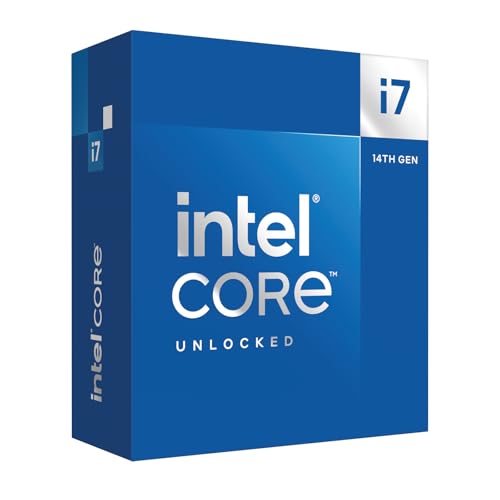 Intel Core i7-14700K Desktop Processor | Check price on Amazon | |
 AMD Ryzen 7 9800X3D 8-Core, 16-Thread Desktop Processor | Check price on Amazon | |
 AMD Ryzen 9 5950X 16-Core, 32-Thread Unlocked Desktop Processor | Check price on Amazon | |
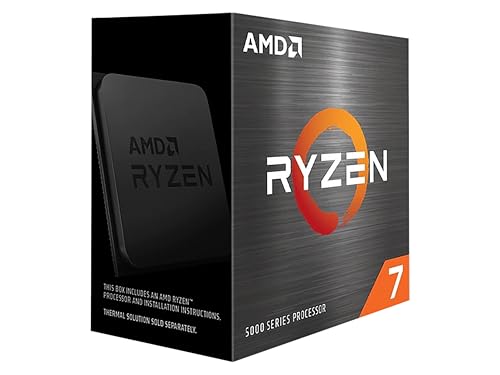 AMD Ryzen 7 5700X3D 8-Core, 16-Thread Desktop Processor | Check price on Amazon | |
 AMD Ryzen 5 9600X | Check price on Amazon |
Key takeaways
- Compare five desktop CPUs that handle gaming, editing and everyday multitasking with fast speeds and steady, reliable performance for years.
A desktop processor decides how a gaming PC feels in everyday use. It sets how quickly games load, how steady frame rates stay when a scene gets busy, and how smoothly the machine handles a game running alongside a browser, a voice chat app and a video editor. A weak processor can hold back even a strong graphics card, while a well matched one keeps the whole system responsive for years.
As an Amazon Associate, we earn from qualifying purchases.
This guide compares five desktop processors that suit different gaming builds and budgets. The lineup covers a hybrid Intel chip with twenty cores, two cache-heavy AMD gaming chips, a sixteen-core AM4 veteran for heavy multitasking, and a six-core AM5 chip for a first build. Each entry notes its socket and memory type, so you can see at a glance whether it fits the board and memory you already own or plan to buy.
Quick answer
For most gaming builds, the Intel Core i7-14700K is the balanced pick, pairing twenty cores with fast single-thread speed. The Ryzen 7 9800X3D is the best choice for pure gaming frame rates, the Ryzen 9 5950X suits heavy multitasking on AM4, the Ryzen 7 5700X3D refreshes an older AM4 rig, and the Ryzen 5 9600X starts a new AM5 build without overspending.
Intel Core i7-14700K Desktop Processor
The 14700K is the most versatile processor in this guide. Its hybrid layout pairs 8 performance cores with 12 efficiency cores, giving it 20 cores and 28 threads in total, with a maximum turbo frequency of 5.6 GHz. That spread of cores keeps a game running smoothly while background work such as streaming, voice chat or a browser with a dozen tabs carries on without stuttering, and it also makes the chip a strong pick for editing and rendering work between gaming sessions.
It fits the LGA1700 socket and works with both DDR4 and DDR5 memory, which means it can slot into an existing 600 or 700 series board and reuse memory you already own, or anchor a fresh DDR5 build. Integrated graphics keep the machine usable without a graphics card during a build or a repair, and the unlocked multiplier leaves room to tune performance later. One step is essential before the first game: Intel has issued microcode updates addressing instability in 13th and 14th generation parts, so update the motherboard BIOS to the current release and load the recommended default power settings.
AMD Ryzen 7 9800X3D 8-Core, 16-Thread Desktop Processor
The 9800X3D is built for one job above all else: the fastest gaming frame rates AMD can offer. It is an 8-core, 16-thread AM5 processor built on the Zen 5 architecture, with stacked 3D V-Cache giving it 96 MB of L3 cache. That extra cache keeps the data games revisit most often close to the cores, which shows up as higher frame rates and smoother minimums in cache-sensitive titles, especially at the resolutions where the processor rather than the graphics card sets the pace.
It boosts up to 5.2 GHz, drops into current AM5 boards and pairs with DDR5 memory, so it shares a platform with the 9600X below and leaves the rest of a build unchanged. The trade-off is honest: eight cores are plenty for gaming, but heavy editing or streaming work that leans on many threads belongs on the 14700K or the 5950X instead. One ownership note matters. Public reports have linked some 9800X3D failures to certain AM5 motherboards, with board makers pointing to BIOS settings, so update the board to the latest BIOS before installing the chip and buy from a seller with a straightforward return policy.
AMD Ryzen 9 5950X 16-Core, 32-Thread Unlocked Desktop Processor
The 5950X is the end of the line for AM4, and for heavy multitasking it remains the strongest reason to keep an AM4 machine alive. Sixteen cores and 32 threads, a maximum boost of 4.9 GHz and 64 MB of L3 cache make it the socket’s best chip for work that scales: running a game alongside a stream, editing video while a render finishes, or keeping several demanding applications open at once. Single-thread pace is a generation behind the newer parts here, so a seat used only for gaming will feel the difference, but as a do-everything box it is hard to beat.
Because it uses the AM4 socket and DDR4 memory, it drops into boards and memory a builder may already own, which makes it a processor-only upgrade rather than a platform rebuild. Two ownership notes matter for planning: it ships with no cooler, so a serious tower cooler belongs in the same order, and holding boost clocks under long all-core loads asks for a motherboard with strong power delivery. For a gaming PC that also serves as a home workstation, this is the most cores this platform will ever offer.
AMD Ryzen 7 5700X3D 8-Core, 16-Thread Desktop Processor
The 5700X3D answers a narrower question: how to make an existing AM4 gaming PC faster without replacing the board and memory. It carries 8 cores and 16 threads with 96 MB of L3 cache built on 3D V-Cache, the same stacked-cache arrangement as its bigger sibling, with a lower 4.1 GHz maximum boost that trades a little clock speed for the cache. That trade suits games whose working set fits the pattern the extra cache rewards, and it shows up most clearly in titles that lean on the processor rather than the graphics card.
It suits AM4 owners upgrading from Ryzen 1000, 2000 or 3000 series chips who want a near-flagship gaming result from the same motherboard, and it is not a sensible buy for anyone who already runs a 5700X or 5800X and feels no specific bottleneck. Like the 5950X it ships with no cooler, and the board’s CPU support list and BIOS version need checking before ordering, since Ryzen 5000 support on early AM4 boards varies by model and revision. For a rig that still has life in it, this is the cheapest meaningful upgrade left on the platform.
AMD Ryzen 5 9600X
Not every gaming build needs sixteen cores. A PC that plays games, browses the web and handles everyday tasks is bound by the graphics card and the storage more often than by the processor, and the 9600X covers that role while keeping the AM5 upgrade path open. It uses the same AM5 socket and DDR5 memory as the 9800X3D, so every other part in the build carries over, and its six Zen 5 cores deliver fast single-thread performance for the games and tools that dominate daily use.
A later swap to an X3D chip stays open on the same board, which makes this the sensible first processor for a new AM5 build whose owner has not yet decided how far to push gaming performance. It boosts up to 5.4 GHz, supports PCIe 5.0 on select motherboards, and runs on a modest 65W thermal design power, so cooling stays simple and quiet. It does not suit a machine that runs several demanding jobs at once, where six cores become the ceiling quickly, and it ships with no cooler, so budget for one. As the start of a modern build, it keeps the platform current and the budget pointed at the graphics card, where gaming performance usually needs it most.
How to choose
Start by profiling how the PC will actually be used. Count how much of the week is pure gaming against multitasking work such as streaming, editing or running several demanding applications at once. Pure gaming builds should weight clock speed and cache and look at the 9800X3D or the 5700X3D, while mixed-use machines should weight core count and look at the 14700K or the 5950X.
Platform decides the real cost. AM4 chips reuse DDR4 and older boards, so the processor is the whole purchase. AM5 means a new board and DDR5 in the same order. LGA1700 sits between, with DDR4 and DDR5 board options. Check the motherboard’s CPU support list and required BIOS version before ordering any of them, and flash the update while the old processor is still installed if you are upgrading.
Finally, budget the supporting parts honestly. Two of the AMD picks ship without coolers, sustained all-core loads need boards with strong power delivery, and a gaming PC earns a solid power supply before it earns a faster chip: a weak supply can take the whole system down with it.
Who should skip
Skip this entire category if the machine is used only for web browsing, email and office work; any modern processor handles those tasks, and the money is better spent on storage or a larger screen. Skip it if the graphics card is the real bottleneck: a faster CPU does nothing for a game limited by an ageing card. And skip the unlocked, high-power parts if the PC lives in a small room where heat and fan noise during long sessions will bother the people working next to it; a lower-power build serves that room better.
FAQ
Do I need a new motherboard for these CPUs?
It depends on the socket. The Ryzen 9 5950X and Ryzen 7 5700X3D fit AM4 boards with DDR4 memory, often after a BIOS update, so they suit an existing rig. The Ryzen 7 9800X3D and Ryzen 5 9600X need AM5 boards with DDR5, while the Intel Core i7-14700K fits LGA1700 boards with DDR4 or DDR5. Check the board’s CPU support list before ordering.
How many cores do I need for gaming?
Six fast cores are enough for most games today, which is why the Ryzen 5 9600X works well as a starting point. Eight cores add headroom for a game running alongside streaming software, voice chat and a browser. Sixteen or twenty cores only earn their keep when the PC also edits video, renders, or runs several demanding applications at once.
Does a faster CPU raise frame rates in every game?
No. A faster processor helps most in games that lean on the CPU, such as strategy titles, simulation games and busy multiplayer scenes, and at resolutions where the processor sets the pace. In visually heavy games at high settings, the graphics card is usually the limit, so a CPU upgrade alone changes little. Match the processor to the games you actually play.
Do any of these processors include a cooler?
None of the five processors here ships with a cooler in the box. Budget for a capable tower air cooler or an all-in-one liquid cooler, sized for the chip’s heat output, and check the case has room for it before ordering. A cooler that handles sustained loads keeps boost clocks steady and the machine quiet during long sessions.
Final verdict
Match the processor to the build. The Intel Core i7-14700K is the default pick for a mixed gaming and work machine, the Ryzen 7 9800X3D is the frame-rate pick for pure gaming on AM5, and the Ryzen 9 5950X is the multitasking pick for builders keeping AM4 alive. The Ryzen 7 5700X3D refreshes an older AM4 rig for the least money, and the Ryzen 5 9600X starts a new AM5 build without overspending. Whichever you choose, update the BIOS first, budget for a cooler, and put the rest of the money toward the graphics card.
Product and ASIN Reference
| Product | ASIN |
|---|---|
| Intel Core i7-14700K Desktop Processor | B0CGJ41C9W |
| AMD Ryzen 7 9800X3D 8-Core, 16-Thread Desktop Processor | B0DKFMSMYK |
| AMD Ryzen 9 5950X 16-Core, 32-Thread Unlocked Desktop Processor | B0815Y8J9N |
| AMD Ryzen 7 5700X3D 8-Core, 16-Thread Desktop Processor | B0CQ4H4H7X |
| AMD Ryzen 5 9600X | B0D6NN6TM7 |









