
Our Short List of 3
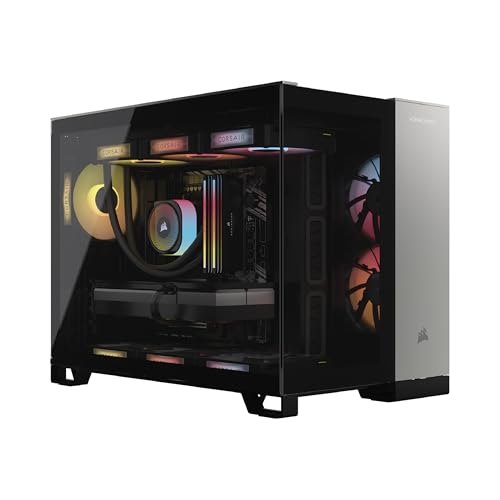
- Best for: 4K gamers who want an X3D processor and flagship graphics in one branded tower.
- Processor: AMD Ryzen 7 9800X3D
- Graphics: NVIDIA GeForce RTX 5090, 32 GB graphics memory
- Memory: 64 GB Corsair Dominator Titanium RGB DDR5
- Storage: 2TB M.2 SSD plus 2TB M.2 SSD

- Best for: Players with very large libraries who want fast SSD space backed by bulk hard drive storage.
- Processor: Intel Core Ultra 9 285K, 3.7 GHz, up to 5.7 GHz
- Graphics: NVIDIA GeForce RTX 5090, 32 GB graphics memory
- Memory: 64 GB DDR5, 5600 MHz, maximum 256 GB
- Storage: 2TB NVMe M.2 SSD plus 4TB HDD

- Best for: Streamers and creators who want the PC itself to be part of the room’s display.
- Processor: AMD Ryzen 9 9950X3D
- Graphics: NVIDIA GeForce RTX 5080, 16 GB GDDR7
- Memory: 64 GB DDR5, 4800 MHz, maximum 256 GB
- Storage: 2TB Gen4 SSD
All 5 Picks at a Glance
| Product | Specs | Action |
|---|---|---|
| Corsair Vengeance a5100 |
| Check price on Amazon |
| CLX Set |
| Check price on Amazon |
| Empowered PC Panorama XL |
| Check price on Amazon |
 Corsair ONE a600 |
| Check price on Amazon |
 MSI Infinite RS |
| Check price on Amazon |
Key takeaways
- Five liquid-cooled gaming desktops with 64GB of DDR5 memory, from a compact dual-loop system to RTX 5090 towers built for big libraries and creators.
Buying a liquid-cooled desktop with 64GB of memory is really a decision about sustained load, not peak numbers on a box. A radiator keeps a flagship processor steadier through long sessions, and a full 64GB of RAM removes memory as the bottleneck when a game runs beside streaming software, voice chat, and a browser full of tabs. The catch is that both features must belong to the exact configuration being sold, not to a cheaper variant sharing the same listing page.
This guide is for 4K gamers who want flagship graphics, creators who game and render on one machine, and players with large libraries who hate closing background apps. Every pick below was chosen from its Amazon listing title and specification table, and each listing states liquid cooling and 64GB of installed memory for the configuration sold under its ASIN.
Quick Picks
As an Amazon Associate we earn from qualifying purchases
| Product | Best for | Key spec from title |
|---|---|---|
| Corsair Vengeance a5100 | 4K gaming on an X3D processor | Ryzen 7 9800X3D, RTX 5090, 64GB DDR5 |
| CLX Set | Big libraries split across fast and bulk storage | Core Ultra 9 285K, RTX 5090, 360mm AIO |
| Empowered PC Panorama XL | A glass showcase build that also creates | Ryzen 9 9950X3D, RTX 5080, 360mm liquid cooled |
| Corsair ONE a600 | A compact, quiet desk setup | Liquid cooled Ryzen 9 9900X3D and RTX 5080 |
| MSI Infinite RS | Upgraders who want a standard tower | Core i9-14900KF, RTX 4090, liquid cooling |
How to Choose
Confirm the radiator and what it actually cools
Liquid cooling in this class almost always means an all-in-one loop on the processor, described by radiator size: 240mm, 360mm, or dual loops. A 360mm radiator gives a high-core-count chip more thermal headroom during long sessions, while a compact machine may split cooling across two smaller radiators, one for the CPU and one for the GPU. Read the listing wording closely. Some desktops say liquid cooled because of a single CPU loop while the graphics card stays air cooled, which is fine, but you should know which parts the loop covers before paying for the badge.
Treat 64GB as a configuration, not a product family
Large system builders sell one model name in several memory sizes, and the 32GB version often sits on the same page as the 64GB one. Check the style name and the installed RAM field for the exact option you are buying, and note how the memory is arranged. Two free slots matter if you ever plan to add more; a listing that lists 64GB as both the installed and maximum capacity means the memory you receive is all the machine will ever hold without replacing the sticks outright.
Match the processor to the work beside the game
The processors here split into two camps. Cache-heavy X3D chips from AMD are built around gaming, while high-core-count Intel and Ryzen 9 parts trade some of that focus for rendering, encoding, and compile work. If the desktop only plays games, the gaming-tuned chip is the sensible pick. If the same machine exports video or runs virtual machines during the week, core count earns its keep. Either way, liquid cooling matters more as core counts climb, because these processors draw heavily under all-core loads.
Plan storage and ports around your library
A single 2TB SSD fills quickly when individual games pass a hundred gigabytes, so look at total capacity and layout. Some towers pair a fast NVMe drive with a large hard drive for overflow, while others split storage across two SSDs. Count display outputs if you run multiple monitors, check whether Wi-Fi is built in or needs a wired connection, and confirm which Windows edition is installed, since Pro features such as Remote Desktop are absent from Home editions. A quick port count now also prevents an avoidable hub purchase later.
The 5 Best Options
Corsair Vengeance a5100
- Best for: 4K gamers who want an X3D processor and flagship graphics in one branded tower.
- Processor: AMD Ryzen 7 9800X3D
- Graphics: NVIDIA GeForce RTX 5090, 32 GB graphics memory
- Memory: 64 GB Corsair Dominator Titanium RGB DDR5
- Storage: 2TB M.2 SSD plus 2TB M.2 SSD
4K gamers who want an X3D processor and flagship graphics in one branded tower.
The listing gives 64GB as the maximum memory size, so there is no room to grow beyond the installed kit.
Corsair builds this tower around the Ryzen 7 9800X3D, a processor aimed squarely at gaming, and pairs it with the flagship RTX 5090. The listing states 64GB of Dominator Titanium RGB DDR5 memory and two 2TB M.2 SSDs, so storage arrives split across two fast drives rather than one. Cooling comes from an iCUE LINK TITAN 240 RX RGB liquid CPU cooler inside a dual-chamber glass case. It suits a player who wants a single-purpose 4K machine from a large brand, with Windows 11 Pro and a fully modular power supply already fitted.
CLX Set
- Best for: Players with very large libraries who want fast SSD space backed by bulk hard drive storage.
- Processor: Intel Core Ultra 9 285K, 3.7 GHz, up to 5.7 GHz
- Graphics: NVIDIA GeForce RTX 5090, 32 GB graphics memory
- Memory: 64 GB DDR5, 5600 MHz, maximum 256 GB
- Storage: 2TB NVMe M.2 SSD plus 4TB HDD
Players with very large libraries who want fast SSD space backed by bulk hard drive storage.
It ships with Windows 11 Home rather than Pro, and the memory uses two slots, so upgrades mean replacing sticks.
The CLX Set takes the high-core-count route, matching an Intel Core Ultra 9 285K with an RTX 5090 and a 360mm liquid cooling system. Its storage layout is the practical highlight: a 2TB NVMe SSD for the games in rotation and a 4TB hard drive behind it for everything else. The listing states 64GB of DDR5 memory at 5600 MHz, eleven USB ports, and Wi-Fi, with Windows 11 Home preinstalled. Buyers who keep enormous libraries installed, or who split time between gaming and heavy multitasking, get the most from this arrangement.
Empowered PC Panorama XL
- Best for: Streamers and creators who want the PC itself to be part of the room’s display.
- Processor: AMD Ryzen 9 9950X3D
- Graphics: NVIDIA GeForce RTX 5080, 16 GB GDDR7
- Memory: 64 GB DDR5, 4800 MHz, maximum 256 GB
- Storage: 2TB Gen4 SSD
Streamers and creators who want the PC itself to be part of the room’s display.
The listed memory speed of 4800 MHz is the slowest here, and the style name must be checked at checkout so the 64GB configuration is the one ordered.
The Panorama XL wraps its hardware in frameless tempered glass front and side panels, then fills the view with ten ARGB fans and a 360mm liquid cooler. Under the glass sits a Ryzen 9 9950X3D, the top AMD chip here for mixing gaming with creation work, alongside an RTX 5080 and a 2TB Gen4 SSD. The listing’s style name spells out the exact configuration, Ryzen 9 9950X3D with 64GB and 2TB, and it bundles an RGB keyboard and mouse, internal Wi-Fi 7, and a three year warranty, which makes it the most presentation-focused pick in this group.
Corsair ONE a600
- Best for: Desk setups short on space where a quiet, compact tower matters more than internal expansion.
- Processor: AMD Ryzen 9 9900X3D, 4.4 GHz, up to 5.5 GHz
- Graphics: NVIDIA GeForce RTX 5080, 16 GB GDDR7, liquid cooled
- Memory: 64 GB DDR5, 6000 MHz, maximum 64 GB
- Storage: 2TB M.2 SSD plus 2TB M.2 SSD
Desk setups short on space where a quiet, compact tower matters more than internal expansion.
Memory is already at its 64GB maximum, and the compact case leaves less room for later internal upgrades than the full towers.
The Corsair ONE a600 is the outlier in shape: a compact aluminum tower, finished in Wood Dark, that liquid cools both halves of the system with dual 240mm liquid coolers. Its Ryzen 9 9900X3D and RTX 5080 are both liquid cooled according to the listing, a rare arrangement that targets quiet running in a small footprint. Memory is 64GB of DDR5 at 6000 MHz, storage totals two 2TB M.2 SSDs, and the machine weighs about 27 pounds. It fits a tidy desk where a full glass tower would dominate, without giving up the 64GB requirement.
MSI Infinite RS
- Best for: Owners who expect to open the case later and want four memory slots and a standard tower layout.
- Processor: Intel Core i9-14900KF, up to 5.8 GHz, LGA 1700 socket
- Graphics: NVIDIA GeForce RTX 4090, 24 GB graphics memory
- Memory: 64 GB DDR5, 5600 MHz, 4 slots, maximum 192 GB
- Storage: 2TB M.2 NVMe SSD
Owners who expect to open the case later and want four memory slots and a standard tower layout.
The processor and graphics card are a generation older than the other picks, and at 52 pounds this is the heaviest machine here.
MSI’s Infinite RS is the previous-generation flagship route: an Intel Core i9-14900KF with an RTX 4090, liquid cooling, and a standard tower layout the listing describes as DIY friendly. The specification table lists 64GB of DDR5 at 5600 MHz across four memory slots with a 192GB maximum, which gives it the clearest memory upgrade path here. A 2TB M.2 NVMe SSD, Wi-Fi 7, Windows 11 Pro, and an included keyboard and mouse round it out. It suits a buyer who values a conventional, serviceable tower over the newest silicon.
Which One Fits Your Situation
You play at 4K and the PC does nothing else
Choose the Corsair Vengeance a5100. Its Ryzen 7 9800X3D is the gaming-focused processor in this lineup, the RTX 5090 is the strongest graphics card listed, and the twin SSDs keep load times off your mind. Nothing in its specification is aimed at office work or rendering, which is exactly the point for a dedicated gaming desk.
You game, stream, and edit on the same machine
The Empowered PC Panorama XL and the CLX Set both fit, for different reasons. The Panorama XL’s Ryzen 9 9950X3D handles creation workloads while its glass case suits an on-camera setup. The CLX Set counters with a 24-core Intel processor and far more total storage. Pick by whether the second job is video work beside a camera or a giant library beside everything else.
Your desk is small and noise carries
Take the Corsair ONE a600. Dual liquid coolers cover the processor and the graphics card, the aluminum case is a fraction of the towers’ size, and the whole machine weighs about half of the MSI. It is the only pick designed around a compact, quiet footprint rather than adapted to one, and it still meets the full 64GB and liquid cooling brief.
You plan to upgrade this PC for years
The MSI Infinite RS is built for that path. Four memory slots with a 192GB ceiling, a standard tower the listing calls DIY friendly, and conventional parts throughout make later changes straightforward. You accept a previous-generation processor and graphics card in exchange for the easiest machine here to service and expand over time.
Common Mistakes
- Buying the model name instead of the configuration, then receiving the 32GB variant that shares the same listing page.
- Assuming liquid cooled means the graphics card is on a loop, when many towers liquid cool only the processor.
- Ignoring the maximum memory figure, which reveals whether 64GB can ever grow or the installed kit is the ceiling.
- Overlooking the Windows edition, then finding Remote Desktop and other Pro features missing on a Home installation.
- Filling a single 2TB SSD within months because the library size was never counted against the storage on offer.
Frequently Asked Questions
Does liquid cooling make a gaming desktop faster?
Not directly. A liquid loop moves heat away from the processor more effectively, which helps a high-core-count chip hold its speeds through long sessions instead of easing off as temperatures climb. The frame rate still comes from the processor and graphics card themselves; cooling simply protects the performance those parts already have.
Is 64GB of RAM useful for gaming alone?
Most games run within far less, so the benefit shows up around the game rather than inside it. Streaming software, voice chat, capture tools, and dozens of browser tabs can stay open without the system swapping to storage. Buyers who close everything before playing gain the least, while multitaskers feel the difference every session.
Can I add more memory to these desktops later?
It depends on slots and the listed maximum. The CLX Set and Panorama XL list a 256GB maximum, and the MSI lists 192GB across four slots, while both Corsair systems list 64GB as the ceiling. Check the memory section of the exact listing, because the answer changes between configurations of the same model name.
What should I check when a liquid-cooled PC arrives?
Confirm the configuration in the system settings matches the listing: processor, graphics card, installed memory, and storage. Then check the radiator fans spin up under load, look over the loop fittings and tubing for any sign of leaks after shipping, and verify the Windows edition matches what the listing stated before settling in.









