
Our Short List of 3
All 5 Picks at a Glance
| Product | Specs | Action |
|---|---|---|
 Razer BlackShark V2 X Gaming Headset | Check price on Amazon | |
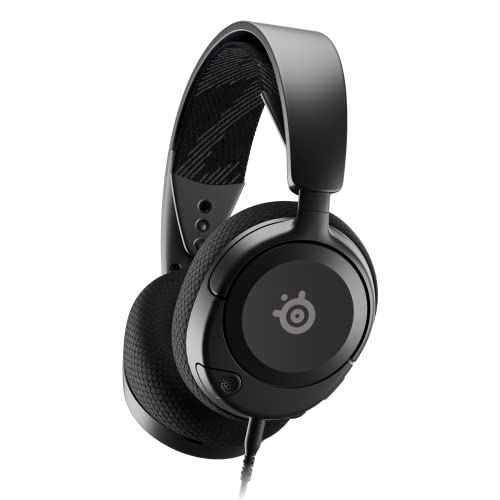 SteelSeries Arctis Nova 1 Multi-System Gaming Headset | Check price on Amazon | |
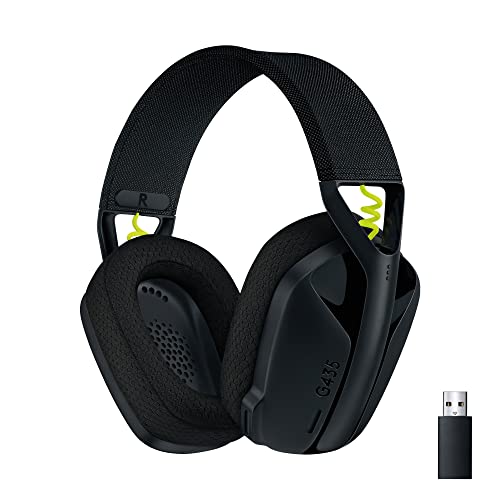 Logitech G435 Lightspeed and Bluetooth Wireless Gaming Headset | Check price on Amazon | |
 Corsair HS65 Surround Multiplatform Wired Gaming Headset | Check price on Amazon | |
 HyperX Cloud III Wired Gaming Headset | Check price on Amazon |
Key takeaways
- Compare wired and wireless budget gaming headsets for PC, with clear mics, light frames, and simple connections for desk and laptop play at home.
- Top Pick: Razer BlackShark V2 X Gaming Headset
- Runner-up: SteelSeries Arctis Nova 1 Multi-System Gaming Headset
- Also consider: Logitech G435 Lightspeed and Bluetooth Wireless Gaming Headset
A good budget gaming headset for PC should do three things well: carry game sound clearly, make your voice easy to understand, and stay comfortable through a long session.
The five headsets below cover the main budget paths. Four are wired and simple to set up, and one is wireless for a cleaner desk.
As an Amazon Associate, we earn from qualifying purchases.
Quick answer
For most PC players, the Razer BlackShark V2 X is the simplest budget starting point, with light weight, 50mm drivers, and a bendable cardioid mic. Choose the SteelSeries Arctis Nova 1 for software tuning, the Logitech G435 for wireless freedom, the Corsair HS65 Surround for Dolby Atmos on PC, or the HyperX Cloud III for the most connection options.
Razer BlackShark V2 X Gaming Headset
Listed features center on TriForce Titanium 50mm drivers, tuned with separate attention to highs, mids, and lows, plus software-enabled 7.1 surround sound on Windows 10 64-bit. The HyperClear cardioid microphone is bendable, so it can be positioned close to the mouth, and its pickup pattern is designed to focus on voice while reducing sound from the back and sides. Closed earcups and memory foam cushions support passive noise isolation.
At a listed weight of 240 grams, it suits players who want a light wired headset for team games, classes, and everyday PC use. It also suits households that share one headset across a laptop and a console controller.
The trade-offs are clear. The microphone is not presented as detachable, surround sound depends on software and a supported Windows setup, and wired use means managing a cable at the desk. Buyers who want wireless freedom or a removable mic for music listening should look at other picks in this guide instead.
SteelSeries Arctis Nova 1 Multi-System Gaming Headset
SteelSeries lists the Nova Acoustic System with custom-designed high fidelity drivers, support for spatial audio, and a 10-band parametric equalizer through its software for added sound customization on supported setups. The listed frequency range is 20 Hz to 22,000 Hz, with 36 ohms impedance and 93 dB sensitivity. The microphone is described as noise-cancelling, which suits voice chat in a shared room.
Comfort is a central part of the design. The headset is listed at 236 grams, making it one of the lighter wired options here, and its ComfortMax style design is aimed at longer wear. That makes it appealing for students, remote workers who game after hours, and players who dislike heavy headsets.
Trade-offs include wired-only use and software features that depend on using the companion tools on a computer. The equalizer and spatial options add flexibility, but they also add setup steps compared with a plug-and-play headset with no tuning. If you want the lightest simple option with no software layer, another pick may feel easier.
Logitech G435 Lightspeed and Bluetooth Wireless Gaming Headset
The listing gives a weight of only 165 grams, or 5.8 ounces, which is notably lighter than the wired models above. Drivers are 40mm, battery life is listed at up to 18 hours, and wireless range is listed at up to 10 meters. Support is listed for Dolby Atmos, Tempest 3D AudioTech, and Windows Sonic, depending on the platform and game in use.
Instead of a boom arm, the G435 uses built-in dual beamforming microphones. That keeps the profile clean for calls, music, and travel, and the design is described as made with memory foam ear cushions and sizing aimed in part at younger players and smaller head sizes.
The trade-offs follow from that design. There is no boom microphone to position, no 3.5mm wired fallback listed as a main connection, and the smaller fit may not suit every adult head shape. Battery charging also becomes part of the routine. Choose it for wireless convenience and very light weight, not for the most flexible wired setup.
Corsair HS65 Surround Multiplatform Wired Gaming Headset
Corsair lists custom-tuned 50mm neodymium audio drivers and a frequency range of 20 Hz to 20 kHz. On PC and Mac, the listing highlights Dolby Atmos spatial sound and SonarWorks SoundID technology, which tailors sound settings to personal listening preferences, along with compatibility with the iCue software ecosystem. Those features separate it from basic wired headsets that offer no sound personalization at all.
For comfort and build, the listing describes memory foam leatherette ear pads and a lightweight construction reinforced with aluminum. That combination suits longer PC sessions at a fixed desk, as well as players who prefer a more structured feel than an all-plastic frame. Voice chat is handled by the built-in microphone design described for this multiplatform model.
Trade-offs are mainly about focus. The strongest extra features are tied to PC and Mac use, so console-only players get less from the package. It is also wired only, so there is no option to stand up and keep listening away from the desk. Buyers who mainly want wireless play should choose the Logitech pick instead.
HyperX Cloud III Wired Gaming Headset
Sound comes from angled 53mm drivers, the largest drivers listed in this group. The headset also includes a lifetime activation of DTS Headphone:X Spatial Audio, described as supporting precise sound localization and a virtual sound stage. Controls for volume and microphone mute are placed on the earcup, so basic adjustments do not require opening a system menu during play.
Comfort and durability are central claims in the listing. HyperX describes signature memory foam in the headband and ear cushions, wrapped in leatherette, plus a flexible full metal frame. The detachable 10mm microphone is described as noise-cancelling, with a built-in mesh filter to help reduce disruptive sound, and it can be removed when the headset is used only for listening.
At a listed weight with mic of 320 grams, it is the heaviest pick here, which is the main trade-off. It also sits at the upper end of a budget shortlist in features, even without a wireless option. Choose it for connections, a detachable mic, and a metal frame, and accept the extra weight.
How to choose
Start with connection type, because it shapes daily use more than any single sound feature. A 3.5mm wired headset is the simplest choice for a desktop, laptop, and controller, with no charging and little setup. USB can add software sound options on a computer, while wireless removes cable clutter but adds a receiver, pairing, and charging.
Next, check microphone style. A bendable boom mic is usually the clearest choice for team chat because it sits near the mouth. A built-in beamforming mic keeps the headset cleaner for calls, but placement is fixed. A detachable mic is useful if the headset will also be worn for music away from the desk.
Then look at fit and weight. Lighter headsets around 165 to 240 grams tend to suit long sessions and smaller heads, while a heavier metal-frame model can feel sturdier but more noticeable over time. Cushion material, headband padding, and room for glasses matter as much as driver size on paper.
Finally, treat surround and equalizer features as bonuses. They can help in supported PC games, but they depend on platform and setup. Clear stereo sound, good mic position, and a fit you can wear are the safer budget priorities.
Who should skip
Skip every headset here if you need active noise cancellation for loud travel, a studio microphone for recording, or a dedicated audiophile headphone for critical music listening. These are gaming-first designs, and their microphones, tuning, and controls reflect that purpose.
Also skip the wired models if cable management is a deal breaker, and skip the wireless G435 if you dislike charging a headset or need a traditional boom mic. If your PC lacks the ports a model needs, choose a different design rather than relying on extra adapters.
Frequently asked questions
Is a wired or wireless headset better for PC gaming on a budget?
Wired headsets are usually simpler and need no charging, which suits a fixed desk and shared family computers. Wireless headsets give a cleaner setup and freedom to move, but they add battery management and a receiver. On a budget, choose wired for reliability and easy multi-device use, and wireless only if cable clutter is a real daily problem.
Do I need surround sound in a budget gaming headset?
No. Clear stereo sound and good directional cues in the game itself matter more than a surround label. Software surround and spatial audio can add a sense of space in supported PC games, but support varies by title and platform. Treat those features as a useful extra after fit, microphone clarity, and a connection type that matches your computer.
Can one of these headsets work for school or work calls too?
Yes, most of them can, especially models with a clear boom or cardioid microphone and a standard computer connection. A detachable mic helps if you want a cleaner look on video, while built-in mics keep things simple. Check your laptop ports, and test mic levels in your meeting app before an important call.
How long should a budget gaming headset last?
Lifespan depends on build, handling, and how often cushions and cables are stressed, so no single timeline fits every model. A metal-reinforced frame, careful cable routing, and storing the headset on a stand or hook can help. Keep warranty details, avoid yanking connectors, and replace worn cushions when available instead of replacing the whole headset early.
Final verdict
There is no single winner for every desk. The BlackShark V2 X is the easy wired starting point, the Arctis Nova 1 adds software tuning in a light frame, and the G435 removes the cable entirely. The HS65 Surround focuses on PC sound personalization, while the Cloud III offers the most connections and a detachable mic. Match connection, mic style, and weight to your setup, and any of the five can be a sensible budget buy.









