We independently review everything we recommend. When you buy through our links, we may earn a commission. As an Amazon Associate we earn from qualifying purchases.
Best Budget Document Scanners for Home and Office Use
Compare the best budget document scanners for home and small offices, from tiny USB-powered portables to fast duplex desk models with auto feeders.
Compare the best budget document scanners for home and small offices, from tiny USB-powered portables to fast duplex desk models with auto feeders.
⭐ Key Takeaways
Quick answer: Our top pick is Epson WorkForce ES-50 Portable Sheet-Fed Document Scanner for PC and Mac, with Brother DS-640 Compact Mobile Document Scanner as a strong alternative.
Paper piles up fast: tax forms, contracts, receipts, school letters, and old records you cannot throw away but rarely need on paper. A dedicated document scanner turns that stack into searchable files you can store, back up, and find in seconds.
The five models below cover the main budget shapes, from pocket-size single-sheet scanners to compact desk units with real document feeders.
As an Amazon Associate, we earn from qualifying purchases.
Quick answer
For most people, the Brother DS-640 is the simplest budget pick, with fast single-sheet scanning and USB power. Receipt-heavy users should look at the Epson RapidReceipt RR-60, while anyone scanning longer stacks should step up to the ScanSnap iX1300 or the Canon imageFORMULA R40, both of which add duplex scanning and a proper document feeder.
Epson WorkForce ES-50 Portable Sheet-Fed Document Scanner for PC and Mac
Top Pick
Epson WorkForce ES-50 Portable Sheet-Fed Document Scanner for PC and Mac
The Epson WorkForce ES-50 (ASIN B07KQZWPYN) is a single-sheet portable scanner built for light, occasional jobs. It feeds one page at a time and scans a single page in as fast as 5.5 seconds, handling documents up to 8.5 by 72 inches, so long receipts and banners are not a problem. It draws power over its USB connection to a PC or Mac, which means there is no separate power brick or battery to charge and carry.
Epson describes it as the fastest and lightest mobile single-sheet scanner in its class, and the listing notes Windows and Mac compatibility with a TWAIN driver included. Bundled software support includes optical character recognition, so scans can become searchable PDF files rather than flat images. That matters if you plan to search inside contracts, forms, or statements later instead of opening files one by one.
This model suits travelers, field workers, and anyone who scans a few pages at a time at different desks. The trade-offs are clear: there is no automatic document feeder, no Wi-Fi, and scanning is single-sided, so two-sided pages need a second pass by hand. For small jobs, that simplicity is the point. For regular stacks of paperwork, a feeder model below will save far more time.
The Brother DS-640 (ASIN B083R36CY4) is a compact mobile scanner that balances speed and simplicity. Brother rates it at up to 16 pages per minute for both color and black-and-white documents at letter size, which is quick for a single-sheet design. It measures under 12 inches long and the listing gives an item weight of 1.03 pounds, so it fits easily in a laptop bag or a shallow desk drawer.
Power comes through the included micro USB 3.0 cable connected to a laptop or PC, so no wall outlet is required while scanning. The scanner handles a variety of documents, including invoices, receipts up to 72 inches long, business cards, and plastic ID cards. Included software, available by download, adds document management and optical character recognition, along with image cleanup tools such as automatic color detection, background removal, and text enhancement.
Compatibility is broad, with support for Windows, Mac, and Linux, plus TWAIN, WIA, ICA, and SANE drivers. This is a strong fit for home office users and mobile professionals who scan short documents throughout the week. The limits are the same as any single-sheet model: no feeder for stacks, no duplex capture, and no wireless option, so every page is fed by hand and two-sided originals need flipping.
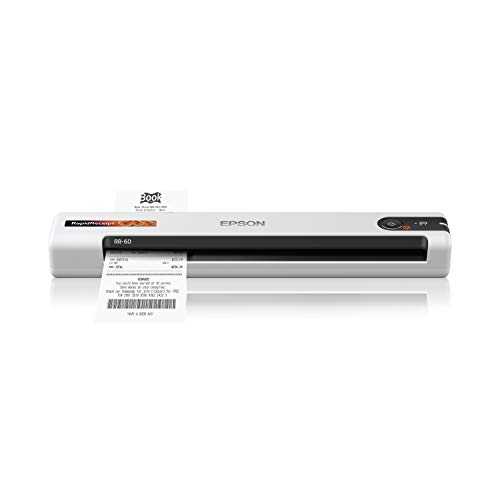
Epson RapidReceipt RR-60 Mobile Receipt and Color Document Scanner with Complimentary Data Management Software for PC and Mac
Epson RapidReceipt RR-60 Mobile Receipt and Color Document Scanner with Complimentary Data Management Software for PC and Mac
The Epson RapidReceipt RR-60 (ASIN B08P3YM18F) is a mobile single-sheet scanner designed around receipts, invoices, and everyday paperwork. Epson lists scan speeds up to 10 pages per minute and support for sheets up to 8.5 by 72 inches. It is USB-powered and weighs under 10 ounces according to the listing, making it one of the lightest options in this guide and easy to move between a desk, a kitchen table, and a laptop bag.
What sets the RR-60 apart is its software. Receipt management software is included with no subscription required, and Epson says it can extract and categorize key data from receipts automatically. The ScanSmart software can create searchable and editable PDF files, and the listing highlights integration with financial applications such as QuickBooks and TurboTax. For freelancers and small business owners who mainly need clean records for expenses and tax time, that data handling matters more than raw speed.
The trade-offs are portability limits: scanning is single-sided, there is no automatic document feeder, and there is no Wi-Fi, so it must stay connected to a computer by USB. If your scanning is mostly receipts and short forms, those limits are reasonable. If you regularly scan long two-sided documents, a duplex feeder model is a better match.
The ScanSnap iX1300 (ASIN B09FX5SRQT) is the compact desk option for people who have outgrown single-sheet scanning. It offers double-sided color scanning at up to 30 pages per minute, so both sides of a page are captured in one pass. The automatic document feeder holds up to 20 sheets, and a separate manual feeder handles single items such as receipts, photos, business cards, and plastic cards using a return scan path.
Connectivity covers both USB and Wi-Fi, and the listing notes scanning to Mac, PC, mobile devices, and cloud services, with the option to use the mobile app without a computer. Optical resolution is listed at 600 dpi, which is plenty for documents, receipts, and everyday photos. The space-saving design is a key part of the pitch: the feeder folds into a small footprint, so it can live on a crowded desk without dominating it, even while in use.
This model suits home office users who scan mixed stacks every week and want duplex speed without a full-size machine. The main trade-offs are a smaller feeder than the Canon below and a more involved software setup through ScanSnap Home. For moderate weekly volume in a tight space, it is the most balanced feeder scanner here.
The Canon imageFORMULA R40 (ASIN B07YNK4S9Y) is the high-volume pick in this budget group. Its automatic document feeder holds up to 60 sheets, the largest capacity here, and Canon lists scan speeds up to 40 pages per minute for black-and-white and 30 pages per minute for color in simplex mode, doubling to up to 80 images per minute in duplex mode. That makes it well suited to clearing filing cabinets, client files, or a semester of paperwork in a few sittings.
The R40 connects by USB and supports both Windows and Mac. Bundled software includes Canon CaptureOnTouch and a TWAIN driver, and the listing describes converting paper documents into searchable digital files and scanning to cloud destinations. It handles a wide variety of documents, including receipts, business cards, and passports according to the comparison details on the listing, and it carries a one-year limited warranty from Canon.
The trade-offs are size and connectivity: at just over six pounds it is a stay-on-the-desk machine, and there is no Wi-Fi, so scanning happens at the connected computer. Choose it if feeder capacity and duplex speed matter more than portability. For a small desk or travel use, the portable models above are easier to live with.
How to choose
Start with volume. If you scan a few pages a week, a single-sheet portable like the ES-50, DS-640, or RR-60 is enough, and you gain a tiny footprint and USB power. If you scan stacks weekly, prioritize a feeder: the iX1300 holds 20 sheets, while the R40 holds 60 and scans two-sided pages much faster.
Next, check duplex. Single-sided models require you to flip two-sided pages by hand, which gets tedious quickly. The iX1300 and R40 capture both sides in one pass, a major time saver for contracts, statements, and double-sided forms.
Then look at software. Receipt-focused buyers benefit from the RR-60 and its receipt management and finance app integration. General office users should confirm searchable PDF creation and optical character recognition are included, and check driver support for their operating system, especially on Mac and Linux.
Finally, consider connection and space. USB-only models are simple and need no network setup, but they tie scanning to one computer. Wi-Fi on the iX1300 adds phone and cloud scanning flexibility. Measure your desk too, because feeder scanners need room for paper to enter and exit cleanly.
Who should skip
Skip this whole category if you only scan one or two pages a month. A phone scanning app or the scanner built into a printer you already own will handle that load without new hardware, cables, or software to learn.
Skip the portable single-sheet models if your paperwork is mostly long, two-sided, or stapled sets. Feeding pages one at a time and flipping them by hand will frustrate you, and a feeder scanner will pay for its extra size in saved time within a few big jobs.
Skip budget document scanners entirely if you mainly scan photos for archiving, bound books, or fragile originals. These sheet-fed designs are built for loose paper, and a flatbed scanner is the safer tool for delicate or bound material.
Frequently asked questions
Can a budget document scanner create searchable PDF files?
Yes, all five models here include software with optical character recognition, which turns scanned text into searchable and often editable files. The exact workflow differs by brand, and recognition quality depends on the original print quality, page alignment, and resolution you choose, so clean, flat pages at document settings usually give the best results.
What is the difference between simplex and duplex scanning?
Simplex scanning captures one side of a page per pass, so a two-sided document needs to be flipped and scanned again. Duplex scanning captures both sides in a single pass. The iX1300 and R40 offer duplex capture, while the ES-50, DS-640, and RR-60 are simplex models designed for lighter, mostly one-sided work.
Do portable scanners need a power outlet?
The three portable models here run on USB power from a connected computer, so no wall outlet or separate adapter is needed while scanning. That makes them easy to use in shared spaces or while traveling, as long as a laptop or desktop is nearby. The desk feeder models use their own power supplies instead.
Can these scanners handle receipts and cards?
Yes, each model lists support for receipts, and most also handle business cards and plastic ID cards. Long receipts are a strength of the portable models, which accept pages up to 72 inches long. Thick or embossed cards should be fed one at a time, following the feed path each maker specifies for card stock.
Final verdict
There is no single winner here, only a best fit for your paper load. Pick the Brother DS-640 for simple, fast everyday scanning, the Epson ES-50 for the lightest travel option, and the RapidReceipt RR-60 when receipts and expense records dominate. Choose the ScanSnap iX1300 for compact duplex feeder scanning, and the Canon imageFORMULA R40 when feeder capacity and clearing large stacks matter most. Match the feeder, duplex support, and software to how you actually work, and any of these five will clear a desk drawer of paper for good.
E
Emubox Editorial Team
We compare specs, materials and verified owner reviews before a product earns a spot. Rankings are never paid.
Affiliate disclosure. As an Amazon Associate we earn from qualifying purchases at no extra cost to you. Prices accurate as of the date shown.
Best 2mm 70 cm portable antennas compared: telescopic radio antennas near 70 cm, with connectors, bands and collapsed sizes explained before you buy today.
Find the best thermostat setting for winter and summer, with energy-saving setbacks, humidity tips, and smart schedules for a comfortable home year-round.
The best affordable business computer monitors balance sharp text, eye comfort and lasting value. Compare four reliable office displays built for long workdays.
Looking for the best inexpensive HD TVs non smart? Compare five genuinely non-smart HD televisions with tuners, HDMI inputs and simple setup for any small room.


 Brother DS-640 Compact Mobile Document Scanner
 Canon imageFORMULA R40 Office Document Scanner









