We independently review everything we recommend. When you buy through our links, we may earn a commission. As an Amazon Associate we earn from qualifying purchases.
Best Budget Mini Keyboards: 5 Compact Picks for Small Desks
Compare five budget mini keyboards in compact 60 and 65 percent layouts, from wireless mechanical boards to slim Bluetooth picks for small desks.
As an Amazon Associate, we earn from qualifying purchases.
The best budget mini keyboard for most people is the Royal Kludge RK61, because it packs a true mechanical feel, hot-swappable switches, RGB backlighting, and three ways to connect into a 61-key board at the budget tier. If quiet typing and portability matter more, the Logitech K380 is the better pick, while the Razer Huntsman Mini is the premium choice for gaming.
A mini keyboard is a compact board that drops the number pad, and usually the function row as well, shrinking the footprint to roughly two thirds of a full-size keyboard. A 60 percent layout keeps 61 keys and moves arrows and navigation keys behind a function layer, while a 65 percent layout adds back dedicated arrow keys for 68 keys in total. Both layouts leave far more room for a mouse or a notebook, and both travel far more easily than a full-size board.
For most buyers, the Royal Kludge RK61 is the right starting point, with hot-swappable switches that can be pulled out and replaced without soldering, and Bluetooth, 2.4 GHz wireless, and wired USB-C connectivity. The RK68 adds dedicated arrow keys, the Logitech K380 and Pebble Keys 2 K380s are the quiet, slim options for shared offices and bags, and the Razer Huntsman Mini sits at the premium end with optical switches and an aluminum frame.
Quick Comparison
Keyboard
Layout
Keys
Connection
Switch Type
Tier
Royal Kludge RK61
60 percent
61
Bluetooth, 2.4 GHz, USB-C
Mechanical, hot-swappable
Budget
Royal Kludge RK68
65 percent
68
Bluetooth 5.0, 2.4 GHz, USB-C
Mechanical, hot-swappable
Mid-range
Logitech K380
Compact
79
Bluetooth
Scissor membrane
Budget
Logitech Pebble Keys 2 K380s
Compact
79
Bluetooth
Scissor membrane
Budget
Razer Huntsman Mini
60 percent
61
Wired USB-C
Clicky optical
Premium
How to Choose a Budget Mini Keyboard
Start with the layout, because it decides how the keyboard feels every day. A 60 percent board is the smallest practical option and works well for gaming and very small desks, but it hides the arrow keys behind a function layer, so editing text takes adjustment. A 65 percent board keeps dedicated arrow keys, which makes it easier for writing, coding, and office work, at the cost of a slightly wider case. If you have never used a compact board before, the 65 percent layout is the safer first step.
Next, decide between mechanical and membrane switches. Mechanical switches give a distinct tactile bump or click with each press, last for a very high number of keystrokes, and can often be swapped for a different feel. Membrane and scissor-switch boards are quieter, slimmer, and lighter, and they usually run far longer on a set of batteries. Gamers and heavy typists usually prefer mechanical switches, while people who type in quiet rooms often prefer slim membrane boards.
Connectivity matters just as much. Bluetooth lets one keyboard pair with a laptop, a tablet, and a phone, and the Logitech boards here switch between three paired devices with a single key press. A 2.4 GHz wireless receiver gives a more stable connection for gaming, and a wired USB-C connection removes battery worries and keeps latency low. The slim Logitech boards run on two AAA batteries and are rated for up to two years on the K380 and up to three years on the K380s, while mechanical wireless boards use rechargeable batteries and need charging more often.
The Royal Kludge RK61 is the best budget mini keyboard overall, and it earns that spot by offering features that usually cost far more. This is a 60 percent mechanical keyboard with 61 keys, hot-swappable switches, RGB backlighting, and tri-mode connectivity over Bluetooth, a 2.4 GHz wireless receiver, or a wired USB-C cable. The Brown switch version gives a gentle tactile bump without a loud click, and the switches can be pulled out and replaced whenever you want a different feel.
The RK61 ships with a coiled aviator cable, and its ABS double-shot keycaps let the RGB backlight shine through the legends. The companion software supports remapping keys and adjusting lighting effects.
Specs
Layout: 60 percent, 61 keys
Switches: Hot-swappable RK Brown switches, tactile
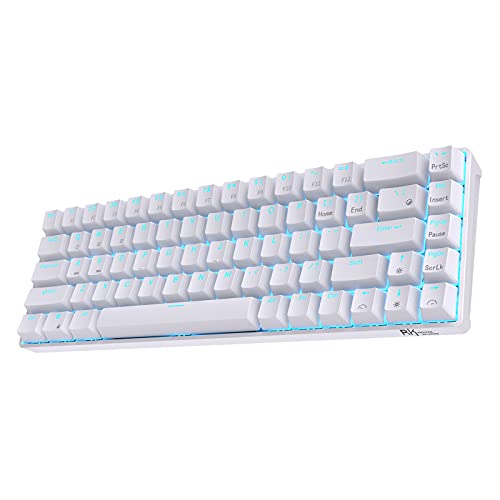
The Royal Kludge RK68 is the pick for anyone who likes a 60 percent board but is not ready to give up dedicated arrow keys. Its 65 percent layout keeps 68 keys, including a standalone arrow cluster and a small set of control keys, so moving around documents feels natural from the first day. Everything else follows the same formula as its smaller sibling: hot-swappable switches, wireless Bluetooth connectivity, and RGB backlighting in a compact case.
The Brown switch version gives a quiet tactile bump that suits both typing and gaming, and the hot-swappable sockets mean the switches can be changed later without soldering. The board connects over Bluetooth 5.0, 2.4 GHz wireless, and wired USB-C. Its rechargeable battery is rated at 1450 mAh, and the case measures about 12.17 x 4.06 x 1.54 inches with a weight of 0.60 kilograms.
Specs
Layout: 65 percent, 68 keys
Switches: Hot-swappable Brown switches, tactile
Connectivity: Bluetooth 5.0, 2.4 GHz wireless, wired USB-C
The Logitech K380 is the quiet classic of this list, and it remains one of the best compact keyboards for anyone who values portability and silence over mechanical switches. It uses low-profile scissor keys with round keycaps, and the typing feel is soft and quiet, which makes it ideal for shared offices, libraries, and late-night typing. The board pairs with up to three devices over Bluetooth and switches between them with the Easy-Switch keys, so one keyboard can serve a laptop, a tablet, and a phone without re-pairing.
Battery life is the K380’s quiet superpower. It runs on two AAA batteries and is rated for up to two years of use, so it can sit on a desk for months without any thought about charging. The board measures 10.9 x 4.9 x 0.6 inches and weighs 423 grams, and it works across Windows, Mac, Chrome OS, Android, iPadOS, and iOS. There is no backlight and no number pad, but for travel and tablets, the K380 is the budget pick that has earned its reputation over many years.
The Logitech Pebble Keys 2 K380s is the refreshed successor to the K380, and it keeps everything that made the original popular while adding a few modern touches. It is a slim, minimalist Bluetooth keyboard with scooped round keys, and it pairs with up to three devices across Windows, macOS, iPadOS, iOS, ChromeOS, and Android. At 415 grams it is light enough to carry every day.
The biggest differences from the original K380 are the customizable shortcut keys and the longer battery life. Ten function keys can be personalized through the Logi Options+ software, and the two AAA batteries are rated for up to 36 months of use.
Specs
Layout: Compact, no number pad
Keys: 79 keys
Switches: Scissor membrane, scooped round keys
Connectivity: Bluetooth, Easy-Switch for up to 3 devices
Battery: 2 AAA batteries, rated up to 36 months
Dimensions: Slim portable design
Weight: 415 grams
Software: Logi Options+ for customizable shortcuts
The Razer Huntsman Mini is the premium pick in this list, and it is the board to choose when gaming performance matters more than wireless convenience. This is a 60 percent keyboard with 61 keys, and the Purple switch version covered here uses Razer Clicky Optical switches, which register a press with a beam of light instead of a metal contact, giving a fast, crisp click across every key.
Build quality is where the Huntsman Mini pulls ahead of the budget boards. The frame uses aluminum construction, the keycaps are doubleshot PBT with legends that will not fade or wear smooth, and the detachable USB-C cable makes the board easy to pack. Chroma RGB lighting can be customized per key, and onboard memory stores lighting profiles and key mappings on the keyboard itself.
Specs
Layout: 60 percent, 61 keys
Switches: Razer Clicky Optical switches, Purple switch version
Connectivity: Wired USB-C, detachable cable
Backlight: Razer Chroma RGB, per-key lighting
Keycaps: Doubleshot PBT
Frame: Aluminum construction
Memory: Onboard memory for profiles and key mappings
Model number: RZ03-03390100-R3M1
Tier: Premium
Frequently Asked Questions
What is the best budget mini keyboard for most people?
The Royal Kludge RK61 is the best budget mini keyboard for most people, because it combines a 60 percent mechanical layout, hot-swappable switches, RGB backlighting, and Bluetooth, 2.4 GHz wireless, and wired USB-C connectivity at the budget tier. It suits gaming, typing, and travel.
Is a 60 percent keyboard or a 65 percent keyboard better?
A 65 percent keyboard is better for most first-time buyers, because it keeps dedicated arrow keys and a small control cluster while staying nearly as compact as a 60 percent board. A 60 percent keyboard is better when the smallest possible footprint matters most, such as a tiny desk or a gaming setup that needs maximum mouse room, but it hides the arrow keys behind a function layer.
Can a mini keyboard work with a tablet and a phone?
Yes, and the Bluetooth boards in this list are the best choices for that job. The Logitech K380 and the Pebble Keys 2 K380s can pair with up to three devices and switch between them with a single key press, so one keyboard can serve a laptop, a tablet, and a phone. The Royal Kludge boards also connect over Bluetooth.
Do mini keyboards have arrow keys?
A 65 percent mini keyboard has dedicated arrow keys, while a 60 percent mini keyboard reaches the arrows through a function layer instead. The Royal Kludge RK68 keeps a standalone arrow cluster, while the RK61 and the Razer Huntsman Mini use a function layer for arrows, which keeps the case as small as possible.
Conclusion
The best budget mini keyboard depends on how you type, where you type, and whether you game. The Royal Kludge RK61 is the best all-round choice at the budget tier, with mechanical switches, hot-swappable sockets, RGB lighting, and three connection options in a 61-key case. The Royal Kludge RK68 adds dedicated arrow keys for writers, while the Logitech K380 and the Pebble Keys 2 K380s are the quiet, slim Bluetooth options for travel and shared spaces. The Razer Huntsman Mini sits at the premium tier with optical switches and an aluminum frame. Pick the layout first, then the switch type, and any of these five will make a small desk feel much bigger.
E
Emubox Editorial Team
We compare specs, materials and verified owner reviews before a product earns a spot. Rankings are never paid.
Affiliate disclosure. As an Amazon Associate we earn from qualifying purchases at no extra cost to you. Prices accurate as of the date shown.
Best 2mm 70 cm portable antennas compared: telescopic radio antennas near 70 cm, with connectors, bands and collapsed sizes explained before you buy today.
Find the best thermostat setting for winter and summer, with energy-saving setbacks, humidity tips, and smart schedules for a comfortable home year-round.
The best affordable business computer monitors balance sharp text, eye comfort and lasting value. Compare four reliable office displays built for long workdays.
Looking for the best inexpensive HD TVs non smart? Compare five genuinely non-smart HD televisions with tuners, HDMI inputs and simple setup for any small room.

 Royal Kludge RK61
 Royal Kludge RK68
 Logitech K380
 Logitech Pebble Keys 2 K380s
 Razer Huntsman Mini









