We independently review everything we recommend. When you buy through our links, we may earn a commission. As an Amazon Associate we earn from qualifying purchases.
Best Budget USB Flash Drives for Fast, Portable Storage
Compare five budget USB flash drives with 128GB capacity, metal bodies and USB 3.0 and 3.1 speeds for backups, file transfers and everyday carry.
Samsung BAR Plus 3.1 USB Flash Drive, 128GB, 400MB/s, Rugged Metal Casing, Storage Expansion for Photos, Videos, Music, Files, MUF-128BE3/AM, Champagne Silver
Samsung BAR Plus 3.1 USB Flash Drive, 128GB, 400MB/s, Rugged Metal Casing, Storage Expansion for Photos, Videos, Music, Files, MUF-128BE3/AM, Champagne Silver
Compare five budget USB flash drives with 128GB capacity, metal bodies and USB 3.0 and 3.1 speeds for backups, file transfers and everyday carry.
⭐ Key Takeaways
Quick answer: Our top pick is SanDisk 128GB Ultra Flair USB 3.0 Flash Drive – SDCZ73-128G-G46, Black, with Samsung BAR Plus 3.1 USB Flash Drive, 128GB, 400MB/s, Rugged Metal Casing… as a strong alternative.
Cloud storage has not killed the flash drive. Moving a large video file to a colleague, installing an operating system, carrying documents between home and office, or keeping an offline backup of important photos is still faster and simpler with a drive in your pocket than with uploads, links and logins.
The budget end of the market is strong: every drive in this guide holds 128GB, uses USB 3.0 or 3.1, and comes from a major memory brand. The real differences are read speed, body design and how the drive survives daily carry. This guide compares five, from a tiny plug-and-stay drive to a rugged all-metal model.
As an Amazon Associate, we earn from qualifying purchases.
Quick answer
The Samsung BAR Plus is the budget USB flash drive most people should buy: its metal body is tough, it reads at up to 400 MB/s, and it shrugs off water, drops and magnets. If you want a drive that stays plugged into a laptop permanently, choose the tiny Samsung FIT Plus instead.
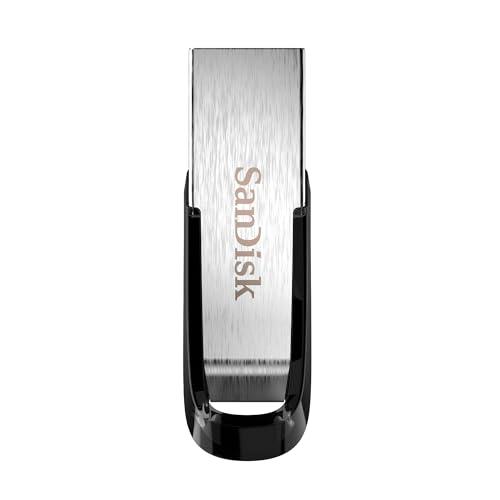
SanDisk 128GB Ultra Flair USB 3.0 Flash Drive – SDCZ73-128G-G46, Black
Top Pick
SanDisk 128GB Ultra Flair USB 3.0 Flash Drive – SDCZ73-128G-G46, Black
The SanDisk Ultra Flair is the classic budget recommendation: a slim metal-cased USB 3.0 drive with read speeds up to 150 MB/s, which is brisk enough for everyday file shuttling, photo libraries and document backups. The metal casing doubles as a heat sink and survives pockets and keyrings better than plastic sticks, and the drive supports password protection with SanDisk’s SecureAccess software for buyers who carry sensitive files. It works with any USB port, dropping to USB 2.0 speeds on older machines, and the 128GB size shown here sits in the middle of a range that runs from small capacities up to 512GB.
The compromises are speed and size. Faster drives in this guide read more than twice as quickly, which matters when you regularly move tens of gigabytes, and the Ultra Flair’s slim body, while elegant, has a small keyring loop that some users find fiddly. Write speeds, as with most budget drives, are well below the headline read figure. For general-purpose carry, though, it remains a dependable, good-looking drive from the biggest name in flash storage, and it is often the easiest of these five to find in a full range of capacities.
Samsung BAR Plus 3.1 USB Flash Drive, 128GB, 400MB/s, Rugged Metal Casing, Storage Expansion for Photos, Videos, Music, Files, MUF-128BE3/AM, Champagne Silver
Runner-Up
Samsung BAR Plus 3.1 USB Flash Drive, 128GB, 400MB/s, Rugged Metal Casing, Storage Expansion for Photos, Videos, Music, Files, MUF-128BE3/AM, Champagne Silver
The Samsung BAR Plus is the performance and durability pick. Its USB 3.1 interface reads at up to 400 MB/s on this 128GB model, so large folders and video files move in a fraction of the time the slower drives need. The one-piece metal body has an integrated key ring and a satisfying weight, and Samsung rates it to survive water, shock, extreme temperatures, magnets and X-rays, the hazards that actually kill pocket drives. It comes in Champagne Silver and Titan Grey, and capacities run up to 512GB for buyers who want one drive for everything.
There are two honest trade-offs. Write speeds trail the headline read speed, as usual, though they remain strong for the class. And the sleek metal body is slightly wider than basic sticks, which can matter on laptops with tightly spaced ports. Neither issue dents the overall package: fast transfers, a body that shrugs off daily abuse, and a design you will not be embarrassed to pull out in a meeting. For a main everyday-carry drive that you intend to keep for years, the BAR Plus is the strongest all-round choice in this guide.
Samsung FIT Plus USB 3.1 Flash Drive 128GB (MUF-128AB/AM)
Samsung FIT Plus USB 3.1 Flash Drive 128GB (MUF-128AB/AM)
The Samsung FIT Plus is built to disappear. The tiny low-profile body sits almost flush in a USB port, so you can leave it plugged into a laptop permanently as semi-fixed extra storage, or use it in a car stereo, TV or game console where a full-size stick would stick out and get knocked. Despite the size, this 128GB version reads at up to 400 MB/s over USB 3.1, matching the BAR Plus, and it carries the same Samsung durability ratings for water, shock, temperature, magnets and X-rays in miniature form.
Small size brings predictable compromises. There is no cap and no real keyring loop, the stubby body can be fiddly to grip and remove from tight ports, and a drive this easy to forget is also easy to lose track of, so it is a poor place for your only copy of anything. Sustained writes can also warm the tiny casing. Used as intended, though, as a leave-in storage upgrade for a laptop that is always short of space, or as a media drive for a TV or car, the FIT Plus does a job no full-size drive can do as neatly.
SanDisk 128GB Ultra Fit USB 3.1 Flash Drive – SDCZ430-128G-G46
SanDisk 128GB Ultra Fit USB 3.1 Flash Drive – SDCZ430-128G-G46
The SanDisk Ultra Fit is the other plug-and-stay option, and the budget one. It packs 128GB into a body barely bigger than the USB connector itself, reads at up to 130 MB/s over USB 3.1, and is designed to live in a laptop, car or TV full time. SanDisk includes its SecureAccess software for optional password-protected folders and a file recovery offer, which adds a little peace of mind for a drive that will hold real data. For expanding a cramped laptop or loading a media library for the car, it covers the brief at the lowest cost in this guide.
The limits are speed and handling. At up to 130 MB/s it is the slowest reader here alongside the PNY, fine for documents and music but sluggish for huge video files, and the tiny body gets warm under sustained transfers and can be awkward to pull from recessed ports. It is also, like the FIT Plus, very easy to misplace. Judged as a set-and-forget storage bump rather than a daily transfer tool, though, the Ultra Fit is excellent value, and its tiny size is exactly the point.
PNY 128GB Turbo Attaché 3 USB 3.0 Flash Drive, Silver (Pack of 2)
PNY 128GB Turbo Attaché 3 USB 3.0 Flash Drive, Silver (Pack of 2)
The PNY Turbo Attaché 3 two-pack is the practical bulk buy: two 128GB USB 3.0 drives in one package, ideal for households, students and small offices that need a drive in several places at once, or one for work files and one for personal backups. Each drive reads at up to 100 MB/s, uses a sliding collar design that protects the connector without a cap to lose, and works in any USB port with the usual backward compatibility. PNY backs the drives with a five-year warranty, which is generous for the category.
Individually, the drives are unremarkable: the plastic body feels less premium than the metal Samsung and SanDisk models, and read and write speeds are the most modest in this guide, so big transfers take patience. The sliding mechanism can also collect pocket lint over time. None of that matters much for the intended use. When the job is handing a client a drive you may not get back, loading an installer, or keeping a spare in every bag and drawer, two decent drives beat one excellent one, and that is exactly the value this pack delivers.
How to choose
Capacity first. 128GB suits documents, photos and a handful of large files, and it is the sweet spot for budget drives. If you move video projects or full system backups, step up to 256GB or 512GB versions of these same models rather than juggling several small drives.
Speed second, and read the fine print. Headline figures are always read speeds; write speeds on budget drives are much lower, which is what you feel when copying files onto the drive. USB 3.1 models like the Samsung drives read several times faster than basic USB 3.0 sticks, but only when plugged into a USB 3 port on the computer.
Design third. Full-size metal drives with key rings suit daily pocket carry and survive abuse best. Tiny plug-and-stay drives suit laptops, cars and TVs where the drive lives in the port. Sliding and capped designs protect the connector in bags. Finally, consider the connector itself: every drive here is USB-A, so owners of USB-C-only laptops will need an adapter or a dual-connector drive instead.
Who should skip
Skip a flash drive entirely if your real need is backup: a single pocket drive is easy to lose and is not a safe home for your only copy of anything, so use an external hard drive or cloud backup for that job. Skip the tiny plug-and-stay models if you swap drives between machines all day, since their stubby bodies are fiddly to remove. Skip USB-A drives if your laptop has only USB-C ports and you dislike adapters. And if you regularly move very large files, a portable SSD is dramatically faster and worth the extra cost.
FAQ
What is the difference between USB 3.0, 3.1 and 3.2 on flash drives?
Mostly marketing labels for the same underlying speeds. For flash drives, what matters is the rated read speed in megabytes per second and whether your computer has a matching fast port. A USB 3.1 drive rated at 400 MB/s, like the Samsung models here, is far quicker in practice than a basic USB 3.0 drive rated at 100 MB/s, whatever the labels say.
Why is my flash drive slower than its advertised speed?
The advertised figure is a maximum read speed under ideal conditions. Write speeds are lower, small files transfer far slower than one large file, USB 2.0 ports cap any drive at low speeds, and drives slow down as they fill or warm up. For big transfers, plug into the fastest blue or USB-C-adjacent USB 3 port and copy a few large files rather than thousands of small ones.
How long do USB flash drives last?
A quality drive from a major brand typically lasts many years of normal use, and the metal-bodied models here are rated against water, shock and temperature extremes. Flash memory does wear with heavy rewriting, though, and pocket drives are easily lost. Treat a flash drive as a transfer and carry tool, keep backups elsewhere, and replace any drive that starts producing copy errors.
Can I leave a flash drive plugged into my laptop all the time?
Yes, and the tiny FIT Plus and Ultra Fit are designed for exactly that, acting as semi-permanent extra storage. Just remember the drive will draw a little power, can be knocked in transit if it protrudes, and should never hold your only copy of important files. For a laptop that is always short on space, a leave-in drive is a neat, cheap upgrade.
Final verdict
The Samsung BAR Plus is the best all-round budget flash drive here: fast, metal and genuinely rugged. The FIT Plus wins for leave-in laptop storage, the Ultra Fit does the same job for less, the Ultra Flair is the dependable classic for general carry, and the PNY two-pack covers households and offices that need drives everywhere. Pick by how you carry and how much you move at once, and any of the five will serve you well.
E
Emubox Editorial Team
We compare specs, materials and verified owner reviews before a product earns a spot. Rankings are never paid.
Affiliate disclosure. As an Amazon Associate we earn from qualifying purchases at no extra cost to you. Prices accurate as of the date shown.
Best 2mm 70 cm portable antennas compared: telescopic radio antennas near 70 cm, with connectors, bands and collapsed sizes explained before you buy today.
Find the best thermostat setting for winter and summer, with energy-saving setbacks, humidity tips, and smart schedules for a comfortable home year-round.
The best affordable business computer monitors balance sharp text, eye comfort and lasting value. Compare four reliable office displays built for long workdays.
Looking for the best inexpensive HD TVs non smart? Compare five genuinely non-smart HD televisions with tuners, HDMI inputs and simple setup for any small room.


 Samsung FIT Plus USB 3.1 Flash Drive 128GB (MUF-128AB/AM)
 SanDisk 128GB Ultra Fit USB 3.1 Flash Drive – SDCZ430-128G-G46
 PNY 128GB Turbo Attaché 3 USB 3.0 Flash Drive, Silver (Pack of 2)









