
Our Short List of 3

- Best for: A living room TV with an optical output where you want the simplest possible setup, with one cable and a remote that covers the basics.
- Channels: 2.0
- Maximum output: 120 Watts
- Inputs: HDMI ARC, optical, USB playback, Bluetooth
- Sound: S-Force Pro front surround, Dolby Digital, voice enhancement

- Best for: An older TV with no HDMI ARC, or a TV where you want the widest choice of legacy inputs, since optical, coaxial, and AUX are all covered.
- Channels: single soundbar
- Inputs: optical, coaxial, 3.5 mm AUX, Bluetooth
- Sound: dialogue mode, bass control
- Bar size: 21.6 in wide, 2.6 in tall, 3.4 in deep
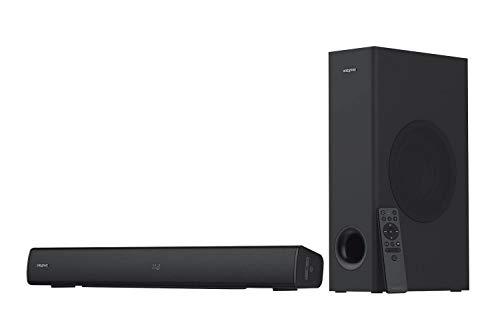
- Best for: A bedroom or a small room where dialogue clarity matters most, and where a compact bar with a real subwoofer fits the space.
- Channels: 2.1
- Peak output: 160 Watts
- Inputs: HDMI ARC, optical, 3.5 mm AUX, USB audio, Bluetooth 5.0
- Sound: Clear Dialog and Surround by Sound Blaster
All 4 Picks at a Glance
| Product | Specs | Action |
|---|---|---|
| 1. Sony HT-S100F |
| Check price on Amazon |
| 2. Bose Solo 5 |
| Check price on Amazon |
| 4. Creative Stage V2 |
| Check price on Amazon |
 5. JBL Bar 2.0 All-in-One (MK2) |
| Check price on Amazon |
Key takeaways
- Five soundbars that connect to older TVs through optical, AUX, or RCA, with simple remotes and no app needed. Compare legacy inputs and pick one.
An older TV can still look fine while sounding thin, and a soundbar is the simplest fix. The catch is the connection. Many new soundbars assume your TV has an HDMI ARC port, and plenty of older sets do not have one at all. If the bar you buy only talks over ARC, it will sit silent in front of a TV that cannot speak that language.
The five soundbars below all work with older TVs because each one offers a legacy wired input: optical, a 3.5 mm AUX jack, or RCA. Every pick also ships with a remote, needs no phone app, and sets up with one cable and a single menu change on the TV. That is the whole test for this list. If a bar could only connect over HDMI ARC, it did not make the cut.
Disclosure: As an Amazon Associate, we earn from qualifying purchases.
Quick Picks
The short version: the Sony HT-S100F is the simplest all-round pick, with optical and HDMI ARC in one slim bar. The Bose Solo 5 is the pick for a TV with no HDMI ARC at all, since it connects over optical, coaxial, or AUX. The Polk Signa S2 is the pick for a bigger room, thanks to its wireless subwoofer. The Creative Stage V2 is the pick for a desk or a small room where dialogue clarity matters most. The JBL Bar 2.0 All-in-One (MK2) is the pick for a tight shelf, since it is the shortest bar here.
| Soundbar | TV Connections | Channels | Subwoofer | Remote |
|---|---|---|---|---|
| Sony HT-S100F | Optical, HDMI ARC | 2.0 | Built-in bass reflex | Yes |
| Bose Solo 5 | Optical, coaxial, 3.5 mm AUX | Single bar | None | Universal remote |
| Polk Signa S2 | Optical, HDMI ARC, 3.5 mm AUX | 2.1 | Wireless, 5.25 in | Yes |
| Creative Stage V2 | Optical, HDMI ARC, 3.5 mm AUX | 2.1 | Wired, 5.25 in | Yes |
| JBL Bar 2.0 All-in-One (MK2) | Optical, HDMI ARC | 2.0 | Built-in bass | Yes |
How to Choose
Optical vs AUX vs RCA. Optical, also called TOSLINK, is the best legacy connection on most older TVs. It carries a clean digital signal, it is immune to the hum that analog cables can pick up, and it was fitted to most flat-panel TVs made from the late 2000s onward. Look for a small square port on the back of your TV, often with a little flap, labeled Digital Audio Out or Optical. A 3.5 mm AUX jack, usually the TV headphone jack, is the next option. It works on almost any TV with a headphone socket, but the sound is analog, so a long or cheap cable can add a faint hiss. RCA, the red and white pair, is the oldest option here and the one to use when the TV has no optical port and no headphone jack. RCA is analog like AUX, and it needs the TV volume set high enough to feed the bar a strong signal. When a soundbar offers more than one of these, take optical first, AUX second, and RCA third.
Check the TV audio-output settings. Plugging the cable in is only half the job. Most older TVs keep playing through their own speakers until you tell them otherwise. Open the TV sound menu and choose Optical, Digital Audio Out, or External Speakers. If the TV offers a digital audio format setting, set it to PCM, the safest choice when the bar stays silent. On an AUX or RCA connection, turn the TV volume up to about three quarters, then use the soundbar remote for day-to-day volume. If your TV also has HDMI ARC, ARC is worth using, since it lets the TV remote control the bar volume, but ARC is a bonus here, never a requirement.
Mounting vs tabletop. A soundbar can sit on the TV stand in front of the screen or hang on the wall below it. Tabletop is the easy choice: put the bar on the stand, leave a small gap under the TV so the bar does not cover the remote sensor, and you are done. Wall mounting looks tidier and frees the stand, but it needs screws, a level, and a clear path for the cable to the TV. Every bar in this list can sit on a stand, and the Sony, Bose, Creative, and JBL bars also have wall-mount keyholes or brackets. Measure the width of your TV stand before you buy. A bar wider than the stand will overhang the edges, and a bar taller than the gap under the TV will block the bottom of the picture.
When an extractor is needed. Some very old TVs have no optical port, no headphone jack, and no RCA audio output at all, only HDMI ports with no ARC. In that case no soundbar in this list can connect directly, and the fix is a separate HDMI audio extractor that sits between the TV and a source device. That is a different product from a soundbar, so it is not picked here. If your TV has at least one of optical, AUX, or RCA, you do not need an extractor.
Keep the remote simple. Every bar here includes a physical remote, and none of them needs a phone app for basic use. That matters on an older TV, where the goal is one remote for volume and one cable for sound. Check that the remote has clear volume, mute, and input buttons you can find by touch. The Bose remote goes further and can also control the TV and a Blu-ray player, which cuts down the remote clutter on the coffee table.
5 Best Options
1. Sony HT-S100F
- Best for: A living room TV with an optical output where you want the simplest possible setup, with one cable and a remote that covers the basics.
- Channels: 2.0
- Maximum output: 120 Watts
- Inputs: HDMI ARC, optical, USB playback, Bluetooth
- Sound: S-Force Pro front surround, Dolby Digital, voice enhancement
A living room TV with an optical output where you want the simplest possible setup, with one cable and a remote that covers the basics.
This bar has no 3.5 mm AUX input, so a TV with only a headphone jack cannot connect to it. If your TV lacks an optical port, pick the Bose or the Polk instead.
The Sony HT-S100F is the most straightforward pick in this list. It is a slim 2.0-channel bar that connects over HDMI ARC or optical, and Sony includes an optical cable in the box, so an older TV with an optical output needs nothing extra. The bar has a built-in bass reflex speaker and a built-in tweeter, plus S-Force Pro front surround processing that widens the sound without extra speakers. A voice enhancement mode lifts dialogue, which helps when speech gets buried under music.
Watch out for: This bar has no 3.5 mm AUX input, so a TV with only a headphone jack cannot connect to it. If your TV lacks an optical port, pick the Bose or the Polk instead.
2. Bose Solo 5
- Best for: An older TV with no HDMI ARC, or a TV where you want the widest choice of legacy inputs, since optical, coaxial, and AUX are all covered.
- Channels: single soundbar
- Inputs: optical, coaxial, 3.5 mm AUX, Bluetooth
- Sound: dialogue mode, bass control
- Bar size: 21.6 in wide, 2.6 in tall, 3.4 in deep
An older TV with no HDMI ARC, or a TV where you want the widest choice of legacy inputs, since optical, coaxial, and AUX are all covered.
There is no HDMI input, so a move to a newer TV still means using optical. The bar also has no separate subwoofer, so deep bass stays modest.
The Bose Solo 5 is the only bar here with no HDMI port at all, and that is exactly why it fits older TVs so well. It connects over optical, coaxial, or 3.5 mm AUX, and the bar detects which cable you plugged in, so there is no input menu to fight with. Bose includes both an optical cable and a coaxial cable in the box. A dialogue mode makes speech easier to follow, and a bass control on the remote adjusts the low end. The universal remote can also control the TV and a Blu-ray player, which cuts down the remote clutter on the coffee table.
Watch out for: There is no HDMI input, so a move to a newer TV still means using optical. The bar also has no separate subwoofer, so deep bass stays modest.
3. Polk Signa S2
The Polk Signa S2 is the pick for a larger room, because it pairs a slim bar with a wireless subwoofer. The subwoofer connects to the bar on its own, so the only cable you run is the one from the TV to the bar, and the subwoofer just needs a power outlet where you place it. Inputs cover HDMI ARC, optical, and 3.5 mm AUX, and Polk includes both an HDMI cable and an optical cable in the box. VoiceAdjust lifts speech without changing the rest of the soundtrack, and a night mode lowers the bass while keeping voices clear.
Specs
- Channels: 2.1
- Inputs: HDMI ARC, optical, 3.5 mm AUX, Bluetooth
- Sound: Dolby Digital, VoiceAdjust dialogue control, night mode
- Subwoofer: wireless, 5.25 in driver
- Bar size: 35.4 in wide, 2.15 in tall
- Frequency range: 45 Hz to 20 kHz
- In the box: remote, HDMI cable, optical cable
Best for: A bigger living room where the TV speakers sound thin and distant, and where a wireless subwoofer can add weight without extra cables across the floor.
Watch out for: The subwoofer needs floor space and a power outlet of its own, so it suits a living room better than a cramped bedroom. The bar is 35.4 inches wide, so measure the stand first.
- https://www.amazon.com/dp/B07H1B3PY9
4. Creative Stage V2
- Best for: A bedroom or a small room where dialogue clarity matters most, and where a compact bar with a real subwoofer fits the space.
- Channels: 2.1
- Peak output: 160 Watts
- Inputs: HDMI ARC, optical, 3.5 mm AUX, USB audio, Bluetooth 5.0
- Sound: Clear Dialog and Surround by Sound Blaster
A bedroom or a small room where dialogue clarity matters most, and where a compact bar with a real subwoofer fits the space.
The subwoofer is wired to the bar, so it has to sit close enough for its cable to reach. The bar is also taller than the others here at 3.94 inches, so check it will not block the bottom of the screen.
The Creative Stage V2 is a 2.1-channel bar with a wired subwoofer, built around dialogue clarity. Its Clear Dialog processing pulls speech forward, and a Surround mode widens the sound for movies, both from Sound Blaster. Connections cover TV ARC, optical, AUX, USB audio, and Bluetooth, so almost any older TV can feed it. The included IR remote switches inputs and adjusts bass and treble. At 26.8 inches wide it fits smaller stands and desks, and it is wall-mountable too.
Watch out for: The subwoofer is wired to the bar, so it has to sit close enough for its cable to reach. The bar is also taller than the others here at 3.94 inches, so check it will not block the bottom of the screen.
5. JBL Bar 2.0 All-in-One (MK2)
- Best for: A small TV on a narrow stand, or a bedroom where a short, low bar that disappears under the screen is the goal.
- Channels: 2.0
- Inputs: HDMI ARC, optical, Bluetooth, USB playback
- Sound: Dolby Digital, JBL Surround Sound
- Frequency range: 70 Hz to 20 kHz
A small TV on a narrow stand, or a bedroom where a short, low bar that disappears under the screen is the goal.
There is no 3.5 mm AUX input, so a TV with only a headphone jack cannot connect to it. With no separate subwoofer, deep bass is limited, so this bar suits speech and light movie watching more than bass-heavy films.
The JBL Bar 2.0 All-in-One (MK2) is the most compact bar in this list, at just 24.2 inches wide and 2.2 inches tall. It is a single-box 2.0-channel bar with built-in bass, so there is no subwoofer to place and no extra cable to run. It connects over HDMI ARC or optical, and it decodes Dolby Digital with JBL Surround Sound processing. Bluetooth covers music from a phone, and the USB port plays music from a flash drive. A remote is included, and the bar is low enough to sit in front of almost any TV without blocking the picture.
Watch out for: There is no 3.5 mm AUX input, so a TV with only a headphone jack cannot connect to it. With no separate subwoofer, deep bass is limited, so this bar suits speech and light movie watching more than bass-heavy films.
Which One Fits
Match the bar to the ports on the back of your TV first, then to the room. If the TV has an optical output and the room is a normal living room, the Sony HT-S100F is the easy default: one optical cable, a slim bar, and clear dialogue. If the TV has no HDMI ARC at all, or you want the most connection choices, the Bose Solo 5 covers optical, coaxial, and AUX in one bar. If the room is large and the sound needs real weight, the Polk Signa S2 adds a wireless subwoofer without extra signal cables. If the room is small and speech is the priority, the Creative Stage V2 pairs a compact bar with dialogue processing and a wired subwoofer. If the stand is narrow and the TV is small, the JBL Bar 2.0 All-in-One (MK2) fits where the wider bars cannot. In every case, confirm the TV port before you buy, since the port decides the pick.
Common Mistakes
The most common mistake is buying an ARC-only soundbar for a TV that has no ARC port. Check the back of the TV for the word ARC next to an HDMI port before you order anything. A second mistake is leaving the TV speakers on after connecting the bar, which doubles the sound and makes everything echo. Turn the TV speakers off in the audio menu once the bar is connected. A third mistake is using the wrong digital format: if the bar stays silent over optical, open the TV audio menu and set the digital output to PCM, since that format works with every bar here. A fourth mistake is placing the bar where it blocks the TV remote sensor, which sits at the bottom edge of most older TVs. Leave a clear line of sight between the remote and the TV. A final mistake is expecting a single bar to shake the room. Bars without a subwoofer improve clarity and volume, but deep bass needs one, so pick the Polk or the Creative if low end matters.
FAQ
Can I connect a soundbar to a TV with no HDMI ARC?
Yes. Use the TV optical output if it has one, since that is the best legacy connection. If the TV has no optical port, use the 3.5 mm headphone jack with an AUX cable, or the red and white RCA audio outputs with an RCA cable. The Bose Solo 5 covers all three, and the Polk Signa S2 and Creative Stage V2 cover optical and AUX.
Why is there no sound after I plug in the optical cable?
Open the TV sound menu and change the audio output to Optical or External Speakers, then set the digital audio format to PCM. Also check that the optical cable clicks into both ports, since a loose plug passes no signal at all.
Is HDMI ARC better than optical for an older TV?
ARC is more convenient when the TV supports it, since the TV remote can control the bar volume and the bar can turn on with the TV. Sound quality over optical is just as good for the stereo and Dolby Digital sound these bars handle. If the TV has ARC, use it. If it does not, optical gives the same result with one extra remote in hand.
Do I need a separate subwoofer with a soundbar for an older TV?
Not always. A single bar like the Sony, Bose, or JBL improves dialogue and volume a great deal on its own. A subwoofer adds deep bass for movies and music, so it is worth having in a larger room. The Polk Signa S2 includes a wireless subwoofer, and the Creative Stage V2 includes a wired one, while the other three bars rely on built-in bass.









