We independently review everything we recommend. When you buy through our links, we may earn a commission. As an Amazon Associate we earn from qualifying purchases.
Best Budget HDMI Splitters: Mirror One Source to Two TVs
Compare the best budget HDMI splitters for mirroring one source to two or four screens, with 4K support, EDID advice and powered 1x2 and 1x4 picks.
Compare the best budget HDMI splitters for mirroring one source to two or four screens, with 4K support, EDID advice and powered 1x2 and 1x4 picks.
⭐ Key Takeaways
Quick answer: Our top pick is J-Tech Digital HDMI Splitter 1 in 2 Out, JTD-MINI-1x2SP, with OREI UltraHD 4K HDMI Splitter 1 in 2 Out, UHDS-102 as a strong alternative.
An HDMI splitter takes one source, such as a streaming box, game console or laptop dock, and sends the same picture to two or more screens at once. It is the simplest fix for a desk monitor paired with a wall TV, a shop display that repeats a menu board, or a living room where a projector and a television share one player. Splitters are not switches, and they do not extend a desktop across screens; every output shows an identical mirrored image. This guide compares five powered splitters that cover the common cases, from compact 1×2 boxes for a pair of displays to 1×4 models that feed a whole wall of screens.
As an Amazon Associate, we earn from qualifying purchases.
Quick answer
For most people, the OREI UHDS-102 is the best budget HDMI splitter: it is a powered 1×2 box with HDMI 2.0 support, clean 4K output and a sturdy metal case. Choose the J-Tech Digital mini splitter for the smallest footprint, and pick a 1×4 model from OREI, Enbuer or TKCHAX when three or four screens need the same feed.
J-Tech Digital HDMI Splitter 1 in 2 Out, JTD-MINI-1x2SP
Top Pick
J-Tech Digital HDMI Splitter 1 in 2 Out, JTD-MINI-1x2SP
The J-Tech Digital mini splitter is the pick for tight media cabinets and tidy desks. The metal box measures roughly three inches by two inches, so it disappears behind a television or under a monitor stand, yet it still handles the full job of a larger unit. It takes one HDMI input and mirrors it to two displays at resolutions up to 4K at 60Hz with 4:2:0 color, and it steps down gracefully to 1080p and 720p for older screens. Audio support is broad for the size, covering LPCM, Dolby Digital, DTS 7.1 and the lossless DTS-HD and Dolby TrueHD formats, which makes it a sensible bridge between a player and a TV-plus-soundbar pairing. Power comes from the included adapter, and powered operation matters here: it keeps the signal stable over longer cable runs where passive splitters fade. The limits are the ones shared by every 1×2 splitter. Both screens always show the same content, and when the two displays have different maximum resolutions, both outputs settle at the lower shared resolution. Choose the J-Tech Digital if you want the smallest reliable way to feed two screens from one source and your displays are reasonably well matched.
OREI UltraHD 4K HDMI Splitter 1 in 2 Out, UHDS-102
Runner-Up
OREI UltraHD 4K HDMI Splitter 1 in 2 Out, UHDS-102
The OREI UHDS-102 is the most complete 1×2 splitter in this group and the one to buy when picture quality is the priority. It is built to the HDMI 2.0b standard with HDCP 2.2 support and 18 Gbps bandwidth, so it passes 4K at 60Hz with full 4:4:4 color and 8-bit depth without the chroma compromises of older designs. That makes it a good match for a modern console or a 4K streaming box feeding a television and a monitor that both deserve the full signal. The metal enclosure is compact at about four inches wide, and the package includes the 5V power adapter the unit needs to amplify and distribute the signal cleanly. OREI is also upfront about the behaviour that surprises first-time splitter owners: the box duplicates the source, it cannot extend a computer desktop across two monitors, and mismatched displays cause the output to drop to the best resolution both screens share. Treat that as a planning note rather than a flaw. If your two screens match, the UHDS-102 simply disappears into the setup and works. Pick it when you want a fit-and-forget 1×2 splitter with proper 4K headroom for gaming, streaming or a small presentation rig.
OREI UltraHD 4K HDMI Splitter 1 in 4 Out, UHDS-104
OREI UltraHD 4K HDMI Splitter 1 in 4 Out, UHDS-104
When two outputs are not enough, the OREI UHDS-104 stretches the same formula to four screens. It distributes one HDMI source to four displays simultaneously, keeping the HDMI 2.0 support, HDCP compliance and 18 Gbps bandwidth of its smaller sibling, and it adds EDID management so the source negotiates a resolution and audio format that the connected screens can all accept. That matters in the settings where 1×4 splitters earn their keep: a sports bar corner, a classroom, a trade-show stand or a security desk where several monitors mirror one feed. As with the 1×2 model, every screen shows the same picture, and the shared-resolution rule applies across all four outputs, so a single older 1080p panel in the mix will pull the whole group down to 1080p even if the source and the other screens are 4K. The powered design keeps the signal intact when it is divided four ways, which is exactly where unpowered adapters fail. The box itself stays compact and rack-friendly for its class. Choose the UHDS-104 if you know you need four mirrored displays now, or you want the headroom to add screens later without replacing the splitter.
The Enbuer 1×4 splitter is the straightforward value option for feeding four screens at 1080p. It is a powered distribution box that mirrors one input to four outputs, supports 3D content, and handles resolutions up to 4K x 2K at the 30Hz refresh rate of its HDMI 1.4 generation. That last detail defines its role. For digital signage, menu boards, church and classroom displays, and multi-TV sports setups running at 1080p, the Enbuer covers the job without paying for bandwidth that never gets used. The amplified design buffers the signal so all four outputs stay in sync, and the included AC adapter keeps it fed. Where it gives ground to the newer boxes is at the top end: a 4K source at 60Hz, HDR gaming or a high-refresh monitor feed will exceed what this generation of hardware passes cleanly, and the shared-resolution rule applies here too. It is also a mirror-only device, like every splitter in this guide. Pick the Enbuer when your screens are 1080p panels that all need the same feed and you would rather keep the budget focused on the displays themselves than on the box that drives them.
The TKCHAX 1×4 splitter brings the four-output layout up to the HDMI 2.0 generation, in a compact powered box that suits permanent installs behind a media unit as happily as a portable presentation kit. It mirrors one source to four displays with support for 4K x 2K at 60Hz, UHD resolutions and 3D, and it ships with an AC adapter and EDID support so the source and screens can agree on a workable format without manual fussing. That combination suits a mixed desk-and-living-room setup where a 4K television is the main screen and secondary panels follow along, as well as small commercial installs that want a modern spec sheet. The usual splitter rules still govern it: the image is identical on every output, extended desktops are not possible, and the weakest display in the group sets the ceiling for resolution and refresh rate. Choose the TKCHAX if you want four outputs with 4K 60Hz support and EDID handling, and your setup does not need the brand infrastructure or the metalwork of the OREI boxes. It is a sensible middle path between the older 1080p-focused Enbuer and the premium-feeling OREI UHDS-104.
How to choose
Start with the output count, because it decides the shortlist. Two screens need a 1×2 splitter; three or four need a 1×4, and buying the larger box early is cheaper than replacing a small one later. Next, match the HDMI generation to your source. A 4K console, streaming box or PC that outputs 4K at 60Hz needs an HDMI 2.0 splitter with 18 Gbps bandwidth; an HDMI 1.4 box will cap the signal at 4K 30Hz or push you down to 1080p. Check HDCP support as well, since protected content from streaming services and Blu-ray players needs an HDCP-compliant path, ideally version 2.2 for 4K sources. Always choose a powered splitter. Dividing a signal weakens it, and the amplifier in a powered unit is what keeps four outputs stable over real cable lengths. Finally, remember the shared-resolution rule: every display on a splitter receives the same signal, negotiated down to what the least capable screen accepts. If one old 1080p panel must join a 4K setup, either accept 1080p everywhere or give that panel its own source. EDID controls, where fitted, help the negotiation but cannot repeal the rule.
Who should skip
Skip a splitter entirely if you want different content on each screen. Extending a desktop, running a dashboard beside a video feed, or playing two sources at once calls for a docking station, a second output from the computer, or an HDMI switch or matrix instead. Gamers chasing high refresh rates should also pause: most budget splitters top out at 4K 60Hz and will hold back a 120Hz gaming monitor. If you only ever use one display, a splitter adds cost and a power brick for nothing. And if your real problem is too many sources rather than too few screens, the device you want is a switch, not a splitter.
Frequently asked questions
Does an HDMI splitter lower the picture quality?
A powered splitter that matches your source’s HDMI generation does not visibly degrade the picture, because it copies a digital signal rather than splitting an analog one. Quality problems appear when the splitter is older than the source, for example an HDMI 1.4 box fed by a 4K 60Hz console, or when unpowered adapters starve longer cable runs. Match the specification and the copy stays clean.
Why does my 4K source show 1080p on both screens?
That is the shared-resolution rule at work. A splitter sends one identical signal to every output, and it negotiates that signal with all connected displays at once. If any screen in the group is limited to 1080p, the source is told to send 1080p so that every display can show it. The fix is to use displays with matching capabilities or move the weaker screen to its own feed.
What is the difference between a splitter and a switch?
A splitter takes one input and sends it to several outputs, all showing the same image. A switch does the reverse: several inputs feed one output, and you choose which source is active. A matrix combines both ideas and can route any input to any output. Names are often misused in listings, so check the port layout and the words input and output before ordering.
Do I need a powered HDMI splitter?
Yes, for anything beyond the shortest and simplest runs. Dividing an HDMI signal passively weakens it, and the amplifier in a powered splitter restores the signal so each output stays stable, especially at 4K and across four displays. Every model in this guide is powered, and each includes its adapter or power cable in the box, so there is nothing extra to buy.
Final verdict
For a two-screen setup, the OREI UHDS-102 is the safest buy: current HDMI 2.0 specification, honest documentation and a metal case. The J-Tech Digital mini splitter suits anyone who values a tiny footprint above all. When the screen count grows, the OREI UHDS-104 and the TKCHAX carry 4K 60Hz support to four outputs, while the Enbuer keeps a 1080p four-screen rig simple and inexpensive. Whichever you choose, match the HDMI generation to your source and keep the displays in a group at similar resolutions, and a budget splitter will quietly do its one job for years.
E
Emubox Editorial Team
We compare specs, materials and verified owner reviews before a product earns a spot. Rankings are never paid.
Affiliate disclosure. As an Amazon Associate we earn from qualifying purchases at no extra cost to you. Prices accurate as of the date shown.
Best 2mm 70 cm portable antennas compared: telescopic radio antennas near 70 cm, with connectors, bands and collapsed sizes explained before you buy today.
Find the best thermostat setting for winter and summer, with energy-saving setbacks, humidity tips, and smart schedules for a comfortable home year-round.
The best affordable business computer monitors balance sharp text, eye comfort and lasting value. Compare four reliable office displays built for long workdays.
Looking for the best inexpensive HD TVs non smart? Compare five genuinely non-smart HD televisions with tuners, HDMI inputs and simple setup for any small room.

 J-Tech Digital HDMI Splitter 1 in 2 Out, JTD-MINI-1x2SP
 OREI UltraHD 4K HDMI Splitter 1 in 2 Out, UHDS-102
 OREI UltraHD 4K HDMI Splitter 1 in 4 Out, UHDS-104
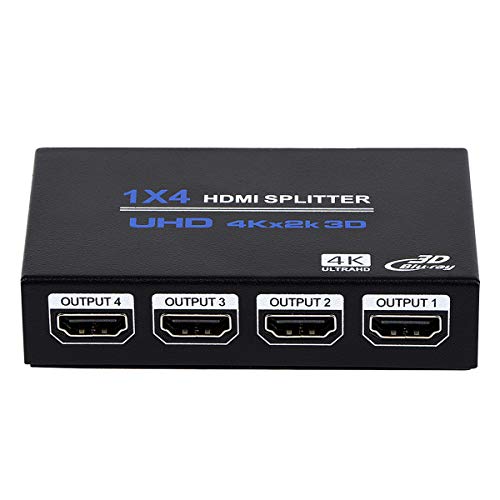 Enbuer HDMI Splitter 1 in 4 Out
 TKCHAX HDMI Splitter 1 in 4 Out









