
Our Short List of 3
All 5 Picks at a Glance
| Product | Specs | Action |
|---|---|---|
 ASUS ROG Rapture GT-AX11000 | Check price on Amazon | |
 NETGEAR Nighthawk Pro Gaming XR1000 | Check price on Amazon | |
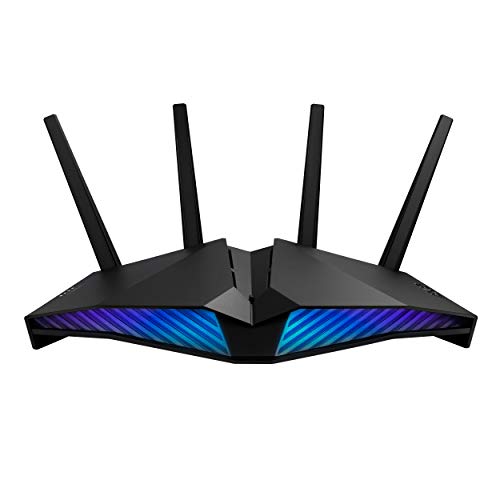 ASUS RT-AX82U | Check price on Amazon | |
 ASUS RT-AX86U | Check price on Amazon | |
 MSI RadiX AXE6600 | Check price on Amazon |
Key takeaways
- Five gaming routers compared for lower lag and steadier connections, from a flagship tri-band ASUS to a WiFi 6E MSI, with the specs that matter for play.
A standard router treats a ranked match the same as a background software update, and that is where lag spikes come from. A gaming router gives game traffic priority and keeps ping steadier when the rest of the house is streaming. The five routers here cover five jobs: a flagship tri-band unit, a DumaOS router for server choice, a mid-range ASUS, a wired-first ASUS, and a WiFi 6E MSI. None of them can fix a slow internet plan on its own.
As an Amazon Associate, we earn from qualifying purchases.
Quick answer
For most gaming households, the ASUS RT-AX86U is the straightforward pick: dual-band WiFi 6, a 2.5 gigabit port, a dedicated gaming port, and Mobile Game Mode at a mid-range size. Players who want server control should take the NETGEAR XR1000 with DumaOS, and households with many devices should take the tri-band ASUS GT-AX11000. The MSI RadiX AXE6600 is the choice when the 6 GHz band matters.
ASUS ROG Rapture GT-AX11000
The GT-AX11000 is the flagship of this roundup, a tri-band WiFi 6 router built for a house where several people game, stream, and video call at the same time. Its three bands run at 2.4 GHz and two 5 GHz bands, with combined wireless throughput rated at 11,000 megabits per second. A 1.8 GHz quad-core processor keeps routing, security, and traffic prioritization running without the router itself becoming the bottleneck. Eight Gigabit LAN ports leave room for a console, a PC, and a streaming box without adding a switch, and a 2.5 gigabit port takes the fastest wired link.
ASUS builds its gaming features in three layers. Adaptive QoS ranks game packets ahead of downloads and video, a dedicated gaming port prioritizes whatever is plugged into it, and the WTFast game accelerator routes game traffic through a private network path. AiMesh lets the router join a mesh with other ASUS units, and AiProtection provides lifetime network security without a subscription. Aura RGB lighting sits on the front and can be switched off. The listing first appeared in December 2018. Confirm the listing reads GT-AX11000 before ordering, because ASUS also sells the GT-AX11000 Pro and the WiFi 6E GT-AXE11000 as separate listings.
NETGEAR Nighthawk Pro Gaming XR1000
The XR1000 is the router for players who want control over where their games connect. Its DumaOS 3.0 software includes a Geo-Filter that limits matchmaking to servers within a chosen distance, a ping heatmap that shows which servers respond fastest, and a bandwidth allocation panel that reserves capacity for the gaming device. That control matters most in competitive shooters, where the server location decides the match.
The hardware is a dual-band WiFi 6 design rated at AX5400, with up to 5.4 gigabits per second of combined wireless throughput. A 1.5 GHz triple-core processor runs the routing and DumaOS features, with 256 MB of flash storage and 512 MB of RAM. Four Gigabit LAN ports and one USB 3.0 port cover wired consoles and a shared drive. The unit measures 11.61 by 7.87 by 2.51 inches and weighs 1.32 pounds.
Two limits deserve attention. There is no multi-gigabit wired port, so a wired connection tops out at Gigabit Ethernet even if the internet plan is faster, and the router has two bands rather than three, so a busy household shares one 5 GHz radio. NETGEAR published security advisories in October and November 2026 covering several other Nighthawk and Orbi models; the XR1000 is not on the affected list, but install firmware updates when the router is first set up.
ASUS RT-AX82U
The RT-AX82U is the mid-range ASUS in this roundup, and it is the pick for a single gaming setup that does not need a third band. It is a dual-band WiFi 6 router rated at AX5400, with a dedicated gaming port that prioritizes the device plugged into it and a Mobile Game Mode that re-prioritizes a phone’s traffic from the ASUS Router app with a single tap. That phone mode separates it from a plain AX5400 router, and it suits households where the main gaming device is a phone as often as a console.
Aura RGB lighting runs along the front edge, AiMesh support lets it extend an existing ASUS mesh, and AiProtection Pro provides network security without a subscription. The router carries 512 MB of RAM. Its dual-band design keeps the setup simple: one 2.4 GHz band for smart home devices, one 5 GHz band for gaming and streaming.
The main caution is a listing trap. ASUS sells a Renewed version under a different ASIN, and Renewed units are not the new retail listing this guide is concerned with. Confirm the listing is the new RT-AX82U before ordering. The router has no 2.5 gigabit port, so a wired PC or console connects at Gigabit speed, which is enough for current play but leaves no headroom for a faster plan.
ASUS RT-AX86U
The RT-AX86U is the wired-first pick in this roundup. It is a dual-band WiFi 6 router rated at AX5700, with a 2.5 gigabit port that gives a wired PC or console a faster link than Gigabit Ethernet, and a dedicated gaming port alongside it. A 1.8 GHz quad-core processor, 256 MB of flash storage, and 1 GB of RAM run the routing, security, and game prioritization. The router uses three external antennas plus one internal antenna, and it weighs 1.8 pounds.
Mobile Game Mode is included, so a phone’s traffic can be pushed ahead of other devices from the ASUS Router app during a match. Port forwarding controls are exposed for players who host servers or need open NAT types, and AiMesh support lets the router join a mesh if coverage becomes an issue. The listing first appeared in July 2020.
The RT-AX86U is dual-band, so it has no dedicated third radio for gaming traffic, and its wireless side is shared between gaming and everything else in the house. ASUS also sells the RT-AX86U Pro as a separate listing with a faster processor, so confirm the model field reads RT-AX86U and not RT-AX86U Pro before ordering.
MSI RadiX AXE6600
The RadiX AXE6600 is the WiFi 6E pick, and it is the only router here with a 6 GHz band. Its three bands run at 2.4 GHz, 5 GHz, and 6 GHz, with combined throughput rated at 6,600 megabits per second: 574 on 2.4 GHz, 1,201 on 5 GHz, and 4,804 on 6 GHz. The 6 GHz band is the least congested radio available in a home. A Qualcomm 1.8 GHz quad-core processor runs the router, with 512 MB of DDR4 RAM and 256 MB of flash storage.
Six fixed antennas carry RGB lighting that changes color with the QoS mode: green for AI QoS, red for gaming, purple for streaming, and blue for work from home. The Dragon Shield button switches AI QoS presets without opening the app. Wired connections get one 2.5 gigabit WAN or LAN port, one Gigabit WAN or LAN port, three dedicated Gigabit LAN ports, and one USB 3.0 port. The unit measures 13.3 by 8.8 by 7.8 inches and weighs 2.5 pounds, and MSI covers it with a three-year warranty.
Two points need care. MSI’s own specification table lists no built-in online protection suite, so the router relies on its firewall and access controls. And the near-identical RadiX AX6600, model GRAX66, is a WiFi 6 router with no 6 GHz radio, so confirm the model field reads RadiX AXE6600, model GRAXE66, before ordering. This pick is fresh for emubox.
How to choose
Start with the internet plan. A gaming router cannot deliver more speed than the plan provides, and a 2.5 gigabit port only helps if the plan itself exceeds Gigabit speed. Next, count the wired devices. A console and a PC hard-wired to the router get the lowest latency in the house, so the number and speed of LAN ports matter more than the headline wireless number. Then look at the bands. Tri-band routers give gaming traffic its own radio, which helps when several people stream at once, while dual-band routers are fine for a single gaming setup. Finally, weigh the software. DumaOS suits players who want server control, ASUS’s Mobile Game Mode suits phone gamers, and MSI’s AI QoS suits households that want one-button presets. A router that still receives updates is safer than a faster one that does not.
Who should skip
A gaming router is the wrong purchase for several households. If only one device games and the rest of the house is quiet, a standard WiFi 6 router with a wired connection does the same job for less. If the internet plan is slow, the router cannot add speed that the plan does not provide. Renters who cannot run an Ethernet cable to the gaming setup lose the biggest advantage these routers offer, since wireless play is always more variable than wired play. Players who expect the router alone to fix high ping should also skip: ping is set mostly by the distance to the game server, and no home router changes that. Anyone with a mesh system that already covers the house should not replace it with a single gaming router.
FAQ
Do gaming routers actually lower ping?
A gaming router can steady ping more than it lowers it. Prioritization keeps a download or a video stream from adding delay during a match, and a wired connection removes wireless variability. The base ping to a game server is set by distance and the internet connection itself, so a router cannot turn a distant server into a nearby one. The Geo-Filter on the XR1000 can help by keeping matchmaking closer to home.
Is WiFi 6E worth it for gaming?
WiFi 6E is worth it when the gaming device has a WiFi 6E radio and the 5 GHz band at home is crowded. The 6 GHz band has more channels and less interference, which keeps latency steadier. It is not worth it for devices that lack a 6 GHz radio, and it does not replace a wired connection.
Should I game on WiFi or Ethernet?
Ethernet is the better choice whenever the console or PC sits near the router. A cable removes wireless interference, keeps latency steadier, and avoids the speed drops that walls and neighbors cause. WiFi is fine for casual play and for devices that move around the house. If running a cable is impossible, a powerline adapter can be a middle ground, though it depends on the wiring in the home.
Do I need a tri-band router?
A tri-band router helps most in a busy household where several people stream, call, and game at the same time, because one radio can be reserved for gaming traffic while the rest of the house uses the others. A single gaming setup in a quiet home does fine with a dual-band router and a wired connection.
Final verdict
The ASUS RT-AX86U is the pick for most players: a 2.5 gigabit port, a dedicated gaming port, and Mobile Game Mode in a mid-range dual-band router. Players who want to choose their servers should take the NETGEAR XR1000 for DumaOS, and busy households should take the tri-band ASUS GT-AX11000 for its third radio. The ASUS RT-AX82U is the value choice, and the MSI RadiX AXE6600 is the pick for WiFi 6E hardware. Plug the gaming device in with a cable, install the latest firmware on setup, and confirm the exact model before ordering.
Product and ASIN Reference
| Product | ASIN |
|---|---|
| ASUS ROG Rapture GT-AX11000 WiFi 6 Gaming Router | B07MRD1LDZ |
| NETGEAR Nighthawk Pro Gaming XR1000 WiFi 6 Router | B08FWNNWTB |
| ASUS RT-AX82U AX5400 Dual Band WiFi 6 Gaming Router | B08BJJ3RGW |
| ASUS RT-AX86U AX5700 Dual Band WiFi 6 Gaming Router | B08BJHS3X7 |
| MSI RadiX AXE6600 WiFi 6E Tri-Band Gaming Router | B0BTQ637LJ |









