
Our Short List of 3

- Best for: Players who want the strongest stated power supply headroom for a future graphics card swap.
- Processor: Intel Core Ultra 9 285
- Graphics: NVIDIA GeForce RTX 5080
- Memory: 32GB DDR5 RAM
- Storage: 1TB SSD
- Best for: Owners who want a liquid-cooled machine built from familiar retail component lines.
- Processor: AMD Ryzen 7 7800X3D
- Graphics: NVIDIA GeForce RTX 5080
- Memory: 32GB Dominator Titanium RGB DDR5
- Storage: 2TB M.2 SSD

- Best for: Owners who open the case often and want the largest radiator and the most working room.
- Processor: AMD Ryzen 9 9950X3D
- Graphics: NVIDIA GeForce RTX 5080
- Memory: ToughRam 32GB DDR5 6000MT/s RGB
- Storage: 2TB NVMe M.2 SSD
All 3 Picks at a Glance
| Product | Specs | Action |
|---|---|---|
| Alienware Aurora ACT1250 |
| Check price on Amazon |
| Corsair Vengeance a5100 |
| Check price on Amazon |
| Thermaltake LCGS View 9580S-380XL |
| Check price on Amazon |
Key takeaways
- Compare liquid-cooled gaming desktops built for later upgrades: AIO radiator sizes, power supply headroom and DDR5 platforms from three brands.
Buying a liquid-cooled gaming desktop with upgrades in mind changes the shortlist. The question is not only how fast the machine is today, but what the case, power supply and motherboard let you change in two or three years: a stronger graphics card, more memory, a second drive. Liquid cooling adds its own check, because radiator size and mounting space decide whether the loop still suits a hotter processor later. The three desktops below state their cooling in the listing itself, and each one leaves a different kind of room to grow.
This guide is for buyers replacing an aging tower, players who expect a mid-life graphics card swap, and owners who keep a desktop through several component generations. Every pick is a prebuilt gaming desktop whose Amazon listing names liquid cooling, and every specification quoted comes from the names and specification fields on those product pages, so you can match each machine against your own upgrade plans.
Quick Picks
As an Amazon Associate we earn from qualifying purchases
| Product | Best for | Key spec from title |
|---|---|---|
| Alienware Aurora ACT1250 | Players planning a later graphics card swap | 1000W Platinum PSU, 240mm liquid-cooled CPU |
| Corsair Vengeance a5100 | Upgraders who prefer standard retail parts | Liquid cooled Ryzen 7 7800X3D, 32GB DDR5 |
| Thermaltake LCGS View 9580S-380XL | Owners who want case room to work in | 360mm AIO cooler, dual chamber glass case |
How to Choose
Radiator Size and Cooling Headroom
Radiator size is the first number to compare. A 240mm unit, like the one in the Alienware below, suits a single high-end processor and keeps the case layout simple. A 360mm radiator spreads heat across three fans and leaves more thermal margin for a future processor that draws more power under load. Check where the radiator mounts in the listing photographs and description, because a front-mounted unit can limit graphics card length, while a top mount can crowd tall memory modules. The listing should state the radiator size outright; if it only says liquid cooled, treat the cooling capacity as unconfirmed.
Power Supply Headroom for the Next Graphics Card
A graphics card swap is the upgrade most owners actually make, and the power supply decides whether it stays simple. Read the wattage and certification in the listing: a 1000W Platinum rated unit, as fitted to the Alienware here, gives generous headroom for a hungrier card later. Where a listing omits wattage entirely, assume nothing and check the full specification table before ordering. Also note the connector story the listing tells, since newer cards expect modern power leads, and a proprietary supply in a fixed size can block a straight replacement years from now, even when the wattage itself looks sufficient.
Memory and Storage Expansion Paths
All three machines here ship with 32GB of DDR5 and at least 1TB of solid state storage, which is the current comfort zone for large game libraries. For upgrades, what matters is what the listing says about the platform underneath: DDR5 leaves a longer runway than DDR4, and a 2TB drive fitted from the start, as on the Corsair and the Thermaltake, postpones the storage question entirely. Where a listing names a memory speed, such as 6000MT/s on the Thermaltake, match any later kit to that figure so the whole set runs together at one speed.
Case Space and Motherboard Platform
Upgrade plans live or die on physical room. A dual chamber case, like the Thermaltake below, separates the power supply and cables from the main compartment, which makes later work cleaner and leaves the glass side unobstructed. A clear panel, as on the Alienware, lets you inspect the loop and card seating without opening anything. Motherboard detail is the thinnest part of most prebuilt listings: chipset names appear on some pages and not on others, so if a specific board feature drives your plan, confirm it on the listing before the machine ships to you.
The 3 Best Options
Alienware Aurora ACT1250
- Best for: Players who want the strongest stated power supply headroom for a future graphics card swap.
- Processor: Intel Core Ultra 9 285
- Graphics: NVIDIA GeForce RTX 5080
- Memory: 32GB DDR5 RAM
- Storage: 1TB SSD
Players who want the strongest stated power supply headroom for a future graphics card swap.
Some listing fields describe this model inconsistently, so confirm the title names liquid cooling and the 240mm figure on the page you order from.
The Aurora ACT1250 is the pick for players who want a liquid-cooled flagship from a major brand and plan to keep the chassis through a graphics card swap later. Its listing pairs an Intel Core Ultra 9 285 with an RTX 5080, a 240mm liquid-cooled CPU loop and a 1000W Platinum rated power supply, which is the figure that matters most for upgrade headroom. The clear side panel makes internal checks easy, and 32GB of DDR5 with a 1TB SSD covers current libraries while leaving the storage question open for a second drive further down the line.
Corsair Vengeance a5100
- Best for: Owners who want a liquid-cooled machine built from familiar retail component lines.
- Processor: AMD Ryzen 7 7800X3D
- Graphics: NVIDIA GeForce RTX 5080
- Memory: 32GB Dominator Titanium RGB DDR5
- Storage: 2TB M.2 SSD
Owners who want a liquid-cooled machine built from familiar retail component lines.
The listing names no power supply wattage, so check the full page if a future graphics card swap is already planned.
The Vengeance a5100 suits upgraders who think in standard parts. The listing leads with liquid cooling on a Ryzen 7 7800X3D, an RTX 5080 and 32GB of Dominator Titanium RGB DDR5, with a 2TB M.2 SSD already fitted so storage pressure stays low from day one. Because the machine is built from Corsair’s own retail component lines, memory and cooling parts follow familiar naming when replacement time comes. The listing keeps motherboard and power supply detail brief, so buyers planning a specific swap should read the full specification table carefully before ordering this one.
Thermaltake LCGS View 9580S-380XL
- Best for: Owners who open the case often and want the largest radiator and the most working room.
- Processor: AMD Ryzen 9 9950X3D
- Graphics: NVIDIA GeForce RTX 5080
- Memory: ToughRam 32GB DDR5 6000MT/s RGB
- Storage: 2TB NVMe M.2 SSD
Owners who open the case often and want the largest radiator and the most working room.
The same View naming covers several processor and card pairings, so match the model code VXLS-X870-580-LCS before ordering.
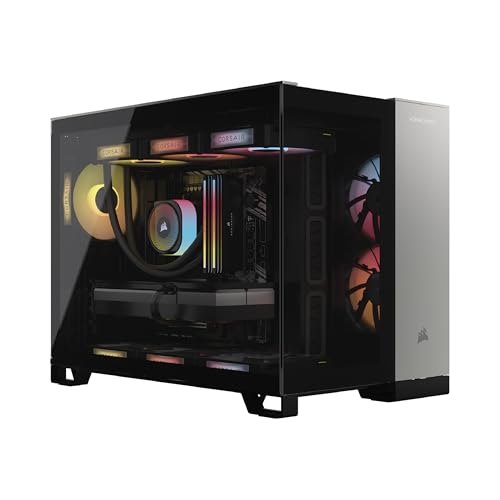
The View 9580S-380XL is the spacious option of the three. Its listing describes a dual chamber design with edge-to-edge tempered glass and a 360mm AIO cooler on a Ryzen 9 9950X3D, the largest radiator in this roundup, alongside an RTX 5080 and 32GB of ToughRam DDR5 running at 6000MT/s. A 2TB NVMe M.2 drive handles the library, and the roomy dual chamber layout is the draw for owners who expect to open the case, reroute cables and fit longer cards down the line without fighting for space.
Which One Fits Your Situation
You Plan a Graphics Card Swap in Two Years
Start with the Alienware Aurora ACT1250. Its listing states the two figures that decide a later swap: a 1000W Platinum rated power supply and a 240mm liquid-cooled CPU loop that keeps the processor side settled while the card changes. The clear panel helps you judge card length and cable room at a glance before you commit. Confirm the exact card dimensions against the case when the upgrade day arrives.
You Want Standard Parts You Can Source Anywhere
The Corsair Vengeance a5100 fits owners who think in retail component names. Its memory is Corsair’s own Dominator Titanium line and the machine is assembled from the brand’s regular ranges, so replacements and additions follow familiar naming when the time comes. The 2TB drive fitted from the start also removes the most common early upgrade from your list, leaving memory as the likely first change.
You Keep Opening the Case and Changing Things
Choose the Thermaltake LCGS View 9580S-380XL. The dual chamber layout its listing describes keeps the power supply and cabling behind a partition, the edge-to-edge glass shows the whole build, and the 360mm radiator is the largest here. Owners who reroute cables, add drives and swap cards regularly get the most working room from this layout, and the glass makes every change easy to inspect afterwards.
You Want One Machine for Play and Heavy Work
The Thermaltake also carries the strongest processor in this group, a Ryzen 9 9950X3D, with 32GB of memory running at 6000MT/s, which suits long editing or compiling sessions beside gaming. If your work is lighter and the power supply figure matters more to your plans, the Alienware’s 1000W Platinum unit makes it the steadier long-term base for later changes.
Common Mistakes
- Assuming every prebuilt uses a standard motherboard and power supply size, when some brands fit proprietary parts that block a straight swap.
- Planning a graphics card upgrade without reading the power supply wattage printed in the listing.
- Treating liquid cooled as one thing, when listings may mean a 240mm or 360mm radiator with very different headroom.
- Forgetting that a front-mounted radiator can shorten the space left for a longer graphics card.
- Ordering from a model name alone without confirming the exact configuration, since one name can cover several processor and card pairings.
Frequently Asked Questions
Can I add a second SSD to these desktops later?
Storage is usually the simplest change, but the listings here do not promise spare slot counts, so treat the fitted drive as the confirmed fact: 1TB in the Alienware and 2TB in the Corsair and the Thermaltake. If a second drive is central to your plan, confirm the free M.2 and bay provision on the product page before ordering.
Does a liquid-cooled prebuilt need regular maintenance?
The systems here use sealed all-in-one loops, which are not opened or refilled during normal use. Care is limited to keeping radiator fins and case filters clear of dust and checking that hoses stay unkinked after any move. If a pump sound changes or temperatures climb, that becomes a support question for the brand rather than a home repair job.
Is 32GB of DDR5 enough for the next few years?
For gaming libraries and everyday multitasking, 32GB is the comfortable figure today, and all three machines ship with it. Buyers running virtual machines, large editing timelines or heavy browser workloads alongside games may plan a memory addition later, which is why matching the speed printed in the listing matters when that day arrives.
What should I confirm on the listing before ordering?
Match four lines against your plan: the radiator size, the power supply wattage and certification, the exact processor and graphics card pairing, and the fitted memory and storage. Model families repeat across configurations, so the specification table on the page you order from is the record that counts, not a sibling listing with a similar name.









