We independently review everything we recommend. When you buy through our links, we may earn a commission. As an Amazon Associate we earn from qualifying purchases.
Best Laptop Charging Stations: 5 Multi-Port Desk Picks
Charge a laptop plus your phone and tablet from one hub. Compare the best laptop charging stations with high-watt USB-C ports for tidy, fast desk charging.
Charge a laptop plus your phone and tablet from one hub. Compare the best laptop charging stations with high-watt USB-C ports for tidy, fast desk charging.
⭐ Key Takeaways
Quick answer: Our top pick is Anker Prime 6-in-1 Charging Station (140W), with Ugreen Nexode 100W GaN USB C Charger, 4-Port as a strong alternative.
A laptop, phone, tablet, earbuds, and a watch can easily mean five separate chargers fighting over two outlets. A proper charging station consolidates everything into one unit with enough wattage to feed a USB-C laptop at full speed while the smaller gear tops up beside it. The five stations below range from travel-friendly GaN chargers to desktop hubs with AC outlets and eight ports.
As an Amazon Associate, we earn from qualifying purchases.
Quick answer
The Anker Prime 6-in-1 is the best desk pick for most people, adding AC outlets alongside fast USB-C charging. Choose the Ugreen Nexode 100W for a compact travel-ready charger, the Baseus PicoGo 140W for a smart display and strong multi-device output, the Anker Prime 250W for multi-laptop desks, and the 300W 8-port station when sheer port count rules.
The Anker Prime 6-in-1 is less a charger and more a small power hub for your desk. It combines two AC outlets, two USB-C ports, and two USB-A ports in one unit with 140W of total output, fed by a detachable 5-foot cord. That mix means a laptop charger, a lamp, or a monitor can plug into the same station that fast-charges your laptop over USB-C.
For laptop owners, the headline is simple: one USB-C port can deliver high-wattage charging on its own, and the station intelligently shares power when more devices connect. Phones and tablets take the remaining ports, and the AC outlets eliminate the power strip you would otherwise need. The flat design sits neatly at the back of a desk rather than dangling from a wall socket.
It is not the smallest travel companion, and the USB-A ports are best treated as slow overnight charging for accessories. Buyers who only ever charge one laptop and one phone can spend less on a plain GaN charger. As a permanent desk fixture that replaces a strip and two chargers at once, though, this is the most complete package here.
The Ugreen Nexode 100W is the compact option that still treats a laptop as the priority. One of its three USB-C ports can deliver the full 100W when used alone, which is enough for most ultrabooks and MacBook models to charge at full speed. A fourth USB-A port handles older cables and accessories.
GaN construction keeps the body small, roughly the size of a chunky deck of cards, and foldable prongs make it an easy travel companion. Plug in a second laptop and the output splits sensibly between ports; add phones and tablets and the charger keeps distributing power according to its published combinations rather than letting everything crawl.
There are no AC outlets and no display, so it is a pure charger rather than a desk hub. Heavy multi-laptop households will outgrow 100W of total output. For a single-laptop worker who moves between home, office, and coffee shops, the Nexode hits the sweet spot of size, speed, and simplicity. It also runs noticeably cooler than older silicon chargers of similar output, which helps it keep full speed during long charging sessions on warm days.
Baseus PicoGo 140W USB C Charger, 4-Port
The Baseus PicoGo 140W brings a smart display and touch controls to the multi-port charger format. Its screen shows live charging information, which sounds like a gimmick until you are diagnosing why a laptop is charging slowly; seeing the actual wattage settles the question instantly. Three USB-C ports and one USB-A port share 140W of GaN power.
That output is enough to fast-charge two laptops at once while a phone tops up, with the charger’s power distribution system adjusting the split as devices connect and fill. Support for modern fast-charge protocols, including PD 3.1, keeps it compatible with current MacBooks, Windows ultrabooks, handheld consoles, and phones.
The display and touch interface add cost compared with plainer rivals, and four ports is the ceiling, so very large device collections still need a second unit. For tech-leaning users who like visibility into what their gear is doing, the PicoGo turns a commodity charger into a genuinely more useful desk tool. The touch controls also let you check port status without opening an app or reaching behind the unit, a small convenience that adds up on a crowded desk.
Anker Prime Charging Station, 250W 6-Port GaN USB C Charger
Anker Prime Charging Station, 250W 6-Port GaN USB C Charger
Some desks run two laptops, and this is the station built for them. The Anker Prime 250W spreads its output across four USB-C and two USB-A ports, with the lead USB-C port capable of 140W on its own. A built-in display shows what each port is doing, so a workstation with a work laptop, a personal laptop, a tablet, and a phone can all charge without guesswork.
Total output of 250W is the real story: instead of the steep slowdowns most chargers suffer when every port is busy, this unit keeps multiple laptops charging at useful speeds simultaneously. The desktop form factor and power cord suit a permanent workstation rather than a travel bag, and it anchors a desk the way a good dock does.
It is the priciest style of charger on this list and overkill for a one-laptop household. Shared desks, creators with camera batteries and tablets in rotation, and anyone tired of negotiating over the good charger will find the headroom worth it. This is the buy-once option of the group. A small control dial on the unit adjusts settings and display behavior without needing a phone app, which keeps quick changes quick.
300W USB C Charger Block, 8-Port GaN Fast Charging Station
300W USB C Charger Block, 8-Port GaN Fast Charging Station
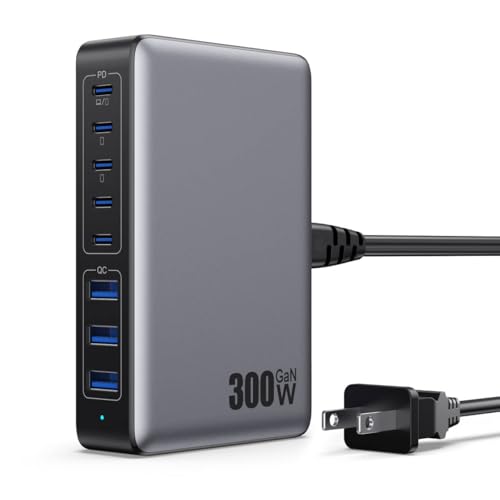
When the device count keeps growing, this 300W desktop station answers with eight ports: five USB-C and three USB-A. Two of the USB-C ports support 100W-class power delivery, so a pair of laptops can charge properly while phones, tablets, watches, and earbuds fill the rest. It is a charger block with a power cord, designed to live on or under a desk as the single refueling point for everything.
The appeal is consolidation for busy households and shared offices: one unit on one outlet replaces a drawer of mismatched adapters. Intelligent distribution shares the 300W total across whatever is plugged in, prioritizing nothing fancy but keeping everything moving.
You give up the polished apps, displays, and brand ecosystems of the Anker and Baseus models, and the generic presentation means checking the port layout carefully so your hungriest devices land on the high-wattage ports. For pure ports-per-outlet value in a family charging corner, it is the practical winner. Labeling the two high-wattage ports with a small sticker is a worthwhile five-minute job, so guests and kids plug laptops in where they will actually charge quickly.
How to choose
Start with your laptop’s charger rating. Most ultrabooks need 45W to 65W to charge at full speed, larger models want 90W or more, and a station’s single-port maximum must meet that number or charging slows down. Then look at total output: when several devices connect, the total is shared, so a busy desk needs generous headroom above the laptop’s share alone.
Count ports by type, not just in total. Modern gear is mostly USB-C, but keyboards, watches, and older phones still use USB-A cables. AC outlets, like those on the Anker Prime 6-in-1, turn a charger into a true desk hub and can retire a separate power strip.
Form factor decides where the station lives. Compact GaN chargers with folding prongs travel well and plug straight into the wall, while corded desktop blocks sit flatter and reach more easily across a desk. Displays are a luxury, but they do help confirm that a laptop is actually fast-charging. Buy for the desk you have today plus one extra device, and you will not outgrow the station quickly.
Who should skip
Skip a charging station if you only own a laptop and a phone; the charger that came in the box plus a small dual-port GaN charger will cover you for less. Gamers with high-draw laptops should check their machine’s wattage carefully, since many gaming laptops need far more power than any station here provides and must use their bundled adapter.
Also skip if your real problem is data, not power. These stations do not move files or drive monitors; that is docking station territory. And if your devices live in different rooms, two smaller chargers placed where you actually sit beat one big station across the house.
FAQ
How many watts does my laptop need from a charging station?
Check the rating on your original charger or the laptop’s support page. Most ultrabooks charge fully at 45W to 65W, while larger performance models may need 90W to 140W. If the station’s single-port output is lower than the original charger’s rating, the laptop still charges but more slowly, especially while in use.
What happens when I plug several devices into one station?
The station divides its total output among the connected devices, so speeds drop as ports fill up. Chargers publish split tables for each combination; a good rule is to put your laptop on the highest-rated USB-C port. Generous total wattage, like 250W or 300W models, keeps those slowdowns small in everyday use.
Can a charging station replace my laptop’s original charger?
For most ultrabooks, yes, provided the station’s USB-C port meets the wattage and your cable is rated for it; cable ratings matter, and a cheap cable can cap speeds. Keep the original adapter as a travel spare. High-performance and gaming laptops with proprietary or very high-wattage adapters should stay on their bundled chargers.
Is it safe to leave devices plugged into a station all day?
Modern stations from established brands include temperature monitoring and over-current protection, and devices themselves stop drawing power when full. Leaving gear connected is normal desk behavior. Sensible habits still apply: keep vents unobstructed, avoid stacking hot chargers, and retire any cable with a frayed jacket or loose connector.
Final verdict
The Anker Prime 6-in-1 is the most complete desk solution, blending outlets and fast USB-C charging in one tidy unit. The Ugreen Nexode 100W travels best, the Baseus PicoGo adds a genuinely useful display, the Anker Prime 250W serves multi-laptop desks, and the 300W 8-port block wins on sheer capacity. Match total wattage to your laptop count, and any of them will end the daily charger shuffle.
E
Emubox Editorial Team
We compare specs, materials and verified owner reviews before a product earns a spot. Rankings are never paid.
Affiliate disclosure. As an Amazon Associate we earn from qualifying purchases at no extra cost to you. Prices accurate as of the date shown.
Best 2mm 70 cm portable antennas compared: telescopic radio antennas near 70 cm, with connectors, bands and collapsed sizes explained before you buy today.
Find the best thermostat setting for winter and summer, with energy-saving setbacks, humidity tips, and smart schedules for a comfortable home year-round.
The best affordable business computer monitors balance sharp text, eye comfort and lasting value. Compare four reliable office displays built for long workdays.
Looking for the best inexpensive HD TVs non smart? Compare five genuinely non-smart HD televisions with tuners, HDMI inputs and simple setup for any small room.

 Anker Prime 6-in-1 Charging Station (140W)
 Ugreen Nexode 100W GaN USB C Charger, 4-Port
 Anker Prime Charging Station, 250W 6-Port GaN USB C Charger
 300W USB C Charger Block, 8-Port GaN Fast Charging Station









