
Key takeaways
- The best fanless mini PC under $400 is usually an Intel N-series box such as the MINIX NEO Z150-0dB (N150) or a MeLE Quieter 4C (N100), which suit silent…
The best fanless mini PC under $400 is usually an Intel N-series box such as the MINIX NEO Z150-0dB (N150) or a MeLE Quieter 4C (N100), which suit silent desktops, media centers and light office work, while heavier workloads need a fan or a stronger fanless unit such as the ZOTAC ZBOX CI669 Nano, which uses a much more powerful Core i7 and sits in a higher tier. Passive cooling trades peak performance for silence, so the key is matching the chip to the job.
Our top picks


As an Amazon Associate we earn from qualifying purchases at no extra cost to you.
Quick answer by buyer type
- Silent everyday desktop or HTPC: MINIX NEO Z150-0dB (N150) or a MeLE Quieter 4C (N100; the maker also sells N150 versions).
- Stronger fanless pick: MINIX lists the Z300-0dB (Core i3-N300) and its newer Z350-0dB (Core i3-N350), which add cores over the N150 but belong to a higher price tier.
- Router, firewall or home lab: fanless N100 boxes with multiple Ethernet ports, sold mostly by industrial-style makers; many arrive as barebones.
- Most powerful passive option: ZOTAC ZBOX CI669 Nano, which ZOTAC lists as a barebones system with a Core i7-1355U, so it is a stretch pick above this guide’s tier.
How fanless mini PCs work
A fanless PC uses the metal chassis as a heatsink, so heat leaves through fins or the body of the case rather than by forced airflow. That makes the machine silent and removes a wear item, but it also limits how much power the chip can use over long periods. Fanless designs are usually paired with low-power processors in the Intel N100, N150 and N300 range, and passive chassis can run warm under sustained load. Leaving open space around the case helps heat disperse.
At a glance
| Model | Best for | Key stated specs | Limits |
|---|---|---|---|
| MINIX NEO Z150-0dB | Silent desktop or media box | Intel N150 (4C/4T, up to 3.6GHz, 6W TDP), 24EU UHD graphics, DDR4-3200 SO-DIMM (8 or 16GB factory configs), M.2 NVMe slot, 2x HDMI up to 4K60, 2.5G Ethernet, Wi-Fi 6, 12W typical and 25W max power, 12.3 x 12 x 4.6cm, 0.89kg, VESA mount supplied | HDMI version, Wi-Fi generation and maximum RAM differ between listings and manuals |
| MINIX NEO Z350-0dB | Slightly stronger fanless option | The maker lists an Intel Core i3-N350 (up to 3.9GHz), 16GB DDR4-3200, 512GB NVMe, 2.5G Ethernet, Wi-Fi 6, a successor to the Z300-0dB | Likely above the cap; check the exact listing |
| MeLE Quieter 4C | Compact quiet desktop | Intel N100 (up to 3.4GHz, 6W), three 4K@60Hz outputs through two HDMI 2.0 ports and USB-C, M.2 slot, Gigabit Ethernet, Wi-Fi 5, about 131 x 81 x 18mm, VESA mount | Memory type (LPDDR4X, LPDDR5 or DDR4) and storage vary by listing; N150 versions also exist; single-channel graphics |
| ASUS ExpertCenter PN42 | Brand-name low-power box | ASUS lists a fanless Intel N100 (6W), one DDR4-3200 SO-DIMM slot (16GB maximum), M.2 NVMe, Wi-Fi 6E, VESA mount | Sold both as barebones and as systems with little memory and storage; LAN count differs by version; an older 2023 design |
| ZOTAC ZBOX CI337 nano (N100) | Business-style passive box | ZOTAC lists an N100, one DDR5 SO-DIMM slot, a 2.5-inch SATA bay, M.2 2242 slot, two HDMI 2.0 plus DisplayPort, dual Gigabit Ethernet, Wi-Fi 6, about 0.9L | Sold as a barebones kit without memory, storage or operating system |
| Industrial-style N100 boxes from smaller makers | Cheapest barebones options | Typically barebone N100 units with several Ethernet ports | Specifications and warranty vary widely; barebones need memory, storage and an operating system added |
The main picks in detail
MINIX NEO Z150-0dB
MINIX is a long-established mini PC brand and lists the Z150-0dB with an Intel N150 chip, a single DDR4-3200 SO-DIMM slot and an M.2 2280 NVMe slot rated for large drives. It also has a microSD slot, two HDMI outputs for 4K at 60Hz, 2.5 Gigabit Ethernet and Wi-Fi 6, plus USB 3.2 Gen 2 Type-C and Type-A ports. The listed power use is about 12W typical and 25W maximum. One review reports around 7W at idle and no thermal throttling during a two-hour combined CPU and GPU stress run, which is a helpful data point for a passive box. A VESA bracket is supplied, so the unit can be fixed behind a monitor. Sources disagree on some details: one manual lists HDMI 2.0 while other listings say HDMI 2.1 TMDS, some listings say Wi-Fi 5 for the 8GB version, and the maximum memory is stated differently, with Intel documenting a 16GB limit for the N150. Check your specific SKU.
MeLE Quieter 4C
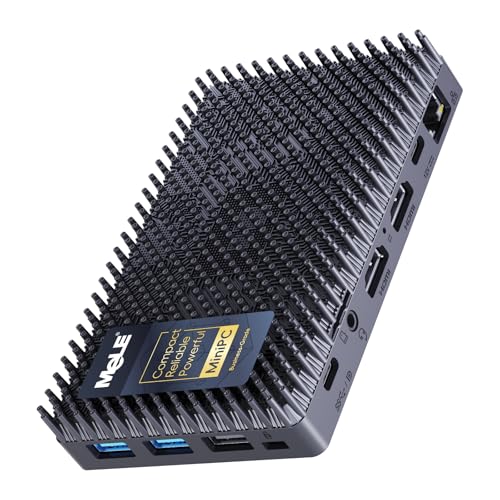
The Quieter 4C is a very small passive PC, about the size of a thick tablet, built around the Intel N100 and offered by MeLE in several memory and storage configurations. Listings show triple 4K@60Hz output through two HDMI ports and a USB-C port, an M.2 slot for an SSD, Gigabit Ethernet and Wi-Fi 5, and some listings describe N150 versions. Because the case is passive, reviewers note that its surface can get quite warm, so keep it in open air. Memory type and storage differ between listings, so confirm them for the exact version.
Router and firewall builds
Home lab users often buy fanless N100 boxes with several Ethernet ports for firewall software. These are a different product category than a desktop mini PC, and many arrive as barebones, so confirm what is included and what operating system you plan to run.
Higher-end fanless: ZOTAC ZBOX CI669 nano
ZOTAC lists the CI669 nano as a fanless barebones system with a Core i7-1355U, up to 64GB of DDR5 across two slots, an M.2 NVMe slot, a 2.5-inch bay, dual LAN, Wi-Fi 6 and Thunderbolt 4 in a 1.8L chassis. It is a different class from N-series boxes, so treat it as a stretch pick above this guide’s tier for people who need more processing than an N-series chip delivers.
Fit, size and compatibility notes
- Placement: because the chassis is the heatsink, keep it in open air. Avoid enclosed cabinets and stacking items on top, and follow the maker’s manual.
- Heat: expect the case to feel warm in normal use. Passive designs can get hot under sustained load.
- Memory and storage: check whether memory and SSD are included. Barebone units need both.
- Mounting: many fanless boxes include a VESA mount, which keeps the unit in free air behind a screen.
- Ports: check the HDMI version for 4K60 on a television, and Ethernet speed if you use a fast home network.
- Operating system: the MINIX Z150 ships with Windows 11 Pro per its listing; other brands vary.
Pick X if…
| If you want… | Pick | Reason |
|---|---|---|
| A silent desktop for browsing, documents and video | MINIX Z150-0dB or MeLE Quieter 4C | N150 or N100 chip, passive cooling |
| Documented thermal behavior | MINIX Z150-0dB | A review reports no throttling in a two-hour stress run |
| A firewall or router box | Fanless N100 with multiple Ethernet ports | Network-focused hardware |
| Cheapest barebones | Industrial-style N100 box | Industrial-style, add your own RAM and SSD |
| More processing power without a fan | ZOTAC ZBOX CI669 nano or similar | Stronger passive chip at a higher tier |
Budget tiers
Entry: barebones industrial N100 boxes that need memory, storage and a system installed.
Budget cap: complete N150 systems with memory, storage and Windows, such as the MINIX Z150-0dB.
Mid-range and above: stronger passive systems such as the ZOTAC CI669 nano and higher-power fanless designs.
Matching the chip to the job
Fanless designs rely on low-power processors, so the practical question is what you plan to do with the machine. Browsing, office suites, video streaming, digital signage, a home dashboard or a lightweight server are comfortable territory for N100, N150 and N300 class chips. Sustained heavy loads, such as long video exports, are where passive chassis show their limits, because the case warms until the chip reduces its speed to stay within its thermal envelope. Fanless boxes suit light workloads rather than heavy local computing. Placement matters too: a unit mounted behind a monitor with a VESA bracket sits in open air, while one tucked into a closed cabinet will run hotter. Following the maker’s guidance on clearance and ambient temperature is the simplest way to protect the hardware and keep performance steady. If you find you need more headroom, a quiet fan-cooled mini PC may serve better than a passive one.
Alternatives to consider
- A quiet mini PC with a fan: models such as the Beelink EQ14 use a small fan and reviewers describe them as quiet in normal use, with more headroom than a passive box.
- A DIY passive case: some third-party passive cases turn a compatible small-form-factor board into a fanless system, though this takes assembly and careful power limits.
- A stick PC: some passive stick PCs handle light tasks and home-automation software, with less port variety than a mini PC.
Frequently Asked Questions
Are fanless mini PCs powerful enough for everyday use?
Yes for web browsing, documents, video playback and light multitasking. They are not meant for heavy video editing, large local computing or modern games.
Do fanless PCs overheat?
They are designed to run warm and shed heat through the case. Open space around the unit helps, and one review of the MINIX Z150 reports no throttling over a two-hour stress run, but always follow the maker’s guidance on placement.
Is an N150 better than an N100?
The N150 is a slightly newer refresh with a higher maximum clock according to listings, so it is usually preferred if the price is similar. Differences in daily use are small.
Can I add memory or storage to a fanless mini PC?
Often yes, but limits vary. The MINIX Z150 has one DDR4 slot and one M.2 NVMe slot, and sources disagree on its maximum memory, so check the maker’s manual before upgrading.
Is silent operation really silent?
A fanless system has no fan noise. Some units may still produce faint electronic noise from the power supply or storage, which is usually not audible in a normal room.
Can a fanless mini PC run 24/7?
Passive designs suit always-on light tasks because there is no fan to wear out, but heat is the limit. Check each maker’s stated operating temperature range and duty rating, and give the unit open air.









