We independently review everything we recommend. When you buy through our links, we may earn a commission. As an Amazon Associate we earn from qualifying purchases.
Best Budget Graphics Cards: 5 Picks for 1080p Gaming
Compare five budget graphics cards for smooth 1080p gaming in 2026. Real specs, VRAM, power needs, and fit guidance to help you choose with confidence.
Compare five budget graphics cards for smooth 1080p gaming in 2026. Real specs, VRAM, power needs, and fit guidance to help you choose with confidence.
⭐ Key Takeaways
Quick answer: Our top pick is ASUS Dual GeForce RTX 4060 V2 OC, with ASRock Radeon RX 7600 Challenger 8GB OC as a strong alternative.
The ASUS Dual GeForce RTX 4060 V2 OC is the best budget graphics card for most gamers. It pairs 8GB of GDDR6 memory with DLSS 3 upscaling, a compact two-fan design, and a modest 115W power draw, so it runs smooth 1080p gaming in a wide range of builds. If raw frame rates matter more than upscaling, the ASRock RX 7600 Challenger delivers strong 1080p performance. For the lowest spend, the XFX RX 6600 CORE and the MSI RTX 3050 Ventus 2X XS cover 1080p play with 8GB each, while the ASRock Arc A750 Challenger SE adds a wide 256-bit bus and strong video encoding for creators.
How to Choose a Budget Graphics Card
Start with VRAM. In 2026, 8GB of GDDR6 is the sensible floor, since games at 1080p with high-resolution textures can already push past 6GB. All five cards in this guide carry 8GB.
Next, match the card to your monitor. For 1080p at 60Hz, any card here works well. For 1080p at 144Hz or higher, favor the RTX 4060 or RX 7600. For 1440p, those two are the realistic picks, helped by DLSS 3, FSR, or XeSS.
Check power and connectors before ordering. The RTX 4060 draws 115W and the RX 6600 draws 132W, so each needs only one 8-pin connector and a 550W power supply. The RX 7600 draws 165W with one 8-pin connector. The Arc A750 draws 225W and needs two 8-pin connectors plus a 650W power supply. The RTX 3050 draws 130W with one 8-pin connector.
Measure your case. Dual-fan cards such as the ASUS RTX 4060 V2 and the MSI RTX 3050 Ventus 2X XS are compact and fit most mid-tower and many small cases. The XFX RX 6600 and ASRock RX 7600 are longer, so check clearance against drive cages and front radiators. Every card here uses a PCIe 4.0 slot and works in a PCIe 3.0 slot.
Finally, weigh the ecosystem. NVIDIA cards bring DLSS 3 frame generation and mature ray tracing. AMD cards bring FSR upscaling and strong raw performance per tier. Intel Arc cards bring XeSS upscaling and excellent AV1 encoding, but driver behavior varies more by game.
The ASUS Dual GeForce RTX 4060 V2 OC is the most balanced budget graphics card in this guide. It is built on the Ada Lovelace architecture with 3072 CUDA cores, and its factory overclock reaches 2535 MHz in OC mode. DLSS 3 frame generation raises frame rates in supported games, keeping 1080p play smooth at high settings and making 1440p viable in many titles.
The V2 design is compact and practical. Two Axial-tech fans cool the card, with 0dB technology stopping the fans at idle. Its two-slot design fits cases that reject thicker triple-fan cards. At 115W it is the most power-efficient card here, needing a single 8-pin connector and a 550W power supply.
Specs
GPU: NVIDIA GeForce RTX 4060, Ada Lovelace, 3072 CUDA cores
Memory: 8GB GDDR6, 128-bit interface
Boost clock: 2535 MHz in OC mode
Features: DLSS 3, ray tracing, 4th Gen Tensor Cores, 3rd Gen RT Cores
The ASRock RX 7600 Challenger is the raw-performance pick in this guide. It uses the RDNA 3 architecture with 2048 stream processors, and its boost clock reaches 2695 MHz, the highest of the five cards here. In games without upscaling, it often posts the strongest frame rates of the group at 1080p, and it handles 1440p at medium to high settings. FSR adds headroom where supported.
Cooling is a dual-fan design with a striped axial fan layout and a metal backplate strip, and 0dB silent cooling stops the fans under light loads. The card needs one 8-pin connector and a 550W power supply, and it carries three DisplayPort 1.4 outputs plus one HDMI 2.1 port. ASRock backs the card with a 3-year warranty.
Note: one Amazon listing field says GDDR6X, while ASRock specifies GDDR6. Follow the manufacturer specification.
The XFX Speedster SWFT 210 RX 6600 CORE is the value pick. It is built on the RDNA 2 architecture with 1792 stream processors and a boost clock up to 2491 MHz. With 8GB of GDDR6 memory, it handles 1080p gaming at high settings in most titles.
At 132W it needs one 8-pin connector and a 550W power supply. It carries three DisplayPort outputs and one HDMI port. It is longer than the compact NVIDIA cards here, so measure case clearance before ordering.
The ASRock Arc A750 Challenger SE is the wildcard pick, and the best choice here for creators. Its 8GB of GDDR6 memory sits on a wide 256-bit bus, the widest in this guide, which helps with high-resolution textures and video work. The GPU clock reaches 2200 MHz, and the card supports XeSS upscaling. Where it stands out most is video encoding: Intel Arc cards support AV1 encoding, which produces smaller files at similar quality for streaming and recording.
The Challenger SE is the second-edition design, with an updated cooler and LED lighting around the fans that can be disabled. The trade-offs are real: at 225W it draws the most power here and needs two 8-pin connectors plus a 650W power supply, and Arc driver behavior varies more by game than NVIDIA or AMD.
Specs
GPU: Intel Arc A750, Xe HPG microarchitecture, 28 Xe cores, 28 ray tracing units
The MSI RTX 3050 Ventus 2X XS 8G OC is the entry-level pick. It uses the Ampere architecture with 2560 CUDA cores and a boost clock of 1807 MHz, and its 8GB of GDDR6 memory keeps it relevant for 1080p gaming at medium to high settings. It supports DLSS upscaling and ray tracing.
The Ventus 2X XS is the most compact card here at 8.07 inches long, a good fit for small cases and older builds.
Specs
GPU: NVIDIA GeForce RTX 3050, Ampere, 2560 CUDA cores
Memory: 8GB GDDR6, 128-bit interface, 14 Gbps
Boost clock: 1807 MHz
Features: DLSS, ray tracing, 2nd Gen Ray Tracing Cores, 3rd Gen Tensor Cores
Installation takes about fifteen minutes and needs only a screwdriver. First, uninstall the old graphics drivers, then shut the PC down. Open the case, remove the slot covers that line up with the PCIe x16 slot, and press the new card firmly into the slot until the latch clicks. Connect the 8-pin power cables and boot the PC. Install the latest drivers from NVIDIA, AMD, or Intel before launching a game. Fans staying still at idle is normal for the 0dB designs here.
Frequently Asked Questions
Is 8GB of VRAM enough for a budget graphics card in 2026?
Yes, for 1080p gaming. All five cards here carry 8GB of GDDR6, which handles high-resolution textures at 1080p. For 1440p at high settings, 8GB can become a limit in the most demanding games, so use DLSS, FSR, or XeSS at higher resolutions.
Do I need a new power supply for a budget graphics card?
Usually not, as long as your unit meets the card’s wattage. The RTX 4060, RX 6600, RX 7600, and RTX 3050 each need one 8-pin connector and a 550W supply. The Arc A750 needs two 8-pin connectors and a 650W supply.
Will these cards fit in a small case?
The MSI RTX 3050 Ventus 2X XS at 8.07 inches and the ASUS RTX 4060 V2 with its two-slot design fit compact builds best. The XFX RX 6600 and ASRock RX 7600 are longer, so measure from the rear bracket to the nearest obstruction before ordering.
Which budget graphics card is best for streaming?
The ASRock Arc A750 Challenger SE is the strongest streaming pick here, with AV1 encoding that produces smaller files at similar quality. The RTX 4060 is also solid for streaming thanks to NVIDIA’s mature encoder and DLSS 3 support.
Conclusion
For most buyers, the ASUS Dual RTX 4060 V2 OC is the best budget card: efficient, compact, and strengthened by DLSS 3. The ASRock RX 7600 Challenger leads on raw frame rates, the XFX RX 6600 CORE is the best value at the lowest tier, the ASRock Arc A750 Challenger SE is the creator’s choice with AV1 encoding and a 256-bit bus, and the MSI RTX 3050 Ventus 2X XS fits small cases and older PCs best. Confirm power connectors and case clearance first, and match the card to the games you actually play.
E
Emubox Editorial Team
We compare specs, materials and verified owner reviews before a product earns a spot. Rankings are never paid.
Affiliate disclosure. As an Amazon Associate we earn from qualifying purchases at no extra cost to you. Prices accurate as of the date shown.
Best 2mm 70 cm portable antennas compared: telescopic radio antennas near 70 cm, with connectors, bands and collapsed sizes explained before you buy today.
Find the best thermostat setting for winter and summer, with energy-saving setbacks, humidity tips, and smart schedules for a comfortable home year-round.
The best affordable business computer monitors balance sharp text, eye comfort and lasting value. Compare four reliable office displays built for long workdays.
Looking for the best inexpensive HD TVs non smart? Compare five genuinely non-smart HD televisions with tuners, HDMI inputs and simple setup for any small room.

 ASUS Dual GeForce RTX 4060 V2 OC
 ASRock Radeon RX 7600 Challenger 8GB OC
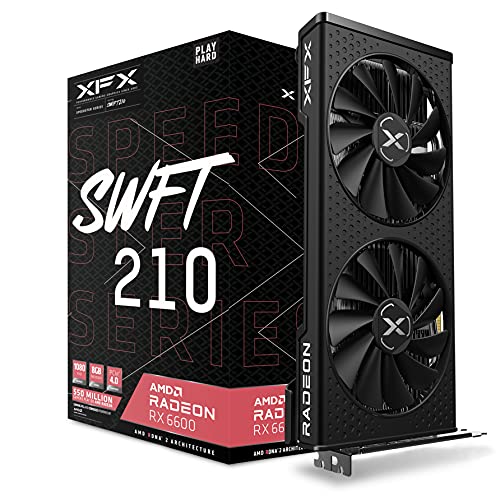 XFX Speedster SWFT 210 Radeon RX 6600 CORE
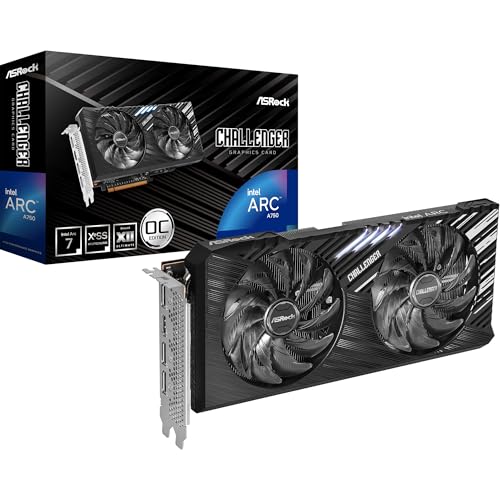 ASRock Intel Arc A750 Challenger SE 8GB OC
 MSI GeForce RTX 3050 Ventus 2X XS 8G OC









