We independently review everything we recommend. When you buy through our links, we may earn a commission. As an Amazon Associate we earn from qualifying purchases.
Best Budget External GPU Enclosures: 5 Picks for 2026
Compare five budget external GPU enclosures for laptops and mini PCs, from Thunderbolt docks to an OCuLink dock, and find the setup that fits your card.
Compare five budget external GPU enclosures for laptops and mini PCs, from Thunderbolt docks to an OCuLink dock, and find the setup that fits your card.
⭐ Key Takeaways
Quick answer: Our top pick is Razer Core X V2, with Sonnet eGFX Breakaway Box 350W as a strong alternative.
As an Amazon Associate, we earn from qualifying purchases.
A budget external GPU enclosure turns a thin laptop or a small mini PC into a machine that runs demanding games and creative apps. You install a desktop graphics card, connect it with one cable, and the laptop gains desktop-class graphics without a full desktop build. The five below cover Thunderbolt, USB4, and OCuLink, from a simple open dock to a complete liquid-cooled box with a card already inside.
The Razer Core X V2 is the best budget external GPU enclosure for most buyers: it supports Thunderbolt 5, Thunderbolt 4, and USB4, fits cards up to four slots wide, and returns up to 140W of charging power to a compatible laptop. If your budget is tighter and your laptop has Thunderbolt 3, the Sonnet eGFX Breakaway Box 350W is the most affordable enclosed option here, with a 350W supply built in. The Sonnet Breakaway Box 750ex adds a stronger 750W supply plus a USB hub and Ethernet. The MINISFORUM DEG1 is the cheapest way to reuse a desktop card with an OCuLink mini PC or handheld, while the GIGABYTE AORUS RTX 5090 AI Box is the only pick that arrives with a card already installed.
How to Choose a Budget External GPU Enclosure
Start with the connection on your computer, because it decides which enclosures work. Thunderbolt 3, 4, and 5, USB4, and OCuLink are not interchangeable, and the host must explicitly support external graphics over its port. A USB-C shaped port alone does not prove that support, so check the maker’s compatibility list before ordering.
Next, match the enclosure to the card you plan to use. Enclosed chassis list a maximum card length and width in slots, and a maximum supported card power. A card that is too long, too wide, or too power hungry will not fit or run reliably. Open docks such as the MINISFORUM DEG1 have no walls, so card length is rarely a problem.
Power delivery matters twice: the supply must cover the graphics card, and many enclosures also charge the laptop over the same cable. The figures here range from 15W on the oldest Sonnet box to 140W on the Razer Core X V2, so check what your laptop needs. Finally, decide between a bare enclosure and a complete box: four picks here are empty, while the GIGABYTE AORUS RTX 5090 AI Box arrives with a liquid-cooled RTX 5090 installed.
The Razer Core X V2 is the most forward-looking enclosure here. It connects over Thunderbolt 5, Thunderbolt 4, or USB4 through a PCIe 4.0 x4 link, and Razer states it can return up to 140W of charging power to a compatible laptop. The chassis fits full-length desktop graphics cards up to four slots wide, and Razer includes a Thunderbolt 5 cable in the box. The graphics card and the power supply are sold separately, so you choose an ATX power supply that matches your card. Compatibility is the main thing to check: it works with Windows 11 computers whose maker explicitly supports external graphics, and Razer states it is not compatible with Mac computers. There is no Ethernet port, USB hub, or downstream Thunderbolt port, so it is a focused enclosure rather than a full dock. The model covered here is RC21-02270200-R3U1.
The Sonnet eGFX Breakaway Box 350W is the most affordable enclosed option here, and the simplest way to add desktop graphics to a Thunderbolt 3 laptop or Intel Mac. It is a Thunderbolt 3 to PCIe expansion chassis with a 350W power supply built in, and it supports full-length, full-height, single- or double-width cards. Sonnet rates the box for cards requiring up to 300W of power, with one 8-pin and one 6-pin auxiliary power connector. Upstream power delivery is modest at 15W, so most laptops will still need their own charger connected. The single Thunderbolt 3 port runs at 40 Gbps, and the plain steel chassis has no extra ports, no hub, and no RGB lighting. It works with Windows computers and Intel Macs with a Thunderbolt 3 port and external graphics support, and it is not compatible with Apple silicon Macs for GPU use. The model covered here is GPU-350W-TB3Z, first listed on Amazon in May 2017.
Specs
Host connection: Thunderbolt 3, 40 Gbps
GPU interface: PCIe 3.0 x16 slot, x4 electrical
Maximum card power: Up to 300W
Power supply: 350W built in
Laptop charging: Up to 15W
Model: GPU-350W-TB3Z
ASIN: B072L9QTZT
Tier: Budget
Best for: Thunderbolt 3 laptop owners who want the lowest-cost enclosed path.
The Sonnet eGPU Breakaway Box 750ex is the workstation pick in this roundup. Its 750W power supply supports cards requiring up to 375W of continuous power plus 100W of peak power, covering high-end cards the 350W box cannot feed. It also delivers up to 85W of charging power to a connected laptop, enough for many ultrabooks. Where the 750ex stands out is connectivity: four USB 3.2 Gen 1 Type-A ports and a Gigabit Ethernet port let one Thunderbolt cable connect the card, a keyboard, a mouse, drives, and a wired network. It supports full-length, double-width cards up to 312mm long, and Sonnet includes a 0.8-meter Thunderbolt cable. It works with Intel Windows and Intel Mac computers; M1 Macs are not compatible with external GPUs. The model covered here is GPU-750WEX-TB3.
Specs
Host connection: Thunderbolt 3, 40 Gbps
GPU interface: PCIe 3.0 x16 slot, x4 electrical
Maximum card power: Up to 375W continuous, plus 100W peak
Maximum card length: Up to 312mm
Power supply: 750W built in
Laptop charging: Up to 85W
Extra ports: Four USB 3.2 Gen 1 Type-A, one Gigabit Ethernet
Model: GPU-750WEX-TB3
ASIN: B08Q755RQS
Tier: Mid-range
Best for: Creative workstations that need a strong power supply, a USB hub, and wired networking.
The MINISFORUM DEG1 is the cheapest way to reuse a desktop graphics card with a mini PC or handheld that has an OCuLink port. Instead of a closed chassis, it is an open dock: an OCuLink 4i uplink running PCIe 4.0 x4 at up to 64 Gbps feeds a PCIe x16 slot for the graphics card. That link is faster than Thunderbolt 3 or 4, and the open design removes card-length limits. The dock accepts standard ATX or SFX power supplies through a 24-pin ATX connector, and it has a Force Power On button. MINISFORUM lists support for large cards including the RTX 4090 and the RX 7900 XTX. Trade-offs: OCuLink does not support hot plugging, so the computer must be off before connecting or disconnecting the dock, and the open frame leaves the card exposed to dust and bumps. The listing covered here is the DEG1 with OCuLink 4i, ATX and SFX support, and Force Power On.
Specs
Host connection: OCuLink 4i, PCIe 4.0 x4, up to 64 Gbps
GPU interface: PCIe x16 slot, x4 electrical
Power supply: ATX or SFX, not included
UPC: 728434106494
ASIN: B0G7FFDLJP
Warranty: 2-year warranty
Tier: Budget
Best for: OCuLink mini PC and handheld owners who already own a card and a power supply.
The GIGABYTE AORUS RTX 5090 AI Box is the only pick here that arrives as a complete graphics solution. Instead of an empty enclosure, it contains a GIGABYTE WATERFORCE GeForce RTX 5090 with 32GB of GDDR7 memory, a liquid cooling system with a 240mm radiator, its own power supply, and a Thunderbolt 5 and USB4 interface. You connect one cable and the laptop gains flagship desktop graphics, with no card or power supply to buy and install. The box is built for gaming, creative work, and local AI tasks that benefit from large video memory, and it provides display outputs, USB ports, Ethernet, and laptop charging over the same Thunderbolt connection. Because the graphics card is built in, there is no upgrade path: the GPU cannot be swapped for a different card later. The host computer needs a Thunderbolt 5 or USB4 port with external graphics support. The model covered here is GV-N5090IXEB-32GD, with UPC 889523052884.
Specs
Graphics card: GeForce RTX 5090, 32GB GDDR7, included
Do I need a Thunderbolt port to use an external GPU enclosure?
Most enclosed options need a Thunderbolt 3, 4, or 5 port, or a USB4 port, and the host must explicitly support external graphics. The MINISFORUM DEG1 is the exception: it uses OCuLink instead, so it suits mini PCs and handhelds with an OCuLink port but no Thunderbolt port.
Is the graphics card included with an external GPU enclosure?
Usually not. Four of the five picks here are empty enclosures or open docks, so you supply the desktop graphics card yourself, and the Razer Core X V2 and the MINISFORUM DEG1 also need a separate power supply. The GIGABYTE AORUS RTX 5090 AI Box is the exception: it arrives with an RTX 5090 installed.
Can I use an external GPU enclosure with a Mac?
It depends on the model and the Mac. The Sonnet Breakaway Box models work with Intel Macs that have Thunderbolt 3 and support external graphics, but Apple silicon Macs do not support external GPUs. Razer states the Core X V2 is not compatible with Mac computers at all.
How much power delivery should an enclosure provide to my laptop?
It depends on what your laptop draws. The Razer Core X V2 returns up to 140W, which covers most thin and light laptops without a separate charger. The Sonnet 750ex provides up to 85W, which suits many ultrabooks, while the Sonnet 350W box provides only 15W, so the laptop charger stays connected.
Conclusion
The best budget external GPU enclosure depends on your port and your card. The Razer Core X V2 is the best pick for most buyers with a modern Windows laptop, with Thunderbolt 5 support, room for four-slot cards, and 140W of laptop charging. The Sonnet eGFX Breakaway Box 350W is the most affordable enclosed option for Thunderbolt 3 owners, while the Sonnet Breakaway Box 750ex adds the power and ports a creative workstation needs. The MINISFORUM DEG1 is the smartest choice for OCuLink mini PCs and handhelds, with a fast 64 Gbps link and no card-size limits. The GIGABYTE AORUS RTX 5090 AI Box is the premium one-box answer for buyers who want flagship graphics without assembly. Confirm your host port, card size, and power needs first.
E
Emubox Editorial Team
We compare specs, materials and verified owner reviews before a product earns a spot. Rankings are never paid.
Affiliate disclosure. As an Amazon Associate we earn from qualifying purchases at no extra cost to you. Prices accurate as of the date shown.
Best 2mm 70 cm portable antennas compared: telescopic radio antennas near 70 cm, with connectors, bands and collapsed sizes explained before you buy today.
Find the best thermostat setting for winter and summer, with energy-saving setbacks, humidity tips, and smart schedules for a comfortable home year-round.
The best affordable business computer monitors balance sharp text, eye comfort and lasting value. Compare four reliable office displays built for long workdays.
Looking for the best inexpensive HD TVs non smart? Compare five genuinely non-smart HD televisions with tuners, HDMI inputs and simple setup for any small room.

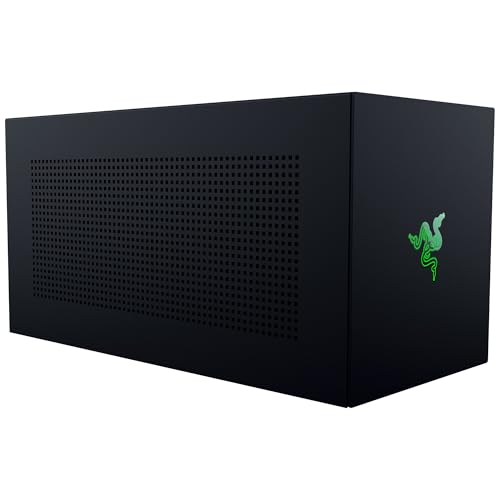 Razer Core X V2
 Sonnet eGFX Breakaway Box 350W
 Sonnet eGPU Breakaway Box 750ex









