
Key takeaways
- Find the best affordable big monitors for work, study and everyday use. Compare large 27-inch and 32-inch screens, resolution, panels and ports here today.
Finding the best affordable big monitors starts with one question: what will you do with the screen every day? A large monitor gives you room for two documents side by side, a wider spreadsheet, and a more comfortable view for long sessions. The monitors in this guide are all 27 inches or larger, and they balance size, resolution, panel quality, and ports.

The quick answer is that most buyers should start with a 32-inch QHD monitor for the best all-round value, or a 27-inch 4K monitor if sharp text matters more than sheer size. A 32-inch Full HD monitor can still work well for video and simple tasks, but text will look softer than on a higher-resolution panel. A smart monitor can replace a second device in a small room, but it is not the best choice if you only want a plain display.
Quick Picks
Our Short List of 3
All 5 Picks at a Glance
| Product | Specs | Action |
|---|---|---|
| Samsung 32-Inch Flat Computer Monitor LS32B300NWNXGO | Check price on Amazon | |
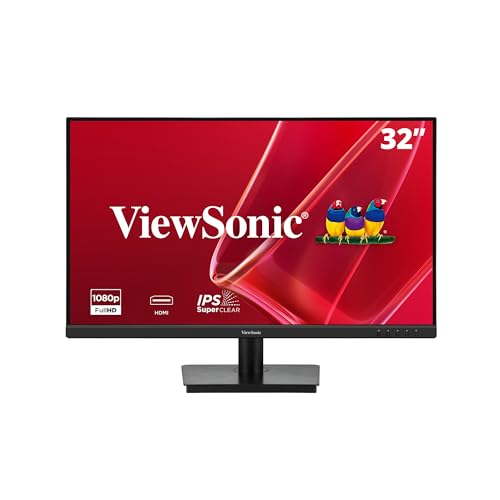
| ViewSonic VA3209M | Check price on Amazon | |
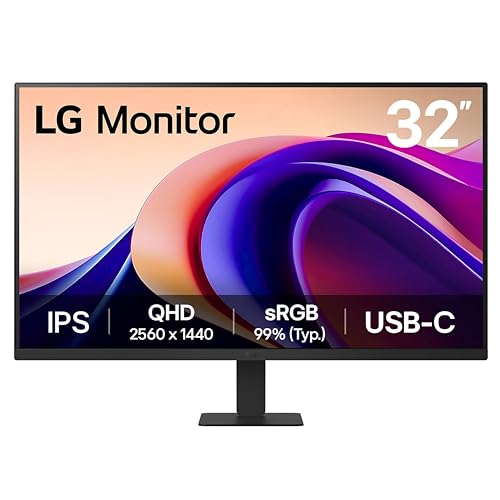 LG 32U631A-B | Check price on Amazon | |
 Dell S2721QS | Check price on Amazon | |
 Samsung 32-Inch M8 M80D Smart Monitor | Check price on Amazon |
How to Choose
Screen Size and Desk Space
A 27-inch monitor fits most desks and works well at arm’s length. A 32-inch monitor feels much larger and fills more of your field of view, which helps for video and side-by-side windows, but it needs more desk depth. If your desk is shallow, a 32-inch screen can feel too close, so you may need a monitor arm. Measure your desk before you choose, and set the top of the screen at or slightly below eye level.
Resolution and Text Sharpness
Resolution matters more as a screen gets larger, because the same pixels are spread across a bigger area. Full HD, at 1920 x 1080, is practical on a 27-inch screen and workable on a 32-inch screen, but text will look softer on the larger panel, especially for long documents and spreadsheets. QHD, at 2560 x 1440, is a strong middle ground for a 32-inch monitor, with sharper text and more usable space. 4K UHD, at 3840 x 2160, is the sharpest option here. Think about resolution and size together: a 27-inch 4K screen will look sharper than a 32-inch Full HD screen.
Panel Type and Colour
Most affordable big monitors use IPS or VA panels. An IPS panel keeps colour consistent across wide viewing angles, which helps when you share the screen or sit slightly off centre, and it suits office work, study, and photo viewing. A VA panel often has stronger contrast, which can make dark video scenes look deeper. A monitor that lists 99% sRGB coverage is designed to show colours accurately for everyday work and web use. If your desk faces a window, a matte finish and a brighter panel will be easier to live with than a glossy screen in direct light.
Refresh Rate and Everyday Smoothness
Refresh rate, measured in hertz, describes how often the screen updates each second. A 60Hz monitor is fine for office work, reading, and video. A 75Hz monitor feels a little smoother when you scroll, and a 100Hz monitor feels smoother still. Higher rates are most noticeable in fast games, but they do not change the sharpness of a still image. If you play games, look for a higher refresh rate and adaptive sync support, such as AMD FreeSync, which helps reduce tearing. If you mainly work with documents and email, a 60Hz or 75Hz panel will be enough.
Ports, Cables, and Compatibility
Check the ports on the monitor and on your computer before you buy. HDMI is the most common connection for laptops, desktop computers, and game consoles. DisplayPort is common on desktop computers and is often used for higher refresh rates and resolutions. USB-C can carry video, data, and charging through one cable on many modern laptops, but not every USB-C port supports video output, so check your laptop manual. Also check what is in the box, as some monitors include only a power cable. If you want to connect two devices, you will want at least two video inputs and an easy way to switch between them.
Stand, Ergonomics, and Eye Comfort
You will spend many hours looking at this screen, so comfort matters. A good stand should let you adjust height and tilt, and ideally swivel. Pivot, which rotates the screen into portrait orientation, is useful for long documents and code. If the stand does not adjust enough, a VESA mount lets you attach the monitor to a monitor arm; check the VESA pattern, usually 100 x 100 mm, before you buy an arm. Flicker-free backlighting, a low blue light mode, and a reader mode can make long sessions easier. Built-in speakers are convenient for calls, but external speakers or headphones will usually sound better.
Smart Features and Extra Functions
Some large monitors include smart features beyond a simple display. A smart monitor can run streaming apps and work without a computer, using Wi-Fi, a remote control, and built-in speakers. That can be useful where one screen must serve as both a monitor and a television. It also adds setup steps, software updates, and account sign-ins that a plain monitor does not need. A built-in camera can help for video calls, but check whether it can be covered when not in use. If you want a simple screen for a desktop computer, a plain monitor is often the better choice.
The Best Best Affordable Big Monitors Reviewed
Samsung 32-Inch Flat Computer Monitor LS32B300NWNXGO
The Samsung 32-Inch Flat Computer Monitor LS32B300NWNXGO is a straightforward way to get a large screen. It has a 32-inch Full HD display at 1920 x 1080, a 75Hz refresh rate, and a three-sided borderless design. The VA panel gives strong contrast for video and everyday use. AMD FreeSync support helps keep motion smooth with a compatible computer, Game Mode adjusts the image for gaming, and Eye Saver Mode reduces blue light. HDMI and DisplayPort inputs connect easily to a laptop, desktop computer, or game console.
This monitor suits a buyer who wants size first and simplicity second. It works well for browsing, email, streaming video, and light office work, and as a large second screen for a laptop.
Partial-fit point: Full HD resolution across a 32-inch screen means text will look softer than on a QHD or 4K monitor of the same size. That matters most for long reading sessions. If sharp text is your top priority, choose a higher-resolution monitor in this guide.
ViewSonic VA3209M
The ViewSonic VA3209M is a 32-inch IPS monitor with Full HD resolution of 1920 x 1080, a 75Hz refresh rate, and thin bezels on three sides. The IPS panel keeps colours consistent across a wide viewing angle, which helps when you move around at your desk or share the screen. Eye Care technology includes flicker-free backlighting and a blue light filter, designed to reduce eye strain during long sessions. It has HDMI and VGA inputs, so it connects to a modern computer through HDMI and to an older computer through VGA.
This monitor is aimed at home and office use: word processing, spreadsheets, email, browsing, and video calls. The thin-bezel design looks modern, and the tilting stand adjusts the viewing angle. It also supports VESA mounting, so you can attach it to a monitor arm if needed.
Partial-fit point: Full HD on a 32-inch panel is not as sharp as QHD or 4K on the same size screen, and text can look soft at close range. If you work mainly with text or detailed images, a higher-resolution monitor will be easier on the eyes. If you want a large IPS screen for general home and office use, the ViewSonic VA3209M is a solid, uncomplicated choice.
LG 32U631A-B
The LG 32U631A-B is the all-round pick in this guide. It has a 32-inch IPS display with QHD resolution of 2560 x 1440, a 100Hz refresh rate, and HDR10 support. That gives you a noticeably sharper image than a Full HD 32-inch monitor, more space for side-by-side windows, and smoother scrolling than a 60Hz screen. The IPS panel covers 99% sRGB, which helps colours look accurate for everyday work and photo viewing. Reader Mode and Flicker Safe are included for long reading sessions, and the three-side virtually borderless design keeps the screen looking clean.
Connectivity is a strength. The monitor has HDMI and USB-C with 15W power delivery, so a compatible laptop can connect and charge through a single USB-C cable, although that charging power is modest. The slim stand tilts to adjust the viewing angle, and the monitor supports the LG Switch app for screen splitting. QHD is also a good match for a mid-range computer, because it does not demand as much graphics performance as 4K.
This LG model suits the widest range of buyers here: office workers, students, and home users who want one large monitor for work, study, and video. Its main limitation is the stand, which offers tilt but not the full height, swivel, and pivot range of some office monitors. If you need precise height adjustment, plan to use a VESA monitor arm.
Dell S2721QS
The Dell S2721QS is a 27-inch 4K UHD monitor with a resolution of 3840 x 2160, an IPS panel, and 99% sRGB colour coverage. It is the sharpest monitor in this guide for text and fine detail, because it packs four times the pixels of Full HD into a smaller screen than the 32-inch models. The three-sided ultrathin bezel design looks modern, and the stand is one of the best here, with height, pivot, swivel, and tilt adjustment. Built-in dual 3W speakers are included for calls and casual video, and the monitor supports HDR content playback.
It has two HDMI ports and one DisplayPort input, so you can connect two devices and switch between them. AMD FreeSync support helps keep motion smooth, and Picture-by-Picture and Picture-in-Picture modes let you view content from two sources at once. The flicker-free screen with ComfortView is designed to reduce blue light and improve eye comfort.
Partial-fit point: at 27 inches, it is smaller than the 32-inch monitors in this guide and will not fill your field of view in the same way. What it gives you instead is the cleanest text, the most detailed image, and the most adjustable stand in this list. If you read or edit detailed work for hours each day, that trade-off is worth making.
Samsung 32-Inch M8 M80D Smart Monitor
The Samsung 32-Inch M8 M80D Smart Monitor is a different kind of large monitor. It has a 32-inch 4K UHD display at 3840 x 2160, HDR10+ support, and AI upscaling. It also works as a smart monitor, with built-in streaming apps, a Gaming Hub, Wi-Fi, and Bluetooth, so you can stream video and play games without a computer connected. A SlimFit Camera is included for video calls, built-in speakers are included for video and calls, and the ergonomic stand adjusts in height. USB-C, HDMI, and USB ports are included.
This model suits a mixed-use room where one screen needs to do more than one job. It works as a 4K computer monitor during the day and as a streaming screen in the evening, without a separate television or streaming device. The remote control makes it easy to switch between computer input and streaming apps from a distance.
Partial-fit points: first, this is a smart monitor, not a plain monitor, so it needs Wi-Fi, a Samsung account for the full range of smart features, and occasional software updates. Some streaming features may require separate subscriptions. Second, it has only one HDMI port and a 60Hz refresh rate, so it is not the best choice for fast-paced gaming or for a desk where you need several HDMI devices at once. If you want a large 4K screen that can also stream and work without a computer, the M8 M80D is the most versatile option here.
What to Check Before You Buy
Before you buy, check five practical details. First, measure your desk: a 32-inch monitor needs more width and depth than a 27-inch monitor. Second, check your computer: make sure it has the right output and can drive the resolution you choose. Third, check the cables in the box and the cables you own. Fourth, check the stand and VESA mount: if the stand does not adjust to the height you need, a monitor arm can help only if the monitor supports VESA mounting. Fifth, check the return policy and warranty, keep the box until you have used the monitor for a few days, and test all the ports you plan to use.
Also think about lighting: a large screen reflects more light than a small screen, so a desk facing a bright window can cause glare. A matte finish and a position that avoids direct sunlight will help. If you share a desk, check the viewing angle. For sound, built-in speakers are convenient, but external speakers or headphones will usually sound better.
FAQ
Is a 32-inch monitor too big for a normal desk?
A 32-inch monitor can work on a normal desk if it has enough depth. If you sit close, it can feel large. If your desk is deep enough to place the screen at arm’s length, it can be comfortable. If your desk is shallow, a 27-inch monitor is often a better fit, or you can use a monitor arm to push a 32-inch screen further back.
Is Full HD enough on a 32-inch monitor?
Full HD is usable on a 32-inch monitor for video, browsing, and everyday tasks, but text will look softer than on a QHD or 4K screen of the same size. If you read long documents or edit photos, QHD or 4K will be easier on the eyes. If you mainly watch video or sit further back, Full HD can still be a practical choice.
Is QHD or 4K better for a large affordable monitor?
QHD is often the better balance for a 32-inch affordable monitor, because it is sharper than Full HD, gives you more usable space, and is easier for a normal computer to drive than 4K. 4K is better if you want the sharpest text and the most detailed image. For a 27-inch monitor, 4K makes a clear difference in text sharpness.
Do I need a high refresh rate for office work?
You do not need a high refresh rate for office work, but a higher rate can make scrolling feel smoother. A 60Hz monitor is fine for documents, email, and video. A higher refresh rate matters most for gaming. For most office and study use, resolution, panel type, and ergonomics matter more.
Can a smart monitor replace a television?
A smart monitor can replace a television in a small room, a bedroom, or a guest room, because it can run streaming apps and work without a computer. It may not include a tuner for broadcast channels, and some apps may require separate subscriptions or an account. If you want one screen for both computer work and streaming, a smart monitor is a useful compromise. If you want a large screen for a living room viewed from a sofa, a television is usually a better choice.
Bottom Line
The best affordable big monitors give you a large, comfortable screen without adding features you will never use. If you want the best all-round value, choose the LG 32U631A-B, with its 32-inch QHD IPS panel, 100Hz refresh rate, and 99% sRGB colour coverage. If sharp text matters most, choose the Dell S2721QS, with its 27-inch 4K IPS panel and fully adjustable stand. If you want the largest screen for everyday use, choose the Samsung 32-Inch Flat Computer Monitor or the ViewSonic VA3209M, and accept that Full HD text will look softer on a 32-inch screen. If you want one screen for work and streaming, choose the Samsung M8 M80D Smart Monitor. Measure your desk, check your ports, and match resolution to the way you actually use a screen.
Disclosure: As an Amazon Associate, we may earn from qualifying purchases.









